To check a miter saw for square crosscuts, unplug it, set the miter to its zero-degree detent and the bevel to zero as the model’s manual directs, then use a combination square to check the blade against the fence without touching the teeth. If the blade and fence are not square, use only the adjustment procedure for your exact saw model. A zero reading on the miter pointer alone does not prove the blade is physically aligned.
Check the blade-to-fence alignment safely
- Unplug the saw. Do not adjust or inspect the blade with the saw connected to power.
- Set the saw for a zero-degree crosscut. Put the miter table at its zero-degree detent and lock it. Set the bevel to zero following the instructions for your model.
- Position the head and rails as the manual specifies. This varies. For example, the Bosch 3912/3915 manual calls for lowering and pinning the head, then releasing the rail lock and sliding the head back to check the full travel. Other Bosch models specify a different head or rail position. Follow your exact manual rather than assuming one setup fits every saw. Bosch product manuals
- Place a combination square against the fence. Bring its ruler against the flat body of the blade, clear of the teeth. The square should sit flush and the blade should meet it evenly along its length. Bosch’s model-specific manual states: “The saw blade should contact the full length of the square.” Bosch product manuals
- Confirm the check before adjusting. If you see a gap, make sure the square is seated correctly and recheck that the miter and bevel settings match the manual. Do not force the square against the blade; pressure can distort the check and may create a hazard.
Adjust the fence only by the procedure for your saw
If the manual provides a fence-alignment adjustment, use its specified fasteners, tools, and sequence. On some Bosch models, the procedure calls for keeping the head lowered, loosening specified bolts behind the fence, adjusting until the square makes full contact, then retightening the bolts and checking alignment again. Some saws also require sliding fence sections to be moved or removed first. Bolt locations and counts differ, so do not copy another model’s instructions.
Some DEWALT saws use detent-screw adjustments as part of correcting a zero-degree straight cut. That is not a universal fence-adjustment method: follow the instructions for the applicable model. DEWALT: Adjust for Accurate Straight Cuts
Know which alignment is actually off
| Check | What the square references | What it affects | What to consult |
|---|---|---|---|
| Blade to fence | The blade body and fence, with the miter at zero | Whether a straight crosscut is square across the workpiece | Your model’s fence-alignment procedure |
| Blade to table (bevel) | The blade and saw table, with the bevel at zero | Whether the blade is vertical to the table rather than tilted | Your model’s separate zero-bevel or 90-degree blade procedure |
| Miter pointer | The pointer and zero mark on the miter scale | Whether the indicator reads zero; it does not physically square the blade to the fence | Your model’s indicator-adjustment procedure |
Diagnose the relevant relationship before turning screws. A pointer can read zero while the blade is out of square to the fence, and adjusting the fence will not correct a bevel error.
What’s actually slowing this PC down?
Pick the symptom - the matching free tool is one click away.
#1 Best Overall
- Fits Most 7-1/4, 8, 8-1/4, 10, And 12-Inch Miter, Sliding Compound Miter, Chop, And Portable Saws
- New Recessed Laser Design To Protect The Laser From Hitting The Material On Deep Cuts
- New Thinner Design To Fit More Saws
- New Brighter And More Accurate Laser Line
If the square is right but cuts are still inaccurate
Check the blade and setup rather than continuing to adjust the fence. DEWALT notes that an old or dull blade can contribute to inaccurate cuts and advises checking blade-nut adjustment. Also confirm that the blade is installed correctly, the saw is stable, and the workpiece is supported properly. If a component is loose or damaged, or the problem persists, consult the model manual or the manufacturer’s support service. DEWALT: Adjust for Accurate Straight Cuts
Quick Recap
Best Value

- SMALL RIGHT ANGLE RULER. This is a palm-sized angle ruler which is perfect for any place where you need accurate 45 or 90 degree but may be difficult to use full-sized angle ruler! For example, such an angle measuring tool can do a great job for squaring up a table saw or miter saw or other tools' blade!
- DUAL SCALES. This angle ruler have both imperial and metric scales. Laser engraved scales is precise, wear-resistant and easy to read. It would no doubt help you ensure accurate square or 45 degree before you cut on your project!
- DURABLE ANGLE RULER. Made of alluminunm alloy with an anti-oxidation finish, this metal angle ruler are in great construction and much more durable than plastic rulers for being sturdy and anti-rust. Such an angle ruler in your apron pocket makes a quick square check more efficient!
- EASY TO POSITION. Three holes built in this right angle ruler make it super easy to position despite of the small size of the ruler! Surely the holes could be used to draw circles if you need to. A very handy little right angle measuring tool!
- QUICK ANGLE CHECK. This alluminum square comes in handy when you try to set up 90 degree or 45 degree, or check the square on small items such as tools' blades. It could also help you a lot in woodworking, small DIY projects, handcrafting, scratch building, or model making.
Rank #4

- 10x Brighter Green Laser - Significantly easier to see in bright lighting and outdoor conditions
- 3rd Generation Design - Improved visibility with a recessed laser and slim profile for broader compatibility
- Precise Cutting Line - Projects a clear, accurate laser line just left of the blade kerf
- Automatic Activation - Laser turns on automatically when the saw blade spins; batteries are pre-installed
- Fits Most Saws - Works with 7-1/4", 8", 8-1/4", 10", and 12" miter, sliding miter, chop, and portable saws
Rank #3

- 【Professional Table Saw Gauge】Neoteck table saw gauge is designed according to the standard miter grooves(3/8 inch x 3/4 inch). It can check table saw miter slot to blade squareness, blade and fence alignment, arbor and blade run-out, or any other alignment and measurement you want, in order to make the table saw in its best condition, which is suitable for most table saws and can be widely used for aligning and calibrating work,shop machinery,band saws,drill presses.
- 【Accurate Digital Dial Indicator】The measuring range of the digital indicator is from 0 - 1 inch (0 ~ 25.4 mm) with high resolution up to 0.0005 inch (0.01 mm),also it is switchable between mm and inch with zero setting function. Compared with the dial gauge, Neoteck digital indicator can provide more convenient use experience and quickly help you finish the alignment work.
- 【CNC Anodized Aluminum Bars】2PCS 3/4 inch adjustable, CNC-machined anodized aluminum bars with 3 chute partitions for enhanced stability and usability. The rod features 6 holes for a digital dial indicator, facilitating precise adjustments across various workshop machines, regardless of differences in chamfer groove and blade distances.(Note: Suitable for table saws with a groove width of 3/4" (19mm) or more; adjustable via screws for optimal fit if the groove width exceeds 3/4" (19mm))
- 【Easy to Install】You can quickly set-up, tune up and check the accuracy of your shop's tools. This system is the self-adjusting “Smart Bar” that will stay tight in a miter slot that isn’t the same size along it’s slot length. You only need to adjust the spring plungers once, and after that, its a perfect fit in the miter slot, which is more efficient and convenient.
- 【Practical Package】Package includes: 2 x anodized aluminum Bar, 1 x digital dial indicator, 1 x back cover, 2 x plum blossom nut, 2 x spring plunger, 2 x hexagon socket nut, 2 x hexagon socket wrench, 2 x metal shop. What's more,the practical storage case can well protect your table saw gauge set and it is more convenient for you to store the gauge and can be carried with you to everywhere.
Rank #2
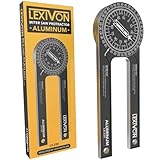
- ACCURATE - Crafted from CNC-machined Anodized Aluminum Alloy Steel. Features easy-to-read precision laser engraved scales.
- DESIGN - Internal Teflon O-ring mechanism swivels during operation and ensures smooth & precise read on inside/outside corners.
- FORGET ABOUT THE GUESSWORK - Two scales transfer your work angle directly to the miter saw for an accurate Miter cut, and Single cut.
- DO IT RIGHT THE FIRST TIME! - Perfect for crown molding, trim work, plumbing, and a variety of other carpentry applications.
- QUALITY - The 1/4-Inch thick aluminum alloy is stronger and won't bend like the plastic ones | Backed by our Lifetime Limited Warranty for your complete peace of mind!
Product prices and availability are accurate as of the date/time indicated and are subject to change. Any price and availability information displayed on Amazon at the time of purchase will apply.
Independent reader supportYour contribution helps us test, update, and keep practical guides available for everyone.