PC Slower Than It Used to Be?
A free scan shows the junk files, broken settings and background clutter dragging Windows down - then fixes them in one click.Free scan · Windows 10 & 11Crashes, No Sound, or Screen Glitches?
Random freezes, missing sound and display glitches usually trace back to one bad driver. Find and replace yours safely.Free scan · under a minuteMost “ribbon cable repairs” are one of four jobs: reseating a loose cable, replacing a removable FFC or FPC, replacing a broken connector or latch, or repairing a torn flex circuit or bonded connection with specialist equipment. Identify the connector before touching the cable. Pulling a cable from a locked ZIF socket can bend contacts or tear the socket from the board. See iFixit’s connector guidance and this ZIF example.
What you may actually be repairing
“Ribbon cable” is a consumer term. The part may be a flat flexible cable (FFC), a flexible printed circuit (FPC), a plug-in connector, or a flex permanently bonded to a display or sensor.
- FFC: A flat film cable with parallel conductors. It is normally replaced as a complete part.
- FPC: A shaped flexible circuit that may include stiffeners, holes, bends, components or branches.
- ZIF connector: A hinged or sliding retainer clamps the cable after it is inserted.
- Press-fit connector: The plug snaps vertically into a board socket and lifts straight up for removal.
- Bonded flex: An LCD, touch panel or sensor may use an ACF-bonded flex rather than a removable plug.
A failure that changes when the device is moved suggests a connection fault, but the cable, latch, socket, solder joints or board traces could each be responsible.
Start with the exact device and symptom
Find the service manual or a guide for the exact model and revision before opening the enclosure. Screw lengths, clips, battery placement, adhesive, cable routing and post-repair calibration vary. For example, DualShock 4 instructions distinguish controller generations.
Quick wins for a faster PC:
Clear out junk files and repair common Windows errorsFree Scan →Scan for outdated or missing drivers - takes under a minuteDriver Scan →Repair Windows errors before they cause bigger problemsFix Now →#1 Best Overall
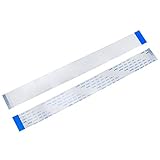
- BROAD COMPATIBILITY: 40-pin Flex Flat ribbon cable for LCD TVs, car DVD screens, and ribbon cable replacement
- PREMIUM FLEXIBLE COPPER: 0.5mm pitch, 200mm length flex flat cable bends smoothly in tight spaces
- RELIABLE SIGNAL TRANSMISSION: Engineered for optimal signal integrity, this cable ensures stable and efficient data transmission, minimizing interference and maintaining good audio and video output for your devices
- EASY DIY INSTALLATION: Replace damaged ribbon cable in minutes, no special tools needed
- PACKAGE: 20 ribbon cables
- Record the precise model and revision.
- Back up data while the device still works.
- Photograph cable routing and connector orientation.
- Note whether the fault started after a drop, hinge movement, liquid exposure or previous opening.
- Look for intermittent screens, touch, keyboards, buttons, cameras, speakers, charging or sensors.
Safety and tools
Power the device off, remove external power and disconnect the battery when the design and service procedure allow. Do not work on a powered circuit unless the manufacturer specifically requires a live test. Protect displays and batteries, use bright magnified lighting, and prefer plastic spudgers or opening picks over metal blades.
Basic equipment
- Plastic spudger or opening pick
- Fine tweezers and the correct screwdrivers
- Microfiber or other soft work surface
- Isopropyl alcohol and lint-free swabs, only where compatible
- Replacement cable matched to the original
- Practical ESD precautions
Advanced equipment
Microscope or inspection camera, multimeter, fine-tip soldering iron, flux, solder wick, hot-air rework station, board preheater and a replacement connector are for board-level work. ACF or display bonding needs specialist bonding equipment.
Inspect before disconnecting anything
- Partially withdrawn or upside-down cable
- Missing or broken locking flap
- Torn conductors, cracked contacts, sharp creases or delamination
- Corrosion, liquid residue or blackened contacts
- Cracked solder joints, lifted socket or missing board pads
- Tape, adhesive or a bracket preventing full insertion
Replacing a cable cannot repair a lifted socket, broken solder joint or torn trace. Do not glue a board connector down: adhesive may add mechanical support but does not restore electrical connections.
Identify the connector before removing the cable
Hinged ZIF latch
Lift or rotate the retainer to its unlocked position, then slide the cable out parallel to the board. The cable should not be pulled against a closed latch. Some latches rotate about 90 degrees, but the exact motion depends on the connector.
Free tools Windows power users keep installed
One-click scans. No signup required.
Sliding ZIF lock
Move the locking bar only the short distance intended by its design. Withdraw the cable evenly and do not remove the bar unless replacing the connector.
Press-fit or “pop” connector
Place a plastic spudger under the connector edge and lift the connector straight up from the board socket. Reconnect by aligning it and pressing evenly. For wide connectors, iFixit recommends pressing from the short sides rather than forcing the center while misaligned.
Rank #2
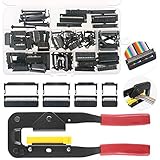
- 💗IDC CONNECTORS KIT -------- This idc cable connector kit includes 4 types of IDC Connector Headers, their pin number and quantity respectively are: FC-10P × 20pcs, FC-16P × 10pcs, FC-20P × 10pcs, FC-26P × 8pcs; In addition, we also prepared an Idc Crimp Tool for you, highly convenient for crimping a variety of Flat Ribbon Cable and IDC Connectors.
- 💗STANDARD SIZE -------- The pitch of Pin Female Header is 2.54mm/0.1". And the Pin Header Size: ① FC-10P -- 18 x 6 x 13mm/0.71" x 0.24" x 0.51"; ② FC-16P -- 25 x 6 x 13mm/1" x 0.24" x 0.51"; ③ FC-20P -- 30 x 6 x 13mm/1.18" x 0.24" x 0.51"; ④ FC-26P -- 38 x 6 x 13mm/1.5" x 0.24" x 0.51"(L*W*H). And the total length of crimper is 240mm.
- 💗IDC CRIMP TOOL -------- This crimper is made of high quality alloy steel, with high hardness and strong toughness, resistant to corrosion and rust! It is designed with a rubber handle to provide you comfortable touch! Its Crimping Distance is range from 6 to 27mm in height and 9.50 in width. Suitable for all 26-, 28- and 29- series IDC male headers or female sockets!
- 💗EASY to OPERATE -------- You just need to put the flat ribbon cable and IDC connectors that need to crimp in the crimper and press them, make the crimp the insulation are all the way toward the wire!
- 💗WIDE APPLICATION -------- IDC crimp tools are widely applied for breadboard style pin connectors and sockets, in the assembly of IDC connectors.
Pull-tab, board-to-board and coaxial connectors
Pull a tab in the direction of cable travel, not sideways. A flat-looking assembly may instead be a board-to-board or coaxial plug; do not treat every one as a ZIF cable.
How to reseat a removable cable
- Open the latch completely or disconnect the press-fit plug using the correct motion.
- Inspect the contacts and socket under magnification. Remove loose debris; use a suitable, fully evaporating electronics cleaner or isopropyl alcohol only when compatible, then let it dry.
- Check which side of the cable carries exposed contacts and center it with the socket.
- Slide the cable to the correct depth with the latch open. It should enter without force.
- Hold it flat while closing the latch, or press a pop connector down evenly until seated.
- Lightly check that a locked cable does not slide out. Restore retaining tape or strain relief.
If insertion is difficult, stop. Recheck latch position, orientation, pitch, cable width, obstruction and insertion depth. Forcing a misaligned cable can bend pins or damage the socket.
When to replace the cable
Replace an FFC or FPC with torn conductors, burn marks, uncleanable corrosion, worn contact fingers, severe creasing, delamination, hinge damage or a missing stiffener. Compare the new part with the old one before removing the original; the replacement should match the original mechanically and be tested before final closure.
Specification checklist
| Specification | What must match |
|---|---|
| Conductors | Number of circuits or positions |
| Pitch | Center-to-center spacing, such as 0.50 or 1.00 mm |
| Length and width | Enough reach without interfering with covers, shields or hinges |
| Contact orientation | Same-side or opposite-side contacts, and top- or bottom-contact geometry |
| Thickness | Must fit the socket and allow the latch to close |
| Stiffeners and shape | Reinforced ends, holes, bends, branches and support tape |
| Electrical characteristics | Voltage, current, shielding, impedance and high-speed requirements |
| Contact finish | Match the original plating where possible |
DigiKey explains why pin count alone is insufficient: pitch, length, contact orientation, thickness and finish also affect compatibility. Standard 0.50 mm FFC ranges are available in multiple lengths, contact counts and orientations; one example is GCT’s catalog range.
Measuring unknown pitch
Use calipers or magnification when possible. Measure from the center of contact 1 to the center of contact 11, then divide by 10. Visual estimates are unreliable for fine-pitch cables.
Can a damaged ribbon cable be repaired?
Limited salvage may be possible when only a removable stiffener is damaged, contamination is light, or an undamaged section can be trimmed and still meet the connector’s mechanical geometry. This is device-specific, not a universal method.
Rank #3
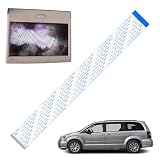
- Product Overview: 1 Pc ribbon cable only works for high definition or blue ray players
- Compatible Models: The cable fit for most 2013-current Chrysler & Dodge models with HD VES, such as compatible with 13-18 Dodge Caravan Chrysler Town Country Minivan Van
- Product Function: The ribbon cable can fix 2nd row screen black or 3rd row screen shows a black screen / a split screen without a signal, get the DVD monitor quickly returned to normal operation
- Premium Material: Made of high-quality materials, it is wear-resistant, and has a long service life. The two ends of the cable are specially designed with reinforced type, which has higher hardness, making it easier and more accurate for you to install and insert, and avoiding installation difficulties caused by bending
- Easy to install: Only a screwdriver and a small ratchet are needed to complete the installation easily, saving you time and money
Do not treat ordinary soldering as a default fix for conductors torn through a fine-pitch or multilayer FPC, high-speed display or camera flex, RF cable, flex with embedded components, or a flex bonded to glass. Heat, solder thickness and added stiffness can make the fault worse.
Broken latch, connector or board socket
Broken locking flap
Some connector families support a separate retainer replacement; others require the complete connector. iFixit documents one replaceable ZIF flap. Tape or paper may help diagnose pressure-related intermittency but is not a dependable permanent repair.
Broken board connector
Replacing a board-mounted connector requires magnification, controlled soldering or hot air, flux and careful pad inspection. Check for lifted pads and torn traces first. Hirose’s repair guidance says not to solder with the FPC inserted; follow comparable manufacturer instructions for the connector being repaired.
Socket pulled from the board
This is a microsoldering and trace-reconstruction job, possibly requiring jumper wires, pad rebuilding, a donor board or professional service. It is not a reseating problem.
Test before final reassembly
- Reconnect the battery and power temporarily only when the device design permits.
- Test every function served by the cable: the full display, touch, buttons, keyboard, charging, cameras, speakers or sensors.
- If the function fails, power down and reseat the relevant connector with the battery disconnected. For display problems, iFixit specifically recommends reseating the interconnect.
- Only after a successful test, reinstall shields, brackets, adhesive and screws.
Troubleshooting after reconnection
The device is still completely dead
- Check battery and nearby connectors.
- Confirm insertion depth, contact direction and latch closure.
- Ensure no cable is trapped under a shield, bracket, speaker or battery.
- Verify the replacement has the correct pin count, pitch and orientation.
One function works but another does not
Suspect partial insertion, damaged contacts, wrong orientation, a same-side/opposite-side mismatch or a similar-looking cable with a different pinout.
Operation is intermittent
Inspect the latch, strain relief, retaining tape, contamination, cracked solder joints and bend radius. Missing brackets or tape can let a cable move during use.
Rank #4

- ALLECIN 4 Values Breadboard Jumper Wires Assortment Kit - Perfectly suitable for variety electronic experiments.
- 400 Tie Point & 830 Tie Point Breadboards‘ Material : ABS plastic panel and tin plated phosphor bronze contact sheet - Provide a better connection.
- 14 Values 24AWG U-Shape male to male jumper wires - 2 mm, 5 mm, 7 mm, 10 mm, 12 mm, 15 mm, 17 mm, 20 mm, 22 mm, 25 mm, 50 mm, 75 mm, 100 mm, 125 mm & 65pcs breadboard flexible jumper wires - Meet the connection needs of the Bread board & 40pin Female to Female / 40pin Male to Female / 40pin Male to Male dupont cable wires.
- Features & Advantages : Since various electronic components can be inserted or pulled out as needed, soldering is eliminated, circuit assembly time is saved, and components can be reused, so it is very suitable for assembly, debugging and training of electronic circuits.
- Humanized packaging for easy storage and use. ### Please confirm the size &data before purchasing.
The cable will not insert
Stop and confirm the latch is fully open, the cable is centered, the contact side is correct, the thickness is compatible and the socket is unobstructed. A detached locking bar may be the fault.
DIY or professional repair?
| DIY is reasonable | Use a specialist |
|---|---|
| Documented model-specific guide; accessible ZIF or press-fit connector; intact socket and latch; direct cable replacement | Swollen battery; bonded display flex; torn pads or traces; microsoldering; high-speed, RF or multilayer flex; valuable sealed device; uncertain connector mechanism |
When contacting a shop, ask whether it performs FFC/FPC connector replacement, torn-pad and trace repair, microsoldering under magnification, ACF or display bonding, and complete functional testing. A general screen-replacement counter may not offer board-level or bonded-flex work.
Frequently Asked Questions
Can I tape a ribbon cable in place?
Tape can provide temporary strain relief or help diagnose a loose connection, but it cannot restore damaged contacts, a broken latch, a lifted socket or torn traces.
Can I replace an FPC with an FFC?
Only when the replacement matches the connector geometry, pitch, contact orientation, thickness, shape, stiffeners and electrical requirements. A similar pin count is not enough.
Does pin count have to match?
Yes, the conductors or positions must match, but pitch, length, contact side, thickness, plating and electrical characteristics must match too.
What does same-side or opposite-side contact mean?
It describes whether the exposed contacts are on the same face at both cable ends or on opposite faces. The arrangement must suit both connectors.
What’s actually slowing this PC down?
Pick the symptom - the matching free tool is one click away.
Can a broken ZIF latch be replaced?
Some connector families have separately replaceable retainers; others require replacing the complete connector. Identify the exact connector before ordering a part.
How do I know whether the board connector is damaged?
Look for a lifted socket, missing pads, cracked solder joints, bent or missing contacts, or a latch that cannot retain an undamaged cable. These signs call for board-level repair rather than another cable.
Quick Recap
Product prices and availability are accurate as of the date/time indicated and are subject to change. Any price and availability information displayed on Amazon at the time of purchase will apply.