Crashes, No Sound, or Screen Glitches?
Random freezes, missing sound and display glitches usually trace back to one bad driver. Find and replace yours safely.Free scan · under a minutePC Slower Than It Used to Be?
A free scan shows the junk files, broken settings and background clutter dragging Windows down - then fixes them in one click.Free scan · Windows 10 & 11For most Apple Home users, the best 2025 upgrade is a purpose-built retrofit controller with native HomeKit support. Meross MSG100/MSG100HK is the value choice, Tailwind iQ3 suits advanced arrival and vehicle automations, and iSmartGate PRO or LITE is better for multi-door, gate, sensor, or camera requirements. Your opener’s exact model and signaling system matter more than brand reputation, so check compatibility before buying.
What adding HomeKit actually does
A retrofit controller leaves the motor and opener in place. It connects to the opener’s command circuit, reads a door-position sensor, and exposes open, closed, and moving states to Apple Home. You can then use the Home app, Siri, scenes, notifications, and (when your Apple Home setup supports it) remote access.
It does not replace photo-eye sensors, mechanical limits, the emergency release, or the opener’s obstruction-reversal system. Never bypass those safety mechanisms.
Check these details before you order
- Brand and model: record the opener’s model number and photograph its terminals.
- Learn-button color and signaling: Chamberlain, LiftMaster, and Craftsman proprietary systems can require an adapter. Tailwind says its iQ3 2.1 does not support white-learn-button Security+ 3.0 openers.
- Sensor method: confirm whether the kit uses a wired tilt or magnetic sensor, a wireless sensor, or opener-native status data.
- Number of doors: one controller may serve one door, while some kits support up to three only in specified wiring and opener configurations.
- Wi-Fi: verify a strong 2.4 GHz signal where the opener is mounted.
- Integration path: distinguish a direct HomeKit setup code from a device that needs Home Assistant, Homebridge, or another bridge.
Use Meross’s compatibility checker for MSG100, MSG100HK, MSG200, and MSG200HK. iSmartGate identifies Security+ 2.0 Chamberlain/LiftMaster/Craftsman installations that need its Switch Adaptor on its product site.
#1 Best Overall

- Compatibility Note: This smart garage door remote (MSG150HK) is designed specifically for the vast majority of Chamberlain, Lift-Master, and Craftsman brand openers (𝗡𝗼𝘁 𝘄𝗼𝗿𝗸𝘀 𝘄𝗶𝘁𝗵 𝗼𝘁𝗵𝗲𝗿 𝗯𝗿𝗮𝗻𝗱𝘀). Work with openers using Security+ 1.0 and Security+ 2.0 protocols (Not Security+ 3.0/Green/White learn button ). For other opener brands, please check out our universal smart garage door remote (MSG100HK) for a smooth smart upgrade.
- Remote Control: Use the Meross app to open or close your garage while cooking, at work, or on vacation. Let in family, guests, or couriers even when you're not home.Ideal for busy parents, frequent travelers, or anyone tired of hiding a spare key. No monthly fee or any other subscription fee!
- Voice Control: Open or close your garage while carrying groceries or handling kids. Just say "Hey Siri, close the garage" or "Alexa, open the garage door" — no phone needed. Compatible with Apple HomeKit, CarPlay, Alexa, Google Assistant, and SmartThings.
- Enhanced Security: Check open/close history in the app. Get alerts when the door is left open too long, left open overnight, or every time it opens or closes. You can also set the door to close automatically after a certain amount of time, or schedule a specific closing time. You’ll never have to wonder again if you forgot to close the garage door.
- Easy to Install: Installation is much easier than you may think. 𝐍𝐎 𝐧𝐞𝐞𝐝 𝐭𝐨 𝐢𝐧𝐬𝐭𝐚𝐥𝐥 𝐚𝐝𝐝𝐢𝐭𝐢𝐨𝐧𝐚𝐥 𝐚𝐝𝐚𝐩𝐭𝐞𝐫 𝐨𝐫 𝐰𝐢𝐫𝐞𝐝 𝐝𝐨𝐨𝐫 𝐬𝐞𝐧𝐬𝐨𝐫𝐬(𝐕𝐬. 𝐚𝐥𝐥 𝐩𝐞𝐞𝐫𝐬). Ideal for renters who can't modify equipment or homeowners who want a quick DIY upgrade. Note: 2.4GHz WiFi network support only
Best options at a glance
| Product | Native Apple Home | Doors | Sensor or adapter | Subscription | Best fit | Main limitation |
|---|---|---|---|---|---|---|
| Meross MSG100/MSG100HK | Yes | Usually one per controller | Separate wired sensor; adapter for some openers | None for ordinary control | Lowest-cost straightforward retrofit | Compatibility must be checked |
| Meross MSG200/MSG200HK | Yes | Multi-door positioning | Confirm kit and opener requirements | None for ordinary control | Multiple doors in the Meross ecosystem | Exact model compatibility varies |
| Tailwind iQ3 2.0/2.1 | Yes | Up to three doors in supported configurations | Configuration-specific; verify opener | Not stated for basic HomeKit control | Vehicle and arrival/departure automation | iQ3 2.1 excludes white-button Security+ 3.0 |
| iSmartGate PRO | Yes | Up to three doors or gates in supported setups | Wired or wireless sensors; Switch Adaptor for Security+ 2.0 | Basic HomeKit has no subscription; optional plugins cost extra | Multi-door, gates, cameras, and user features | More expensive and complex than needed for one door |
| iSmartGate LITE | Yes | Use the vendor’s current model specification | Wired or wireless options vary | Basic HomeKit has no subscription | Premium single-door installation | Fewer capabilities than PRO |
| myQ Home Bridge | Official material documents a HomeKit path | Depends on the compatible ecosystem | Verify exact opener and bridge availability | Verify current terms | Existing compatible Chamberlain/LiftMaster setup | Retail availability and support need current verification |
| DIY controller or bridge | Through a verified Home Assistant/Homebridge path | Depends on hardware | DIY wiring and sensors | Depends on services used | Local control and custom automation | Maintenance and compatibility risk |
Best value: Meross MSG100 or MSG100HK
Meross is the simplest recommendation when your opener passes its compatibility check. The vendor listed MSG100 at $49.99 on its official store when documented, with Apple Home/HomeKit, Siri, Alexa, and Google Assistant support and no monthly subscription for ordinary control. Some U.S. and Canadian openers require a Meross accessory, so do not assume the base kit is sufficient. See the MSG100 product page and accessory collection.
When Meross is the right choice
- Your exact opener appears in the compatibility checker.
- You accept mounting a separate wired door sensor.
- You want inexpensive direct Apple Home control rather than vehicle-based automation.
Meross installation and pairing
- Identify the opener, learn-button type, terminals, and existing safety sensors.
- Confirm compatibility and Wi-Fi coverage.
- Mount the controller, attach the supplied sensor to the moving door and stationary frame as directed, and connect the opener terminals only after confirming the wiring method.
- Use the Meross app when its instructions call for it, update firmware, then open Apple Home, tap Add Accessory, scan the HomeKit code or enter it manually, and assign a room and name.
- Run complete open, stop, close, and partial-position tests.
If pairing fails, Meross documents temporarily testing 2.4 GHz Wi-Fi, manual code entry, vendor-app setup, firmware updates, and factory reset in its troubleshooting guide. Meross says local app control can continue when the internet is down if the local network remains available; that does not guarantee remote Apple Home access.
Best for advanced automation: Tailwind iQ3
Tailwind is the stronger choice when arrival and departure behavior, multiple vehicles, or differentiated users matter. Tailwind lists iQ3 2.0 from $89.99 and iQ3 2.1 at $99.99 on its official pages, with HomeKit, Siri, CarPlay through HomeKit, Google Home, Alexa, SmartThings, IFTTT, Home Assistant, Hubitat, and a local control API.
The iQ3 2.1 is designed for up to three garage doors or one gate in supported configurations. Its critical exception is explicit: it does not work with Chamberlain or LiftMaster openers using a white learn button, identified by Tailwind as Security+ 3.0. Check the iQ3 2.1 compatibility information and the vendor’s current product range before selecting a generation.
Quick wins for a faster PC:
Fix the driver behind crashes, sound loss and screen glitchesFind Drivers →Repair Windows errors before they cause bigger problemsFix Now →Rank #2

- Works with Most Models: The smart garage door opener(MSG100HK) is work with 200 brands and over 1600 models. Compatible with openers using Security+ 1.0 and Security+ 2.0 protocols (does not support Security+ 3.0 ). If your garage door requires an extra adapter, please contact us. We'll ship the adapter to you at no additional cost.
- Voice Control: You can control your devices hands-free, just give voice commands to turn on/off the connected devices. Compatible with Apple HomeKit, Siri, Amazon Alexa, Google Assistant, and CarPlay. Please scroll down and check the "Product guides and documents - User Manual" for more product information
- Remote Control: You can turn the garage door on/off from anywhere with internet access via the Meross app. To let in your family, guests, or couriers through the garage door while you are cooking or not at home. No monthly fee or any other subscription fee! Note: 2.4GHz WiFi network support only
- More Precise and Stable: It comes with a high-sensitivity wired sensor that monitors the status of the garage door more accurately and the signal stays stable. And you can check the garage door open/ close operation records through the app. Stay alert by different notification modes such as garage door open/ close status, overtime notification, and overnight notification to remind you to close the garage door
- Easy to Install: Installation is much easier than you may think. Please refer to our installation guide and video tutorial and make sure your WiFi strength is acceptable near your garage door. If you meet any issue about meross garage opener remote, simply contact meross support team
Trade-offs
- More configuration and a higher purchase price than Meross.
- Vehicle sensors and phone-location permissions can affect automations.
- Use Apple Home as the main control surface after setup, but keep the Tailwind app available for configuration and diagnostics.
Best premium and multi-door option: iSmartGate PRO or LITE
Only iSmartGate PRO and LITE are identified by the vendor as HomeKit-capable among its product range. PRO can control up to three doors or gates in supported installations and offers wired or wireless sensor choices plus optional camera and user-management features. Security+ 2.0 Chamberlain, LiftMaster, and Craftsman installations require the iSmartGate Switch Adaptor. See iSmartGate’s product information and its compatibility and Matter page.
Basic HomeKit control, remote access, notifications, and ordinary smart-home connections do not require a subscription according to iSmartGate. Optional video access is listed at $29.95 for three years; expanded user plugins are listed at $49 per year for 100 users or $99 per year for unlimited users. The vendor also states that IFTTT integration was scheduled to discontinue on October 1, 2025, so treat third-party integrations as changeable. Details are on the subscription page.
Where myQ Home Bridge fits
Chamberlain’s official material still describes the myQ Home Bridge as a HomeKit and Siri route. It is sensible only when the bridge is available in your market, your exact opener is supported, and current support information is satisfactory. Do not infer that every myQ opener can be added directly to Apple Home. Check the official myQ page and current supported-partner information.
DIY and bridge-based integrations
A local controller exposed through Home Assistant or Homebridge can provide local operation, deep automations, and freedom from a vendor cloud. It is not plug-and-play HomeKit: you must verify the relay’s voltage and signaling, sensor behavior, firmware, HomeKit integration, network reliability, and maintenance process for your exact opener. Choose this route only if you already maintain that infrastructure and can recover from updates or failures.
What’s actually slowing this PC down?
Pick the symptom - the matching free tool is one click away.
Rank #3

- Voice control: Garage Door Opener is compatible with Apple HomeKit, Apple Watch, Siri. Control your smart Opener through voice commands, easily turn on/off (E.g. "Hey Siri, open Garage Door ")
- HomeKit remote control: To enable the HomeKit remote control, you need to use a IOS device,and set these Apple devices as Homekit bridges and connect them to your home WiFi network. and there is no distance limit. Suitable for any 2.4GHz or dual-band WiFi router. No hub is required.
- Remote Monitoring: You can open or close the door by the APP. You can check the garage door open or closed state in real time. You can authorize multiple people to access your garage.
- WIDE COMPATIBILITY: You can only use one controller per garage door opener. Compatible with most general garage door openers.
- Timer: You can set schedules to open and close your garage door.
Native HomeKit, Matter, and bridges explained
A native HomeKit accessory pairs directly with Apple Home using a HomeKit setup code. A Matter accessory can also be added to Apple Home when its exact garage-door function is supported and the product is appropriately certified; Matter support in Apple Home began with iOS 16.1 and corresponding Apple-platform releases. Apple’s guidance is at Matter in Apple Home and Works with Apple Home.
A bridge-based product instead depends on another computer or service. It can be preferable for an existing Home Assistant or Homebridge installation, but it adds another failure point. Alexa, Google, or IFTTT compatibility alone is not evidence of Apple Home support.
Safe installation and Apple Home setup
- Disconnect power as instructed by the opener manual before touching terminals; never guess at voltage or connect an unknown relay.
- Keep photo-eye sensors, emergency release, wall button, and mechanical safety reversal functional.
- Mount the controller near the opener and install the door sensor exactly as the vendor specifies.
- Set up in the vendor app first when required, install firmware updates, and then use Apple Home’s Add Accessory flow with the QR code or manual setup code. Apple documents the accessory setup model at Apple’s HomeKit documentation.
- Test fully closed, fully open, moving, and partially open states. A false “closed” state is a safety problem.
- Configure remote access only after your Apple Home hub and account setup are working; local operation and remote internet access are separate behaviors.
Useful automations—and risky ones
Good starting automations
- Notify you when the door remains open beyond a defined interval.
- Close the door at bedtime after checking that no person, pet, vehicle, or delivery is in the path.
- Use a delayed close with a notification and an opportunity to cancel.
Use arrival opening cautiously
Do not open the garage unconditionally from a broad geofence. Location drift, a borrowed vehicle, or a phone left at home can trigger an unsafe action. If you use vehicle or arrival automation, require precise conditions, test while present, and name each door clearly so Siri cannot open the wrong one.
Troubleshooting by symptom
Apple Home cannot add the accessory
- Confirm the exact model explicitly supports HomeKit or Apple Home.
- Put the iPhone or iPad on the home Wi-Fi and test 2.4 GHz if the vendor recommends it.
- Use the vendor app, enter the setup code manually, update firmware, and factory-reset only according to the manual.
- Check that the accessory is not paired to another Apple Home and verify home-hub status before retrying.
Apple Home reports the wrong door state
Recheck sensor orientation and mounting on the moving section and stationary frame, recalibrate, test fully open and closed, and replace wireless-sensor batteries where applicable. Do not enable automations until repeated cycles report correctly.
Do these 3 things before closing this tab:
1Scan for outdated or missing drivers - takes under a minute2Clear out junk files and repair common Windows errors3Fix the driver behind crashes, sound loss and screen glitchesRank #4
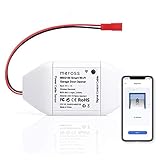
- Be Smart: Make your existing garage door smart. Remote and Voice Control, just tapping the meross app from anywhere or speaking to your Alexa, Google Assistant or SmartThings devices. To let in your family, guests or couriers through the garage door while you are cooking or not at home. No monthly fee or any other subscription fee!
- Works with Most Models: The smart garage door opener is work with 200 brands and over 1600 models (adapter maybe required). Support the openers using Security+ 1.0 and Security+ 2.0 protocols (Not Security+ 3.0 ). If your garage door openenr requires an extra adapter, please contact us. We'll ship the adapter to you at no additional cost.
- Multiple Notification Modes: Stay alert by different notification modes such as garage door open/ close status, overtime notification and overnight notification to remind you close the garage door. And you can check the garage door open/ close operation records through the APP.
- More Precise and Stable: It comes with a high sensitivity wired sensor which monitors the status of garage door more accurate and the signal stays stable. With adapter convert 110v to 5v, much safer.
- Easy to Install: Installation is much easier than you may think. Pls make sure your wifi strength is acceptable near your garage door. If you meet any issue about meross garage opener remote, simply contact meross support team
The controller opens but cannot close
Check for a required proprietary adapter, the configured opener type, and a momentary button-command requirement. Do not alter photo-eye wiring or safety terminals.
The vendor app works but Apple Home does not
Confirm HomeKit pairing, permissions, firmware, app versions, and local-network access. Remove and re-add the accessory only if the vendor documents that recovery path; remote-access problems should be tested separately from local control.
Which choice fits your situation?
- Cheapest straightforward retrofit: Meross MSG100/MSG100HK after a successful compatibility check.
- Advanced arrival and vehicle automation: Tailwind iQ3, provided the selected generation matches your opener.
- Multiple doors, gates, sensors, or camera options: iSmartGate PRO; choose LITE for a simpler premium installation.
- Chamberlain/LiftMaster/Craftsman Security+ 2.0: Select a controller whose required Switch Adaptor or accessory is explicitly supported.
- White-button Security+ 3.0: Do not buy Tailwind iQ3 2.1; verify another compatible controller or adapter.
- Local-control enthusiast: A verified Home Assistant or Homebridge solution, accepting the maintenance burden.
- Existing myQ ecosystem: Keep myQ Home Bridge only after confirming current hardware availability and exact Apple Home support.
The Bottom Line
Compatibility is the deciding factor. Start with the opener model and signaling system, then choose Meross for value, Tailwind for sophisticated automation, iSmartGate for multi-door features, or a maintained local bridge for technical control. Install the sensor correctly, preserve every mechanical safety feature, and treat automatic opening as a security-sensitive function.
Quick Recap
Product prices and availability are accurate as of the date/time indicated and are subject to change. Any price and availability information displayed on Amazon at the time of purchase will apply.