Protect outdoor PoE equipment by treating the cable route, Ethernet surge protection, grounding and bonding, and related power connections as one system. A compatible RJ45 protector can help divert transient energy, but only when installed as specified and connected to an effective grounding path. It cannot guarantee survival of a direct lightning strike or every surge event.
Why outdoor PoE links are exposed
Outdoor copper Ethernet can carry lightning-induced or other transient voltages toward connected equipment. A cable running between outdoor and indoor devices may expose both ends; a link between buildings also crosses systems that can sit at different electrical potentials. Ground-potential rise and differences between bonding paths can create damaging voltage between equipment and its connections.
IEEE lists IEEE 1692-2023 as an active guide to protecting communication installations from lightning effects, including surges associated with ground-potential rise and similar potential differences. Its public listing summarizes the guide’s scope, not all of its engineering detail. IEEE also lists IEEE C62.43.1-2020 as an application guide for surge protective devices and circuits used in information and communications technology circuits; its listing notes amendment C62.43.1a-2023.
How to plan protection for an outdoor PoE link
-
Map the exposed path and equipment
Identify outdoor, aerial, underground, and building-to-building Ethernet runs, where each cable enters a structure, and which device supplies PoE. Record the powered device and any outdoor AC power connections. This shows where a transient could enter and which interfaces need to be considered.
Quick wins for a faster PC:
Clear out junk files and repair common Windows errorsFree Scan →Fix the driver behind crashes, sound loss and screen glitchesFind Drivers →Special offer. See more information about Outbyte and uninstall instructions. Please review EULA and Privacy policy.#1 Best Overall
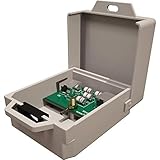 Tupavco Outdoor Ethernet Surge Protector - Gigabit and PoE++ compatible
- Outdoor Ethernet Surge protector for gigabit GbE PoE/high PoE+ (HPoE) 1000 Mbps LAN Ethernet network
- Gas discharge tubes for full protection GDT - Lightning Suppressor RJ45 cable protection Cat6/Cat5
- Outside use weater resistant - line-line line-ground protection, bidirectional clamping, 5Ka 8/20μs
- Thunder arrestor protects computer networking equipment devices like router, modem, camera, switch etc.
- Mounting holes to mount to the wall, electric Panel or network rack cabinet - box Lock option
-
Check the equipment’s grounding and PoE instructions
Read the manuals for the camera, access point, radio, switch or injector, and any surge protector. Check whether the equipment calls for shielded cable, a grounding terminal, a grounded PoE adapter, or a particular passive-PoE arrangement. For example, TP-Link’s Pharos guidance discusses shielded CAT5e or above and the supplied grounded PoE adapter, as well as a separate grounding-terminal method for general cable. Do not assume another manufacturer’s setup is identical.
-
Choose a cable route and bonding design
Account for how exposed the run is, whether it is aerial or protected, the cable’s shielding, and how it enters the building. TP-Link’s lightning protection guide advises against unprotected aerial runs and discusses signal arresters for outdoor connections and bonding earthed systems into an equipotential zone. These are vendor recommendations, not a universal code prescription; apply local rules and a site-specific design.
Rank #2
 Waterproof Ethernet Surge Protector
- Ethernet surge protector with 1000 Mbps and PoE++ compitability - won't slow your network down
- Waterproof ethernet protector - perfect for protecting remote outdoor devices from storm & lightning
- Rated to 6 kV (common-mode) and 2 kV (differential-mode) - low clamping voltage (<30 V common-mode)
- PoE++ supports up to 48V power to your devices, low 0.2 dB insertion loss ensures no added latency
- Activates under 1 ns, stopping voltage surges before damage occurs on your equipment
-
Match and install a suitable Ethernet protector
Check the protector’s supported data rate, PoE type and power requirements, connector arrangement, and any passive-PoE behavior against the actual link. Install it in the specified direction and connect its grounding point exactly as instructed. TP-Link’s installation instructions, for its product context, specify incoming cable to “IN,” the protected device to “OUT,” and connection of the arrester’s ground terminal to the grounding system.
-
Bring in a qualified professional when the site requires it
Use an appropriately qualified electrical or network professional for building-to-building links, outdoor AC supplies, a lightning protection system, or a complex bonding arrangement. IEEE’s public standards listings and manufacturer diagrams do not establish a universal do-it-yourself wiring method.
Special offer. See more information about Outbyte and uninstall instructions. Please review EULA and Privacy policy.Rank #3
 Outdoor Ethernet Surge Protector - Gigabit and PoE++ Compatible (2 Pack)
- Outdoor Ethernet Surge Protector (2 Pack) for Gigabit GbE PoE/High PoE+ (HPoE) 1000 Mbps LAN Ethernet Network
- Gas Discharge Tubes for Full Protection GDT - Lightning Suppressor RJ45 Cable Protection CAT5/CAT6/CAT7
- Outside Use Weather Resistant - Line-Line Line-Ground Protection, Bidirectional Clamping, 5KA 8/20μs
- Thunder Arrestor Protects Computer Networking Equipment Devices like Router,Modem,Camera,Switch etc
- Mounting Holes to mount to the Wall, Electric Panel or Network Rack Cabinet - Box Lock Option
Where should Ethernet surge protectors go?
Placement depends on the route and the system design. Protection may be needed near an outdoor device, where a cable enters a building, or at both points. Ubiquiti’s ETH-SP-G2 datasheet depicts protectors near an outdoor CPE and at a building entry. Treat that as the manufacturer’s example for its use case, not a rule for every installation. Decide placement with the cable path, equipment instructions, and grounding and bonding design in view.
What to check when choosing an RJ45 protector
- Ethernet rate: The protector must support the link speed. TP-Link explicitly instructs users to match the arrester’s port rate to the device port in its installation guidance.
- PoE compatibility: Confirm the supported PoE type and power requirements, including any vendor-specific passive-PoE behavior. “RJ45 surge protector” alone does not establish compatibility with every PoE implementation.
- Grounding connection: Check the specified ground point, conductor arrangement, and installation instructions. A protector without its prescribed effective ground path cannot be assumed to divert a surge as intended. Do not assume mounting metal is bonded or improvise a separate ground.
- Evidence beyond a headline rating: Review the manufacturer’s stated standards, test conditions, signal bandwidth, PoE support, environmental rating, and installation requirements. A discharge-current figure by itself does not establish overall protection or guarantee that equipment will survive a strike.
Example: Ubiquiti ETH-SP-G2
The ETH-SP-G2 illustrates why specifications should be checked against the exact document and product revision. Ubiquiti’s datasheet describes the protector for PoE and non-PoE devices and specifies up to 1 Gbps. The manufacturer’s current technical page lists PoE support and protection up to 2.5 Gbps. These are manufacturer specifications, not independent comparative test results; do not combine the two speed claims into one universal rating.
Rank #4
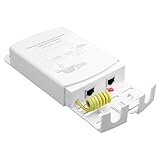
- All-in-One Outdoor Network Extension: This rugged, waterproof Gigabit Ethernet network power supply is engineered for seamless deployment. Functioning as a powerful POE extender and signal booster, it reliably delivers both data and power to remote devices such as IP cameras, wireless access points, and security systems
- Broadly compatible with IEEE 802.3af/at/bt standards: The Wall Mount Waterproof POE is compatible with all standard IEEE 802.3af/at PoE switches, PoE injectors, and PoE network video recorders
- RJ45 Port with Ground Wire Safety Kit: This outdoor PoE extender features RJ45 output and input ports with an integrated ground wire design. The PoE device transmits at 10/100/1000Mbps speeds and incorporates a safety ground wire design
- Built for Harsh Environments:The Outdoor PoE Gigabit Extender is engineered for extreme weather conditions. Featuring a seamless, one-piece housing with IP65 waterproof rating, it withstands the most demanding outdoor challenges. Enhanced with 5KV lightning protection, it delivers uninterrupted network connectivity through rain, wind, or sunshine!
- Compact design, easy installation: The outdoor waterproof POE Gigabit network surge protector measures 145x98x32 mm, suitable for mounting under eaves, on poles, or on exterior walls in any outdoor environment
Ubiquiti’s quick-start guide describes grounding with STP cable to a grounded metal pole or structure, or using a drain wire connected to a remote grounding point. Follow the product instructions and confirm that the proposed connection fits the site’s bonding design.
Independent reader supportYour contribution helps us test, update, and keep practical guides available for everyone.What a surge protector can—and cannot—establish
A protector is one part of coordinated protection, not lightning immunity. TP-Link states that “grounding, reasonable wiring, and the use of lightning arresters” are crucial to preventing hazards from induced lightning strikes in its outdoor installation guidance. That is manufacturer guidance for its surveillance-equipment context, not a substitute for local electrical requirements.
Best Value
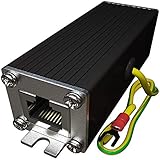
- Ethernet Surge Protector for Gigabit GbE PoE/High PoE++ (HPoE) 1000 Mbps LAN Ethernet Network
- Gas Discharge Tubes for Full Protection GDT - Lightning Suppressor RJ45 Cable Protection CAT6/CAT5
- Aluminum Case,Ground Wire 12AWG,Line-Line Line-Ground Protection,Bidirectional Clamping,20KA 8/20μs
- Thunder Arrestor Protects Computer Networking Equipment Devices like Router,Modem,Camera,Switch etc
- Provide transient protection for the protected differential line pair to IEEE 802.3 af/at/bt (PoE++ 15V/24V/30V/48V/50V/56V Transmission) Mode A and B IEC 61000-4-5 (Lightning/Surge) 20KA (8/20μs) with PoE current of 1.6A / 2 pairs and 3.2A / 4 pairs (154W/48V max).
PoE protection also involves both signal and power considerations. Texas Instruments’ application note on lightning surge protection for PoE powered devices provides engineering context related to IEEE 802.3, IEC 60950, and ITU-T K.44. It is older material, so use it alongside current equipment instructions and applicable standards rather than as a complete design specification.
Quick Recap
Product prices and availability are accurate as of the date/time indicated and are subject to change. Any price and availability information displayed on Amazon at the time of purchase will apply.