Outdated Drivers Are Slowing You Down
One free scan finds every outdated or missing driver and matches the right update for your exact hardware.Free scan · exact hardware matchPC Slower Than It Used to Be?
A free scan shows the junk files, broken settings and background clutter dragging Windows down - then fixes them in one click.Free scan · Windows 10 & 11For addressable LED strips and lighting effects, use a WLED controller with Home Assistant’s official WLED integration. For a conventional analog RGBW strip with separate red, green, blue, and white channels, ESPHome’s RGBW light component is the more direct fit. The key is matching the controller’s output type to the strip—not choosing a board based only on its Wi-Fi or Home Assistant support.
Choose a controller by the kind of strip
“RGBW” can describe different hardware. A conventional four-channel RGBW strip has separate red, green, blue, and white inputs. An addressable strip uses a digital data protocol and compatible LED chips; it may offer per-pixel effects rather than four whole-strip analog channels. Those setups need different controller outputs.
| Decision | WLED | ESPHome RGBW |
|---|---|---|
| Best fit | Addressable strips, effects, and segments | Four independently driven analog RGBW outputs |
| Home Assistant control | The WLED device and its segments appear as light entities | The ESPHome RGBW component is exposed through the native API |
| Controller platform | Official WLED releases for ESP8266 and ESP32 | Microcontrollers supported by ESPHome |
| Important check | Confirm the strip’s digital chipset and protocol are supported | Match the output hardware and electrical ratings to the strip |
When WLED is the right choice
WLED is designed for addressable LED control and effects. Its documentation lists common chipsets including WS2812B, WS2811, SK6812, APA102, and WS2801. Home Assistant’s official integration can discover WLED devices automatically or add them by hostname or IP address, and requires WLED 0.14.0 or newer. See the Home Assistant WLED integration documentation.
WLED can still be a suitable choice when a strip is described as RGBW, but check its exact topology and controller support: the label alone does not establish whether it is analog or addressable. A conventional four-channel analog strip needs suitable PWM outputs; a digital strip needs the protocol its LEDs expect.
Quick wins for a faster PC:
Scan for outdated or missing drivers - takes under a minuteDriver Scan →Repair Windows errors before they cause bigger problemsFix Now →#1 Best Overall

- 【Compatible Lights】Only support PWM 5050SMD 3528SMD 5630SMD RGBW FCOB COB RGBW 5 wires(+ R G B W) LED strip. CAN NOT work with SPI LED strip light with IC, such as WS2811, WS2812B, WS2813, WS2814, WS2815, SK6812 etc.
- 【Group Control】4-zone group control separately, no device limits.Each remote can match and control one or more controller.Auto transmitting and synchronization the signal,Independent control of individual areas.As long as the distance between the controllers is no more than 98 feet in open environment, you can control the controllers in 4 different areas.You can also purchase multiple of our controllers separately.
- 【2.4G Wireless Transmitting】RC03RFB remote adopts advanced 2.4GHz RF wireless transmission technology. The control range is up to 98 feet.The touch wheel+ button design, simple to operate.It can bring you a better experience.
- 【Brightness and Color adjusting】You can adjust the brightness and light color according to your different use requirements.RGB+White, 16 million colors to choose.New black appearance of the remote control.Comfortable hand feeling.
- 【Voltage】Support DC5V/DC12V/DC24V. 12V LED strip,please use 12V power supply. ATTENTION: The maximum allowable current through the two power interfaces of the controller is 5A and 12A respectively.
Mixed RGB+CCT limitation
Some strips combine RGB with tunable white channels and are sold as RGB+CCT or RGBCCT. WLED’s Home Assistant integration does not expose independent RGB and CCT controls for mixed-type strips: only one color model is active at a time. If separate RGB and tunable-white sliders are essential, verify that the specific controller and integration support that behavior before buying.
When ESPHome is the right choice
For a conventional four-channel analog RGBW strip, ESPHome has an explicit RGBW light component. It builds the light from four float output components—red, green, blue, and white—and documents per-channel max_power settings for color correction. This makes the separate white channel part of the RGBW light model rather than an assumed extra feature. Read the ESPHome RGBW light component documentation.
Rank #2
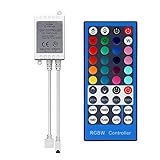
- Multi-Functions-- There are 40 Keys on the remote, you can use it to turn led strip ON/OFF, change 20 colors, DIY modes as you like, set lighting modes, such as flash, jump, strobe and more
- Compatible with RGB Strip-- Work with SMD 5050 3528 2835 RGBW led light strips with 5-Pin connectors.
- Safe to Use---Low power consumption, the perfect assembling part with 12V power adapter and 16.4ft 5050 300pcs led strip(not included). Output 12V 6A Max
- IR Remote --- IR remotes have a performance range of about 30 feet. Please note: IR remotes must be pointed directly at the devices you are trying to control. Easy installation, Please note that the arrow mark must be aimed at the arrow mark on the light strip
- SUPERNIGHT Guaranteed: We offer this dimmer controller 30-day money-back guarantee for any reason + 12 month warranty for quality-related issues. Our friendly customer service staff will try our best to assist you fix the issue in 24 hours all year around
Home Assistant communicates with ESPHome devices through its native API. The current Home Assistant ESPHome integration documentation says a newly added device must run ESPHome 2025.4.0 or later. Check the documentation again when setting up a device, since firmware requirements can change.
Check compatibility before you buy or wire
- Identify the strip topology. Determine whether it is a four-channel analog RGBW strip, an addressable strip, or mixed RGB+CCT/RGBCCT. Use the strip’s datasheet or wiring diagram, not just its listing title.
- Match the output type. A conventional four-channel RGBW strip needs appropriate analog PWM outputs; an addressable strip needs a controller supporting its digital protocol and chipset.
- Verify the electrical ratings. Check strip and controller voltage, per-channel current capacity, grounding, wiring, and power-supply requirements in their product datasheets. There is no universal wattage, channel-current, or maximum-length figure that applies to every controller and strip.
- Confirm firmware compatibility. The documented Home Assistant WLED integration minimum is WLED 0.14.0. For a newly added ESPHome device, Home Assistant currently specifies ESPHome 2025.4.0 or later.
- Plan Home Assistant setup. For WLED, allow automatic discovery or add the device by hostname/IP using the integration. For ESPHome, configure the RGBW component and use the native API integration.
A practical hardware path
For an addressable-lighting project, a compatible ESP32 development board or pre-flashed WLED controller is a practical starting point, paired with a strip whose chipset WLED supports and a power supply selected for that strip. For an analog four-channel RGBW project, choose an ESPHome-capable controller with appropriate outputs and ratings, then configure the four channels in ESPHome.
Rank #3

- 【Compatible Lights】Only support PWM 5050SMD 3528SMD 5630SMD RGBW FCOB COB RGBW 5 wires(+ R G B W) LED strip. CAN NOT work with SPI LED strip light with IC, such as WS2811, WS2812B, WS2813, WS2814, WS2815, SK6812 etc.
- 【Group Control】4-zone group control separately, no device limits.Each remote can match and control one or more controller.Auto transmitting and synchronization the signal,Independent control of individual areas.As long as the distance between the controllers is no more than 98 feet in open environment, you can control the controllers in 4 different areas.You can also purchase multiple of our controllers separately.
- 【2.4G Wireless Transmitting】RC03RFB remote adopts advanced 2.4GHz RF wireless transmission technology. The control range is up to 98 feet.The touch wheel+ button design, simple to operate.It can bring you a better experience.
- 【Brightness and Color adjusting】You can adjust the brightness and light color according to your different use requirements.RGB+White, 16 million colors to choose.New black appearance of the remote control.Comfortable hand feeling.
- 【Voltage】Support DC5V/DC12V/DC24V. 12V LED strip,please use 12V power supply. ATTENTION: The maximum allowable current through the two power interfaces of the controller is 5A and 12A respectively.
Before ordering, confirm the listing’s voltage, maximum channel current, connector arrangement, firmware, and whether the product is built for analog RGBW or addressable LEDs. A controller advertised as “RGBW” is not necessarily interchangeable with one intended for addressable pixels.
Quick Recap
Best Value

- 【Smart Bluetooth Controller】You can download the "Happy Lighting" APP from iTunes/Google Play, or scan the QR code on the controller to download the APP, after that you become able to control the light changes through the APP.
- 【Rich Functions】you can adjust the brightness of the light strip, the color of the light, as well as the music mode, voice control mode, 20 kinds of jumping modes to choose from, and you can also timer. Just Bluetooth controller, you can realize the wonderful rotten atmosphere.
- 【Scope of application】the controller is suitable for RGB and RGBW light strips, the input and output voltage are DC12V-24V. it is suitable for hotel, bar, KTV, family, and other leisure and entertainment scene lighting.
- 【Supported OS】For Android 4.3 or higher / IOS 6.0 or higher.
- LED Bluetooth controller is directly through the cell phone remote control, the remote distance can reach 15M, no need to set up, easy to connect, open the software within 5 seconds can automatically connect to the controller!
Rank #4

- 【40 Keys RGBW Remote Controller】You can choose 20 static colors, adjust brightness, turn On/Off, control modes: Flash, Strobe, Fade, RGB Smooth-change, Static, DIY frequently-used modes as you like.
- 【Supernight RGBW Controller】Output: 4 CMOS-drain-open output,Max load current: 2A*4CH,must works with DC 12V/24V SMD 5050 RGBW LED strip lights
- 【For RGBW Strip Light】RGBW STRIP is assembled with RGB LEDs and White LEDS,so you can control RGB LEDs and White LEDS by remote controller simultaneously or separately.
- 【Easy to Use】If you want a straight-forward, simple to use, cost-effective remote, our this rgbw controller 5 pin is the way to go.
- 【IR Remote】IR remotes have a performance range of about 30 feet. Please note: IR remotes must be pointed directly at the devices you are trying to control.
Product prices and availability are accurate as of the date/time indicated and are subject to change. Any price and availability information displayed on Amazon at the time of purchase will apply.