The YBox2 is a DIY networked set-top box that connects to a television and displays customized content over the internet. It is a legacy electronics project, not a current streaming device: Adafruit’s listing says the kit is no longer stocked. If you already have a board, the key requirements are a composite-video input, Ethernet, and a correctly matched DC power supply.
What is the YBox2 kit?
YBox2 is an open-source DIY project designed by Robert Quattlebaum and based on the earlier YBox from Uncommon Projects. Adafruit describes the kit as a networked set-top box built around a Parallax Propeller controller. Its PCB and components are supplied unassembled, so building one involves soldering rather than simply plugging in a finished appliance.
The project documentation includes example widgets such as weather, an alarm clock, and Twitter updates. Those are historical examples, not a promise that their original servers or third-party services still work. The widget documentation itself notes that an old server address should be updated.
What you need to connect YBox2 to a TV
The board outputs composite video through RCA and is specified for NTSC or PAL televisions with a composite input. Connect its video output to the television’s composite input, then connect Ethernet to a router that provides DHCP. The board also has an infrared receiver for a TV remote, a full-color status LED, a piezo buzzer, and a pushbutton.
Recommended Free Tools
#1 Best Overall
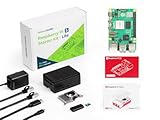
- Versatile RAM Options for Every Project: Available in 4GB, 8GB, and 16GB LPDDR4X-4267 configurations. Whether you are learning Python basics (4GB), managing a Smart Home hub (8GB), or deploying intensive Edge AI models (16GB), there is a precision-engineered solution for your specific performance needs
- Reliable Pre-Loaded Storage Solution: Includes a premium 64GB MicroSD card pre-flashed with the official 64-bit Raspberry Pi OS. We use high-endurance memory chips to solve common "SD card corruption" issues, ensuring a seamless plug-and-play experience for immediate project deployment
- Enhanced Active Cooling Protection: Specifically designed for the high-power Raspberry Pi 5. The kit features a precision-fit case with an integrated low-noise variable speed fan and high-conductivity heatsink, preventing thermal throttling during sustained 4K60p video output or heavy CPU loads
- Sustained TYPE-C Power Stability: Includes a dedicated TYPE-C power supply optimized for the Pi 5's new power architecture. It provides reliable current to support the PCIe 2.0 interface and high-speed USB 3.0 peripherals, eliminating system crashes caused by underpowered generic chargers
- Professional Ecosystem Ready: Fully compatible with Home Assistant, Ubuntu, and various Python libraries. Backed by Seeed Studio's extensive technical documentation and community support, making it the ideal choice for industrial monitoring, digital signage, and advanced IoT innovation
If your display has no composite input, you may need a composite-to-HDMI or other suitable converter. The project documentation does not certify a particular adapter, so check that any converter accepts the board’s video format and is compatible with your display. The YBox2’s output is locally generated composite video; it is not documented as a modern streaming-video service device.
Choose NTSC or PAL
NTSC is the default video mode. According to the manual, you can select PAL in the bootloader by holding the board’s pushbutton for a few seconds. Use the mode supported by your television or video converter.
Rank #2

- Complete set: Contains everything you need to get started in the world of Raspberry Pi 3 B - Computer, Power Supply, Case, Memory Card, USB-Reader, HDMI Cable.
- Powerful Computer: Equipped with the latest Raspberry Pi 3 B, featuring a high-speed 1.4GHz quad-core processor and 1GB of RAM, ideal for even the most demanding applications.
- Practical Case: Protect your Pi, keeping your device running smoothly even during intense use.
- Practical Case: Protect your Pi, keeping your device running smoothly even during intense use.
- Easy Setup: With this comprehensive starter set, you can start using your Raspberry Pi 3 B immediately, bringing your creative ideas and projects to life with ease.
Power supply requirements
The manual specifies a 5–9 V DC supply with a 2.1 mm barrel connector, positive tip, and current up to 300 mA. Check voltage, polarity, connector size, and available current before connecting a supply; matching only the voltage is not enough. The board’s on-board regulator provides 3.3 V.
The manual cautions that a 9 V battery may not run the board for long, if at all, because of its power draw. Do not assume a battery or an arbitrary wall adapter is suitable unless it meets the stated requirements.
The Tool Desk
Outbyte Driver Updater FREEScan for outdated or missing drivers - takes under a minuteDriver Scan →Outbyte PC Repair FREEClear out junk files and repair common Windows errorsFree Scan →Rank #3

- The Raspberry Pi Raphael Starter Kit for Beginners: The kit offers a rich learning experience for beginners aged 10+. With 337+ components, 161 projects, and 70+ expert-led video lessons, this kit makes learning Raspberry Pi programming and IoT engaging and accessible. Compatible with Raspberry Pi 5/4B/3B+/3B/Zero 2 W /400, RoHS Compliant
- Expert-Guided Video Lessons: The Raspberry Pi Kit includes 70+ video tutorials by the renowned educator, Paul McWhorter. His engaging style simplifies complex concepts, ensuring an effective learning experience in Raspberry Pi programming
- Wide Range of Hardware: The Raspberry Pi 5 Kit includes a diverse array of components like Camera, Speaker, sensors, actuators, LEDs, LCDs, and more, enabling you to experiment and create a variety of projects with the Raspberry Pi
- Supports Multiple Languages: The Raspberry Pi 4 Kit offers versatility with support for 5 programming languages - Python, C, Java, Node.js and Scratch, providing a diverse programming learning experience
- Dedicated Support: Benefit from our ongoing assistance, including a community forum and timely technical help for a seamless learning experience
What assembly involves
The kit is unassembled and requires soldering. The assembly guide estimates about two hours and recommends checking the parts against the bill of materials before starting. The preparation guide recommends a basic electronics tool set, while the product listing excludes tools. The documentation does not require a particular commercial tool model.
- Inventory the parts: Compare the supplied components with the assembly guide’s bill of materials before soldering.
- Prepare tools and workspace: Have appropriate soldering tools and a suitable work surface ready; the kit listing does not include tools.
- Assemble the board: Follow the project assembly guide, checking component placement and orientation as you work.
- Connect and test: Once assembled, use a supply that matches the manual’s requirements and connect composite video and Ethernet as needed.
Is the mint-tin enclosure required?
No. The mint tin is an optional enclosure, not a required kit component. The enclosure guide describes making access openings for power, video, infrared, and the LED, cutting an opening for Ethernet, insulating the circuit board from the metal tin, and securing the board with small screws and nuts. If you do not want to modify a tin, the board can be used without that optional enclosure.
Rank #4

- Function: Geekworm NASPi offering an easy and fast way to create your home media center and building NAS or Web server for your Raspberry Pi 4 with a single 2.5 inch SATA HDD/SSD
- NASPi is composed of three parts: X823 storage shield, X-C1 adapter board, heat dissipation system(include X823-A3 metal fan bracket and 4010 PWM fan), and they will be packed into a ALU-case (Raspberry Pi 4 Case) to get a complete NASPi; (X-C1 V2.0 support auto power on function, X-C1 V1.3 doesn't)
- How to Power NASPi: 5Vdc +/-5% , ≥4A, Via Type-C Port of X-C1 ; Recommend to use Geekworm UL listed 5V 4A Type-C power adapter
- SSD Thickness Description: NASPi supports SSD with a thickness not exceeding 9.8mm, most 2.5" HDD/SSD on the market are only 7mm thickness
- Button Switch Operation: Press button 1~2 seconds to reboot, 3 seconds to safe shutdown, 8 seconds to force shutdown (need to install shell script firstly)
Availability and what to consider before building
Adafruit’s listing currently says the kit is no longer stocked, so its old listed price is not a current offer and the original kit should not be assumed readily available new. For an existing board or a second-hand kit, first confirm that its parts are present and that you can meet its connection and power requirements.
- Display: You need a compatible composite input, or a converter whose compatibility you have verified.
- Network: The listing specifies Ethernet and a router with DHCP.
- Power: Verify the 5–9 V DC range, positive-tip 2.1 mm barrel connector, and current requirement.
- Build readiness: The kit requires soldering and the listing excludes tools.
- Software expectations: Treat documented widgets and services as historical examples unless you can independently confirm their current endpoints work.
The project documentation explains what the original hardware was designed to do, but does not establish a particular modern replacement or certify current compatibility for its example services.
PC Slower Than It Used to Be?
A free scan shows the junk files, broken settings and background clutter dragging Windows down - then fixes them in one click.Free scan · Windows 10 & 11Outdated Drivers Are Slowing You Down
One free scan finds every outdated or missing driver and matches the right update for your exact hardware.Free scan · exact hardware matchQuick Recap
Best Value

- 【What you Get】You will get 1*Pi 5 8GB Single Board,1*RasTech Case,1*Active Cooler,1*Screwdriver,1*Installation instructions,12-month free warranty, lifetime service, 24-hour prompt and friendly response.
- 【More Connectors】There are two USB 3.0 ports(5Gbps simultaneously) and two USB 2.0 ports, which triple total bandwidth ,support any combination of up to two cameras or displays. Peak SD card performance is doubled through support for the SDR104 high-speed mode. It provides a smooth desktop experience for you. Offer Gigabit Ethernet and a PCIe interface, along with dual-band Wi-Fi and Bluetooth 5.0/BLE wireless capability. The RasTech Pi 5 Kit use the new 27W 5.1V 5A USB-C power connector.
- 【 Support Dual 4Kp60 Display 】Each of the two microHDMI sockets can control a 4K display at 60 Hertz, now support HDR, offering super HD video for media streaming projects. RPi 5 is the first RPi model that comes with a PCI Express port (PCIe 2.0 x1 with 500 MB/s) to attach SSDs (requires separate M.2 HAT).
- 【 Excellent Chips And Applications】Pi 5 is a full-size Pi computer using silicon built in-house at Pi. The RP1 “southbridge” provides the bulk of the I/O capabilities for Pi 5. Pi 5 is more friendly and convenient in the development of Internet of Things, Web development, machine identification, automatic control and other electronic equipment applications and network.
- 【 Faster CPU, Better GPU 】 Pi 5 features a Broadcom BCM2712 64-bit quad-core Arm Cortex-A76 processor running at 2.4GHz, it delivers a 2–3× increase in CPU performance relative to RaspberryPi 4. The 800MHz VideoCore VII GPU is compatible to OpenGL ES 3.1 and Vulkan 1.2, substantial uplift in graphics performance. Pi 5 Offers lightning-fast CPU speed, a PCI Express interface, a Real Time Clock (RTC) and a power button and runs significantly cooler than Pi 4.
Product prices and availability are accurate as of the date/time indicated and are subject to change. Any price and availability information displayed on Amazon at the time of purchase will apply.