mV means millivolts—one-thousandth of a volt. A multimeter displays mV or offers an mV setting when it is measuring a relatively small voltage, such as a sensor signal, voltage drop, thermocouple output, or low-voltage circuit reference. For example, 250 mV is the same electrical voltage as 0.250 V.
What does mV stand for?
The prefix milli- means one-thousandth. Therefore:
- 1 mV = 0.001 V
- 1 V = 1,000 mV
| Symbol | Meaning | Voltage equivalent |
|---|---|---|
| V | volt | 1 V |
| mV | millivolt | 0.001 V |
| μV | microvolt | 0.000001 V |
| kV | kilovolt | 1,000 V |
A millivolt is not a different kind of electricity. It is simply a smaller unit of voltage, or electrical potential difference. A reading of 0.5 V and a reading of 500 mV describe the same voltage.
As an Amazon Associate I earn from qualifying purchases.
Pay attention to the letters and capitalization:
- mV means millivolts and measures voltage.
- mA means milliamps and measures current.
- MΩ means megohms and measures resistance.
Why does a multimeter have an mV setting?
Low-voltage signals can be difficult to read conveniently on a large volts range. An mV range gives the meter a more appropriate measurement span and may provide finer display resolution. Instead of showing 0.250 V, for example, it may show 250.0 mV.
Do these 3 things before closing this tab:
1Scan for outdated or missing drivers - takes under a minute2Repair Windows errors before they cause bigger problems3Fix the driver behind crashes, sound loss and screen glitchesThe lower range can also have different accuracy and input characteristics from the meter’s ordinary voltage ranges. That does not mean mV is automatically more accurate. The specifications for the particular range determine the result.
#1 Best Overall

- VERSATILE FUNCTIONALITY: Measures AC/DC voltage up to 600V, 10A DC current, 2MΩ resistance; additional features include continuity, diode test and battery test
- LEAD-ALERT PROTECTION: LEDs on the meter illuminate to indicate proper test lead placement, enhancing accuracy and safety during measurements
- BACKLIT DISPLAY: LCD shows clear readings in low-light conditions for enhanced visibility
- BATTERY TEST: Battery test mode can be used for checking if batteries are working
- CONVENIENT FEATURES: Test lead holders on the back of the meter, kickstand and optional magnetic hanger (Cat. Nos. 69445 or 69417) for hands-free operation
Keysight describes sensitivity as the smallest input level a digital multimeter can detect for a specified measurement range. A meter must be sensitive enough for the signal you are trying to measure; having an mV label alone does not guarantee useful performance.
mV display versus mV measurement mode
These are related but not always identical:
- Dedicated mV mode: You select a millivolt function or range, and the meter is configured to measure a low voltage.
- Automatic mV display: An autoranging meter may be in its general AC-voltage or DC-voltage function but automatically display a small result in mV for easier reading.
Meter controls vary. One model may have a separate mV selector position; another may share a V/mV position with a function button; another may change between volts and millivolts automatically. Check the markings and manual for your meter rather than assuming every selector works the same way.
What produces millivolt-level signals?
Millivolt readings are common in electrical and construction-related troubleshooting, including:
Crashes, No Sound, or Screen Glitches?
Random freezes, missing sound and display glitches usually trace back to one bad driver. Find and replace yours safely.Free scan · under a minuteWindows Errors? Fix Them Before They Spread
Repair common Windows errors and clear accumulated junk for a smoother, more stable PC - no reinstall needed.Free scan · no reinstall- Electronic and automotive sensors.
- Thermocouples.
- Voltage drops across wiring, connectors, or components.
- Shunt resistors used to infer current.
- Audio and instrumentation signals.
- Circuit-board reference points.
- A battery that is nearly discharged or connected through a fault.
A standard handheld meter is not equally suitable for every one of these jobs. Frequency response, input impedance, noise rejection, bandwidth, accuracy, and the meter’s measurement method all matter.
How to measure millivolts with a multimeter
- Inspect the meter and leads. Do not use damaged insulation, loose probe tips, or a meter that is unsuitable for the environment.
- Insert the black lead into COM.
- Insert the red lead into the V/Ω/mV terminal. Do not use the A or mA terminal for a voltage measurement.
- Choose the correct function. Use DC mV for a steady-polarity signal such as a sensor output or battery-related circuit. Use AC mV for a small alternating signal.
- Select a suitable range. With manual ranging, begin above the expected value if you are uncertain, then reduce the range only when it is safe to do so.
- Connect the probes across the two points. Put the black probe on the reference or negative point and the red probe on the positive or higher-potential point.
- Read the result and unit. Note whether the display says mV or V and whether the function is AC or DC.
- Remove the probes before changing functions or terminals.
Voltage is measured across two points. It is not measured by putting the meter in series as you would for a current measurement.
Examples of mV readings
| Display | Equivalent in volts |
|---|---|
| 2 mV | 0.002 V |
| 25 mV | 0.025 V |
| 100 mV | 0.100 V |
| 250 mV | 0.250 V |
| 450 mV | 0.450 V |
| 600 mV | 0.600 V |
| 1,000 mV | 1.000 V |
If the meter displays 36.4 mV DC, the measured voltage is 0.0364 V DC.
Rank #2

- Additional Tips - The following incorrect operations may cause the multimeter not to show results: Firstly, the plugs of test leads are not fully inserted or not inserted into the correct sockets. Secondly, the manual rotary switch is not placed in the correct position. In addition, this meter can not test all AC Current and below 100mV AC Voltage. Please check the user manual carefully before measurement.
- Versatile Digital Multimeter - Accurately measures AC/DC Voltage, DC Current, Resistance, and Diode. This Multimeter is a really useful tool for solving industrial and household electrical issues. Suitable for Household Outlets, Fuses, Batteries (including Vehicles), Automotive Circuit Troubleshooting, Charging Systems, Testing electronics in Cars etc.
- Troubleshooting with Accuracy - This Multimeter has a sampling speed of 2 times per second; Built-in a backlight LCD display with 3 ½ digits (1999 count) 0.6”, and high polarity including negative and positive readings.
- Ensures Safety - Double fuse is anti-burn and protects from overloading. The silicone cover can protect the multimeter from failing damage and prevent electric shocks. And low battery indication will be displayed when battery power is low.
- Ease of Use - Support Data Hold and Continuity Buzzer. Includes Convenient feature like LCD Backlit Screen makes it easy to use in dimly light areas. Batteries/Set of Test Leads/User Manual are Included.
What does a negative mV reading mean?
A minus sign normally means the red probe is at a lower potential than the black probe. For example, if the red probe is at 0.10 V and the black probe is at 0.30 V, the meter will show approximately −200 mV.
Recommended Free Tools
This does not automatically indicate defective wiring or a faulty meter. Reverse the probes if you want the same difference shown as a positive value, or retain the negative sign when polarity is meaningful.
AC mV versus DC mV
DC mV measures a voltage with a fixed polarity or a DC level, such as a sensor output, reference voltage, or voltage drop across a shunt.
AC mV measures an alternating component or changing waveform, such as a small audio signal or ripple. AC readings may be reported as RMS, average responding, or another meter-specific value. True-RMS capability is useful, but it does not make a meter accurate for every waveform: frequency range, bandwidth, crest factor, noise, and input conditions still apply. The Keysight 34450A manual, for example, documents separate AC and DC ranges and the conditions applying to its AC true-RMS measurements.
Resolution, accuracy, sensitivity, and noise
These terms are easy to confuse:
- Resolution is the smallest displayed increment. A display changing in 0.1 mV steps has 0.1 mV display resolution.
- Accuracy describes how close the result is expected to be to the true value under stated conditions.
- Sensitivity describes the meter’s ability to respond to a small input.
- Noise floor is unwanted variation that can obscure a small signal.
- Range is the span of values the selected setting can measure.
More digits do not automatically mean more truth. As a model-specific example, Fluke lists the 117 with a 600.0 mV range, 0.1 mV resolution, and DC mV accuracy of ±(0.5% of reading + 2 counts). At a displayed 100.0 mV, that specification works out to approximately ±0.7 mV under the manufacturer’s stated conditions. It is an example of how to read a specification, not a universal accuracy rule for every multimeter. See the Fluke 117 specifications for the applicable conditions.
Quick wins for a faster PC:
Repair Windows errors before they cause bigger problemsFix Now →Fix the driver behind crashes, sound loss and screen glitchesFind Drivers →Why does an mV reading fluctuate?
A changing last digit may be normal at the limit of a meter’s resolution, but a large or erratic change can have several causes:
Rank #3
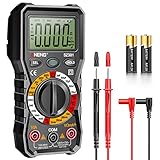
- Versatility: ANENG multi meter is a highly adaptable electronic tool that can be used to measure a wide range of electrical properties, including AC/DC voltage, current, resistance,continuity,diode and Live wire.This makes it an essential tool for anyone working with electronics or electrical systems,also widely used by hobbyists, students, and professionals in various fields, including engineering, automotive repair, and electricians.
- Precision: Multimetro typically have two probes that can be inserted into the circuit being measured, allowing for precise and accurate readings. This makes them ideal for detecting even small changes in voltage or current.
- User-friendly display: ANENG Multi Tester have a clear and easy-to-read display screen that shows the measurement values, as well as various settings and modes that can be adjusted to suit different measurement tasks. This Voltmeter makes it easy for users to quickly and accurately obtain the information they need.
- Safety & Portable: ANENG electrical tester is designed with safety features, such as anti-burn with double fuses,overload protection and insulated probes, to ensure safe and reliable use.Amp meter is compact and lightweight, making it easy to carry around and use on the go.
- Customer Service: ANENG offers exceptional customer service and after-sale support and technical assistance for their digital multimeter. This electrical tools comes equipped with two AA batteries that are pre-installed, and includes a silicone protective case and two high-quality cable leads for added convenience and protection.
- Electrical noise or interference from nearby wiring and equipment.
- Poor probe contact or oxidized terminals.
- Long, unshielded, or poorly arranged test leads.
- A floating or disconnected circuit node.
- An unstable source or intermittent connection.
- AC pickup while measuring a high-impedance DC point.
- Ground-loop or reference problems.
- Input impedance loading the circuit.
- A signal outside the meter’s specified frequency or bandwidth.
Try making firm contact, shortening the leads, measuring against a clearly defined reference, and checking both AC mV and DC mV. Compare the meter with a known source if possible. Look for a stable average, but do not average away a genuine intermittent fault without understanding the circuit.
Keysight’s multimeter guidance identifies incorrect function or terminal selection, unsuitable leads, wrong range, over-limit conditions, and noise or interference as common sources of measurement error.
What happens if the voltage is too high?
Depending on the meter, an excessive input may produce an automatic range change or an indication such as OL, O.L., overload, or a flashing high-value display. The exact indication is model-dependent; it generally means the selected range has been exceeded or the instrument cannot provide a valid reading. See the manufacturer’s instructions for the specific display behavior. Fluke documents examples of distinct overrange indications in its instrument documentation.
Never choose mV just because it shows more decimal places. If the voltage may be higher than the range, select a suitable higher range or use autorange. An incorrect connection can blow a fuse, damage the meter, or expose you to dangerous energy.
mV, volts, milliamps, and diode test
| Function | What it measures | How the probes are connected |
|---|---|---|
| DC V or DC mV | Direct voltage or voltage drop | Across two points |
| AC V or AC mV | Alternating voltage | Across two points |
| mA or A | Current | In series, using the correct current terminal |
| Diode test | Forward voltage and diode behavior | Across the diode, with the circuit de-energized |
Ordinary mV mode does not directly measure current. A known shunt resistor can create a voltage drop proportional to current:
V = I × R
Therefore:
I = V ÷ R
This method requires a known resistance, correct polarity, an adequate resistor power rating, and awareness that the resistor changes the circuit. Do not place a meter in mV mode in series to measure current.
Rank #4

- Versatile Digital Multimeter - Accurately measures AC/DC Current, AC/DC Voltage, Capacitance, Frequency, Duty Cycle, Resistance, Diode, Continuity and Temperature.
- Thoughtful Design - Support Data Hold, Large LCD Backlit Screen, Auto Shut-off and Kickstand make the process of measurements easier. Professional level is reflected in some features include Auto-Ranging capability, and True RMS for measuring both AC Current and Voltage.
- Suitable For Many Occasions - This Multimeter is a golden partner to help to troubleshoot a variety of automotive and household electrical problems safely and accurately.
- Ensure Safety - Double ceramic fuse is anti-burn and protects from overloading,and it will be more secure and reliable; F400mA/600V and F10A/600V explosion-proof ceramic fuse tubes can protect the multimeter effectively.
- Additional Tips - Please take off the cap before using the test leads. Check the manual for more usage information.
Manual ranging versus autoranging
Autoranging is usually easiest for beginners because the meter selects a usable range and may switch between V and mV for readability. It can, however, change ranges repeatedly when a signal is near a boundary.
Manual ranging can be faster and steadier during troubleshooting. It keeps the meter on a known range and makes the expected resolution and overload behavior easier to predict. Start higher than the expected signal when uncertain; then choose a lower range only if the voltage is known to be within its limits.
Some meters have unusual restrictions. For example, the Fluke 12 manual documents a 4000 mV range with 1 mV resolution that can be entered only in manual-range mode and is intended for use with accessories.
Independent reader supportYour contribution helps us test, update, and keep practical guides available for everyone.Input impedance and circuit loading
A digital multimeter normally has high input impedance, but it is not infinite. The meter can affect a high-resistance divider, weak sensor output, floating node, or low-current instrumentation circuit. Check the input-impedance specification when the signal source is high impedance or especially sensitive.
The Keysight 34450A documentation illustrates this issue by specifying different input-impedance characteristics for different ranges, including approximately 10 MΩ on many ranges and higher impedance on particular low-voltage DC ranges.
The Tool Desk
Outbyte Driver Updater FREEFix the driver behind crashes, sound loss and screen glitchesFind Drivers →Outbyte PC Repair FREERepair Windows errors before they cause bigger problemsFix Now →Is measuring mV safe?
The mV label is not a safety rating. Safety depends on the meter’s design, input protection, terminals, leads, CAT rating, expected voltage, and measurement environment. A low-looking display value does not prove that the circuit is low energy or safe to touch.
Best Value

- 【9999 Counts & Rechargeable】FNIRSI DMT-99 digital multimeter features high-resolution 9999-count True RMS for accurate AC/DC measurements across various electrical systems. The built-in 1500mAh rechargeable lithium battery with Type-C charging eliminates frequent battery replacement, making it ideal for extended electronics repair and field testing
- 【Smart Auto-Identification】Streamline troubleshooting with Auto-Mode, which instantly detects AC/DC voltage, resistance, and continuity. This rechargeable multimeter also supports AC/DC current, NCV, frequency, and diode testing—providing comprehensive coverage for automotive diagnostics and household electrical safety
- 【Graphic Waveform & Monitoring】This automotive multimeter plots real-time ripples via Graphic View, visualizing voltage/current fluctuations as waveforms to capture transient spikes traditional meters miss. Monitoring Mode triggers automatic alarms based on custom thresholds—enabling hands-free tracking of intermittent faults for efficient diagnostics
- 【Vivid Screen & Anti-Burn Pro】This multimeter features a 2.4" HD TFT color screen with adjustable brightness for crystal-clear visibility in any lighting. Engineered for maximum safety, it incorporates dual ceramic fuses and advanced protection circuitry to reducing the risk of accidental burn-outs during complex automotive circuitry and industrial tasks
- 【User-friendly Design】Includes ultra-fine multimeter test leads perfected for SMD and tight circuit boards. This compact multimeter features a back-integrated kickstand and storage slots, delivering a grab-and-go solution that eliminates clutter for technicians demanding precision on the move
- Keep the black lead in COM and the red lead in the voltage input for voltage measurements.
- Never connect a voltage source to the current input.
- Use leads and a meter rated for the environment.
- Confirm the expected voltage before selecting a manual range.
- Do not use resistance, continuity, or diode mode on an energized circuit unless the instrument specifically permits it.
- Use appropriate procedures for mains, distribution panels, automotive high-current systems, and industrial equipment.
CAT ratings address the electrical environment and transient energy, not merely the number shown on the screen. For example, the Fluke 117 is specified as CAT III 600 V, while the Fluke 177 is specified as CAT III 1000 V/CAT IV 600 V. Those ratings still do not make every function, connection, or working practice safe in every situation. Consult the Keysight safety guidance and your meter’s manual before working on hazardous circuits.
When a handheld multimeter is not enough
A regular handheld meter may be adequate for a stable millivolt reading, but consider another instrument when you need:
- Microvolt-level measurements or traceable calibration.
- Very low noise and high repeatability.
- Waveform shape, ripple, timing, transients, or frequency-dependent analysis.
- Differential or isolated measurements.
- Thermocouple temperature measurement with appropriate reference compensation.
- Very low burden or circuit loading.
Use an oscilloscope when the waveform or transient behavior matters. Use a bench DMM for controlled, high-resolution measurements. A dedicated thermocouple instrument may be more appropriate when the goal is temperature rather than simply measuring a small voltage.
What’s actually slowing this PC down?
Pick the symptom - the matching free tool is one click away.
Instrument capability varies enormously. A high-end Keysight 3458A, for example, documents a 100 mV DC range and nanovolt-level stated resolution under specified conditions; that should not be treated as typical handheld-meter performance. Its manual gives the relevant limitations and conditions.
Choosing a multimeter for mV work
If you regularly need dependable low-level measurements, compare more than whether the meter has an mV button:
- Separate AC and DC mV functions.
- Resolution appropriate to the signal.
- Published accuracy on the low-voltage range.
- Input impedance and possible circuit loading.
- AC bandwidth, measurement method, and True-RMS limitations.
- Autoranging and manual-ranging options.
- Safety category and input protection.
- Test-lead quality and rating.
- Calibration or certification requirements.
- Whether a handheld meter is actually the right instrument.
For occasional identification or basic troubleshooting, a correctly specified handheld meter may be sufficient. For precision electronics, low-noise measurements, or waveform analysis, choose equipment based on the signal and environment rather than the presence of an mV label.
Quick Recap
Product prices and availability are accurate as of the date/time indicated and are subject to change. Any price and availability information displayed on Amazon at the time of purchase will apply.
Free tools Windows power users keep installed
One-click scans. No signup required.