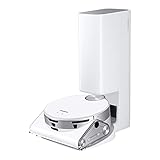
Samsung’s Bespoke AI Jet Bot Steam Ultra is a premium robot vacuum and mop with a camera, SmartThings connectivity, live video, patrol functions, person-presence detection and pet-monitoring features. It can give you a remote view of parts of your home, but it should not be treated as a professional alarm system, identity-recognition camera or guaranteed emergency detector.
What Samsung’s Ultra robot vacuum is
The Bespoke AI Jet Bot Steam Ultra is Samsung’s flagship-style wet-and-dry robot vacuum and mop in its newer Ultra-branded range. Samsung identifies the model family as VR90F01***, with the final characters varying by market and configuration.
The robot combines vacuuming, mopping, camera-based navigation, LiDAR and 3D sensing with an all-in-one cleaning station. It is also connected to Samsung’s SmartThings platform, which is what enables remote viewing, patrol functions and related home-care features.
The word “first” needs context. This is best understood as Samsung’s first robot vacuum in this newer Ultra range—not Samsung’s first AI robot vacuum, camera-equipped cleaner or monitoring-capable model. Samsung’s earlier Jet Bot AI+ and Bespoke Jet Bot Combo AI already offered camera-based monitoring features.
Do these 3 things before closing this tab:
1Repair Windows errors before they cause bigger problems2Scan for outdated or missing drivers - takes under a minute3Clear out junk files and repair common Windows errors#1 Best Overall

- PRECISE NAVIGATION: LiDAR sensors create accurate room maps for the Jet Bot plus to navigate so no worrying about your robotic vacuum going to places it shouldn’t; Mapping can also be controlled via the Samsung SmartThings App
- INTELLIGENT POWER CONTROL: Jet Bot plus identifies the surface type and amount of dust and automatically adjusts suction so you get a thorough clean no matter the floor type
- AUTOMATIC EMPTYING WITH CLEANSTATION: A convenient, no-touch, hygienic way to empty your robot vacuum’s dustbin; Clean Station removes dust using Air Pulse technology
- CLEANER AIR: Advanced 5-layer HEPA filtration system traps up to 99.99% of dust
- CHOOSE WHERE YOU CLEAN: Select where Jet Bot should or should not clean by choosing specific areas of your home to clean with Select and Go
Samsung promoted the Ultra around IFA 2025 and CES 2026. Regional listings exist, but availability, model suffixes, specifications and pricing vary by country.
How home monitoring works
Live view through SmartThings
The onboard camera can provide a live view through the SmartThings app. That lets an owner check parts of the home remotely, assuming the robot is powered, connected to Wi-Fi, reachable by the app and able to access the relevant area.
The robot’s low viewpoint can be useful for checking pets or seeing activity near the floor. It is less suitable for observing counters, high shelves, distant doorways or areas hidden behind furniture.
Patrol mode
In supported SmartThings experiences, Patrol mode allows the robot to move through areas of the home while providing monitoring information. This is more flexible than a fixed camera, but it also introduces obvious limits: the robot may be docked, blocked by clutter, unable to cross a threshold, trapped by cables or unable to enter rooms with closed doors.
Person detection is not identification
Samsung describes person detection based on general visual indicators. The robot may detect that a person is present and, in supported configurations, send a notification. Samsung’s product information says this function cannot identify individual people and may be limited when a person is partly obscured or not fully visible.
That means it cannot reliably tell you who entered the home. It should be described as presence detection, not facial recognition or identity verification.
Pet monitoring and two-way communication
Samsung also promotes SmartThings Pet Care features for checking on or locating pets. The robot includes a microphone and speaker for supported two-way communication experiences, allowing a user to communicate through the device.
Samsung’s Family Care material presents a caregiving scenario in which the robot can check on someone and enable communication. That is a useful supplementary feature, but it is not a guarantee that the robot will detect a fall, medical emergency or incapacitated person.
Recommended Free Tools
Is it a security camera?
Partly—but “camera-equipped robot vacuum with monitoring features” is the more accurate description.
Rank #2
- OBJECT RECOGNITION: No pick-up needed before vacuuming as Jet Bot’s powerful 3D camera and LiDAR sensors identify objects, how close to get to some, or whether to avoid them
- MONITOR YOUR HOME: Jet Bot AI plus 's Front camera can share real time video by streaming to your mobile phone using the SmartThings app
- PRECISE NAVIGATION: LiDAR sensors create accurate room maps for the Jet Bot to navigate so no worrying about your robotic vacuum going to places it shouldn’t; Mapping can also be controlled via the Samsung SmartThings App
- INTELLIGENT POWER CONTROL: Jet Bot AI plus identifies the surface type and amount of dust and automatically adjusts suction so you get a thorough clean no matter the floor type
- CLEANER AIR: Advanced 5-layer HEPA filtration system traps up to 99.99% of dust -
| Capability | What to expect |
|---|---|
| Remote live view | Yes, through SmartThings when the robot and network are available. |
| Mobile patrol | Yes, where the supported Patrol function is available and the robot can reach the area. |
| Person presence alerts | Supported, with visibility and software limitations. |
| Person identification | No. Detection does not establish who someone is. |
| Guaranteed intrusion detection | No. It is not a professional alarm system. |
| Guaranteed emergency or fall detection | No. Caregiving examples should not be treated as medical monitoring. |
A dedicated indoor camera remains better for continuously watching a specific entrance or room. A monitored alarm system is better for professional intrusion response. The Samsung robot adds mobility and cleaning-related convenience, but its security coverage depends on where it is, whether it can move and whether its connection is working.
Cleaning and navigation features
The Ultra is designed to combine cleaning automation with more advanced sensing. Samsung’s announced and regional materials describe:
- Vacuuming and mopping.
- AI Object Recognition.
- AI Floor Detect.
- AI Liquid Recognition.
- Active Stereo 3D sensing.
- dToF LiDAR and 3D mapping.
- DuoClear brush technology.
- Mop lifting.
- EasyPass wheels for crossing some thresholds.
- Automatic dust emptying and water handling through the cleaning station.
Samsung also promotes steam treatment, hot-water mop washing and hot-air drying. The important qualification is that the steam-sanitization claim applies to the mop pads; it should not be rewritten as a promise that the robot disinfects every floor surface.
The Tool Desk
Outbyte PC Repair FREERepair Windows errors before they cause bigger problemsFix Now →Outbyte Driver Updater FREEScan for outdated or missing drivers - takes under a minuteDriver Scan →AI object or liquid recognition can help the robot respond to household conditions, but it is not a guarantee that every cable, toy, spill or pet accident will be detected correctly.
What the cleaning station does
The dock is intended to reduce routine intervention. Depending on the regional model and package, it can:
- Empty collected dust into a dust bag.
- Wash the mop pads with hot water and, in supported models, steam.
- Dry the mop pads with hot air.
- Refill the robot’s water supply.
- Collect dirty water.
Samsung also describes an Auto-Drain model with automatic refill and drainage. That is a distinct configuration, so buyers should not assume every Ultra package connects directly to household plumbing. An auto-drain version may be inconvenient for renters or homes without a suitable water and drain connection.
Dock automation does not eliminate maintenance. Owners still need to clean or replace filters, brushes, mop components, washing trays, tanks and dust bags.
Privacy and security
The connected monitoring functions require a compatible Wi-Fi connection, a Samsung account and the SmartThings mobile app. SmartThings is available on Android and iOS, subject to regional compatibility.
Samsung says live-monitoring data uses end-to-end encryption. It also places the product within its Knox security architecture and cites Knox Matrix Trust Chain and Knox Vault for qualifying 2025 appliances. Samsung further says the Ultra received Diamond-level IoT security marketing-claim verification from UL Solutions.
Rank #3

- [Perfect Replacements] --- The VCA-RDB95 dust bag only suits for SAMSUNG Jet Bot AI+ / Jet Bot+ / Bespoke Jet Bot Combo AI robot vacuum clean station. Please kindly check your vacuum cleaner model before purchasing.
- [Same Quality as the Original] --- The dust bag is not original but uses the same design and materials as the OEM, sealed rubber ring and self-closed bag to ensure 100% quality and avoid releasing harmful dust into the air.
- [Efficient Work] --- The replacement dust bag is made of 5 layers of fabric (non-woven fabric, melt-blown fabric and cotton), combined with clean station can capture up to 99.99% of ultra-fine dust in your home.
- [Large Capacity] --- Each vacuum cleaner bag can be used about 30 times. We recommend that you change the bag at least once a month according to the amount of dust collected by the vacuum cleaner.
- [Worth Buying] --- You will get 8-pack replacement dust bags and our customer service 24 hours a day. We care about the feelings of every user and are always ready to help you solve any problems.
Those statements are relevant, but they do not mean the device is impossible to hack. A certification or marketing-claim verification is not an absolute security guarantee. Users should still:
- Use a strong, unique Samsung-account password and enable available account protections.
- Secure the home Wi-Fi network.
- Install firmware and app updates.
- Review SmartThings permissions and shared-account access.
- Place the dock carefully so the camera does not routinely capture private areas.
- Check current regional privacy terms and data-handling settings.
Anyone uncomfortable with an indoor camera should consider whether the monitoring features justify the privacy trade-off, even if the security architecture is well specified.
Quick wins for a faster PC:
Fix the driver behind crashes, sound loss and screen glitchesFind Drivers →Repair Windows errors before they cause bigger problemsFix Now →Selected regional specifications
One Samsung regional product listing gives the following figures. They are market-specific and should not be assumed to apply to every Ultra package:
| Item | Listed specification |
|---|---|
| Robot dimensions | 359 × 100 × 364 mm |
| Robot weight | 4.3 kg |
| Cleaning-station dimensions | 444 × 520 × 510 mm |
| Cleaning-station net weight | 18.4 kg |
| Dust-bag capacity | 2.5 L |
| Fresh-water tank | 4 L |
| Dirty-water tank | 3.6 L |
| Listed security-update date | November 14, 2030, for that regional listing |
Another regional Samsung page lists threshold crossing of up to 45 mm, or about 1.8 inches, for EasyPass wheels. Confirm the specification for the exact market and model suffix before relying on it.
Availability and price
Samsung has announced and listed the Bespoke AI Jet Bot Steam Ultra in selected markets, but the reviewed material does not establish a universal price or confirmed U.S. launch.
| Market | Confirmed information | Price status |
|---|---|---|
| United States | Check Samsung’s current U.S. catalog before treating it as launched or supported. | No confirmed Ultra price in the reviewed sources. |
| France | Samsung’s 2026 newsroom material references model VR90F01EBG. | No confirmed price in the reviewed sources. |
| Other markets | Regional Samsung product pages exist, with differing suffixes and configurations. | Varies by country and package. |
International availability should not be converted into a blanket U.S. availability claim. Imported models may have different SmartThings support, warranty coverage, consumables, electrical requirements or service arrangements.
PC Slower Than It Used to Be?
A free scan shows the junk files, broken settings and background clutter dragging Windows down - then fixes them in one click.Free scan · Windows 10 & 11Outdated Drivers Are Slowing You Down
One free scan finds every outdated or missing driver and matches the right update for your exact hardware.Free scan · exact hardware matchHow it compares with the Bespoke Jet Bot Combo AI
The Bespoke Jet Bot Combo AI launched in 2024 and already included AI object recognition, SmartThings integration and remote-monitoring features. Its reported U.S. launch list price was $1,699.99, but that was a historical figure for the older model—not a current price for the Ultra.
Independent reviews of the Combo AI praised aspects such as obstacle avoidance and smart-home integration, while also reporting software instability and inconsistent remote live-view performance in some conditions. Those findings apply to the older model and do not prove that the Ultra has the same problems, but they are a reason to test the current SmartThings experience before buying.
The Ultra is better framed as a newer flagship-style generation with upgraded sensing, cleaning-station features and security positioning—not as Samsung’s first AI or camera-equipped robot vacuum.
Quick Recap
Who should consider it?
The Ultra makes the most sense for:
- Households already invested in Samsung SmartThings.
- Pet owners who value occasional remote checks.
- Caregivers seeking an additional way to check a home or loved one.
- Buyers who want vacuuming, mopping and dock-based maintenance in one system.
- Homes where the specified threshold-crossing capability is useful.
- Users comfortable operating a mobile indoor camera.
It is a poor fit for:
- Buyers seeking the best cleaning performance per dollar.
- Privacy-sensitive households that do not want an indoor camera.
- Homes without reliable Wi-Fi or a Samsung account.
- Anyone expecting professional security monitoring.
- Homes with clutter, cables, stairs or inaccessible rooms that would limit patrol coverage.
- Renters who cannot install or accommodate an auto-drain/refill configuration.
- Buyers in markets where the product is not officially sold or supported.
What to check before buying
- Confirm the exact regional model code and whether it is officially sold in your country.
- Check the current Samsung or authorized-retailer price rather than relying on launch coverage.
- Measure the proposed dock location and leave enough operating clearance.
- Verify Wi-Fi, SmartThings and Samsung-account requirements.
- Decide whether live camera monitoring is acceptable for everyone in the home.
- Confirm whether the package includes standard tanks or an auto-drain/refill setup.
- Review the cost and availability of dust bags, filters, brushes and mop components.
- Do not buy it as a substitute for fixed security cameras, alarms or professional monitoring.
Sources
- Samsung Global Newsroom: security, SmartThings, Knox and model-family information
- Samsung regional product specifications and monitoring features
- Samsung SmartThings Family Care information
- Samsung Design: Auto-Drain configuration
- TechRadar review of the older Bespoke Jet Bot Combo AI
Product prices and availability are accurate as of the date/time indicated and are subject to change. Any price and availability information displayed on Amazon at the time of purchase will apply.




