If an electronic safe’s battery is dead and its override key is missing, the right next step depends on the exact make and model. Check the safe’s model label, find its manual, and use only the recovery methods documented for that safe. Some models accept external power; others have a model-specific key override. Neither method is universal, and the documented examples still require the existing code.
Start with the safe’s make and model
Find the identification label on the outside of the safe and note the make, model, and serial number. Use those details to locate the matching owner’s manual or contact the manufacturer. Battery compartments, override keys, and external-power connections differ—even among safes from the same brand.
Do not pry open the keypad or remove a cover or panel unless the manual instructs you to. A keypad that looks similar to another model’s may not use the same recovery procedure.
Check which recovery method the manual supports
Compare the manual’s instructions with what you have available: the correct code, the override key, and any specified external-power input. A 9V battery, USB cable, or key is useful only if your safe’s manual documents that method.
#1 Best Overall
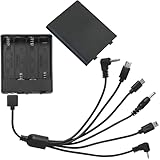
- 6 head with cover and switch external safe battery box, 4 AA batteries, voltage 6V, suitable for various brands of safe.
- Multi-functional interfaces to meet the needs of different situations: 6 interfaces are Type-c header, Micro-USB, 3.5MM hollow header, 2.5MM, 3.5MM and Mini-USB.
- Features: 6 kinds of interfaces, stable performance, plug and play, universal, suitable for various types of safes
- Material: PP, selected excellent plastic material, strong and fall-resistant, not easy to deform, beautiful appearance
- Package contents: 1 general safe emergency power supply (not including battery)
| Documented example | Recovery route | Model-specific limit |
|---|---|---|
| Certain SentrySafe SFW123T/U and SFW205T/U models | Connect a 9V battery at the documented auxiliary contacts, wake the keypad, enter the five-digit code, then turn the handle. | Only the listed families are covered; the code is still required. SentrySafe says auxiliary override is not the primary access method. SentrySafe instructions |
| SentrySafe FP/FPW families | Use the documented jumper procedure with a 9V battery, then enter the five-digit code. | The battery arrangement and lock design differ from other families. Follow the instructions for the exact model. SentrySafe battery guidance |
| First Alert safe covered by the reviewed manual | Use the emergency override key; once open, replace the four AA cells in the inside-door compartment and test the code. | The key steps and battery count apply to the safe covered by that manual, not every First Alert model. First Alert manual |
| Supported Mycube models | Use the manual key if available, or connect compatible USB/USB-C external power and enter the code. Contact Mycube about replacement-key assistance if needed. | Check the keypad port and match the connector to the model. Mycube support |
Try documented external power if you know the code
If the manual identifies an external-power connection, use only the specified battery or connector and follow the model’s sequence. External power wakes the keypad; it does not replace the code.
SentrySafe auxiliary 9V power
For certain SFW123T/U and SFW205T/U models, SentrySafe describes connecting a 9V battery to the auxiliary contacts. A correctly connected battery produces three chirps; wake the keypad, enter the five-digit code, and turn the handle. These steps are limited to the listed families and should not be assumed to fit another SentrySafe. See SentrySafe’s model-family instructions.
Rank #2

- GENUINE APC UPS BATTERY REPLACEMENT: For optimal performance, use APC-branded replacement battery cartridges with your APC Back-UPS and Smart-UPS, and check the product you receive to confirm it is APC-branded
- TESTED AND CERTIFIED RBC CARTRIDGE: Each APC Replacement Battery Cartridge (RBC) is tested and certified for compatibility to restore your APC UPS performance to original factory specifications
- MODEL-SPECIFIC COMPATIBILITY: APCRBC124 is compatible with APC Back-UPS models BX1500M, BR1500G, and Smart-UPS model SMC1000-2UC (verify compatibility before ordering)
- BACKED BY APC WARRANTY: Genuine APC replacement batteries are backed by a 2-year manufacturer warranty
Mycube USB or USB-C power
For supported Mycube models, the manufacturer describes supplying external power through a compatible USB or USB-C connection, then entering the code once the keypad has power. Check the port on your keypad and the matching model guidance before connecting anything. Mycube support.
Use an override key only as the manual directs
If you find the key supplied with the safe, follow the instructions for that model. For the safe covered by its reviewed manual, First Alert locates the override cover below the keypad and directs the user to turn the key clockwise, then move the handle up and right. Those directions are not universal; another safe may place or operate its override differently. Check the covered model’s manual.
Do these 3 things before closing this tab:
1Clear out junk files and repair common Windows errors2Scan for outdated or missing drivers - takes under a minute3Repair Windows errors before they cause bigger problemsRank #3

- I Type 9V Battery Clip terminated with 2-pin PH2.0 connector.
- Cable: Approx. 15cm(6 inch) length.
- Connector: Battery Snap, 2 Pin PH2.0 Male Connector.
- Application: Connecting the battery to electric board for power supply, replacement part for ESL 10 lock, etc.
- Package Include: 3pcs 9V Battery Snap Lead Wire (NO battery included)
If the key is missing or power recovery does not work
- Gather the make, model, and serial number from the safe’s label.
- Contact the manufacturer through its official support channel. Ask which replacement-key or service options are available for that model.
- If manufacturer support cannot resolve the lockout, contact a qualified safe technician. Describe the model and what you have already tried; do not attempt drilling, prying, picking, keypad disassembly, or electrical bypasses.
For example, Mycube directs users who do not have a manual key to support for replacement-key assistance. That route is specific to Mycube; contact other manufacturers for their own model-matched process. Mycube support.
Replace the batteries and test before relocking
Once the safe is open, replace the batteries exactly as its manual specifies. Battery count and location vary; First Alert’s reviewed manual, for example, describes four AA cells in the inside-door compartment for the covered model. SentrySafe advises against certain battery types and mixing old and new cells or different brands on the models covered by its guidance, so check the relevant instructions before replacing cells. SentrySafe battery guidance · First Alert manual.
With the door still open, enter your code and confirm the lock operates before closing the safe or reinstalling any cover the manual says to remove. First Alert’s manual specifically directs users to test the personal passcode before replacing the lock cover.
Quick Recap
Product prices and availability are accurate as of the date/time indicated and are subject to change. Any price and availability information displayed on Amazon at the time of purchase will apply.




