Yes—DIRIGERA is finally an IKEA smart-home hub most beginners can set up and live with comfortably. It is substantially simpler than the older TRÅDFRI gateway, with guided installation, room-based controls, scenes, routines, physical remotes and support for IKEA’s Zigbee and newer Matter products.
The catch is important: DIRIGERA is an excellent IKEA-centered controller, not a universal smart-home platform. At $119.99 in the US on IKEA’s product page as observed on August 18, 2026, it makes the most sense when you plan to use several IKEA bulbs, sensors, remotes, blinds or air-quality products—not when you only need one or two standalone Matter devices.

As an Amazon Associate I earn from qualifying purchases.
What is IKEA DIRIGERA?
DIRIGERA is the central hub for IKEA’s current Home smart system. It connects to your router with the supplied cable and is managed through the IKEA Home smart app. IKEA says the hub requires a Wi-Fi network in the home, although the hub itself uses a wired connection to the router.
Recommended Free Tools
DIRIGERA has three relevant smart-home roles:
- Matter bridge: it can connect supported older IKEA Zigbee products to Matter-compatible ecosystems.
- Matter controller: it can manage supported Matter devices.
- Thread Border Router: it helps connect IKEA’s newer Matter-over-Thread products to the network.
Those labels do not mean every Matter product, device type or feature will work identically in IKEA Home smart, Apple Home, Google Home or Alexa. Compatibility still depends on the product category, software and platform.
#1 Best Overall

- Versatile Control: Push, double push, twist, or push & twist to customize actions for lights, music, blinds, and smart home devices.
- Advanced Customization: Fully configurable for advanced users with complete control over device integrations and automation. Flic Twist works when connected through the Flic Hub Mini or Hub LR, enabling secure control across Matter, HomeKit, Alexa, SmartThings, Homey, IKEA Dirigera, Philips Hue, Nanoleaf, Govee and so much more. Over 10,000 integrations and devices compatible.
- Family-Friendly: Accessible interface makes it easy for everyone in the household to control smart home features.
- Stylish, Wireless, Mountable, Battery-powered and beautifully minimal. Use on a table, desk or cupboard. You can also mount it directly on the wall, or on a metal plate for quick access in any room
- Wireless Connectivity: Effortless setup and operation with wireless connectivity to smart home ecosystem.
IKEA’s DIRIGERA product page and its Matter system guide distinguish between the hub’s bridge, controller and Thread functions.
Is DIRIGERA easy to set up?
For a new IKEA installation, the answer is generally yes. IKEA Home smart guides you through the process instead of requiring you to build a network manually.
- Connect DIRIGERA to power.
- Connect it to your router with the supplied cable.
- Install the IKEA Home smart app. The US product page lists iOS 16.4 or later and Android 10 or later.
- Follow the on-screen hub setup.
- Install any requested app or hub updates.
- Put an IKEA accessory into pairing mode and add it in the app.
- For Matter products, scan the Matter QR code or enter its numeric code.
- Assign the product to a room.
- Test it in IKEA Home smart before adding Apple Home, Google Home or Alexa.
A correctly added product should appear in the app, respond to basic controls and remain reachable after your phone leaves the app. A partner platform may expose the product afterward, but its available controls can differ.
Free tools Windows power users keep installed
One-click scans. No signup required.
What can still make setup difficult?
DIRIGERA’s guided setup removes much of the old friction, but it cannot eliminate network problems. During setup, keep your phone on the same Wi-Fi network as the hub. IKEA recommends checking IPv6, trying the 2.4 GHz band when range or pairing is troublesome, and ensuring the network is stable.
Matter-over-Thread products can be more complicated. If you have an Apple TV, HomePod, Google Nest Hub, Google TV Streamer or another Thread Border Router, multiple Thread networks or commissioning paths can make troubleshooting harder. IKEA specifically recommends temporarily disconnecting other Thread Border Routers when a Matter-over-Thread connection fails.
See IKEA’s Thread and Matter troubleshooting guidance for the current network checks.
New installation versus TRÅDFRI migration
This is where many “easy setup” claims need qualification. Starting from scratch with DIRIGERA is simpler than moving an established TRÅDFRI system.
Quick wins for a faster PC:
Clear out junk files and repair common Windows errorsFree Scan →Fix the driver behind crashes, sound loss and screen glitchesFind Drivers →Rank #2

- LOCAL PROCESSING FOR INSTANT RESPONSE: The Hubitat Elevation C-8 Pro runs automations directly on the hub, not on remote servers, so lights, locks, thermostats, and routines keep working even when your internet goes down; this local-first architecture delivers near-instant response to every trigger without relying on remote servers to process commands; compatible with 1,000+ devices across 100+ brands, and device data stays at home for enhanced privacy
- WORKS WITH ALEXA, GOOGLE HOME, AND APPLE HOMEKIT: Connect your preferred voice assistant and start controlling your smart home from day 1; the C-8 Pro is compatible with Amazon Alexa, Google Home, and Apple HomeKit, so your existing ecosystem works alongside the hub without compromise; Ring camera integration adds a concrete layer of security awareness; approachable setup is supported by step-by-step documentation and an active online community ready to guide you through every stage
- MULTI-PROTOCOL SUPPORT WITH EXTENDED RANGE: A single hub covers Matter 1.5, Z-Wave 800 Series with Long Range, Zigbee 3.0, and Bluetooth, so existing devices stay compatible without extra bridges or adapters; 800 Series Z-Wave and Zigbee 3.0 deliver improved reliability and mesh stability, backed by Z-Wave Alliance membership; 2 dedicated external antennas, one for Z-Wave and one for Zigbee, extend wireless reach in larger homes and device-dense environments where signal consistency is critical
- AI-ASSISTED AUTOMATION AND ADVANCED RULE ENGINE: The AI-assisted routine builder suggests and builds automations based on your connected devices, no programming required; Rule Machine enables multi-condition logic across lighting scenes, geofenced arrivals, layered security responses, and whole-home scheduling; when your family arrives after dark, the hub can unlock the door, activate pathway lights, and adjust the thermostat, turning complex sequences into reliable hands-free routines
- NO SUBSCRIPTION REQUIRED AND CONTINUOUS UPDATES: Full platform functionality needs no recurring subscription; every automation, integration, and advanced feature is available from setup; continuous platform updates since 2018 have expanded compatibility without requiring new hardware; an active community of tech-savvy homeowners and DIY smart home builders shares custom apps, drivers, and automation blueprints for ongoing value; compact at 3.23 x 2.95 x 0.67 in and just 0.16 lb, it fits anywhere
Existing IKEA products may need to be reset and paired again rather than transferred perfectly. That can be inconvenient if bulbs are installed in ceilings, behind furniture or throughout a large home. Before beginning migration:
- Photograph existing rooms, device locations and scenes.
- Make sure DIRIGERA is available before dismantling the old setup.
- Check which products are supported in the current IKEA system.
- Do not reset the TRÅDFRI installation until you know the new hub is ready.
Many IKEA smart products reset by holding a system button for around 10 seconds where applicable. IKEA smart lights generally use a prescribed six-toggle off-and-on sequence. Follow the instructions for the specific product rather than assuming every accessory resets the same way.
What is daily use like?
The IKEA Home smart app is DIRIGERA’s biggest advantage. It organizes products by room and makes ordinary tasks—turning lights on, dimming them, changing supported color or color temperature, and controlling groups—straightforward.
You can also create scenes and routines for common situations such as morning, evening, bedtime or leaving home. DIRIGERA is a good fit for people who want simple household behavior without constructing a complex rules engine.
Physical controls remain just as important. IKEA’s remotes, dimmers, motion sensors and wall-mounted controls mean family members and guests do not need to open an app for every light. That combination of app control and physical control is one of the ecosystem’s practical strengths.
The app is not a substitute for a power-user automation platform. Readers looking for elaborate conditions, advanced presence detection, extensive energy history, scripting or obscure third-party device support will find a lower ceiling than with Home Assistant or a broader hub.
Which products does DIRIGERA support?
Older IKEA Zigbee products
DIRIGERA continues to support supported older IKEA products through the IKEA ecosystem. It can also bridge supported IKEA Zigbee devices into Matter-compatible platforms.
Newer Matter-over-Thread products
IKEA’s newer sensors and other products use Matter over Thread. These depend on a functioning Thread network, with DIRIGERA providing Thread Border Router functionality. The exact experience varies by product and software version.
Outdated Drivers Are Slowing You Down
One free scan finds every outdated or missing driver and matches the right update for your exact hardware.Free scan · exact hardware matchPC Slower Than It Used to Be?
A free scan shows the junk files, broken settings and background clutter dragging Windows down - then fixes them in one click.Free scan · Windows 10 & 11Product categories
The IKEA system covers categories including:
- Smart bulbs and lamps
- Wireless dimmers and remotes
- Smart plugs and control outlets
- Motion sensors
- Door and window sensors
- Air-quality sensors
- Blinds and shades
- Air purifiers
- SYMFONISK-related smart-home products
SYMFONISK products have an important qualification: Sonos handles updates for the speakers. Do not treat a current category list as a guarantee that every individual IKEA product or every feature is supported. Check the relevant IKEA smart-home guide and live product page before buying.
Apple Home, Google Home and Alexa compatibility
IKEA officially lists integrations with Amazon Alexa, Apple Home/HomeKit and Google Home/Google Assistant. This allows IKEA devices to participate in a broader household setup, but “works with” does not guarantee identical behavior across platforms.
There are three separate questions to ask:
- Can the product be controlled in IKEA Home smart?
- Can DIRIGERA bridge or commission it through Matter?
- Which controls, sensors and automation triggers does the chosen partner platform expose?
A bulb may expose brightness and color in one app, while a sensor or blind may present fewer controls in another. Partner-platform behavior also depends on that platform’s controller, account and local network.
For basic setup, add and test the product in IKEA Home smart first. Then link or share it with the chosen ecosystem. IKEA also documents its broader smart-lighting integrations and troubleshooting.
Do these 3 things before closing this tab:
1Clear out junk files and repair common Windows errors2Scan for outdated or missing drivers - takes under a minute3Repair Windows errors before they cause bigger problemsDoes DIRIGERA work without the internet?
IKEA designs its smart products to retain basic local functions, including basic lighting control, without depending entirely on a remote server. That is a meaningful advantage for everyday use.
Do not interpret this as “everything works offline.” Internet access is used for software updates, online services, remote access and maintaining compatibility with integrations. A local light command may continue to work during an internet outage, while a remote-control feature or third-party integration may not.
Rank #4
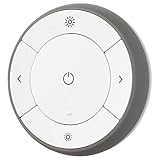
- You can use TRÅDFRI remote to control up to 10 LED light bulbs at a time - dim, switch on and off, choose colors and step by step change from warm to cold light.
- You can use TRÅDFRI gateway and app to create several groups of light sources and control them in different ways.
- The remote control works with TRÅDFRI bulbs.
- With TRÅDFRI remote control you can dim your lights without a hardwired installation.
- A magnet makes it easy to attach the remote control to the wall bracket.
IKEA’s Home Smart policy and product support policy provide the applicable qualifications.
Independent reader supportYour contribution helps us test, update, and keep practical guides available for everyone.What to do when pairing fails
Check the pairing window
IKEA says a new Matter product is ready to connect for 15 minutes after being powered on. If that window expires, press the system button once to reopen it where applicable. Smart lights may need to be power-cycled according to IKEA’s instructions.
What’s actually slowing this PC down?
Pick the symptom - the matching free tool is one click away.
Reset the product
If pairing still fails, factory-reset the product and try again. Many products use a system-button hold of around 10 seconds; smart lights use the prescribed six-toggle reset sequence. A product previously paired to another system may require this step.
Resolve Thread problems
- Temporarily unplug other Thread Border Routers.
- Try pairing through IKEA Home smart.
- Reconnect the other Thread Border Routers after pairing.
- If necessary, reset the Thread network through the hub settings in IKEA Home smart.
- Reset affected Matter devices again after rebuilding the Thread network.
Also check that the accessory has power or a charged battery, the phone and hub are on the same network, IPv6 and local discovery are not being blocked, and the network is not isolating devices.
Price and value
The current US price observed on IKEA’s product page on August 18, 2026, was $119.99. Prices vary by country, retailer and promotion, so older reviews quoting approximately $109 should not be treated as the current standard price.
$119.99 is difficult to justify for a single Matter bulb or sensor. The calculation changes when DIRIGERA manages a growing IKEA system: several lights, physical controls, sensors, blinds or air-quality products can all share one IKEA-focused app and automation layer.
The hub also has a clearer support horizon than many inexpensive connected products. Under IKEA’s stated policy, the hub or gateway receives at least three years of software support after purchase, while IKEA smart products receive at least five years of support when paired with DIRIGERA or TRÅDFRI, subject to the policy’s conditions. That is a minimum commitment, not a promise of indefinite compatibility.
DIRIGERA versus the alternatives
| Option | Best for | Trade-off |
|---|---|---|
| DIRIGERA | IKEA-centered homes wanting guided setup, physical controls and simple routines | Less flexible for mixed-brand and advanced automation |
| No separate hub | Someone with a small number of Matter products and a compatible existing controller | May not provide the full IKEA Home smart experience or older IKEA Zigbee support |
| Home Assistant Green | Broad multi-brand support, local control and complex automations | More configuration, maintenance and troubleshooting for beginners |
| Aqara Hub M3 | Aqara-heavy homes wanting a broader Aqara-centered hub | Not the natural center for IKEA’s app and physical-control ecosystem |
| Aeotec Smart Home Hub / SmartThings | Users already invested in SmartThings and broader multi-brand support | More than is necessary for a simple IKEA-only installation |
Who should buy DIRIGERA?
Buy it if:
- You are starting an IKEA lighting or sensor system.
- You expect to add several IKEA products over time.
- You want remotes, dimmers and sensors as well as phone control.
- You value guided setup over maximum customization.
- You are upgrading from TRÅDFRI and want IKEA’s current platform.
- You want IKEA products available alongside Apple Home, Google Home or Alexa.
Skip it if:
- You only own one or two standalone Matter devices.
- You want one universal hub for many unrelated brands.
- You use Home Assistant and want deep local control or scripting.
- You are unwilling to troubleshoot Matter, Thread or network discovery.
- You expect a full-featured automation engine with extensive historical data.
Verdict
DIRIGERA delivers the improvement IKEA users have been waiting for. For a new IKEA system, the guided IKEA Home smart app, room organization, scenes, routines and physical controls make the experience genuinely approachable. Matter and Thread also give the platform a more useful role in modern smart homes than the older TRÅDFRI gateway.
But the best description is still “an excellent IKEA controller with Matter connectivity,” not “a universal smart-home hub.” The $119.99 US price is worthwhile when DIRIGERA will coordinate a growing IKEA setup. It is poor value for a tiny installation, and mixed-brand enthusiasts should consider Home Assistant, SmartThings or Aqara instead.
Quick Recap
Product prices and availability are accurate as of the date/time indicated and are subject to change. Any price and availability information displayed on Amazon at the time of purchase will apply.

