For a routine reset, unplug your Samsung front-load washer—or switch off its circuit breaker—wait about 1–5 minutes, then restore power. Samsung describes this power cycle as the closest equivalent to a conventional washer reset; it may clear a minor glitch, but it does not repair the cause of a recurring error. Calibration and Wi-Fi reset are separate procedures with different purposes.
Choose the right kind of reset
| Action | Purpose | When it applies | Limit |
|---|---|---|---|
| Power cycle | Restore power after a glitch; Samsung’s closest equivalent to an ordinary reset | General troubleshooting | May not fix the underlying fault and can erase error history |
| Calibration | Recalibrate weight detection | Supported models; drum must be empty | Controls vary by model |
| Network reset | Clear stored Wi-Fi and network information | Wi-Fi-capable models with connectivity trouble | Does not repair a washer fault |
These procedures are not interchangeable. In particular, a power cycle is not a factory reset: Samsung’s general U.S. washer instructions do not describe a conventional reset function. Check the full model number printed on your appliance and consult its manual when the controls or procedure differ. Samsung’s reset guidance covers the general power cycle and network reset.
How to power-cycle a Samsung washer
- Turn the washer off. Unplug it from the outlet, or switch off the circuit breaker supplying it.
- Wait about 1–5 minutes so residual electrical charge can clear.
- Restore power, turn the washer on and see whether the original issue remains.
A power cycle may clear a temporary glitch or stored error. It is not a repair, and it may not resolve the condition that triggered the problem.
What to do if an error returns
An error code identifies a problem; clearing the display does not correct its cause. For example, Samsung describes 4C/4E as a water-fill error. If a water-supply or installation issue remains, the code may reappear after power cycling.
Outdated Drivers Are Slowing You Down
One free scan finds every outdated or missing driver and matches the right update for your exact hardware.Free scan · exact hardware matchPC Slower Than It Used to Be?
A free scan shows the junk files, broken settings and background clutter dragging Windows down - then fixes them in one click.Free scan · Windows 10 & 11#1 Best Overall

- Perfect Fitment: Motor Inverter Control Board Compatible with Samsung Washer WF42H5000AW/A2, WF42H5200AF/A2, WF42H5200AP/A2, WF42H5200AW/A2, WF42H5400AF/A2, WF42H5400AW/A2, WF42H5600AP/A2, WF42H5600AW/A2, WF45H6100AP/A2, WF45H6300AG/A2, WF45H6300AW/A2 WA56H9000AP/A2, WA56H9000AW/A2 etc. Replace DC92-01531B AP5955156 3996732 PS10063192 EAP10063192 PD00037437
- Solves Washer Issues: Effectively resolves frequent problems such as failure to start, drum not spinning, excessive noise or vibration, and unstable drum movement. Also supports troubleshooting error codes like 3C, 3C2, 3E, 3E2, and AE6
- Durable and Reliable: Built with high-quality ABS protective casing and a fully sealed waterproof structure for superior resistance to moisture, heat, and wear. Premium electronic components and stable circuit design ensure long-lasting, consistent performance
- Quieter and Smoother Operation: Advanced inverter control technology minimizes operational noise and vibration, enhancing drum stability and wash performance—so you enjoy a quieter, more peaceful laundry experience
- Quick and Easy Installation: Engineered for seamless fitment—no special tools or technical expertise needed. Replace your old control board in about 15 minutes. Always remember to disconnect power and shut off the water supply before starting installation
- Use the troubleshooting instructions for the specific code and the manual for your model. Samsung’s washer information and error-code guide provides code-related guidance.
- Follow the code-specific troubleshooting before resetting, unless those instructions call for a reset.
- If the same code returns, do not repeatedly reset just to clear it. A reset can erase error history that may help a technician diagnose the problem. Continue the code-specific checks or request service.
For errors without a dedicated solution in Samsung’s general error-code guidance, Samsung advises turning the washer off for 2–3 minutes, turning it back on and restarting the cycle. If the error continues, request service. The code-specific article and your model’s manual take precedence for a particular fault.
How to run Calibration Mode
Calibration adjusts weight detection; it is not a power-cycle reset. Samsung recommends an empty drum. For many front-load models, the procedure is:
Rank #2

- Washer Control Board Part Number: DC92-02393M (AP7017659)
- Replaces Part Number: DC92-02393A, DC92-02393B.
- Suitable For Combination: Washer/Dryer
- For: WA50R5400AV/US-0000 WA50R5400AV/US-0051 WA50R5400AW/US-0000 WA50R5400AW/US-0051 WA50R5400AV/US-51 WA50R5200AV/A4-00 WA50R5200AW/US-51 WA50T5300AC/US-01
- If you have any questions before or after the sale, you can contact us by email, we will provide you with satisfactory solutions.
- Remove all items from the drum and turn on the washer.
- Press and hold Temp and Delay End together for three seconds, until “Cb” appears.
- Press Start/Pause. The drum moves back and forth for about 1–3 minutes, and the procedure ends automatically.
The button combination and entry method can vary. If that combination does not work, or your panel has different controls, use the instructions for your full model number rather than trying other combinations. Samsung recommends calibration in connection with installation in its front-load washer calibration guidance. If the tub does not spin while you attempt calibration, Samsung advises requesting service.
Independent reader supportYour contribution helps us test, update, and keep practical guides available for everyone.How to reset Wi-Fi on a compatible washer
This network reset is only for washers with Wi-Fi capability. It clears saved network information; it does not power-cycle the washer or fix an appliance error. Samsung’s U.S. instructions give these steps:
Quick wins for a faster PC:
Scan for outdated or missing drivers - takes under a minuteDriver Scan →Clear out junk files and repair common Windows errorsFree Scan →Fix the driver behind crashes, sound loss and screen glitchesFind Drivers →Rank #3

- The DC92-01982B Electronic Control Board, PCB is a genuine Original Equipment Manufacturer (Authentic OEM) part from Samsung that fits various models from the following brands of washers: Samsung
- OEM Part DC92-01982B Electronic Control Board, PCB is a brand new part; quality tested as per Samsung standards. The genuine replacement part is a new Samsung part that doesn't replace any other part
- The Samsung DC92-01982B Washer Electronic Control Board, PCB manages the washer's functions such as filling, washing, draining and spinning
- The Samsung Part DC92-01982B is also called a MCB, ECB, power control board, and electronic control board
- This part has additional reference specs of WF5100M, 292*88, 220V, and 15V. It is recommended to either refer to your appliance service manual, contact your appliance manufacturer, or contact a service professional to validate the needed part number for your appliance prior to purchasing
- Press and hold Smart Control until “AP” appears, about three seconds.
- Press and hold Temp until “OK” appears, about seven seconds. The display returns to “AP.”
- Turn the washer off. Its next connection attempt refreshes the Wi-Fi/network information.
Do not use these steps on a model without Wi-Fi, and check your manual if its controls differ. See Samsung’s network-reset instructions.
Quick Recap
Rank #4
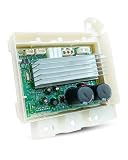
- Replace Part Number: Replace DC92-01531C, 110V, please check the part number before purchase in avoid of unnecessary return
- Efficient and Energy-Saving: Washer conversion control board uses advanced frequency conversion technology to dynamically adjust according to the current working status and load conditions of the washing machine, bringing an efficient and energy-saving washing experience and reducing washing costs and energy consumption
- Stable and Durable: Washer inverter control board adopts a waterproof structure, high-quality electronic components and stable circuit design, has good anti-interference ability and stability, can resistant to high temperatures, wear and corrosion, and can operate stably for a long time
- Easy Installation: Washer Control Board is designed with a plug-in interface, convenient for users to install and replace by themselves without the intervention of professional technician
- Compatible Models: Washer inverter control board fit for WF42H5200AP/A2 WF45H6100AP/A2 WF45H6300AG/A2 WF45H6300AW/A2 WF45K6200AW/A2 WF45K6200AZ/A2 WF45K6500AV/A2 WF45K6500AW/A2 WF50K7500AV/A2 WF50K7500AW/A2 WF56H9100AG/A2 WF56H9100AW/A2 WF56H9110CW/A2 WV55M9600AV/A5 WV55M9600AW/A5 WV60M9900AV/A5 WV60M9900AW/A5
Product prices and availability are accurate as of the date/time indicated and are subject to change. Any price and availability information displayed on Amazon at the time of purchase will apply.




