The Tool Desk
Outbyte Driver Updater FREEFix the driver behind crashes, sound loss and screen glitchesFind Drivers →Outbyte PC Repair FREEClear out junk files and repair common Windows errorsFree Scan →If a laminating pouch is stuck, stop feeding material and do not yank it out. The safe release method depends on your laminator’s exact model: follow its manual for either reverse or a jam-release lever, and stop if that procedure does not free the pouch.
What to do first when a laminating pouch gets stuck
- Stop feeding material. Do not insert another pouch behind the jammed one or pull against resistance. The Snopake/Swordfish HyperSpeed manual warns that forceful pulling can crease the laminated item and damage the laminator.
- Identify the make and model. Find the manual and check its jam-clearing instructions before using any control. Reverse buttons and release levers have model-specific procedures; do not assume your machine has either.
- Use only the procedure in that manual. If the manual does not direct you to pull the pouch, do not do so. Keep fingers and objects out of the inlet, and follow any power-off, unplugging, or cool-down directions.
Use the jam-clearing control specified for your model
If your manual specifies reverse
The Snopake/Swordfish HyperSpeed manual describes automatic jam detection that reverses the rollers to eject a jammed pouch. For a pouch jammed or misaligned before detection activates, it says to press the Roller Reverse button manually and pull the pouch gently. It cautions: “Forceful pulling may damage the laminator.” If the pouch remains stuck, the manual says to turn the machine off and contact the supplier rather than continue trying to extract it.
As an Amazon Associate I earn from qualifying purchases.
If your manual specifies a jam-release lever
Instructions are not interchangeable between laminators. For the Aurora LM1330HC, the manual says to switch the machine off and unplug it, hold down its red jam-release lever, then remove the jammed item through the front or back opening. It also warns users to keep fingers and metal objects out of the inlet and to let a jammed machine cool before removal. Follow this sequence only if it matches your model’s manual.
Quick wins for a faster PC:
Clear out junk files and repair common Windows errorsFree Scan →Fix the driver behind crashes, sound loss and screen glitchesFind Drivers →The KEJILAMA3 manual also describes a jam-release lever, but gives its own procedure. Use the directions for your machine, not another model’s instructions. If automatic reverse fails or the jam persists, follow the manual’s stop and power instructions; do not remove the cover as a fallback.
#1 Best Overall

- LAMINATING MACHINE: One Scotch TL901X Thermal Laminator to help you protect frequently used school documents, assignments and instruction sheets up to 9 in. wide
- PROFESSIONAL FINISH: Two heated rollers with two temperature settings create bubble- and wrinkle-free results that give your documents, photos and more a professional appearance
- FAST LAMINATING: Laminates one letter-size page per minute and has a release lever for quick pouch release, giving you more time to focus on homework or other commitments
- IDEAL FOR: Ideal for creating marker-proof, tear-proof and spill-proof paper items, making this laminator machine a great addition to your dorm room and school supplies
- HOW TO USE: Use this thermal laminating machine to laminate precious photos, school event flyers, yearly schedules and due dates, graduation diplomas, to-do lists and other frequently used documents
When to stop and get service
Stop if your model’s stated procedure fails, the pouch will not move with the permitted gentle assistance, or you notice smoke, an abnormal odor, or visible damage. Turn the laminator off and contact its manufacturer or supplier for guidance. The Aurora LM1330HC manual warns against opening the machine for repair; do not dismantle a unit unless its manufacturer specifically directs you to do so.
After the pouch is out
Clean rollers only as directed
Check your manual before cleaning. The Snopake/Swordfish HyperSpeed manual specifies a roller-cleaning support sheet and says to repeat its cleaning procedure three to five times. That is guidance for that model, not a universal cleaning sequence. Do not apply solvents or insert tools unless your own manufacturer explicitly instructs you to.
Rank #2

- 【100% Never Jam】 Paper jams are a common issue with laminate machines. The Bonsaii Home laminator features patented anti-jam technology that effectively prevents jams, safeguarding your items and ensuring optimal protection.
- 【Versatile and Portable】The Thermal Laminator accommodates 9 inch paper sizes, include 50 Laminting Sheets to meet all your laminating needs. This laminator is compatible with 3-5 mil pouches and measures 13.07L x 4.41W x 2.44H inches, making it ideal for personal and professional use.
- 【Quick Preheating and Laminating】Thermal laminater preheating time of 3 minutes, adhesive speed ≥ 270mm/min, avoiding wrinkles, bubbles, and curling. Lamination machine with faster warm-up and higher lamination speeds can save you valuable time while maintaining quiet and efficient operation.
- 【Various Usage Scenarios】An easy-to-use personal laminator for teachers, parents, and business. You might use Bonsaii laminator machine for home, classroom, office, ideal for preserving important documents and precious photos.
- 【2 Year Professional Service】 Bonsaii provides 2-year professional service for our products. If you have any questions, please tell us. *To use the laminator correctly, please refer to the "Product Description - Warning" section for common mistakes in laminating.
Reduce the chance of another jam
Use pouches and feed materials in the way your laminator’s manual specifies. The Snopake/Swordfish manual, for example, directs users to feed the pouch sealed-edge first and describes using a carrier for cut pouches and for multiple, small, or irregular items. These directions are model- and task-specific; check your manual before changing how you feed materials.
If you need roller-cleaning sheets, choose a type the laminator manufacturer recommends. A cleaning sheet is for maintenance after the jam is cleared, not a tool for pulling out a stuck pouch.
Quick Recap
Best Value

- Thermal laminator for laminating documents up to 9 inches wide;accommodates legal and letter sized paper, photos, and more
- Includes (1) 9-inch laminator machine, (2) 3-mil 8.9 x 11.4 inch laminating pouches,
- Compatible with any 3 mil or 5 mil laminating pouch (mil refers to thickness of lamination film)
- 2 heat settings: 3 mil (best for normal documents,photos, and card stock) and 5 mil (best for thinner papers)
- Quick 3-5 minute warm up with ready indicator light; do not attempt to use before warm up is complete
Rank #4

- 🆗Fast Warm-up, Vivid Color: With 10pcs laminating pouches, crenove laminating machine only takes 1-2 minutes to preheat. Crenova preserves your precious photos' colors, keeping memories alive.
- 🆗Hot&Cold Mode: Hot &Cold modes is specially designed for different items . which is suitable for old photos and documents.
- 🆗Ultra Portability: This laminator features 230mm inlet (9 in, A4 size), perfect to fit any desktop. This great set includes 1 laminator &1 user manual to help you get started quickly.
- 🆗Jam Prevention, Save Important Docs: To clear paper jam issues and protect your important documents, switch off the machine first, push and hold the ABS lever. Pull the stuck paper and pouch out, then release the lever.
- 🆗One Button Operation, Widely Uses: Move the switch to HOT or COLD to auto work. Crenova laminator provides easy, quick, bubble- and wrinkle-free lamination. It is ideal for home, office and school tasks, e.g. painting, menu, letter, certificate, postcard, photo, ID card, tag.
Rank #3
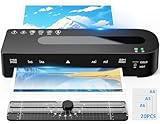
- 4-in-1 Laminator Machine Kit: 9-inch laminator*1, 20pcs thermal laminating sheets (2*A4, 3*A5, 15*A6), paper cutter*1, user manual*1. The paper cutter can cut pouches as you need. 20 pcs laminating sheets to help you start your laminating journey.
- Quick Preheating and Laminating: This A4 laminator takes only 90 seconds to warm up and maintains a steady speed of 320 mm/min, providing professional lamination. It outperforms many models in the same price range. Ultra-quiet (30 dB), this laminator machine is perfect for home offices, classrooms, or busy workplaces.
- Hot & Cold Dual Function Laminator: Our thermal laminator offers both hot and cold laminating modes. Hot Mode seals standard laminator pouches A4 (80–100 microns), ideal for diplomas, menus, or photos. Cold molds use A4 self-adhesive pouches, no preheating required, for thermal receipts or heat. (Please note that cold mode requires self-adhesive pouches, which are not included.)
- Dual Roller & Intelligent Protection: The patented dual roller system provides precise heat and pressure, ensuring high-quality lamination without bubbles, wrinkles, or curling. The NTC temperature control system prevents overheating, protecting your equipment more safely and extending the life of your A4 laminator.
- ABS Quick Release Button: Equipped with a quick-release button, the "ABS" button. If a paper jam occurs, turn off the laminating machine and press the ABS button, then pull out the paper. “ABS” button solves jam problems easily and effectively, which can protect your important documents from damage.
Product prices and availability are accurate as of the date/time indicated and are subject to change. Any price and availability information displayed on Amazon at the time of purchase will apply.
Independent reader supportYour contribution helps us test, update, and keep practical guides available for everyone.



