Windows Errors? Fix Them Before They Spread
Repair common Windows errors and clear accumulated junk for a smoother, more stable PC - no reinstall needed.Free scan · no reinstallOutdated Drivers Are Slowing You Down
One free scan finds every outdated or missing driver and matches the right update for your exact hardware.Free scan · exact hardware matchThe practical answer: you can send surround audio wirelessly, but ordinary rear speakers usually still need AC power. A reliable setup requires a wireless transmitter, a receiver near the rear speakers, and—if those speakers are passive—a rear amplifier. In other words, you can eliminate the long signal cable across the room, but not necessarily every cable.
The best method depends on what you already own: a soundbar, an AV receiver, passive speakers, powered speakers, or a proprietary wireless home-theater system.
As an Amazon Associate I earn from qualifying purchases.
The four ways to make surround speakers wireless
| Approach | Best for | What remains wired |
|---|---|---|
| Matching soundbar rear-speaker kit | Owners of compatible Samsung, Sonos, LG, Bose, Sony, or similar systems | Rear speakers to AC power; soundbar to TV |
| Purpose-built wireless home theater | People starting from scratch | Powered speakers to AC; main hub to TV |
| Wireless adapter plus rear amplifier | Existing AV receivers and passive speakers | Adapter connections, amplifier power, and speaker power |
| WiSA-certified system | Interoperable wireless multichannel installations | Transmitter to source and AC power to each powered speaker |
The simplest and least troublesome option is normally the exact rear kit made for your soundbar. Generic adapters offer more flexibility, but you must verify outputs, channel routing, amplification, latency, and compatibility.
Free tools Windows power users keep installed
One-click scans. No signup required.
What “wireless surround” actually means
These terms are often confused:
- Wireless audio means the signal travels over radio rather than speaker cable.
- Wireless speakers usually contain a wireless receiver and built-in amplifier, but still require AC power.
- Truly cable-free speakers are uncommon in home theater because batteries are impractical for sustained multichannel use.
- Wireless subwoofers are common because a subwoofer usually needs only one low-frequency signal.
- Wireless surround channels must preserve synchronized left and right information, and sometimes additional rear or height channels.
A Bluetooth receiver is not normally a drop-in solution. Typical Bluetooth transmitters are designed for stereo, may add noticeable delay, can limit codec quality, and may not maintain the independent channel routing required for true surround. Some specialized implementations differ, but generic Bluetooth equipment should not be assumed to support discrete 5.1 or Atmos rear channels.
#1 Best Overall
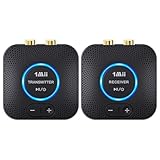
- 【Quick connection】The 1Mii wireless audio adapter connection is quicker and more stable than older versions. After connected to power, the transmitter and receiver will automatically power on and enter paring mode and there is a blue ring light to indicate its working state, hands free for audio entertainment. No more disturbing disconnection and manual re-connection.
- 【Dual AUX/RCA In/Out】Comes with 3.5mm plug to RCA adapter cable, the audio receiver support simoutaneous AUX/ RCA output for 2 powered speakers. Connect the transmitter with PC, TV, CD, MP4 output, and connect the receiver with powered speaker, amplifier or home theater, plug and play, easy operation for true wireless audio transmission. Dual AUX and RCA input at the same time is not recommended, as the audio would be mixed up at the receiving end.
- 【2.4GHz Hi-Fi Audio Enjoyment】The audio adapter kit features 2.4GHz true wireless connection, no more cords, freely enjoy high fidelity music. Very suitable for home TV, PC, powered speaker connection, get rid of distance limitation and enjoy high quality stereo streaming audio at every corner of your home. Please NOTE: the audio kit is not suitable for subwoofer.
- 【262ft Low Latency Syncronization】Designed with anti-interference technology, the transmission distance can reach up to 262ft(80m, no obstacle) and minimum 98ft(30m) for indoor use, enjoy lower than 25ms latency low noise audio. Please NOTE that the transmitter and receiver can only be connected to each other, cannot be paired with other bluetooth devices. Make the transmitter/ receiver powered with our included power adapter is suggested.
- 【Compact Size & Quick Button Control】The audio TX/RX has no external antenna and features extremely compact and light design, convenient for carrying. Volume adjusting is available on the transmitter and the receiver, press the volume +/- button to adjust the input or output audio volume individually. Center is the functional button, press once to mute and press 3s to power off, very easy to control while it's working.
First identify your existing system
Before buying hardware, record:
- Your exact TV, soundbar, or AV receiver model.
- Whether the system is 2.0, 3.1, 5.1, 7.1, or Atmos-capable.
- Whether the rear speakers are passive or powered.
- Whether the receiver has surround pre-outs or only speaker terminals.
- Whether the equipment belongs to a closed ecosystem such as Sonos or a soundbar-specific kit.
- The distance and walls between the main equipment and the rear speakers.
- Whether AC outlets are available behind or beside the seating position.
The exact model matters more than the brand. A rear kit compatible with one Samsung soundbar may not work with another. Sonos also publishes restrictions on which speaker models can be paired as surrounds; arbitrary combinations are not universally supported. See Sonos’s current surround guidelines.
The easiest method: a matching wireless rear kit
A typical soundbar system works like this:
TV HDMI ARC/eARC → soundbar or surround hub )) wireless audio )) rear speakers → AC powerThe rear speakers may pair automatically with the soundbar, or they may use a separate wireless receiver. Follow the manufacturer’s model-specific instructions rather than buying a same-brand kit based only on its logo.
Samsung
Samsung sells wireless rear-speaker kits for compatible soundbars. Confirm the complete soundbar model and rear-kit model on Samsung’s compatibility and setup guidance. Samsung recommends ARC/eARC where available for higher-quality TV audio. A stereo source may not produce the same rear-channel effect as a multichannel source.
Sonos
Sonos uses a soundbar or home-theater speaker connected to the TV, with two compatible Sonos speakers added as surrounds. The exact supported combinations can change, so check the current Sonos pairing rules. For supported configurations, the main home-theater product must use HDMI ARC or eARC for Dolby Atmos content; see Sonos’s Atmos requirements.
Rank #2

- LOW-LATENCY LOSSLESS SOUND QUALITY: 5.8G wireless transmission technology ensures a stable, interference-free ultra-low latency (20ms) audio connection between the transmitter and receiver and CD-level lossless sound quality restoration.
- HIGH POWER OUTPUT: Provides 80W+80W (4Ω) default driving power and optional output power that supports upgrade. You can design the best power match according to the impedance and power of the surround speakers to obtain a more perfect surround sound effect.
- SURROUND SPEAKER VOLUME ADJUSTMENT: You can fine-tune the surround speaker output volume to achieve the best listening state according to the layout and size of your living room
- DUAL INPUT MODES: Features both surround speaker level input and surround line-in input modes for wide compatibility with various A/V receivers
- EASY SETUP: Simple plug-and-play installation with clear input/output connections and volume control for hassle-free wireless rear speaker operation
LG and other proprietary systems
LG rear speakers and receivers must match the compatible soundbar family. LG provides model-specific instructions for systems such as the SP7R on its support page. Bose, Sony, and other manufacturers likewise use designated speakers or receiver kits. Do not assume a generic wireless speaker can be added to a proprietary soundbar.
Converting existing passive speakers
Passive speakers cannot amplify themselves. A wireless receiver connected directly to a passive bookshelf or satellite speaker will produce no useful sound and may be damaged if the connection is wrong.
The correct signal chain is:
AV receiver surround pre-outs → wireless transmitter )) wireless receiver → rear stereo amplifier → passive left and right speakersWith powered speakers, the amplifier is built in:
AV receiver surround pre-outs → wireless transmitter )) wireless receiver → powered rear speakersCheck the connection type carefully:
- Line-level RCA or pre-outs: generally suitable for a compatible wireless adapter.
- Speaker-level binding posts: require a speaker-level wireless solution or an appropriate interface; do not connect them to a line-level input.
- Passive speaker terminals: provide amplified output but cannot be received by an adapter intended only for RCA line-level signals.
- Subwoofer outputs: normally carry mono low-frequency audio and are not automatically suitable for surround channels.
The SVS SoundPath Wireless Audio Adapter is one example of an adapter intended for full-range signals to powered speakers, amplifiers, and surround speakers. SVS lists 16-bit/48 kHz transmission, 14 ms latency, and a 65-foot line-of-sight range. Those are manufacturer specifications, not guaranteed results through walls.
The Tool Desk
Outbyte Driver Updater FREEFix the driver behind crashes, sound loss and screen glitchesFind Drivers →Outbyte PC Repair FREEClear out junk files and repair common Windows errorsFree Scan →SVS’s Tri-Band adapter lists 2.4 GHz, 5.2 GHz, and 5.8 GHz operation, up to 130 feet line of sight, latency under 19 ms, and support for up to six receivers paired with one transmitter. It can help in a congested wireless environment, but it still does not amplify passive speakers.
Rank #3
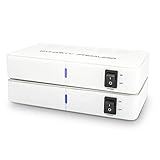
- ✅ 【MAKE YOUR REAR SPEAKERS WIRELESS IN MINUTES】 No more long speaker wires across your living room. Instantly convert passive surround speakers into a clean wireless setup for 5.1 or 7.1 home theater systems.
- ✅ 【BUILT-IN 2x50W AMPLIFIER -NO EXTRA AMP NEEDED】 Unlike basic wireless adapters, this kit powers passive speakers directly. Save money, reduce equipment, simplify installation.
- ✅ 【STABLE DUAL-BAND 5.2 / 5.8GHz TRANSMISSION】 Selectable frequencies + 106 RF channels help avoid WiFi interference and signal dropouts for smooth movie and TV audio.
- ✅ 【LOW LATENCY FOR TV & MOVIES】 Designed for real-time surround sound with minimal audio delay to maintain proper lip-sync performance.
- ✅ 【UP TO 100FT WIRELESS RANGE】 Reliable long-range transmission (line of sight). Perfect for large living rooms, basements, and media rooms.
Purpose-built wireless home theater and WiSA
Purpose-built systems distribute individual channels to powered speakers through a dedicated wireless platform. They can provide automatic pairing and synchronized multichannel playback, but they are usually more expensive and less interchangeable than conventional AV equipment.
WiSA-certified systems are designed for wireless multichannel audio and have included 5.1 systems with wireless front, center, rear, and subwoofer channels. Product availability and compatibility vary, so older WiSA announcements should not be treated as proof of current retail stock. Check current information through WiSA’s member information and the current manufacturer’s product pages.
This route suits a new installation better than a retrofit when you want conventional speaker placement without running signal cable. Its trade-offs are AC power at every speaker, a smaller replacement ecosystem, and potentially limited expansion across brands.
Connect the TV for real surround and Atmos
- Connect the TV’s HDMI ARC or eARC port to the system’s ARC/eARC port.
- Enable HDMI-CEC if the system requires it for power and volume control.
- Set the TV’s digital audio output to the manufacturer’s equivalent of Auto, Passthrough, or Bitstream.
- Avoid forcing stereo PCM when you want discrete surround.
- Check the source device and streaming app for a 5.1 or Atmos audio track.
Menu names differ by TV brand and firmware, so use the television manual for the precise path. Atmos support is not determined by the word “wireless”; the TV, HDMI connection, source, processor, and speakers must all support the desired format.
Rank #4
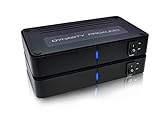
- ✅ 【MAKE YOUR REAR SPEAKERS WIRELESS IN MINUTES】 No more long speaker wires across your living room. Instantly convert passive surround speakers into a clean wireless setup for 5.1 or 7.1 home theater systems.
- ✅ 【BUILT-IN 2x50W AMPLIFIER -NO EXTRA AMP NEEDED】 Unlike basic wireless adapters, this kit powers passive speakers directly. Save money, reduce equipment, simplify installation.
- ✅ 【STABLE DUAL-BAND 5.2 / 5.8GHz TRANSMISSION】 Selectable frequencies + 106 RF channels help avoid WiFi interference and signal dropouts for smooth movie and TV audio.
- ✅ 【LOW LATENCY FOR TV & MOVIES】 Designed for real-time surround sound with minimal audio delay to maintain proper lip-sync performance.
- ✅ 【UP TO 100FT WIRELESS RANGE】 Reliable long-range transmission (line of sight). Perfect for large living rooms, basements, and media rooms.
Confirm the received format on the soundbar display, receiver, or app. It should identify whether it is receiving stereo PCM, Dolby Digital, Dolby Digital Plus, Dolby Atmos, DTS, DTS:X, or an upmixed mode. Rear sound alone does not prove that the source is delivering discrete surround.
Independent reader supportYour contribution helps us test, update, and keep practical guides available for everyone.Place and calibrate the rear speakers
5.1 placement
Place the left and right surround speakers beside or slightly behind the main listening position. Keep them at approximately the same height and aim them according to the manufacturer’s guidance. Avoid putting both directly behind the listener when side placement is possible.
7.1 placement
A 7.1 system uses side surrounds plus dedicated rear surrounds. Do not treat all four speakers as one interchangeable stereo pair; the wireless system must provide the correct channel routing.
Quick wins for a faster PC:
Scan for outdated or missing drivers - takes under a minuteDriver Scan →Clear out junk files and repair common Windows errorsFree Scan →Calibration
- Enter accurate speaker distances.
- Run the receiver or soundbar’s automatic room-calibration routine when available.
- Match surround levels to the front stage.
- Play a channel-identification test and verify left surround, right surround, center, and subwoofer separately.
- Use a familiar dialogue scene to check lip-sync.
Advertised wireless latency is only the delay of the link. TV processing, source buffering, soundbar processing, and room correction can add more. If dialogue is late, use HDMI ARC/eARC where possible, disable unnecessary TV processing, and adjust the system’s lip-sync control. Do not randomly change speaker distances to hide a source or display delay.
Best Value

- ✅[Bluetooth 5.3 Wireless Receiver Built-In] Designed for versatility, the WSA-5BT includes Qualcomm aptX Lossless Bluetooth 5.3 Chipset on the wireless transmitter for streaming audio from your cellphone/tablet/Laptop, making it ideal for home audio and professional applications.
- ✅[Lossless Audio & low Interference] latest wireless audio technology that supports 5.2 & 5.8GHz dual-band selectable digital wireless with an advanced total 106 RF channel auto selection, to avoid to avoid and decrease possibility of interference from the wireless networks routers, cell phone, garage doors, R/Cs, and other 2.4G/5G WiFi network devices for near lossless audio and provides excellent transmission stability
- ✅[Quick and Easy Installation] The WSA-5BT prevents you from ever needing to worry about wires, It eliminates the hassle of connecting the transmitter to any existing stereo, home theatre system or any audio source. Giving you the ability to place powered subwoofer/speakers in distant best sounding location in your room and less cluttered. All you need is setup your powered subwoofer at its intended location with near the power outlet and you`re ready for enjoying the audio wirelessly.
- ✅[High Wireless Transmission Performance] Using the WSA-5BT would be no delays between audio and the film, and provide faster, more stable, better sound quality, latency reducing and less traffic. It also transmit at operating ranges for 100 feet in line of sight or 50 feet through walls, ceilings, and floors (audio transmission range/signal quality will be decreased based on environment).
- ✅[Premium Audio Output] Providing the premium-quality standard audio line level output digital format without audio compression (full CD quality) for stereo audio applications operating.
Troubleshooting wireless surrounds
| Symptom | What to check |
|---|---|
| No rear sound | Exact compatibility, AC power, pairing, surround mode, source format, TV PCM setting, channel assignment, and calibration. |
| Dropouts | Distance, walls, metal furniture, router placement, nearby Bluetooth devices, mesh nodes, cameras, firmware, and cabinet placement. |
| Lip-sync problems | Bluetooth use, separate video/audio paths, TV processing, source settings, receiver buffering, and audio-delay controls. |
| Only stereo plays | Streaming title and subscription, app audio selection, HDMI ARC/eARC connection, TV output mode, and receiver listening mode. |
| Hum or hiss | Correct line-level connection, RCA cable quality, power-supply placement, AC outlet, and possible ground loops. |
| Left and right are reversed | Run a channel test, then correct the app assignment, re-pair the kit, or swap outputs at the rear amplifier. |
For dropouts, move the transmitter and receiver away from the router and out of enclosed cabinets. Update firmware and reboot every component. If the product supports Ethernet, use it where practical. LG’s Sound Suite FAQ, for example, documents wireless-channel restrictions involving DFS channels for certain device-to-device features.
Wireless versus hidden speaker wire
Wireless is not automatically better. Run speaker cable instead when the rear speakers are close enough for an easy route, the room has severe wireless congestion, gaming latency is especially important, or you want long-term compatibility with conventional equipment.
Construction-friendly alternatives include in-wall-rated speaker cable, paintable raceway, baseboard cable channels, under-carpet covers, or routing through an attic, crawl space, or adjacent closet. A cable route generally avoids pairing failures and does not require a new outlet behind every rear speaker.
Recommended Free Tools
Quick Recap
Which setup fits your situation?
- Existing soundbar: buy the rear kit listed as compatible with that exact model.
- Existing Sonos system: use compatible Sonos surrounds and follow Sonos’s current pairing rules.
- Existing Samsung system: verify the exact Samsung Wireless Rear Speaker Kit for the soundbar model.
- AV receiver with powered rear speakers: use a compatible wireless adapter if the receiver has suitable surround pre-outs.
- AV receiver with passive rear speakers: add a wireless receiver and a compact stereo amplifier, or hide speaker cable.
- Wireless-congested room: consider a multiband adapter or a wired route.
- New premium installation: compare a complete wireless platform or WiSA-style system after verifying current availability, formats, and replacement options.
Final purchase checklist
- Exact transmitter, receiver, soundbar, and speaker compatibility is confirmed.
- AC outlets exist near both rear speakers or the rear amplifier.
- The adapter’s input and output types match your equipment.
- A passive speaker amplifier is included or budgeted separately.
- The complete system supports the Dolby or DTS formats you actually use.
- The TV has the required HDMI ARC/eARC connection.
- The advertised range is realistic for your walls and interference environment.
- Firmware support, replacement parts, and the return policy are acceptable.
Product prices and availability are accurate as of the date/time indicated and are subject to change. Any price and availability information displayed on Amazon at the time of purchase will apply.




