Amcrest cameras are most compelling when you want flexible local recording, PoE installation, and model-specific AI features rather than a single all-in-one cloud platform. The range includes traditional IP cameras, SmartHome Wi-Fi cameras, NVR systems, and newer AMLINK-branded products. Their capabilities differ substantially, so the exact model matters more than the Amcrest name alone.
This guide explains the five features that most affect a camera’s usefulness on a home, workshop, commercial property, or construction site: AI detection, night vision, PoE and recording flexibility, audio and deterrence, and remote access.
As an Amazon Associate I earn from qualifying purchases.
1. AI detection can make alerts more useful
Selected Amcrest cameras can distinguish people, vehicles, pets, packages, and other objects. Some traditional IP models also support intelligent video surveillance (IVS), including tripwire, intrusion, and region-based activity rules.
Recommended Free Tools
For example, the Amcrest IP5M-B1276EW-AI advertises human and vehicle detection, tripwire detection, and intrusion detection. The AMLINK AL12M-T1288EW advertises human, animal, package, and vehicle detection.
#1 Best Overall
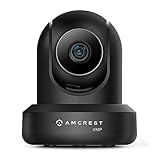
- 4MP H. 265 – 2. 4ghz WiFi IP camera features immaculate 4MP (2688x1520P at 30fps video using excellent low light capability utilizing the CMOS image sensor and chipset. Cover more ground using super-wide 90° viewing angle and remote pan/tilt. Works with Alexa through Amcrest Cloud. H. 265 video compression technology allows smoother video and reduces file sizes and bandwidth consumption. Due to hardware limitations, digital zoom is only available on the Amcrest View Pro App.
- SMARTER SECURITY – Receive motion alert notifications, review footage and engage in two-way communication via your smartphone using the Amcrest View app. Playback and record professionally on a PC using Amcrest Surveillance Pro for Windows and MAC or Blue Iris Professional. Works with Amcrest Cloud remote video storage, MicroSD, Amcrest NVRs, Synology and QNAP NAS, FTP, Chrome, Firefox, Edge, Safari, etc using Amcrest Web View Extension.
- LOW LIGHT NIGHT VISION – Features a CMOS 1/3” 4MP progressive low-light image sensor and built-in IR LEDs to achieve superior low lux performance and night vision up to 32 feet. Not all WiFi IP cameras are built the same and our Texas based team with over 10 years of WiFi camera experience has built-out the performance of this camera by using the highest quality components in order to deliver the ultimate best in class 4MP pan/tilt WiFi camera experience.
- SECURE CLOUD VIDEO BACKUP – The optional Amcrest Cloud remote video storage service allows you automatically store your videos in the cloud hosted and secured by AWS (motion based and 24/7 continuous recording available). If something happens to your local PC/NVR/MicroSDcard(256GB, FAT32)/NAS, the footage will be safely recorded in a secure off-site location and accessible to you through a web-based interface for PC (Windows & MAC) (Chrome/Firefox/Safari/Edge) and Amcrest Cloud smartphone app.
- SIMPLE. RELIABLE. SECURE. - This Amcrest 2.4Ghz wireless security camera features a secure SSL/HTTPS connection, wireless AES/WPA2 encryption, FCC and CE camera certificate, UL rated power supply, and receives regular security firmware updates (Supports 2. 4Ghz Only). Operating Temp: 14°F ~ 113°F. At Amcrest, we want to ensure the safety of our customers, their loved ones, homes, and businesses and you’ll receive a full 1-year US and Lifetime Support provided directly from Amcrest.
That distinction is important: “AI detection” is not a universal Amcrest feature. Capabilities vary by camera, firmware, NVR, app, and region.
Why AI matters on a property or jobsite
Ordinary motion detection may alert you whenever a tree moves, rain crosses the lens, headlights enter the frame, or an insect passes close to the camera. Human and vehicle filtering can make notifications more relevant around:
- Driveways, gates, and site entrances
- Material storage areas
- Equipment yards and workshops
- Restricted rooms or loading zones
- Walkways and perimeter fences
Tripwire rules are useful for detecting movement across a defined line, while intrusion zones monitor activity inside a selected area. Avoid including busy roads, trees, reflective surfaces, or public walkways unless you specifically want those events recorded.
Local, NVR, or cloud AI?
AI processing can happen in different places:
- On-camera AI: Detection is performed by the camera’s own hardware and may work without a cloud subscription.
- NVR-based AI: A compatible Amcrest AI NVR processes or manages detection events.
- Cloud AI: Some cloud-based detection features may require a paid plan or add-on.
Amcrest says at least some SmartHome cameras use on-device AI without requiring a cloud subscription. Its cloud service also offers separate AI options. Check the specification page for the exact model before assuming that an AI feature is included.
AI is an alert filter, not guaranteed facial recognition or intrusion prevention. Accuracy depends on camera angle, lighting, distance, object size, obstruction, weather, and scene complexity. Test alerts during both daylight and nighttime conditions before relying on them.
2. Night vision determines what remains useful after dark
Amcrest cameras may use infrared LEDs, color night vision, white-light illumination, dual-illumination systems, or low-light sensors. These technologies involve different compromises.
The IP5M-B1276EW-AI lists color night vision to approximately 49 feet and infrared night vision to a similar distance. The AMLINK AL12M-T1288EW advertises up to approximately 98 feet of full night vision and 65 feet in color mode. These are manufacturer specifications for particular models, not a general Amcrest range.
Infrared night vision
- Usually produces monochrome footage.
- Does not require visible light.
- Can be less disruptive around homes and neighboring properties.
- May suffer from glare, overexposure, spider webs, glass reflections, or nearby walls.
Color night vision
- Can preserve clothing, vehicle, and environmental colors.
- Often needs ambient light or visible white-light LEDs.
- May be noisier in very dark scenes.
- Can make the camera more noticeable and disturb nearby occupants.
White-light deterrence can illuminate an intruder and discourage activity, but a published illumination distance does not guarantee a clear face or license plate. Identification depends on lens selection, field of view, pixels on the subject, movement, backlighting, rain, fog, and compression.
For a construction site or commercial property, choose the lens and viewing angle for the area being monitored. A wider image can cover more ground but place fewer pixels on a distant face. A narrower or varifocal lens may be better when identifying people at a gate or monitoring a particular equipment area.
3. PoE and local recording offer installation and ownership flexibility
Power over Ethernet
PoE cameras send network data and electrical power through one Ethernet cable. Compared with Wi-Fi, PoE can provide a more dependable connection for fixed outdoor cameras, but it requires infrastructure.
A typical PoE installation needs:
- A PoE switch or injector
- Ethernet cable and suitable terminations
- A router or network connection
- Mounting hardware and cable protection
- Weatherproof routing for outdoor runs
Amcrest setup material references a PoE 802.3at-compliant switch or injector. Product pages may state that the injector or switch is sold separately, so do not treat the camera’s listed price as the complete installation cost.
Wi-Fi as an alternative
Wi-Fi cameras are easier to install where Ethernet cannot be run, but they still need a reliable power source. Signal strength at the final mounting position matters more than signal strength beside the router. Metal framing, concrete, distance, interference, and outdoor walls can all reduce reliability.
Recording choices
Depending on the model, Amcrest cameras may record to:
- microSD storage
- An Amcrest NVR
- A NAS such as Synology or QNAP
- FTP or SFTP storage
- A PC running Amcrest Surveillance Pro
- Third-party software such as Blue Iris
- Amcrest Cloud
The IP5M-B1276EW-AI specifications, for example, list compatibility with Amcrest Cloud, Amcrest NVRs, Synology, QNAP, SFTP, FTP, and Blue Iris. SmartHome cameras may expose a different interface and different protocols.
RTSP and ONVIF: useful, but not unlimited
Many traditional Amcrest IP models document RTSP and ONVIF support. These protocols can help integrate a camera with an existing recorder, but they do not guarantee that every feature will transfer.
Rank #2

- High Performance, Real-Time, True HD – Experience magnificent full-HD 1080P video at 30fps with enhanced low light capability utilizing the Sony Exmor IMX323 image sensor and Ambarella S2LM chipset. Extra-wide 90° viewing angle as well as remote pan/tilt and digital zoom allow you to cover more ground and keep more of what matters to you safe. Works with Amazon Alexa through Amcrest Cloud
- Smarter Security – Receive motion alert notifications, review footage and engage in two-way communication via your smartphone with the Amcrest View app. Playback and record professionally on a PC using Amcrest Surveillance Pro for Windows and MAC (included) or Blue Iris Professional. Works with Amcrest Cloud remote video storage, MicroSd card, Amcrest NVRs, Synology and QNAP NAS, FTP, Pale Moon (32bit) & SeaMonkey Browsers, IE, Safari 11, Firefox 49.0 and Chrome with Amcrest Web View Extension
- Day or Night, Quality Assured – Featuring a Sony Exmor 1/2.7” 2.07MP image sensor and built-in IR LEDs this WiFi camera achieves industry leading 1080P nightvision up to 32 feet
- Secure Cloud Video Backup – The optional Amcrest Cloud remote video storage subscription service allows you automatically store your videos off-site in a third-party location hosted and secured by Amazon AWS. This way if something happens to your local PC/NVR/SDcard/NAS, the footage will be safely recorded in a secure off-site location and accessible to you through a web-based Flash interface for PC (Windows & MAC) (Chrome/Firefox/Safari/Edge) and Amcrest Cloud smartphone app
A third-party system may receive live video but not proprietary AI metadata, two-way audio, PTZ controls, siren commands, or event triggers. Confirm support for the exact camera and recorder combination before buying, especially if you already use a Synology, QNAP, Blue Iris, or another NVR platform. Amcrest technical documentation for representative models includes RTSP and ONVIF information.
Local versus cloud storage
| Choose local recording when… | Choose cloud recording when… |
|---|---|
| You want to avoid recurring fees. | You want footage stored away from the property. |
| You need continuous recording and control over retention. | You want simpler remote playback. |
| You already have an NVR, NAS, or server. | You are concerned that theft could remove both camera and recorder. |
| You prefer footage to remain on-premises. | You accept per-camera subscription costs and have sufficient upload bandwidth. |
Local recording is not automatically theft-proof: a stolen camera may take its microSD card with it, and an NVR can be damaged or removed. For important footage, use an NVR in a secured location or combine local recording with off-site backup.
4. Audio and active deterrence add interaction—but require care
Audio specifications differ sharply between models. A camera may have only a microphone for one-way listening, while another includes both a microphone and speaker for two-way talk.
The IP5M-B1276EW-AI specifies a built-in microphone. The AMLINK AL12M-T1288EW specifies a microphone and speaker for two-way audio. Never infer two-way communication from a product listing that merely says “audio.”
The Tool Desk
Outbyte Driver Updater FREEFix the driver behind crashes, sound loss and screen glitchesFind Drivers →Outbyte PC Repair FREEClear out junk files and repair common Windows errorsFree Scan →Selected models also offer active deterrence such as:
- Warning lights
- Sirens
- Pre-recorded warnings
- Security lighting
These features can draw attention to activity around an entrance, storage area, or restricted zone. They are not a replacement for locks, lighting, fencing, access control, or monitored response. A false detection can trigger a nuisance siren, disturb neighbors, or repeatedly alert workers. Configure the detection zone and test the alarm before enabling it permanently.
Outdoor audio may be difficult to understand because of wind, traffic, and distance. Also consider privacy and local rules before recording or transmitting conversations.
5. Remote viewing and cloud recording simplify access
Amcrest provides several access routes, including Amcrest View Pro, Amcrest View Pro 2, Amcrest Cloud, a camera web interface, desktop software, and third-party platforms such as Blue Iris. The correct option depends on the product family.
Quick wins for a faster PC:
Fix the driver behind crashes, sound loss and screen glitchesFind Drivers →Repair Windows errors before they cause bigger problemsFix Now →Current initialization instructions generally require the owner to configure the camera, create a new administrator password, and then use a QR code or P2P function for app access. The exact labels can vary by camera generation and app version. See Amcrest’s initialization and web-interface guide.
Amcrest Cloud is optional, not universal
Amcrest’s traditional cloud service currently displays a free live-streaming plan with no cloud storage, plus paid motion-recording and continuous-recording plans. The displayed starting signals are approximately $6 per camera per month for motion recording and $9 per camera per month for continuous recording, with retention options ranging from 7 to 90 days and optional 4K and AI add-ons. Prices and plan names can change, so verify them on the official cloud page before purchase.
Cloud plans are charged per camera, making the annual cost significant for larger installations. A $6 monthly plan is $72 per camera per year before any changes, taxes, or add-ons; a $9 plan is $108 per camera per year. Multiply that by the number of cameras when comparing cloud with an NVR or NAS.
Compatibility is another key distinction. Amcrest states that its traditional Amcrest Cloud service supports Amcrest IP cameras but not Amcrest HDCVI DVRs or NVRs. SmartHome products use a separate SmartHome cloud service. Do not assume that every Amcrest-branded device can be added to the same cloud account or app.
PC Slower Than It Used to Be?
A free scan shows the junk files, broken settings and background clutter dragging Windows down - then fixes them in one click.Free scan · Windows 10 & 11Outdated Drivers Are Slowing You Down
One free scan finds every outdated or missing driver and matches the right update for your exact hardware.Free scan · exact hardware matchHow to set up an Amcrest camera
Wired PoE camera
- Connect the camera to a suitable PoE switch or injector.
- Connect the switch or injector to the router.
- Allow the camera to initialize.
- Install Amcrest View Pro from the relevant app store.
- Open the device list and select Add Device.
- Scan the QR code or enter the requested serial information.
- Complete web-interface initialization if prompted.
- Create a new administrator password.
- Confirm the time zone and date.
- Add the camera to the app.
- Configure recording, activity zones, notifications, and user access.
Some NVR pairing workflows require P2P to be enabled and to display an Online status before QR-code pairing. See Amcrest’s AI NVR app instructions.
Wi-Fi camera
- Plug in the camera.
- Wait approximately 30 seconds for initialization.
- Connect your phone to the intended Wi-Fi network.
- Open Amcrest View Pro and select Add Device.
- Select WiFi Camera.
- Follow the pairing instructions.
- Check signal stability at the final location.
- Configure activity zones and recording.
Amcrest’s Wi-Fi quick-start material specifically references the WiFi Camera selection, although app labels may change.
Cloud setup
- Connect and initialize the camera.
- Create an Amcrest Cloud account.
- Select Add Camera.
- Scan or enter the camera serial number.
- Enter the camera’s device credentials, not only the cloud-account credentials.
- Select a storage plan.
- Configure recording and alerts.
- Test live viewing and playback.
- Download an important clip to verify the export process.
An older Amcrest support article recommends approximately 1.5 Mbps upload and 4.5 Mbps download per cloud-connected camera. Treat that as legacy guidance rather than a universal minimum: resolution, frame rate, compression, and recording mode affect bandwidth.
Rank #3

- 4MP H. 265 – 2. 4ghz WiFi IP camera features immaculate 4MP (2688x1520P at 30fps video using excellent low light capability utilizing the CMOS image sensor and chipset. Cover more ground using super-wide 90° viewing angle and remote pan/tilt. Works with Alexa through Amcrest Cloud. H. 265 video compression technology allows smoother video and reduces file sizes and bandwidth consumption. Due to hardware limitations, digital zoom is only available on the Amcrest View Pro App.
- SMARTER SECURITY – Receive motion alert notifications, review footage and engage in two-way communication via your smartphone using the Amcrest View app. Playback and record professionally on a PC using Amcrest Surveillance Pro for Windows and MAC or Blue Iris Professional. Works with Amcrest Cloud remote video storage, MicroSD, Amcrest NVRs, Synology and QNAP NAS, FTP, Chrome, Firefox, Edge, Safari, etc using Amcrest Web View Extension.
- LOW LIGHT NIGHT VISION – Features a CMOS 1/3” 4MP progressive low-light image sensor and built-in IR LEDs to achieve superior low lux performance and night vision up to 32 feet. Not all WiFi IP cameras are built the same and our Texas based team with over 10 years of WiFi camera experience has built-out the performance of this camera by using the highest quality components in order to deliver the ultimate best in class 4MP pan/tilt WiFi camera experience.
- SECURE CLOUD VIDEO BACKUP – The optional Amcrest Cloud remote video storage service allows you automatically store your videos in the cloud hosted and secured by AWS (motion based and 24/7 continuous recording available). If something happens to your local PC/NVR/MicroSDcard(256GB, FAT32)/NAS, the footage will be safely recorded in a secure off-site location and accessible to you through a web-based interface for PC (Windows & MAC) (Chrome/Firefox/Safari/Edge) and Amcrest Cloud smartphone app.
- SIMPLE. RELIABLE. SECURE. - This Amcrest 2.4Ghz wireless security camera features a secure SSL/HTTPS connection, wireless AES/WPA2 encryption, FCC and CE camera certificate, UL rated power supply, and receives regular security firmware updates (Supports 2. 4Ghz Only). Operating Temp: 14°F ~ 113°F. At Amcrest, we want to ensure the safety of our customers, their loved ones, homes, and businesses and you’ll receive a full 1-year US and Lifetime Support provided directly from Amcrest.
What to verify before buying
- Product family: Traditional IP, SmartHome, NVR, or AMLINK.
- Connection: PoE, Wi-Fi, or both.
- Location: Indoor, outdoor, turret, bullet, dome, PTZ, doorbell, or panoramic.
- Resolution and frame rate: 4MP, 5MP, 8MP/4K, or 12MP at the required frame rate.
- Lens: Fixed, varifocal, or motorized; verify the field of view.
- Detection: Human, vehicle, pet, package, tripwire, intrusion, and activity zones.
- Processing: On-camera, NVR-based, or cloud-based AI.
- Night operation: IR range, color range, visible lighting, and reflections.
- Storage: microSD capacity, continuous recording, NVR, NAS, FTP/SFTP, or cloud.
- Integration: RTSP and ONVIF documentation for the exact model.
- Audio: Microphone only or microphone plus speaker.
- Infrastructure: PoE hardware, cable, weatherproofing, NVR hard drive, and mounting equipment.
- Security: Initialization requirements, administrator password, firmware, and user permissions.
- Compliance and warranty: NDAA status and warranty terms vary by product.
Which Amcrest setup fits different buyers?
Best for local-first recording
A traditional Amcrest PoE camera paired with a PoE switch and an NVR, NAS, or microSD card is the logical choice when you want to avoid recurring cloud charges. Verify that the exact model exposes the protocols and AI events your recorder needs.
What’s actually slowing this PC down?
Pick the symptom - the matching free tool is one click away.
Best for a simple indoor Wi-Fi installation
A SmartHome model such as the ASH41-W may suit an indoor user who wants pan/tilt, motion tracking, human and pet detection, two-way audio, microSD, RTSP, Blue Iris, and SmartHome cloud support. It is not a substitute for an outdoor PoE camera.
Best for AI and deterrence
The AMLINK AL12M-T1288EW is an example of a model advertising human, animal, package, and vehicle detection alongside two-way audio, a siren, warning light, microSD support, and IP67 housing. Those specifications are model-specific and should not be generalized to every Amcrest camera.
Best for wide outdoor coverage
The IP5M-B1276EW-AI advertises a wide viewing angle, human and vehicle detection, tripwire and intrusion rules, color night vision, a microphone, and an IP67 weather-resistant housing. Its microphone-only audio and separate PoE hardware make it a poor fit for buyers seeking built-in two-way talk or Wi-Fi.
Amcrest versus Reolink and eufy
| Priority | Amcrest | Reolink | eufy |
|---|---|---|---|
| Local recording | Strong options across selected IP models: microSD, NVR, NAS, PC, and third-party systems. | Strong consumer camera-and-NVR ecosystem. | Often tied to its own ecosystem; verify each product. |
| Open integration | Many traditional IP models document RTSP and ONVIF, but advanced features may not transfer. | Varies by model and recorder. | Some products are more closed. |
| PoE | Broad selection, with separate PoE equipment often required. | Broad PoE selection. | Product-specific; the E41 has an NVR S4 dependency. |
| AI and deterrence | Categories and deterrence features vary by model. | Person, vehicle, color night vision, audio, and other features vary by product. | Selected cameras offer human, pet, and vehicle detection. |
| Cloud dependence | Local recording is available on selected models; cloud is optional but charged per camera. | Depends on model and chosen system. | Depends on product and ecosystem. |
Reolink is a credible alternative for buyers who prioritize a unified consumer-facing camera and NVR system. Its official U.S. store lists PoE models such as the RLC-820A and RLC-843A with features including 4K video and selected AI, audio, color-night, tracking, or zoom capabilities.
Free tools Windows power users keep installed
One-click scans. No signup required.
The eufy PoE Cam E41 lists 4K video, a 122-degree field of view, color night vision, human, pet, and vehicle detection, two-way audio, and IP67 resistance. However, eufy states that the add-on camera is designed exclusively for the eufy NVR S4 and cannot operate independently. That makes it unsuitable for someone seeking an open-ended RTSP/ONVIF-style system.
Common problems and fixes
The camera appears offline
- Check the PoE switch or injector’s power budget.
- Inspect cable terminations and link lights.
- Check the router’s DHCP device list.
- Confirm the phone is on the same network during initial setup.
- Verify P2P status for app access.
- Check whether the camera requires web-interface initialization.
- Reset the camera only after recording its current settings and understanding the reset procedure.
AI alerts are inaccurate
Narrow the detection zone, exclude roads and trees, adjust sensitivity, improve lighting, change the camera angle, and test human and vehicle rules separately. Treat manufacturer detection claims as specifications, not independent accuracy tests.
Night footage is washed out
Reflections from walls, windows, eaves, spider webs, headlights, and white-light LEDs are common causes. Move the camera away from nearby reflective surfaces, clean the lens, adjust the angle, or add a separate light if reliable color identification matters more than stealth.
The cloud plan does not work
Confirm that the device is a compatible Amcrest IP camera rather than an HDCVI DVR/NVR or a SmartHome product using a separate cloud service. Then verify the camera credentials, upload bandwidth, selected plan, and camera assignment.
Do these 3 things before closing this tab:
1Scan for outdated or missing drivers - takes under a minute2Repair Windows errors before they cause bigger problems3Fix the driver behind crashes, sound loss and screen glitchesA third-party recorder shows video but no AI events
RTSP may provide video only, while ONVIF may expose basic discovery, streaming, or limited events. Proprietary AI metadata, audio, PTZ controls, alarms, and deterrence commands may remain available only through Amcrest software or a compatible NVR. This is a model-specific compatibility boundary, so test before committing to a larger installation.
Password and security setup
Current initialization guidance directs users to create a new administrator password, generally 8–32 characters with a mixture of letters, numbers, and symbols. Change any default credentials immediately, avoid password reuse, update firmware from official sources, limit user permissions, and avoid exposing the camera directly to the public internet.
Ownership costs beyond the camera
Budget for the complete system rather than only the camera:
- PoE switch or injector
- Ethernet cable, connectors, conduit, and weatherproofing
- microSD card suitable for surveillance recording
- NVR and surveillance-rated hard drive
- Cloud recording or AI subscriptions, if selected
- Mounting hardware and replacement parts
- Professional installation where cable routing or electrical work requires it
Warranty and compliance also vary. Amcrest states a one-year manufacturer warranty for eligible Amcrest-branded products purchased directly or through an authorized distributor; replacement units may be refurbished. NDAA status must be checked by model: one Amcrest product page includes a non-NDAA-compliance warning, while the cited AMLINK model is advertised as NDAA compliant.
Do these 3 things before closing this tab:
1Scan for outdated or missing drivers - takes under a minute2Repair Windows errors before they cause bigger problems3Fix the driver behind crashes, sound loss and screen glitchesVerdict
Amcrest is a strong fit for technically inclined homeowners, small businesses, and property or construction-site operators who want PoE reliability, local recording, and the possibility of NAS, NVR, RTSP, ONVIF, or PC integration. Its main weakness is not a lack of features but inconsistency across product families. A traditional IP camera, SmartHome Wi-Fi camera, Amcrest NVR, and AMLINK model may use different apps, clouds, protocols, and capabilities.
Before buying, select the recording architecture first: local microSD, NVR/NAS, cloud, or a combination. Then verify the exact model’s lens, frame rate, AI categories, night-vision method, audio hardware, weather rating, storage limit, protocol support, and required infrastructure. That process matters more than choosing the camera with the highest megapixel number.
Quick Recap
Product prices and availability are accurate as of the date/time indicated and are subject to change. Any price and availability information displayed on Amazon at the time of purchase will apply.




