Recommended Free Tools
Start by identifying your Haiku fan’s model, remote type, and mounting style: troubleshooting differs across generations. For a fan that will not start, first check the room’s breaker and switches. For persistent wobble or noise, stop the fan before inspecting it, and leave electrical or structural work to a qualified professional.
Before troubleshooting: identify your Haiku model and mount
Haiku, Haiku Coastal, Haiku L, and Haiku Indoor Gen 2 instructions are not interchangeable. Check the fan’s model information and note whether it has a low-profile or universal mount. Also identify whether its remote is infrared (IR) or Bluetooth; the correct reset and pairing steps depend on that distinction.
For model-specific guidance, use Big Ass Fans’ Haiku ceiling fan support hub. Its maintenance guide covers several Haiku models and is revision G, dated October 14, 2025. The support articles cited below were accessed October 5, 2026.
Haiku fan will not start
Try the external power and control checks first
- Switch the room’s circuit breaker off and back on.
- Turn on the room’s electrical switches and listen for a fan beep.
- Check that the remote is usable: its battery is installed correctly, and any battery-isolating plastic tab has been removed.
These are the initial checks in Big Ass Fans’ Haiku Fan Not Turning On article. For the Bluetooth remote system covered by that guidance, the manufacturer also recommends resetting the remote and attempting to pair it with the fan.
#1 Best Overall

- ☞Easy Installation - Installation of the Universal Ceiling Fan Remote Controls Kit is a breeze, and the looks of the remote are second to none. No need to take off the light kit and blades. Only a 5-wire hookup. All we need to do is loosen the collar at the ceiling, let it slide down to reveal the wires, and access the electrical can. Two wires out of the ceiling connect the remote to electricity, and three wires into the fan control the fan.
- 🛑 STRICT COMPATIBILITY CHECK — AC MOTORS ONLY! DO NOT BUY if your ceiling fan has a DC motor! This universal kit is designed strictly for traditional AC motor fans. How to tell? If your original remote has more than 3 speeds (e.g., 4, 5, 6 speeds) or features a natural wind/reverse button on the remote, it is a DC fan and NOT compatible. Not compatible with Sofucor, CARRO, Merra, Home Decorators Collection, or any DC motor brands.
- 📏 MEASURE BEFORE BUYING — RECEIVER SIZE 4.53"x1.97"x1.06" CRITICAL: Please measure your ceiling fan canopy (top base) space before ordering! The receiver dimensions are 4.53 x 1.97 x 1.06 inches. If your fan is a slimline, hugger, or flush-mount model, this standard-size receiver WILL NOT FIT. *Too tight? If your canopy space is limited, please slide down to our comparison chart below and choose our "Ultra-Small Size Receiver" version instead!
- ☞3-in-1 Replacement Ceiling Fan Remote Control: No more getting up to turn the lights/fan off after reading in bed/sleeping with the replacement remote control. Includes separate buttons for 3 fan speeds, designed to separately ceiling fan remote control speed and light; Includes a wall cradle for a handheld remote control. This kit converts a regular ceiling fan into a remotely controllable one.
- ☞THE PULL-CHAIN RULE: Your fan's original pull chain MUST be pulled to MAXIMUM SPEED and the light turned ON before installing this Ceiling Fan Remote Control, otherwise the remote will not receive power."
If the problem followed installation or a power event
The manufacturer’s no-start guidance includes additional connector checks for a new installation or a problem after a brownout, outage, or electrical storm. Because those checks may involve mains wiring, do not open or rewire the fan unless you are qualified to do so. Contact a qualified installer or Big Ass Fans support if wiring needs inspection.
The maintenance guide also lists the breaker or fuse panel, wall-switch function, adequate supply power, secure wiring, and correct grounding among possible checks. Treat wiring and grounding as professional work, not a quick DIY step.
Rank #2

- ⚠STRICT COMPATIBILITY CHECK : designed with low voltage(24V), this dc motor driver allows safe and operation, reducing the risk of electrical hazards.Only for DC motors,not for AC .Please check your ceiling fan's motor type before purchase. Contact our customer service team for a free compatibility confirmation.
- WORKING VOLTAGE OF THIS PRODUCT:output: 24V DC only; Max. Fan Motor: 35W; Max. Generally compatible with most 6-speed DC ceiling fans . Not compatible with Stepless Dimming. please verify before purchase.
- Multifunctional Ceiling Fan Remote Control:This fan remote control kit can convert a normal ceiling fan into a remote control. 6-speed (high/medium/low) and off; 3 timing remote settings and control buttons: 1H, 2H, 4H; adjustable forward and reverse. 1 button for light on/off control.(no dimming).(without battery)
- Pre-purchase compatibility check: Applicable only to DC motor fans,24V Low voltage - not suitable for AC motors. Please check the type of motor in your ceiling fan light before purchasing! Receiver dimensions: 4.53x2.2x1.03 inches ,remote control dimensions: 1.57 x 5.5 x 0.47 inches, - Please confirm the space for the light cover before purchasing! If your ceiling fan light cover is very compact, this standard-sized fan remote control may not fit
- Strong Signal:The control distance is long. The Universal Ceiling Fan Remote converts a traditional ceiling fan with lights into one that can be controlled remotely.
Fan wobbles: distinguish startup movement from a persistent wobble
A brief startup jerk may be normal
Big Ass Fans’ Haiku Indoor Gen 2 installation guide says: “Your fan may occasionally jerk forward and backward upon startup. This is normal and does not affect fan operation.” That brief movement is different from wobbling that continues while the fan runs.
For ongoing wobble, check blade seating and mounting
- Check that each airfoil is in its intended position. Where the model uses color marks or stickers, match each airfoil mark to the corresponding motor position.
- Look for evenly spaced blades and loose blade fasteners.
- Check that the fan’s mounting hardware is secure. Mount and junction-box requirements vary by model.
For Haiku Coastal, the manufacturer’s wobble instructions say to tighten blade screws hand-tight with a handheld screwdriver, not a power tool. That article specifies a minimum 35 lb fan-rated junction-box capacity for its support context; do not assume the figure or procedure applies to every Haiku model. Have a qualified installer assess a loose or questionable overhead mount.
Rank #3

- 【 Universal Ceiling Fan Remote Control Kit 】 This CENMING ceiling fan remote kit works most 120V 3-speed AC ceiling fans, compatible with Harbor Breeze, Hampton Bay, Hunter, Litex and other ceiling fans. This fan remote kit is suitable for replacement or upgrade your ceiling fans, compatible with most downrod style fans, not recommended for use with hugger style fans. It not for wall mounted fans or exhaust-type fans, and also not for DC motor ceiling fans.
- 【 Ceiling Fan Remote Control Replacement 】 This CENMING model FAN-53T ceiling fan remote controller is designed to separately control your ceiling fan speed and light brightness. The fan remote controller have High/Medium/Low 3-speed and OFF for fan speed control, The light button will control the light brightness dimmer and On/Off. This remote NOT has reverse button, but compatible the fans that has reverse switch itself.
- 【 Fan Remote with Light Dimmer 】 Light dimmer compatible with incandescent light bulbs and some dimmable LED lights. Most LED lights and all CFL lamps are non-dimmable, light dimmer only supports the ON/OFF function in that case, and it may cause to flicker when using the dimming function. The green luminous button can help you find the remote in the dark.
- 【 Powerful and Long-lasting Fan Receiver 】 The rated power of the FAN28R receiver is 240W, which far beyond the general carrying power capacity, it allows you to access more light bulbs, greatly increase the life of the receiver. This FAN28R receiver is suitable for Harbor Breeze, Hampton Bay, Hunter and most 110V 3-speed AC ceiling fans.
- 【 Packing 】 Includes Remote Control *1, FAN28R Receiver *1, Wall Mount Holder *1, User Manual *1, Wire Nuts *6, Screws *2. This remote use a 9V battery (NOT INCLUDE) for power supply.
Slight tilt on a Gen 2 low-profile mount
The Haiku Indoor Gen 2 installation guide describes a specific pivot-bolt adjustment for a fan that hangs slightly tilted with a low-profile mount: raise the lower motor-cover trim, locate the pivot bolt, loosen it with a 5 mm hex key so the fan can hang straight, and retighten it. This is not a general wobble remedy. Do not attempt overhead adjustments if you cannot do them safely; consult a qualified installer.
Fan is noisy during operation
Stop the fan before inspecting it
Bring the fan to a complete stop. Gently rotate the airfoils by hand and check whether anything rubs against the hub. Then inspect accessible fan and mounting hardware for looseness. Do not put your hands near moving blades.
Rank #4
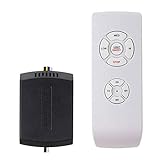
- AC Motor Fans Only – This remote kit is for standard AC motor ceiling fans only. It is not compatible with DC motor fans, smart fans, or fans that require a proprietary control system. This ceiling fan remote can convert traditional ceiling fan lights into wireless control ones. No dimming and no reverse function.
- Check Receiver Space Before Purchase – Receiver size is 2.99 x 2.13 x 0.98 inches. Please measure the canopy space before buying. These ceiling fan remote receivers are a bit smaller than standard receivers and easier to fit in the canopy. Very compact, slimline, hugger, or low-profile fan housings may not have enough room for the receiver.
- Important Installation Setup – Before testing the remote, make sure the wall switch is ON, the fan pull chain is set to HIGH, the light is set to ON, and the receiver wiring is connected correctly. Installation of the ceiling fan remote kit is straightforward and fast, with only 5 wires to be hooked up. Additionally, it comes with wire nuts, an installation guide, and a straightforward remote tray that can be easily attached to the wall.
- ☞Multi-Functions- This universal fan remote converts a regular ceiling fan into a remote-controllable one(NO dimming, NO reverse). The remote control features 4 buttons for fan speed control (High/Medium/Low) and an OFF button, along with a switch for the light ON/OFF control. 4 separate buttons for timing remote setting and control: 1H, 2H, 4H, 8H.
- ☞Compatibility Check Before Buy: For AC Motor Fans Only – Not for DC Motors, please check your ceiling fan light motor type before buying! Receiver Dimensions: 2.99*2.13*0.98 inches – Verify Canopy Space Before Purchase! If your ceiling fan light canopy is very compact, this standard-size fan remote can not fit in!
Universal-mount checks
For a Haiku with a universal mount, the manufacturer’s noise troubleshooting article recommends checking the mount and nearby components, including:
- Whether the metal junction box is fan-rated and securely attached.
- The bracket, mounting ball, and downrod assembly.
- Clearance around the bell-shaped wire cover.
- Whether a wire, ground wire, or safety cable touches the motor.
- Blade installation, bottom trim, and any light-kit parts that could contact the blades.
The same article notes that high humidity can contribute to intermittent clicking at the mounting ball, and outdoor wind can move a fan and contribute to noise. If noise persists after basic checks—or occurs with visible wobble, damaged parts, or a concern about the overhead mounting—stop troubleshooting and get qualified help.
Best Value

- This package does not include a receiver or 12V"A23" battery.This remote control for fan light is great replacement for the original Harbor Breeze,allen roth,Kichler,Hampton Bay fan remote.Enjoy the comfort and convenience of controlling your hampton bay ceiling fan remotely.You can operate the fan remote control while lying on the bed or sofa to stay comfortable.
- This harbor breeze ceiling fan remote control replacement parts for 2AAZPFAN53T 2AAZPFAN-53T L3HFAN11T L3HFAN11T1 L3HFAN11T2 L3H2014FANHD L3H2010FANHD L3H2003FANHD L3HFAN35T L3HFAN35T2 L3HFAN35T1 L3HFAN9T L3HFAN51T, Please make sure the FCC ID/Model of your original remote control is suitable before purchasing.
- Please note that KUJCE9603, CHQ7202T UC7202T and CHQ7202T1 may not be replaced. Can Not Replace A25TX007R , TX007 , TX007-R , A25-TX007R1 , TX007-N , TX007-L , TX007S , TX007LS , TX007R1 , TX007-LR.
- This FAN35T1 ceiling fan remote have 5 buttons, 3-Speed (HI/MED/LO) and OFF for fan speed control, LIGHT/DIMMER for dimming control.Use the included hampton bay fan remote wall mount to keep it in a convenient place.Light dimmer just controls the brightness of the incandescent lights and dimmable LED lamps.Most LED lights and all CFL lights are Not Dimmable, and the remote only control the On/Off in that case.
- This harbor breeze replacement remote compatible with FAN30R, FAN28R, FAN18R and UC7067FMRX receiver.If your receiver is FAN18R, FAN28R, UC7067FMRX or other compatible receiver that has the DIP switches, you need set the same DIP Codes on the transmitter and receiver.If your receiver is FAN30R, do not need to set the codes on the receiver. Please use LEARN button to match the transmitter and receiver
Remote does not control the fan
Haiku L infrared remote
The Haiku L support FAQ says its IR remotes are universally programmed and do not require pairing. Check that the battery’s plastic tab is removed, the battery is serviceable, and you are within range with a clear line of sight to the fan. Battery type varies by remote: some use AAA batteries, while others have a tray-style battery. Confirm which remote you have before buying a replacement.
Bluetooth remote systems
The no-start article’s reset-and-pair direction applies to the Bluetooth remote system it covers, not to Haiku L’s IR remote. Identify the fan and remote type before following a reset or pairing procedure.
Fan does not appear in the Haiku app
For Haiku L, the manufacturer’s FAQ suggests trying a soft reset, a one-minute power cycle, or a network reset when the fan is missing from the app. It states that the supported network must broadcast at 2.4 GHz; 5 GHz is not supported. These instructions are specifically for Haiku L, so check model-specific guidance before applying them to another fan or app setup.
When to stop and get help
- Electrical work: Get a qualified person to inspect wiring, grounding, or connectors if you are not qualified to work on mains-powered equipment.
- Mounting concerns: A loose, unstable, or questionable ceiling attachment needs assessment by a qualified installer.
- Damage or unresolved symptoms: Stop using the fan if parts appear damaged, wobble is pronounced, or noise continues after the relevant basic checks. Use the manufacturer’s support hub for model-specific articles and airflow-support contact options.
Replacement remotes, airfoils, and service kits can depend on model, generation, and remote type. Confirm compatibility through the manufacturer’s parts or support channel before ordering.
Quick wins for a faster PC:
Clear out junk files and repair common Windows errorsFree Scan →Fix the driver behind crashes, sound loss and screen glitchesFind Drivers →Quick Recap
Product prices and availability are accurate as of the date/time indicated and are subject to change. Any price and availability information displayed on Amazon at the time of purchase will apply.