PC Slower Than It Used to Be?
A free scan shows the junk files, broken settings and background clutter dragging Windows down - then fixes them in one click.Free scan · Windows 10 & 11Outdated Drivers Are Slowing You Down
One free scan finds every outdated or missing driver and matches the right update for your exact hardware.Free scan · exact hardware matchThe most useful drill press tips are straightforward: secure the machine and workpiece, choose a speed recommended for your bit and material, start with the bit clear of the surface, and feed steadily. Stop the press before clearing chips or adjusting anything. Controls and specifications vary by model, so use your drill press manual and the bit maker’s instructions for the exact setup.
How do you set up a drill press safely?
Check the machine and work area
Identify your drill press model and consult its manual before setup. Confirm the machine is stable and that the table and head are locked as the manual requires. Keep the table clear of tools and loose material, and wear suitable eye or face protection. Keep loose clothing and gloves away from rotating parts.
Fit the bit and remove the chuck key
Use a bit in good condition that is compatible with the chuck. Secure it according to the machine’s instructions, then remove the chuck key before switching on. If installing or replacing a chuck or arbor, disconnect power and follow the model-specific procedure; mating tapers or threads must match, and mating surfaces may need cleaning. Grizzly’s G0520 manual gives model-specific operating and safety instructions.
How should you secure wood or metal for a drill press?
Clamp the workpiece to the table or base, or hold it in a suitable drill press vise or jig. Do not hold stock by hand: a bit can catch and make the workpiece spin. Sheet metal especially needs to be secured. As the Grizzly G0520 manual puts it, “Always securely clamp the workpiece to the table or base.”
What’s actually slowing this PC down?
Pick the symptom - the matching free tool is one click away.
#1 Best Overall
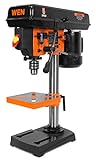
- Features a 2.3A induction motor, an 8-inch swing, and a 2-inch spindle travel
- Includes a 1/2-inch keyed chuck and onboard key storage
- Operates at 5 different speeds: 750, 1100, 1500, 2100, or 3200 RPM
- 6.5 by 6.5 inch height adjustable worktable bevels up to 45 degrees in each direction
- Measures in at 23 inches tall with a 7 by 11-inch base
Choose the workholding method to suit the shape and size of the stock. A vise may suit a smaller, regular piece; clamps or a jig may work better for larger or irregular stock. In every case, check that the setup prevents rotation, is compatible with the table slots, and leaves enough clearance so the bit will not strike the table. Accessories are not universal; confirm fit and use instructions for your machine.
How do you choose drill press speed?
Set speed according to the drill press and bit manufacturers’ recommendations for the material and bit diameter. Do not rely on one RPM as a rule for every job: available ranges and controls differ between machines, and the appropriate setting depends on the bit and material. The G0520 manual advises operators to use speeds appropriate to “the drill bit size and the material that you are drilling.”
Rank #2
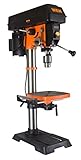
- Features a 6.2-amp induction motor, a 12-inch swing, and a 3-1/8-inch spindle travel
- Adjust the mechanical variable speed anywhere from 580 to 3100 RPM
- Digital speed readout displays current RPM of the machine for maximum precision
- Measures in at 16.8 by 13.5 by 36.6 inches in size with a weight of 85 pounds
- Includes a class IIIA 2.5mW laser, overhead light, adjustable depth stop, table roller extension, beveling 9-1/2 by 9-1/2-inch work table, 5/8-inch capacity keyed chuck, a chuck key with onboard storage, and a two-year warranty
For example, Grizzly lists the G0810 at 150–3000 RPM with 12 speed selections and describes its low RPM as useful for metal drilling. Those are specifications for that model, not a general speed range or a substitute for the manual’s guidance: Grizzly G0810 specifications.
Disconnect power before changing speed if your machine’s manual directs you to do so. Follow its specific procedure rather than reaching near moving parts or assuming every press uses the same controls.
The Tool Desk
Outbyte Driver Updater FREEScan for outdated or missing drivers - takes under a minuteDriver Scan →Outbyte PC Repair FREERepair Windows errors before they cause bigger problemsFix Now →Rank #3
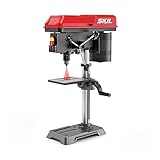
- POWERFUL 6.2 AMP INDUCTION MOTOR—Power through wood, metal, and other materials
- 5-SPEED SYSTEM—Take advantage of 5 speeds from 610 to 2800 RPM for different material types
- LASER ALIGNMENT SYSTEM—Precisely execute drilling maneuvers
- ADJUSTABLE DEPTH STOP—Ensures accurate and consistent depth during drilling
- ADJUSTABLE TABLE HEIGHT—Provides easy depth control
How do you drill cleanly and clear chips?
- Position the work. Set the piece so the bit’s path is clear of the table, then confirm the vise, clamps, or jig are secure.
- Check before starting. Remove the chuck key and tools, clear the table, confirm locks, and make sure the bit is not pressed against the work surface.
- Start and feed steadily. Switch on and lower the bit with even pressure rather than forcing it. For a deep hole, back the bit out as needed to clear chips.
- Stop before clearing or adjusting. Switch off the press before removing chips or changing the setup. Use a brush or other method specified by the manual; do not reach near a running bit.
What should you do after drilling?
Switch off and disconnect power when the manual calls for it, then clean the machine and surrounding area. Follow the model’s maintenance schedule. Manufacturer guidance includes removing dust and chips, lightly lubricating specified moving parts, and checking belts, pulleys, fasteners, and safety components. Use only the maintenance points and methods specified for your press; lubrication and adjustment requirements vary by model. See the relevant manufacturer instructions, such as the Grizzly G0520 manual and Grizzly’s maintenance guidance.
Quick Recap
Best Value

- Exceptional Drilling Performance: Powered by a robust 2.5A induction motor, this benchtop drill press delivers superior power and stability, ensuring top-notch performance even during extended drilling sessions.
- Variable 5-Speed Control: Customize your drilling experience with five adjustable speeds ranging from 750 to 3200 RPM. Effortlessly switch between speeds by adjusting the belt, our bench drill press allowing you to tackle a variety of materials and projects with precision.
- Bright LED Work Light: Never miss a detail with the integrated LED work light. Our LED work light of benchtop drill press illuminates your workspace, providing clear visibility and making it easy to work accurately and efficiently even in dimly lit conditions.
- Precision-Engineered Drilling: Achieve flawless results with our drill press’s low radial runout and 1/2-inch maximum drilling diameter. The adjustable depth stop and 2-inch spindle travel let you set precise drilling depths for perfect holes every time.
- Flexible & Adjustable Worktable: Experience unmatched flexibility and stability with the thick metal worktable that adjusts in height and tilts up to 45°. Our benchtop drill press is ideal for precise, complex drilling hole tasks, making it an invaluable tool for any workshop.
Rank #4
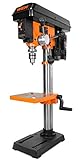
- Features a 6.2-amp induction motor, a 10-inch swing, and a 2-inch spindle travel
- Adjust the mechanical variable speed anywhere from 530 to 3100 RPM
- Digital speed readout displays current RPM of the machine for maximum precision
- Measures in at 13.2 by 19.3 by 33.9 inches in size with a weight of 57 pounds
- Includes a class IIIA 2.5mW laser, adjustable depth stop, beveling 8 by 7.5-inch work table, 1/2-inch capacity keyed chuck, a chuck key with onboard storage, and a two-year warranty
Product prices and availability are accurate as of the date/time indicated and are subject to change. Any price and availability information displayed on Amazon at the time of purchase will apply.