What’s actually slowing this PC down?
Pick the symptom - the matching free tool is one click away.
Some links on this page are affiliate links: if you buy through them we may earn a commission, at no extra cost to you.
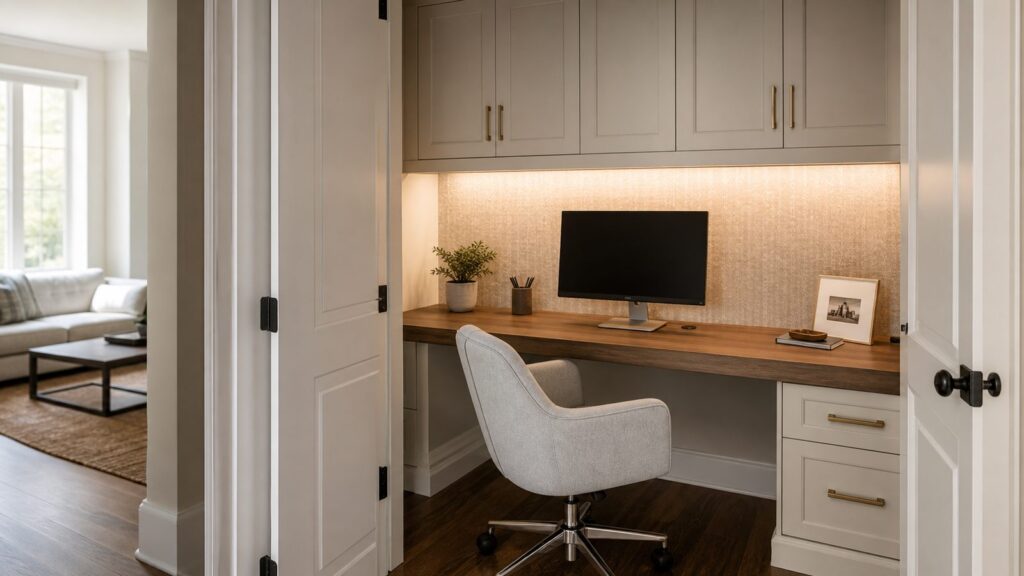
A closet office can be one of the smartest small remodels in a home, but only when it is planned like a real workspace. The best cloffices are not just pretty back walls and shelves. They solve desk depth, chair clearance, outlets, lighting, ventilation, cable routing, and storage before the first piece of trim goes up.
For most U.S. homes in 2026, a simple DIY closet office can cost about $300 to $1,500. A semi-custom setup with better shelving, finish carpentry, task lighting, and limited electrical work usually lands around $1,500 to $5,000. A fully custom built-in closet office can run $5,000 to $15,000 or more, especially with cabinet-grade drawers, integrated LED lighting, premium desktop materials, and professional installation.
As an Amazon Associate I earn from qualifying purchases.
The Tool Desk
Outbyte Driver Updater FREEScan for outdated or missing drivers - takes under a minuteDriver Scan →Outbyte PC Repair FREERepair Windows errors before they cause bigger problemsFix Now →On our job sites, the closet offices that age well all have one thing in common: every inch has a job. The desktop supports real work, the vertical space handles storage, cords have a route, lighting does not glare into the user’s eyes, and the office can either disappear or look calm when work is done.
What Makes a Closet Office Actually Work?
A reach-in closet can become a usable office if it is roughly 36 inches wide or more, but comfort improves quickly once you get into the 48- to 72-inch range. A 20- to 24-inch deep desktop is usually the sweet spot. Shallower than 20 inches, keyboards and monitors start fighting for space. Deeper than 24 inches, many standard closets become tight for chair movement.
#1 Best Overall
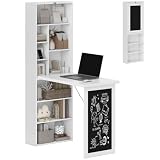
- Space-Saving Sanctuary: Great for home office and small apartments, this fold out desk frees up your space when closed—only 7.7" deep. Switch effortlessly between a full workspace and a neat display cabinet, helping you reclaim your living area
- Unmatched 110 lbs. Stability: Built for serious use, the desktop supports up to 110 lbs. The 0.6" thick MDF panels and top-to-bottom support structure keep the wall desk steady and wobble-free—great for dual monitors, printers, or even a sewing machine
- Tailored Vertical Storage: Stay organized with 6 upper compartments for stationery, decor or files, plus 3 lower shelves for books or storage boxes. The 3-level adjustable bottom shelf fits different item heights, keeping workspace clean and clutter-free
- Interactive Chalkboard Front: The built-in chalkboard allows you to jot down to-do lists, reminders, or family notes. Close the murphy desk to instantly hide visual clutter. Also works as a small breakfast bar or prep surface when life gets busy
- Safety & Durability: The craft desk with storage is made of P2-grade MDF with a smooth, easy-clean surface. Anti-tipping design adds everyday safety. Overall dimension: 38.5" W x 20" D x 60.25" H—designed for lasting use in compact homes
Use standard desk dimensions as your starting point. A typical desktop height is about 28 to 30 inches from the floor. Knee space should be at least 24 inches wide, and 27 inches high is a practical minimum for most adults. If you use a thick butcher block top or a drawer unit below, check the finished knee clearance before installing anything permanently.
Monitor distance is the detail homeowners often miss. In a shallow closet, a laptop alone may work, but a full-size monitor often needs a wall-mounted arm, slim shelf, or riser. Without that, the screen sits too close and the desktop becomes unusable for writing, paperwork, or a second device.
Quick wins for a faster PC:
Repair Windows errors before they cause bigger problemsFix Now →Fix the driver behind crashes, sound loss and screen glitchesFind Drivers →Before choosing wallpaper, paint, or cabinet doors, draw the clearance plan. Mark the desktop depth, chair pullback, monitor location, outlet height, shelf heights, door swing, and storage zones. A beautiful finish cannot fix a workstation that is uncomfortable after 20 minutes.
2026 Closet Office Cost Guide
Closet office pricing overlaps with both home office remodeling and custom closet installation. Whole home-office remodels in existing space are often benchmarked around $50 to $200 per square foot, with small room conversions starting near $1,500 and typical dedicated home office projects around $15,000. Cloffices are usually less expensive because the footprint is smaller, but electrical work, cabinetry, and finish carpentry can still move the number quickly.
| Project Level | Typical 2026 Cost | Best For | Common Scope |
|---|---|---|---|
| Budget DIY | $300-$1,500 | Renters, guest rooms, low-risk closets | Paint or wallpaper, premade desktop, brackets, plug-in light, bins, cable clips |
| Semi-Custom | $1,500-$5,000 | Daily work-from-home use | Installed closet system, built-in desktop, shelves, task lighting, minor electrical, finish trim |
| Custom Built-In | $5,000-$15,000+ | Primary office, high-finish remodels | Cabinet-grade drawers, doors, panels, hardwood or stone top, integrated LEDs, printer pullouts, professional design |
The main cost drivers are closet size, site-built versus modular construction, melamine versus plywood or hardwood, drawer count, door style, desktop material, lighting, receptacle location, drywall repair, trim matching, and local labor rates. Older homes can add cost if the walls are plaster, wiring is outdated, or circuits need AFCI or GFCI protection. Condos may add HOA review, working-hour limits, and stricter rules for wall penetrations.
15 Beautiful Closet Office Ideas That Are Built to Function
1. The Full-Width Floating Desktop
A full-width desktop makes a small closet feel intentional instead of improvised. In a 48- to 72-inch reach-in closet, a 20- to 24-inch deep butcher block, hardwood, plywood, or laminate top gives you a clean work surface without bulky legs.
The build detail that matters is support. We prefer a continuous wall cleat or properly anchored blocking where possible, not a random set of light-duty brackets. A desktop needs to resist sagging and pull-out force, especially when someone leans on the front edge. For a polished finish, scribe the top to uneven side walls, edge-band exposed sheet goods, and caulk tight gaps after paint.
2. The Wallpapered Back Wall
Wallpaper is one of the fastest ways to make a closet office feel designed. It works best on the back wall only, with calmer side walls and a simple desktop. That keeps the space visually strong without making video calls look busy.
Budget about $100 to $500 for peel-and-stick or standard wallpaper in a small closet, more if you choose designer paper or hire installation. Remove rods, patch holes, sand the wall, and prime properly. Wallpaper over rough repair work looks cheap no matter how good the pattern is.
3. The Painted Interior With Matching Trim
Paint is the most cost-effective cloffice upgrade. A deep green, warm white, muted blue, charcoal, or clay tone can make a shallow closet feel like a built-in niche. The key is painting the walls, shelf edges, cleats, and trim as a complete composition.
For a professional look, use a durable interior enamel on the desktop support trim and shelves. Standard wall paint can scuff quickly around chair backs, keyboards, and supply bins. If the closet is near a bathroom or laundry area, use moisture-resistant finishes and keep an eye on airflow.
4. The Cabinet Above, Desk Below Layout
Closed upper storage is ideal for printer paper, chargers, files, and office supplies you do not need every hour. A cabinet above the desk keeps the workspace calm and prevents the open-shelf clutter that small offices collect fast.
Leave enough vertical clearance between the desktop and the bottom of the cabinet. A practical minimum is about 18 inches, but 22 to 24 inches feels better if you use a monitor. If the cabinet is too low, the space becomes cramped and task lighting can glare directly into your eyes.
5. The Side-Wall Pegboard or Rail System
The side walls are the hidden advantage of a closet office. A pegboard, slat rail, or wall-mounted organizer can hold scissors, headphones, pens, calendars, and small supplies without stealing desktop space.
Do these 3 things before closing this tab:
1Scan for outdated or missing drivers - takes under a minute2Repair Windows errors before they cause bigger problems3Fix the driver behind crashes, sound loss and screen glitchesRank #2

- 【Wall Mounted Shelf】 Add Extra Space to Any Room. Whether it's in your office, bedroom, or living room as a compact workstation, in your kitchen as an extra countertop for cooking and dining, in your laundry room, on your balcony, or even in your camper or RV, this shelf is designed to adapt to your needs.
- 【Easy and Convenient to Use】Simply lift up the desk board when you need it, and you'll have a 23.6*11.8 inches workspace. When not in use, fold it down and it's only 2 3/8 inches (6cm) thick, saving space.
- 【Sturdy and Durable】This folding table consists of heavy-duty steel supports, a sturdy bottom support structure, and thickened wood board, with a weight capacity of up to 80 pounds.
- 【Safe and Smooth Design】With rounded corners and a smooth surface, this desk ensures safety and provides a comfortable user experience. The sleek and rounded edges give a pleasant touch, greatly enhancing the overall user enjoyment.
- 【Easy Installation】Effortlessly install this wall shelf with minimal time and effort. Note that it should be installed on sturdy walls such as cement, brick, or drywall.
This idea is especially useful in closets under 48 inches wide. Keep the back wall clean, then use one side wall for daily items. Fasten organizers into studs or proper anchors. Loaded pegboards can pull loose if they are attached like artwork.
6. The Integrated LED Task Light
A single overhead fixture rarely gives good working light in a closet. The better setup is layered lighting: one closet-rated general fixture plus an under-shelf LED task light aimed at the work surface.
Lighting inside closets has code considerations, including fixture type and clearance from storage areas. Hardwired fixtures and new switching should be handled by a licensed electrician. For a budget version, a quality plug-in LED bar can work if the cord route is clean and the outlet is properly located.
7. The Pocket-Door or Bifold-Door Cloffice
Door strategy should be decided early. Removing doors makes the office feel larger, but it also leaves work visible all the time. Bifold doors, pocket doors, sliding doors, or cabinet-style doors let the office disappear after hours.
Standard swinging closet doors can interfere with chair pullback, hallway circulation, or adjacent furniture. If airflow matters because of electronics or a warm room, louvered doors can help. For a high-use office, we often recommend solving doors before millwork, because door hardware can affect clearances and trim layout.
8. The Two-Person Long Closet Desk
A wide closet can become a compact two-person workstation. This works best in a long reach-in closet or converted wardrobe wall at least 84 to 96 inches wide. Plan each work zone at roughly 36 to 42 inches wide, with separate outlets and task lighting.
Do not treat this as one giant shelf. A long desktop needs intermediate support, careful leveling, and a front edge that will not sag over time. Shared spaces also need cable planning so two laptops, two chargers, and two lamps do not turn the desktop into a cord pile.
9. The Printer Shelf and File Drawer Setup
If the cloffice is replacing a real home office, plan for the boring equipment. A printer shelf, file drawer, shredder space, and paper storage are often more valuable than another decorative shelf.
Recommended Free Tools
Put heavy equipment low or on a properly supported shelf. A pull-out printer shelf can be useful in custom cabinetry, but it adds hardware cost and depth. For a simple setup, use one under-desk file cabinet and a shelf above the monitor for paper and supplies.
10. The Video-Call Ready Backdrop
A closet office can look excellent on camera if the back wall is controlled. Use paint, paneling, wallpaper, or wood slats behind the monitor, then keep the desktop area restrained. Avoid busy open shelves directly behind your head.
Light placement matters here. A bright overhead fixture behind you can create shadows on your face. A task light plus a small front-facing lamp or monitor light bar usually performs better for calls. If you add sconces, choose slim fixtures that do not interfere with shoulder movement.
11. The Acoustic Panel Cloffice
Closets can sound boxy, especially with hard walls, a hard desktop, and closed doors. Acoustic panels, cork, fabric-wrapped boards, or even a soft roman shade across the opening can reduce echo.
Free tools Windows power users keep installed
One-click scans. No signup required.
This is useful for remote meetings, podcasting, tutoring, or sales calls. Use fire-safe, interior-rated products and do not cover vents, switches, or electrical devices. Acoustic treatment works best when it is planned with lighting and shelving, not added as an afterthought.
12. The Under-Stairs Closet Office
An under-stairs closet can become a dramatic small office, but it needs more planning than a standard reach-in. Sloped ceilings, odd wall angles, limited ventilation, and stair structure all matter.
Rank #3

- Wall Mounted Folding Table: The collapsible wall desk features coated solid medium density fiberboard and heavy duty folding steel brackets, which is sturdy and durable
- Thoughtful Design: The sturdy and durable hardwood is finished with a polyurethane coating and uses thoughtful rounded corner, which provides a smooth, durable, waterproof and long-lasting work surface and effectively reduces pain during collisions
- Easy Assembly: The bracket and table board do not need to be installed, just six screws need to be inserted on the wall to obtain a floating desk
- Foldable and Save Space: Folds down to the wall by pressing simply the button on the bracket when you don't need to use the laundry table; It can maximize the effective use of your space
- Versatility: The folding workbench can be wall mounted at different heights to suit requirements, and can be used in the laundry room, kitchen, dining room, pantry, bedroom, garage, workshop and studio apartment
Do not cut framing under stairs casually. If you want to open the wall, move framing, or add built-ins that tie into the stair structure, bring in a contractor. A simple desk inserted into the existing opening is one thing; altering structure is another.
13. The Closet Office With a Real Chair
Many beautiful cloffice photos fail in real life because the chair is an afterthought. A real work chair needs pullback clearance, knee room, and a place to live when the doors close.
Crashes, No Sound, or Screen Glitches?
Random freezes, missing sound and display glitches usually trace back to one bad driver. Find and replace yours safely.Free scan · under a minuteWindows Errors? Fix Them Before They Spread
Repair common Windows errors and clear accumulated junk for a smoother, more stable PC - no reinstall needed.Free scan · no reinstallMeasure the chair before building. Many office chairs are 24 to 28 inches wide and need roughly 30 inches of pullback to sit comfortably. If the closet is in a hallway or bedroom traffic path, consider a low-profile task chair, an armless ergonomic chair, or doors that do not collide with the chair base.
14. The Minimal Laptop Niche
Not every closet office needs custom cabinetry. For bill paying, household admin, occasional remote work, or homework, a simple laptop niche can be the right answer. Use a 20-inch deep desktop, one upper shelf, one task light, and clean cable routing.
This is the best budget category. With paint, a premade desktop, sturdy brackets, a plug-in light, and organizers, many homeowners can stay between $300 and $1,500. The limit is electrical. Do not rely on extension cords as permanent wiring. If the outlet location is wrong, price the electrical work before finishing the walls.
15. The Custom Millwork Cloffice
Custom millwork turns a closet office into furniture that belongs to the house. This is where you see flush cabinet doors, finished side panels, inset drawers, integrated lighting, matching base trim, and a desktop that looks built for the opening.
Expect custom built-in costs to commonly fall between $5,000 and $15,000 or more, depending on materials and scope. Premium hardwood, plywood boxes, quartz or stone surfaces, specialty hardware, and integrated LEDs all add cost. The payoff is durability, better fit, and a cleaner result in older homes where walls are rarely square.
Electrical, Lighting, and Permit Notes
Closet offices create electrical questions because closets were not usually designed for monitors, laptops, chargers, printers, task lights, and Wi-Fi equipment. The best outlet location is usually above or just below the desktop, not on the floor behind the chair. Add a grommet, rear cable slot, or recessed power option so cords do not steal the work surface.
New outlets, relocated receptacles, hardwired lighting, new switches, and circuit changes should be handled by a licensed electrician. Depending on the room and local code, AFCI and GFCI protection may apply. Older homes can require more work if the existing circuit is overloaded, the panel lacks capacity, or walls need fishing and repair.
Permits vary by city and county. Painting, removable shelves, and freestanding furniture usually do not require a permit. Electrical work often does. Structural changes, drywall relocation, HVAC alterations, and turning a larger enclosed space into a permanent office may trigger review for light, ventilation, ceiling height, heating, and egress. A closet is not normally treated as a habitable room by itself, but the more permanent and room-like the conversion becomes, the more local officials may care.
Ventilation and Heat: The Comfort Detail People Skip
A small closet can heat up quickly when you add a monitor, laptop dock, printer, LED drivers, and a closed door. Heat buildup shortens equipment life and makes the space uncomfortable.
If you plan to work in the cloffice for full days, keep air movement in the design. Options include removing doors, using louvered doors, undercutting doors, adding a transfer grille where appropriate, or using a quiet fan if allowed by the layout. Closets near bathrooms, laundry rooms, or exterior walls need extra attention because moisture and temperature swings can affect finishes and electronics.
Do not block existing HVAC paths or return-air movement without understanding how the room works. If a remodel changes walls, doors, or airflow in a meaningful way, involve a contractor or HVAC professional before finishing the space.
Independent reader supportYour contribution helps us test, update, and keep practical guides available for everyone.When to DIY vs. When to Hire a Pro
A closet office is a good DIY project when the work is cosmetic and removable. Painting, peel-and-stick wallpaper, freestanding desks, simple shelves, bins, cork boards, and plug-in lights are all reasonable for a careful homeowner. Keep the loads light, follow manufacturer fastener requirements, and avoid using temporary cords as a permanent power plan.
Crashes, No Sound, or Screen Glitches?
Random freezes, missing sound and display glitches usually trace back to one bad driver. Find and replace yours safely.Free scan · under a minuteWindows Errors? Fix Them Before They Spread
Repair common Windows errors and clear accumulated junk for a smoother, more stable PC - no reinstall needed.Free scan · no reinstallRank #4
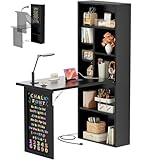
- Space-Saving Foldable Design - Maximize your living space effortlessly with Armocity's innovative foldable table. Its clever collapsible design allows for compact storage when not in use, making it ideal for small home offices, small apartments, or craft corners. Maximizes utility where room is limited
- Integrated Power Outlets Convenience - This versatile folding desk features built-in sockets & USB charging ports, offering convenient charging right at your fingertips. Eliminate cable clutter and keep your devices easily accessible and fully charged
- Optimized Multi-Layer Storage - Featuring multiple storage tiers, this small desk keeps essentials tidy, neatly organized, and within easy reach. The shelving board under the desktop of this murphy desk is height-adjustable, which allows you to place any size of belongings
- Creative & Functional Blackboard - The integrated blackboard panel provides a durable writing surface perfect for notes, reminders, brainstorming, or kids' doodles. Enjoy a versatile desktop that effortlessly transitions between work and play
- Versatile Compact Solution - 6-in-1 Multifunctionality - Perfect as a kids' writing desk, drawing table, craft table, small makeup vanity, manicure table, or sewing machine stand. One table adapts to your evolving needs
Hire a pro when the closet office becomes part of the house. That includes new outlets, hardwired lighting, structural desktop support, custom millwork, drywall changes, HVAC changes, pocket doors, built-in cabinets, or work in an older home with questionable wiring. A contractor can also make the finished details look intentional: scribed panels, level desktops, consistent reveals, matching trim profiles, clean caulk lines, and durable edge treatments.
On our projects, we also look at resale before removing a functional bedroom closet. Converting a secondary closet, hallway closet, landing closet, or oversized guest-room closet is usually easier to justify. Permanently eliminating the only clothes closet in a bedroom can hurt resale unless replacement storage is added elsewhere.
Planning Checklist Before You Build
Measure the clear width, depth, and height of the closet after removing rods and loose shelving. Confirm the wall condition, stud locations, baseboard depth, door swing, flooring transition, and nearby outlets.
Choose the work style before choosing the finishes. A laptop-only station can be shallow and simple. A daily office with two monitors, files, printer storage, and video calls needs better power, deeper planning, and more storage. Decide whether the office will stay open, close behind doors, or disappear behind a curtain or cabinet front.
Then price the project in the right order: electrical first, desktop support second, storage third, finishes last. That sequence prevents the common mistake of spending the budget on wallpaper and shelves, then discovering there is no clean place to plug in a laptop.
The Bottom Line
A closet office proves that bigger is not always better, but smaller must be better planned. The right cloffice can give you a quiet, attractive, highly functional workspace in 15 to 30 square feet. The wrong one becomes a cramped shelf with a chair in the way.
Start with dimensions, power, lighting, ventilation, and support. Then add the finishes that make it beautiful. When the construction details are handled first, a closet office can feel less like a compromise and more like one of the most useful rooms in the house.
Frequently Asked Questions
How much does it cost to turn a closet into an office in 2026?
A budget DIY closet office typically costs about $300 to $1,500. A semi-custom cloffice with installed shelving, a built-in desktop, task lighting, and limited electrical work usually runs $1,500 to $5,000. A custom built-in closet office commonly costs $5,000 to $15,000 or more.
Quick wins for a faster PC:
Scan for outdated or missing drivers - takes under a minuteDriver Scan →Clear out junk files and repair common Windows errorsFree Scan →What is the smallest closet size that can work as an office?
A reach-in closet around 36 inches wide can work for a compact laptop station. For daily comfort, 48 to 72 inches wide is better, with a 20- to 24-inch deep desktop and enough chair pullback outside the closet opening.
Do I need a permit to build a closet office?
Cosmetic work such as paint, removable shelves, and freestanding furniture usually does not require a permit. New outlets, hardwired lights, circuit changes, structural changes, HVAC alterations, and major wall changes often do require permits or licensed trades. Local rules vary.
How deep should a closet office desk be?
Most closet office desks work best at 20 to 24 inches deep. A 20-inch surface can work for a laptop or wall-mounted monitor, while 24 inches gives more room for a keyboard, mouse, notebook, and monitor stand.
Can I add an outlet or hardwired light inside a closet office?
Yes, but new receptacles and hardwired lighting should be installed by a licensed electrician. Closet lighting has fixture and clearance rules, and outlets may need AFCI or GFCI protection depending on the location and local code.
Do these 3 things before closing this tab:
1Scan for outdated or missing drivers - takes under a minute2Clear out junk files and repair common Windows errors3Fix the driver behind crashes, sound loss and screen glitchesIs converting a bedroom closet into an office bad for resale?
It can be if you permanently remove the only functional closet in a bedroom. Buyers usually expect bedroom storage. A reversible setup, a secondary closet conversion, or added replacement storage elsewhere is safer for resale.
Quick Recap
Product prices and availability are accurate as of the date/time indicated and are subject to change. Any price and availability information displayed on Amazon at the time of purchase will apply.

