If your Aiper Seagull Pro will not turn on, check the rotary dial first, then verify the charging setup and indicator lights. The dial’s original position is off; clockwise positions select cleaning modes. Charging requires the cleaner to be off, set to the switch icon, and connected with a dry charging port. These checks can identify setup or low-charge issues, but they cannot diagnose a failed component remotely.
1. Check that the rotary dial is not in the off position
The Seagull Pro uses a rotary control. Its original position switches the cleaner off; turning it clockwise selects Auto (Floor + Wall), Floor Only, or Wall Only. Move the dial deliberately to a cleaning mode and listen for the “ding” described in the Aiper Seagull Pro user manual. If the cleaner remains unresponsive, continue with the charging checks.
2. Set it up correctly for charging
Aiper’s manual says to switch off the power before charging; otherwise, the device cannot recharge and a rapid alarm will activate. For charging, set the dial to the switch icon—not a cleaning mode.
- Turn the dial to the switch icon.
- Make sure the charging port is dry; wipe it dry before connecting the charger.
- Connect the supplied charger securely and check that its connection is firm.
- Watch the indicator ring to confirm whether charging begins.
Aiper’s product FAQ and support likewise advise ensuring the device is off and the charger is properly connected. Do not use a third-party or another-model charger: Aiper warns that charger ratings may differ. If the original charger is missing or damaged, ask Aiper support for a replacement rather than substituting a generic one.
#1 Best Overall
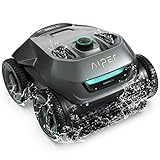
- Smart WavePath Navigation: The Aiper pool robot vacuum features the four-motor WavePath navigation system, ensuring efficient, thorough cleaning of the pool floor, walls, and waterline — all with minimal energy
- Powerful Wall-Climbing Cleaning: Equipped with a four-wheel-drive system, the pool cleaner easily climbs walls and effectively scrubs the waterline. It offers three cleaning modes: Floor, Wall, and Auto, giving you flexible control over the cleaning process
- Quad-Motor Strong Performance: Powered by four motors delivering up to 196W, the Aiper pool vacuum for inground pools filters up to 80 gallons of water per minute, capturing leaves, dirt, pebbles, branches, and more
- Extended Battery Life: With a built-in 7,800mAh battery, the robot pool cleaner for inground pools offers up to 150 minutes of continuous cleaning and fully recharges in just 3–4 hours. Suitable for all pool types
- Hassle-Free Purchase: The Seagull Pro ZT6002 robotic pool cleaner delivers effortless pool maintenance and comes with two-year product protection. Say goodbye to time-consuming cleaning and enjoy a clean, healthy pool.
3. Interpret the indicator in context
The color and behavior matter: a steady battery-state color is different from a flashing fault indication.
| What you see | What the manual says | What to do |
|---|---|---|
| Steady green, blue, yellow, or red battery-state indicator | Green: above 90%; blue: 50–89%; yellow: 10–49%; red: below 9%. | If the charge is low, charge the cleaner using the required dial position and setup. |
| Switch icon remains on and the ring flashes slowly | The manual describes this as normal charging behavior. | Leave it connected until fully charged; the ring turns green when charging is complete. |
| Cleaner is connected while set to a cleaning mode | The mode indicator is on, the ring is off, and the cleaner is not charging; a rapid alarm may sound. | Turn the dial to the switch icon and check the charging setup again. |
| Red-flashing ring with a constant rapid alarm | The manual lists this as a failure indication, with electrical leakage and water blockage as examples. | Use the fault checks below; seek service if the indication returns or the unit behaves abnormally. |
4. If the red fault indication appears
A red battery-state indicator alone means the battery is below 9%; it is not the same as a red-flashing ring accompanied by a rapid alarm. For the latter, Aiper’s troubleshooting guide recommends taking the cleaner out of the water, clearing debris, fully recharging it, and restarting it. The manual identifies electrical leakage and water blockage as examples of failure. These steps are not a guaranteed remedy for a cleaner that will not power on; if the fault returns, stop using it and contact Aiper support.
Rank #2

- Smart WavePath Navigation: The Aiper pool robot vacuum features the four-motor WavePath navigation system, ensuring efficient, thorough cleaning of the pool floor, walls, and waterline — all with minimal energy
- Powerful Wall-Climbing Cleaning: Equipped with a four-wheel-drive system, the pool cleaner easily climbs walls and effectively scrubs the waterline. It offers three cleaning modes: Floor, Wall, and Auto, giving you flexible control over the cleaning process
- Quad-Motor Strong Performance: Powered by four motors delivering up to 196W, the Aiper pool vacuum for inground pools filters up to 80 gallons of water per minute, capturing leaves, dirt, pebbles, branches, and more
- Extended Battery Life: With a built-in 7,800mAh battery, the robot pool cleaner for inground pools offers up to 150 minutes of continuous cleaning and fully recharges in just 3–4 hours. Suitable for all pool types
- Hassle-Free Purchase: The Seagull Pro ZT6002 robotic pool cleaner delivers effortless pool maintenance and comes with two-year product protection. Say goodbye to time-consuming cleaning and enjoy a clean, healthy pool.
5. Contact Aiper rather than opening the battery enclosure
Aiper says the Seagull Pro battery is not user-serviceable and is not replaced as a standalone part under its stated warranty guidance. Do not open the battery enclosure or attempt an unsupported battery swap. Aiper provides repair and warranty request routes through support. When contacting the company, include:
- Model and serial number
- Purchase date
- What the lights and sounds do, including whether any alarm is rapid or continuous
- Which dial position and charging checks you tried
The manual states a 24-month warranty covering the battery and motor from purchase, subject to its printed conditions. That statement does not establish whether a particular repair is covered; check the manual and current regional support policy for your unit.
Quick wins for a faster PC:
Fix the driver behind crashes, sound loss and screen glitchesFind Drivers →Clear out junk files and repair common Windows errorsFree Scan →Quick Recap
Best Value

- 10x Faster Pool Cleaning with AI Patrol System: Single front-facing AI camera detects over 20 debris types and navigates directly to debris. It cleans up to ten times faster than traditional methods for efficient, energy-saving pool floor cleaning.
- 24/7 Truly Carefree Cleaning: Cognitive AI Navium Mode creates autonomous weekly cleaning plans by analyzing pool size, weather, and cleaning history. Once activated, it runs without user intervention, keeping your pool maintained and swim-ready.
- Retrieve without Effort: After cleaning, the robot automatically returns to the pool’s waterline (stay for 10-min) and sends real-time notifications via the app. This means no need to enter the pool or use tools for retrieval.
- No Installation Wireless Charging Dock: Wirelessly charges Scuba V3 with no setup required. Simply place it on the dock to start safe, plug-free charging—no drying or exposed connectors. The dock also keeps the robot stored neatly when not in use.
- No Dust Left Behind: The MicroMesh Multi Layer Filtration System combines a 180 micron debris filter with an ultra fine 3 micron layer that traps sand and invisible contaminants. It keeps your pool water clearer and healthier every time.
Rank #4

- SMALL AND MIGHTY SUCTION-SIDE CLEANER: The Zodiac MX6 connects to a dedicated suction line or through the pool's skimmer and delivers debris to the pool filtration system.
- COVERAGE AND CLIMBING: Cyclonic Turbine creates downforce while X-Trax provide grip to traverse pools and climb walls when set to the proper flow.
- X-Drive Navigation: Hydraulic suction drives internal gears to navigate the pool for thorough coverage of floor and walls.
- ENERGY-EFFICIENT DESIGN: Easy set-up and calibration of flow control to work with variable-speed pumps and lower flow rates. Integrates with exsisting pool filtration system without the need for additional electricity or batteries.
- WHAT'S INCLUDED: Zodiac MX6 Suction cleaner, 32' of Twist Lock Hose, connection accessories for dedicated suction line or skimmer installation.
Rank #3

- Extended Runtime & Flexible Cleaning Modes: Switch to Eco Mode via the app for up to 270 minutes of runtime for daily maintenance. Enjoy up to 180 minutes in Auto, Floor, Wall, or Scheduled modes for deeper cleaning. Scheduled mode features a Weekly Custom Cleaning Plan for hands-free operation
- Intelligent Navigation with Full Coverage: Equipped with 11 high-precision sensors and enhanced dual-path algorithms. The optimized WavePath cleaning pattern ensures systematic coverage with minimal overlap, while adaptive navigation analyzes pool layout in real time to eliminate missed spots
- Dual Filtration for Crystal-Clear Water: Advanced dual-layer filtration system features a replaceable 3-micron ultra-fine filter paired with a 180-micron standard filter. Effectively captures fine dust, sand, leaves, and debris for visibly cleaner and healthier pool water
- Comprehensive 4-Zone Pool Cleaning: Engineered to clean the pool floor, walls, waterline, and shallow areas (above 12 inches). The Caterpillar Treads system enhances mobility and climbing ability, ensuring thorough coverage across all pool zones
- Reliable Performance with 2-Year Warranty: Trusted by over 500,000 pool owners worldwide, this robotic pool cleaner delivers consistent, high-performance results. Built for durability and backed by a 2-year warranty and responsive customer support for worry-free ownership
Product prices and availability are accurate as of the date/time indicated and are subject to change. Any price and availability information displayed on Amazon at the time of purchase will apply.