Crashes, No Sound, or Screen Glitches?
Random freezes, missing sound and display glitches usually trace back to one bad driver. Find and replace yours safely.Free scan · under a minuteWindows Errors? Fix Them Before They Spread
Repair common Windows errors and clear accumulated junk for a smoother, more stable PC - no reinstall needed.Free scan · no reinstallVerdict: The Yale Assure Lock 2 family is a capable, compact deadbolt replacement, but it is not one lock that supports every access method and smart-home standard. Choose the standard Assure Lock 2 for value and flexibility, the Assure Lock 2 Touch for fingerprint entry, or the Assure Lock 2 Plus for Apple Home Key. No model combines fingerprint access, Apple Home Key, and a physical keyway.
The most important decision is not simply which Yale lock looks best. It is whether you need Wi-Fi, Z-Wave, a home hub, a physical key, fingerprint access, or Apple’s tap-to-unlock feature. Select the wrong combination and you may need another module—or discover that the feature you wanted is unavailable on that model.
As an Amazon Associate I earn from qualifying purchases.
Yale Assure Lock 2: quick comparison
| Model | U.S. Yale price snapshot* | Access highlight | Keyway | Wi-Fi option | Z-Wave | Best for |
|---|---|---|---|---|---|---|
| Assure Lock 2 | $189.99 Bluetooth $279.99 Wi-Fi |
Keypad, Yale Access app, Bluetooth | Keyed or key-free | Yes | Yes | Value, guests, and maximum configuration flexibility |
| Assure Lock 2 Touch | $209.99 Bluetooth $299.99 Wi-Fi |
Fingerprint reader, keypad, app | Keyed or key-free | Yes | Yes | Fast local entry without a phone |
| Assure Lock 2 Plus | $219.99 Bluetooth $309.99 Wi-Fi |
Apple Home Key, keypad, app | Key-free only | Yes | No | Apple households that want iPhone or Apple Watch entry |
*Prices observed on Yale’s U.S. pages around August 16–18, 2026. Finishes, availability, and configuration prices can change. See Yale’s Assure Lock 2 collection, Assure Lock 2 Plus page, and Z-Wave range before buying.
Do these 3 things before closing this tab:
1Clear out junk files and repair common Windows errors2Fix the driver behind crashes, sound loss and screen glitches3Repair Windows errors before they cause bigger problemsThese prices are not equivalent products. The Bluetooth models provide local wireless control, while Wi-Fi versions include the hardware needed for remote access and broader integrations. A Bluetooth lock can also be upgraded with Yale’s Wi-Fi Smart Module, but that adds cost and installation complexity.
#1 Best Overall

- MORE WAYS TO ENTER: Hands full of groceries? This keyless entry door lock recognizes when you’re home and unlocks automatically. For everyone else, there’s a keypad, full smartphone and Apple Watch control, or a backup key if all else fails.
- CONTROL FROM ANYWHERE: This electronic door lock puts home security in your pocket - connecting directly to 2.4 or 5 GHz Wi-Fi without a hub or bridge. Lock up, let someone in, and get real-time alerts with the Yale Access app (US & Canada Only).
- UNLIMITED CODES, TOTAL CONTROL: No more hiding spare keys. Give the dog walker Tuesday access, your parents a permanent code, and your Airbnb guest entry that expires at checkout. Share, schedule, or revoke access in seconds.
- STOP WONDERING IF YOU LOCKED UP: DoorSense knows when your door is fully closed and Auto-Lock secures it for you. Head to bed, rush out the door, or chase after the kids — your smart front door lock handles the details so you don't have to worry.
- ENGINEERED FOR RELIABILITY: Grade 2 certified by BHMA, the industry standard for commercial-grade durability. Built to perform from -22°F winters to 140°F summer heat. Low-power alerts let you know when batteries are about to run out.
Which Yale Assure Lock 2 should you buy?
Buy the standard Assure Lock 2 for value and flexibility
The standard Assure Lock 2 is the sensible choice if you mainly want keypad codes, a Yale app, and the option to choose your connectivity later. It is available with a physical keypad or touchscreen and with either a keyed or key-free cylinder, depending on the configuration.
Its physical-keypad version is particularly practical for children, tradespeople, cleaners, short-term guests, and anyone who does not want to learn a touchscreen gesture. A keyed version also gives you a straightforward mechanical fallback if the batteries are exhausted or the electronics fail.
Choose it when you do not need fingerprint access or Apple Home Key, or when you want to decide between Wi-Fi and Z-Wave based on the rest of your home-security system.
Buy the Touch for fingerprint entry
The Assure Lock 2 Touch places a fingerprint reader in the Yale logo. Yale says fingerprints are stored locally, protected with 128-bit AES encryption, and limited to 20 fingerprints. Its support documentation also describes a one-fingerprint-per-user design, so registering several fingers for one person may require separate user profiles. Details are available in Yale’s Touch FAQ.
The Touch is the better household lock when people regularly arrive without a phone, do not want to remember a code, or need a quick way through the door with full hands. It remains available in keyed and key-free versions, and current Yale listings include Z-Wave Touch models—an important correction to older reviews that described Touch Z-Wave support as forthcoming.
The fingerprint reader is not a substitute for a code. Yale’s stated capacity is 20 fingerprints, and Yale’s app remains useful for enrollment and management. The Verge’s hands-on review found fingerprint unlocking fast and reliable, but also noted that the reader is physically small and that enrollment could occasionally be buggy. Those are reviewer observations from a 2023 test, not a guarantee for every user or future firmware version. (The Verge review)
Buy the Plus for Apple Home Key
The Assure Lock 2 Plus is the specialist model for Apple households. Tap a compatible iPhone or Apple Watch to the lock instead of entering a code. Apple Home Key requires an iPhone XS or newer with iOS 15 or later, or an Apple Watch Series 4 or newer with watchOS 8 or later. Android phones can use the Yale Access app with the Plus, but cannot use Apple Home Key. Yale lists those requirements in its Plus FAQ.
What’s actually slowing this PC down?
Pick the symptom - the matching free tool is one click away.
The trade-off is substantial: the Plus is touchscreen-only, key-free, and does not accept Yale’s Z-Wave module. It also has no fingerprint reader. It is therefore not a universal premium version of the Touch; it is a different access philosophy built around Apple Wallet and Apple Home.
The Verge reported very fast local Home Key unlocking, while also noting that the Plus lacks a keyway and fingerprint reader and that remote Apple Home control can be less reliable without the Wi-Fi module. Sharing Home Key access also involves sharing access to the Apple Home rather than simply sending an isolated keypad credential, so it may not suit every guest-access arrangement.
Rank #2

- MORE WAYS TO ENTER: Hands full of groceries? This keyless entry door lock recognizes when you’re home and unlocks automatically. For everyone else, there’s a keypad, full smartphone and Apple Watch control, or a backup key if all else fails.
- CONTROL FROM ANYWHERE: This electronic door lock puts home security in your pocket - connecting directly to 2.4 or 5 GHz Wi-Fi without a hub or bridge. Lock up, let someone in, and get real-time alerts with the Yale Access app (US & Canada Only).
- UNLIMITED CODES, TOTAL CONTROL: No more hiding spare keys. Give the dog walker Tuesday access, your parents a permanent code, and your Airbnb guest entry that expires at checkout. Share, schedule, or revoke access in seconds.
- STOP WONDERING IF YOU LOCKED UP: DoorSense knows when your door is fully closed and Auto-Lock secures it for you. Head to bed, rush out the door, or chase after the kids — your smart front door lock handles the details so you don't have to worry.
- ENGINEERED FOR RELIABILITY: Grade 2 certified by BHMA, the industry standard for commercial-grade durability. Built to perform from -22°F winters to 140°F summer heat. Low-power alerts let you know when batteries are about to run out.
Home Key versus fingerprint access
For most buyers, this is the decisive comparison:
- Choose Home Key if nearly everyone who uses the door carries a compatible iPhone or Apple Watch and your household already uses Apple Home.
- Choose fingerprint access if children, guests, or household members may arrive without their phones, or if you want a local biometric option that does not depend on Apple hardware.
- Choose a physical keypad if the lock will regularly be used by visitors, contractors, or less technical users.
- Choose a keyed model if a traditional mechanical fallback matters more to you than the cleanest exterior.
Home Key can feel more seamless for Apple users, but it ties the premium access method to compatible Apple devices and Apple Home permissions. Fingerprint access is broader within the household, but enrollment and recognition are additional systems to manage. Neither eliminates the need for a working code and a battery-failure plan.
Do you need Wi-Fi?
No, not for basic operation. All three models include Bluetooth. A Bluetooth-only lock can be operated at the door with its keypad or supported access method and managed locally through the Yale Access app.
Wi-Fi becomes important when you need to check or control the lock while away from home, receive remote status information, or connect it to services such as Alexa or Google Home. You can buy a Wi-Fi-equipped version or add Yale’s Wi-Fi Smart Module to a compatible Bluetooth lock. Yale says its Wi-Fi models require a 2.4GHz network and that remote support requires either a Wi-Fi-enabled lock or the Wi-Fi Smart Module. See Yale’s Wi-Fi FAQ.
Wi-Fi is not a replacement for local access. If your internet connection fails, the keypad and Bluetooth functions may still work, while remote control, notifications, and cloud-linked routines may not.
Wi-Fi, Z-Wave, and the modular decision
The Assure Lock 2’s interior connectivity module is the platform’s greatest advantage—and its most confusing feature. Bluetooth is built in; Wi-Fi and Z-Wave are alternative configuration choices in the modular design.
Wi-Fi
Choose Wi-Fi if you want remote access or broad integrations. Yale lists support for platforms and services including Alexa, Google Home, Apple Home, SmartThings, Philips Hue, and Airbnb, subject to the exact model, region, and service support.
Z-Wave
Choose a Z-Wave Assure Lock 2 or Assure Lock 2 Touch if your security or automation system already revolves around Z-Wave. Current Yale listings include both standard and Touch Z-Wave configurations. The Plus is not suitable for this setup.
Do not assume every older Yale module is compatible. Yale’s documentation identifies specific generations and model combinations; the Touch’s support material specifies the Z-Wave 700-series module. For Yale’s current pairing sequence, remove the batteries, insert the correct module, replace the batteries, open the Yale Access app, select the lock, choose Lock Settings, select Yale Smart Module, and follow the pairing instructions. Details are on Yale’s Z-Wave page.
Matter and Thread
Do not buy this family expecting Matter-over-Thread today. Yale’s support material still describes Matter as forthcoming, while current product pages emphasize Bluetooth, Wi-Fi, and Z-Wave. Treat Matter/Thread as an unconfirmed future option, not a shipping feature. (Yale smart-module FAQ)
Rank #3
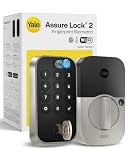
- UNLOCK WITH YOUR FINGERPRINT: The one key that is completely unique to you, and can never be lost or duplicated. With a 99% accuracy and <0.5 recognition time, your fingerprint is the fastest and most secure way to unlock your home. Note: This product only works on 2.4 GHz Wi-Fi and in the U.S. and Canada.
- NO LOCKSMITH NEEDED: The lock replaces your deadbolt on most standard US entry doors using just a screwdriver; no DIY experience required.
- HANDS FULL? NO PROBLEM. A door that auto-unlocks as you approach - now that’s a warm welcome. With this hands-free option, you don’t need to touch your lock or your phone. Always let Yale get the door.
- DON’T WORRY, IT'S LOCKED: Never worry again about remembering to lock the door with Auto-Lock.
- SECURITY AT YOUR FINGERTIPS. The one key that can never be lost or duplicated — your fingerprint. Also, ensure only the right people have access with two-factor authentication, biometric verification, and matte keypads for fingerprint resistance.
Design and installation
The Assure Lock 2 is a full deadbolt replacement, not a retrofit adapter that preserves your existing exterior hardware. That distinction matters. If you want to keep the current outside cylinder or avoid replacing the deadbolt, this is the wrong installation type; consider a retrofit-style lock instead.
Before ordering, verify that your door matches Yale’s listed requirements:
- Door thickness: 1⅜ to 2¼ inches.
- Backset: 2⅜ or 2¾ inches.
- Edge bore: 1 inch.
- Face bore: 2⅛ or 1½ inches.
- Standard U.S. or Canadian deadbolt layout.
- A door and frame that align cleanly, without the bolt rubbing the strike plate.
Use Yale’s compatibility information before purchase, especially on older, unusually thick, metal, multipoint, or otherwise nonstandard doors. The lock electronically determines left- or right-hand handing during setup, but that does not correct a badly aligned frame.
Installation involves mounting the exterior assembly, deadbolt, and interior assembly, inserting four AA alkaline batteries, and completing setup in the Yale Access app. The Verge reported an approximately 10-minute installation experience, but installation time varies with the existing deadbolt and door alignment. The app is required for installation, setup, and ongoing management.
Before enabling motorized locking, operate the deadbolt manually with the door open and then with it closed. The bolt should move freely. A motor struggling against a misaligned strike can look like an electronic or battery problem and can shorten battery life.
Recommended Free Tools
Access methods in daily use
| Method | Models | What it is best for | Important limitation |
|---|---|---|---|
| Keypad code | All configurations with a keypad | Guests, children, contractors, and phone-free entry | Codes must be managed and kept private |
| Yale Access app over Bluetooth | All three families | Local control and setup | Phone must be nearby; account and app are required |
| Fingerprint | Touch | Fast local entry without a phone | Maximum 20 fingerprints; keep a code backup |
| Apple Home Key | Plus | Tap-compatible iPhone or Apple Watch | No Android Home Key, fingerprint reader, keyway, or Z-Wave |
| Physical key | Keyed Assure Lock 2 and Touch | Mechanical fallback | Unavailable on the key-free Plus |
| Remote control and routines | Wi-Fi versions or compatible modules and hubs | Remote status, notifications, and smart-home automation | Depends on Wi-Fi, hubs, accounts, and partner services |
Yale also offers Auto-Unlock through its app ecosystem. Because this relies on phone location and software behavior, treat it as a convenience feature rather than your only access plan.
App, guest access, and privacy
The Yale Access app is central to the product. It handles pairing, owner and guest codes, user permissions, activity history, settings, module configuration, and—depending on the model—fingerprint or Apple Home setup.
That app dependence is useful for managing a rental, household, or service provider, but it means the lock is not an entirely self-contained keypad. You will need a Yale account and must accept Yale’s policies and software terms during setup. The Verge reported three required agreements in its 2023 setup; app screens and requirements can change, so do not assume that historical count remains current.
Use separate credentials for different people where possible. Remove codes promptly when a contractor or tenant no longer needs access, review activity records, and decide whether remote unlocking should be enabled for every account holder. A smart lock’s security depends not only on its hardware but also on the strength of the associated accounts, phones, home network, and door hardware.
Rank #4

- Unlock your way: Key-free access with the keypad, Yale Access app on your smartphone or Apple Watch, or optional Auto-Unlock via Bluetooth
- Auto-Unlocks: Let Yale get the door for you as you get home, with optional Auto-Unlock
- Expecting Company? Send custom entry codes to your loved ones & service people so there will be no more hidden keys
- Don’t worry, it’s locked: With Auto-Lock, you don’t need to remember to lock the door, Yale’s got it
- Security you can trust: Enhanced app security features ensure only those that need access, have it
Security: what the lock can and cannot do
Yale presents the Assure Lock 2 as a security-rated deadbolt platform, and the Touch uses local fingerprint storage with 128-bit AES encryption according to Yale’s support information. Those are manufacturer claims and should not be confused with an independent security audit of the complete product, app, cloud service, and integrations.
Smart features do not compensate for a weak door or frame. Check the strike plate, screws, jamb, and door fit. A secure deadbolt installed in a flexible or damaged frame is still a weak entry point.
Remote unlocking increases convenience but also increases the number of accounts and services that must be protected. Use strong, unique account credentials, enable available account security controls, keep the app and phone updated, and maintain at least one local access method that works without internet service.
Yale lists an outdoor operating range of −22°F to 140°F, but that does not mean every installation is suitable for continuous weather exposure. Yale warns against using the lock on gates or where the interior escutcheon is directly exposed to weather. Follow the manufacturer’s installation guidance.
Free tools Windows power users keep installed
One-click scans. No signup required.
Failure recovery: batteries, phones, Wi-Fi, and fingerprints
Dead batteries
All three models use four AA alkaline batteries, and Yale recommends replacing them approximately once a year. Actual life depends on usage, temperature, connectivity, and alignment, so do not treat one year as a guaranteed runtime.
Keyed Assure Lock 2 and Touch models can be opened with the physical key. Key-free models have exterior contacts for temporary power from a 9-volt battery; after powering the lock, enter the normal code. Keep fresh AA batteries available, and make sure someone can reach the emergency procedure if the home is unoccupied.
Dead phone
A dead phone does not remove keypad codes. On the Plus, supported Apple devices may offer power-reserve behavior in some circumstances, but do not rely on that without confirming it for your device and configuration. Keep a code or another emergency method available.
Lost Wi-Fi or internet
Local keypad and Bluetooth operation can remain available when Wi-Fi is down. Remote status, notifications, cloud routines, and away-from-home unlocking may stop until connectivity returns. Apple Home remote access also depends on a compatible Apple home hub or the lock’s Wi-Fi capability.
Quick wins for a faster PC:
Fix the driver behind crashes, sound loss and screen glitchesFind Drivers →Clear out junk files and repair common Windows errorsFree Scan →Fingerprint failure
Keep a code even if the Touch normally recognizes your finger quickly. Enroll more than one finger where practical, remembering that Yale’s one-fingerprint-per-user design may require separate profiles. A wet, dirty, injured, or poorly enrolled finger can make biometric entry less dependable.
Best Value

- MORE WAYS TO ENTER: Hands full of groceries? This keyless entry door lock recognizes when you’re home and unlocks automatically. For everyone else, there’s a touchscreen keypad, smartphone app access, and Apple Watch control.
- CONTROL FROM ANYWHERE: This electronic door lock puts home security in your pocket—connecting directly to 2.4 or 5 GHz Wi-Fi without a hub or bridge. Lock up, let someone in, and get real-time alerts with the Yale Access app (US & Canada Only).
- UNLIMITED CODES, COMPLETE CONTROL: No more hiding spare keys. Give the dog walker Tuesday access, your parents a permanent code, and your Airbnb guest entry that expires at checkout. Share, schedule, or revoke access in seconds.
- WONDERING IF YOU LOCKED UP? DoorSense knows when your door is fully closed and Auto-Lock secures it for you. Head to bed, rush out the door, or chase after the kids—your smart front door lock handles the details so you don't have to worry.
- ENGINEERED FOR RELIABILITY: Grade 2 certified by BHMA, the industry standard for commercial-grade durability. Built to perform from -22°F winters to 140°F summer heat. Low-power alerts let you know when batteries are about to run out.
Door misalignment
If the motor sounds strained or the bolt will not extend, open the door and test the lock. If it works with the door open but not closed, inspect the strike plate and frame alignment before replacing batteries or blaming the lock.
What changed since early Assure Lock 2 reviews?
Older coverage often used lower launch-era prices and described Z-Wave as available on the base lock while Touch support was still pending. Yale’s current U.S. listings now show Z-Wave versions of both the standard Assure Lock 2 and the Touch. The Plus remains incompatible with Z-Wave.
That change is why buyers should not rely on an old comparison chart. Confirm the exact product listing, module generation, radio, keyway, keypad type, and price before ordering. A phrase such as “Assure Lock 2” describes a family, not one universal specification.
The Tool Desk
Outbyte Driver Updater FREEScan for outdated or missing drivers - takes under a minuteDriver Scan →Outbyte PC Repair FREERepair Windows errors before they cause bigger problemsFix Now →Representative configuration costs
Using Yale’s U.S. price snapshots from August 2026:
- Lowest-cost entry: Bluetooth standard Assure Lock 2 at $189.99.
- Fingerprint entry: Bluetooth Touch at $209.99.
- Apple Home Key: Bluetooth Plus at $219.99.
- Remote-ready standard model: Wi-Fi Assure Lock 2 at $279.99.
- Remote-ready fingerprint model: Wi-Fi Touch at $299.99.
- Remote-ready Home Key model: Wi-Fi Plus at $309.99.
- Z-Wave: current Yale listings show standard models around $209.99–$229.99 and Touch models around $229.99–$249.99, depending on configuration.
A Bluetooth model plus a Wi-Fi Smart Module may be attractive if you already own the lock, but compare the combined total with the direct Wi-Fi configuration. A Z-Wave installation also needs a compatible hub unless your home already has one. Apple Home remote access may require an Apple TV or HomePod serving as a compatible home hub. Do not compare only the lowest lock price with a complete connected installation.
Alternatives worth considering
Aqara U100 and other feature-dense locks
A feature-rich competitor such as the Aqara U100 may appeal if you want several access methods in one product. However, its ecosystem and hub requirements differ from Yale’s, so it is not automatically simpler or more compatible with your existing home. The comparison should be based on your preferred platform, not on the number of features listed on the box.
Retrofit-style locks
If your priority is preserving the existing exterior deadbolt hardware, choose a retrofit-style product rather than the Assure Lock 2. Yale separates its Approach retrofit line from the Assure Lock 2 deadbolt collection. A retrofit lock can be a better fit for a door where replacing the full deadbolt is undesirable.
Z-Wave-native systems
If your home-security system is already built around Z-Wave, begin with the hub’s approved device list and then choose a standard or Touch Z-Wave Assure Lock 2. Do not choose the Plus expecting to add Z-Wave later.
Installation and setup checklist
- Measure the door and confirm the deadbolt, bore, backset, thickness, and frame requirements.
- Choose the access method: keypad, fingerprint, Home Key, or physical key.
- Choose the radio: Bluetooth-only, Wi-Fi, or compatible Z-Wave.
- Install the exterior, deadbolt, and interior assemblies.
- Insert four AA alkaline batteries.
- Install the Yale Access app and create or sign in to a Yale account.
- Pair the lock and allow it to determine door handing.
- Create an owner code and separate guest codes.
- On the Touch, enroll fingerprints and retain a code backup.
- On the Plus, enable Apple Home during setup and confirm device compatibility.
- Install or activate the Wi-Fi Smart Module if remote access or third-party integrations are required.
- Test keypad entry, app entry, auto-lock, DoorSense, and the battery-failure procedure before relying on the lock.
Final recommendations
- Best value: standard Bluetooth Assure Lock 2, preferably with a physical keypad if guests will use it.
- Best for most mixed households: Assure Lock 2 Touch, because fingerprint access is fast and does not require everyone to carry a compatible phone.
- Best Apple experience: Assure Lock 2 Plus, provided you accept its key-free, touchscreen-only design and lack of Z-Wave.
- Best for Z-Wave: standard Assure Lock 2 or Touch in the correct Z-Wave configuration.
- Best for remote Alexa or Google Home control: a Wi-Fi model or a compatible Yale Wi-Fi Smart Module.
- Best for a mechanical backup: a keyed standard Assure Lock 2 or Touch.
- Best for preserving existing exterior hardware: none of these; choose a retrofit-style lock.
The Yale family is a strong choice when its modular approach matches your home. It becomes a poor choice when you expect one model to provide Home Key, fingerprints, Z-Wave, a keyway, and every remote integration at once. Decide the access method and smart-home platform first; then buy the Yale configuration that actually includes them.
Quick Recap
Product prices and availability are accurate as of the date/time indicated and are subject to change. Any price and availability information displayed on Amazon at the time of purchase will apply.




