Some links on this page are affiliate links: if you buy through them we may earn a commission, at no extra cost to you.
When construction automation stops, protect people before you diagnose the machine. Stop the task, keep everyone outside the hazard area, prevent unexpected movement or restart, and follow the site emergency and energy-control procedures. Only then should an authorized, competent person identify the equipment and alarm, consult the exact model manual, and decide whether the fault can be recovered safely or requires the manufacturer or a qualified integrator.
“Construction automation” includes robotic arms, autonomous equipment, machine-tending cobots, surveying systems, lifting aids, and software-controlled tools. Their controllers, stored energy, safeguarding, and recovery functions differ. There is no universal reset or manual-fallback recipe.
As an Amazon Associate I earn from qualifying purchases.
Free tools Windows power users keep installed
One-click scans. No signup required.
The safe response sequence
Use this order for a fault, unexpected stop, collision, loss of communication, or unexplained behavior. It is a decision sequence, not permission to perform work outside your training or the machine’s instructions.
- Stop the task and protect people. Follow the site emergency procedure and use the machine’s safety controls appropriate to the event. Establish a clear exclusion zone. A stopped robot can still move unexpectedly, restart when a condition clears, or drop a load under gravity. OSHA’s robotics guidance emphasizes hazard analysis, safeguarding, and worker protection; RobCo warns that unexpected startup can cause serious injury or death (OSHA Technical Manual; RobCo malfunctions guidance).
- Control hazardous energy before intervention. If anyone will enter a safeguarded space, remove a guard, reach into tooling, or perform maintenance, apply the site’s energy-control procedure. In the United States, OSHA says: “Power and other hazardous energy sources should be controlled in accordance with 29 CFR 1910.147 (The Control of Hazardous Energy (Lockout/Tagout)), or 29 CFR 1910.333 (Selection and Use of Work Practices).” This guidance concerns maintenance, repair, and troubleshooting; trained and authorized personnel must apply the procedure to the actual equipment and energy sources.
- Identify what happened. Record the machine, attachment or end effector, controller, software or program, alarm text or code, operating mode, and the exact action immediately before the stop. Note loads, position, weather, visibility, network status, power changes, guarding, and any contact or obstruction. Do not clear the message before recording it if doing so would erase useful evidence.
- Open the exact model-specific instructions. Search the manufacturer’s manual by the precise model, controller and software version. ABB, Haas and Doosan publish different alarm, safety-recovery and unpowered-operation instructions. A procedure documented for one machine does not authorize the same action on another (ABB troubleshooting; Haas Cobot-F troubleshooting; Doosan safety-function manual).
- Escalate when the fault exceeds your authorization. Contact the manufacturer, approved service organization or qualified integrator when the cause is uncertain, a safety function is involved, a guard or interlock is defective, the machine has been damaged, or recovery requires opening electrical cabinets, defeating protection or using a special mode. A reset is not a repair and must never be used to bypass a safeguard.
- Verify before restarting. Confirm that the cause has been addressed, tools and people are clear, guards and interlocks are installed, emergency-stop devices have been reset according to the manual, and the site’s restart conditions are met. Qualified personnel should inspect and confirm the safety functions before production resumes.
Why the machine and task matter
A robotic arm with a gripper, an autonomous earthmoving machine, a concrete-printing system and a surveying rover can all be called construction automation, but their hazards are not interchangeable. The relevant controls may include electrical power, hydraulics, pneumatics, suspended loads, batteries, stored mechanical energy, hot surfaces, rotating tools, data links and software permissions. A fault in path planning may require a different response from a hydraulic leak, a protective-stop event or loss of localization.
Popular on Amazon

- LOCKOUT TAGOUT KIT: Lockout pouch is made of heavy duty nylon with metal belt loops for convenient tagging on the go, Compliant with OSHA's Lockout Standard
- SAFETY PADLOCKS: The personal lockout kit contains two keyed different padlocks for reliable lockout safety, the key is one use one spare.
- LOCKOUT DEVICES: Kit contains 3 clamp-on circuit breaker lockout, 3 Universal Multi- Pole Breaker ,3 different size lockout hasps,15 heavy duty lockout tags,4 keyed-different safety padlocks:Stainless Steel Lock Beam, with PA Shell ,Vertical Clearance: 1-1/2”, 38mm,Horizontal Clearance: 4/5”, 20mm ,Shackle Dia.: 1/5”, 6mm ,Body Size: 1-4/5” x 1-2/5”, 45 x 37mm
- OSHA COMPLIANT LOCKOUT KIT: Compliant with OSHA's Lockout Standard designed to address risk and safety tagging in any facility
- We have confidence in our product. If you are not satisfied with our products, please contact us and we will reply to you within 24 hours.
Start by determining whether the event is a protective stop, an emergency stop, a normal process pause, a controller fault, a communication failure or physical damage. The labels and consequences vary by manufacturer. A safety stop or emergency stop means the equipment was commanded to stop; it does not prove that the hazard has disappeared, that energy is isolated, or that the underlying fault is cleared.
Is it safe to reset after an emergency stop?
Not automatically. An emergency stop removes or inhibits motion according to the equipment’s design, but it does not explain why the stop occurred. Before any reset, keep people out of the danger zone and determine whether the stop was caused by a person, intrusion, collision, failed guard, overload, software condition or unknown event.
What’s actually slowing this PC down?
Pick the symptom - the matching free tool is one click away.
Use the model’s documented reset sequence. Check whether the machine requires a physical inspection, release of stored energy, a key switch, a teach pendant action, a guarded-area check or a controlled test cycle. If the cause is unknown, a safety circuit will not reset, or the machine behaves differently after reset, stop and escalate. Do not repeatedly press reset to make an alarm disappear.
How to troubleshoot a robot or automated machine alarm
1. Capture the diagnostic record
Write down the exact alarm wording and code, timestamp, operating mode, program or job, axis or tool involved, and the machine’s physical position. Photograph the display and the surrounding work area if doing so is safe. Preserve controller logs rather than overwriting them with repeated restarts.
Also popular on Amazon

- LOCKOUT TAGOUT KIT: Lockout pouch is made of heavy duty nylon with metal belt loops for convenient tagging on the go, Compliant with OSHA's Lockout Standard
- SAFETY PADLOCKS: The personal lockout kit contains two keyed different padlocks for reliable lockout safety, the key is one use one spare.
- LOCKOUT DEVICES: Kit contain 3 Safety Padlocks with number 1-3, 2 Lockout Hasp ,1 Nylon hasp ,15 Loto Tags, 20 Nylon ties , 1 Lockout Tool Bag
- OSHA COMPLIANT LOCKOUT KIT: Compliant with OSHA's Lockout Standard designed to address risk and safety tagging in any facility
- We have confidence in our product. If you are not satisfied with our products, please contact us and we will reply to you within 24 hours..
When escalating a Haas cobot issue, for example, the service guidance asks for serial numbers, error reports, relevant program information, and photos or video. That is a useful example of evidence to gather, not a universal reporting requirement for every manufacturer (Haas Cobot troubleshooting).
2. Check only user-level causes listed by the manual
Some manuals permit checks such as confirming that a gate is closed, an enabling device is held correctly, a tool is seated, air pressure is within range, a battery is charged, a network cable is connected, or the work envelope is clear. Perform only checks assigned to your role. Never remove a cover, enter a cell, alter safety parameters, or bypass an interlock because a checklist is unavailable.
Quick wins for a faster PC:
Fix the driver behind crashes, sound loss and screen glitchesFind Drivers →Clear out junk files and repair common Windows errorsFree Scan →3. Match the alarm to the documented recovery
Use the alarm index and recovery tree for the exact controller and software version. Follow prerequisites in order: operating mode, key position, clearance, tool state, brake release, reduced-speed setting and test motion, if the manual specifies them. Do not substitute a similar-looking procedure from another model or online forum.
4. Stop when the instructions stop
If the manual directs you to service personnel, requires a safety-circuit test, reports encoder or brake errors, identifies damage, or offers a recovery mode you are not trained to use, stop at that point. The boundary in the manual is an authorization boundary, not a suggestion.
Also popular on Amazon
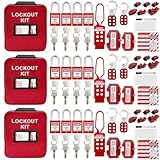
- 1、 What You Get. 3 x Complete LOTO Kits (Each Contains): 4 Safety Padlocks、2 Steel Hasps、1 Nylon Hasp、15 LOTO Tags、20 Cable Ties、1 Big Nylon Pouch、4 clamp-on circuit breaker lockout, 3 Universal Multi- Pole Breaker, 2 Electrical Plug Lockout + SAFBY's 2-Year Support。
- 2、OSHA-Compliant Safety:Meets all lockout/tagout (LOTO) standards for electrical, mechanical and industrial safety,Complete 3-Kit Set Perfect for teams or multiple workstations。Each kit is self-contained with all essential LOTO devices。
- 3、Superior Durability:Reinforced steel hasps withstand tough environments,Weather-resistant tags and nylon components。
- 4、 Clear Hazard Communication:Bright red safety tags with bold warnings,Numbered padlocks for easy identification。
- 5、Convenient Portability:Compact nylon pouch with metal belt loops,Keeps all devices organized and accessible。
Hazardous energy and entry into the work area
Normal automatic operation may keep workers outside a safeguarded space, while troubleshooting can place them next to live electrical parts, moving axes, pressurized lines, suspended loads or a tool that can actuate without warning. OSHA’s robotics guidance describes additional safeguards and procedures when troubleshooting must occur with power on inside the safeguarded space; such work requires the proper assessment, manual mode and trained personnel (OSHA robotics guidance).
Apply the site’s lockout/tagout or alternative energy-control procedure to every relevant source, not only the main disconnect. Depending on the machine, that may include electrical supplies, hydraulic accumulators, pneumatic pressure, gravity, flywheels, elevated implements, batteries and stored energy in tooling. Verify isolation using the equipment’s prescribed method. A lockout tagout kit can support the procedure, but selecting and using devices must follow the site plan, equipment instructions and applicable law; a kit is not a substitute for training or a risk assessment.
Recommended Free Tools
Manual fallback, backdrive and recovery modes
A manufacturer may provide a special recovery mode, brake-release function, backdrive procedure or unpowered operation. Doosan documentation, for example, describes safety recovery and unpowered-operation options for its robots (Doosan other safety measures). Those controls are specific to the supported model, application and authorization level. They must not be copied to another robot, vehicle or controller.
Manual operation is not automatically safer than automation. Moving an arm by hand can release a load, damage a gearbox, cross a pinch point or move an end effector into a person. A construction crew should use a manual fallback only when its task plan, risk assessment and manufacturer or integrator instructions explicitly cover the situation. If they do not, secure the area and obtain qualified help rather than improvising.
Also popular on Amazon

- COMPLETE ELECTRICAL LOCKOUT KIT: Designed for electricians, maintenance teams, and industrial facilities, this complete LOTO kit includes safety padlocks, breaker lockouts, hasps, tags, ties, and storage bag to manage hazardous energy safely and efficiently.
- 4 KEYED-DIFFERENT SAFETY PADLOCKS: Each lock has a unique key configuration for personal lock control. Durable safety locks help prevent unauthorized equipment operation during maintenance and service procedures.
- UNIVERSAL CIRCUIT BREAKER LOCKOUTS: Includes clamp-on and multi-pole breaker lockout devices designed to fit a wide range of electrical panels, helping technicians handle different lockout applications with one kit.
- MORE COMPLETE LOCKOUT OPTIONS: Includes plug lockout, lockout hasps, safety tags, and nylon ties for electrical equipment isolation, group lockout procedures, and daily maintenance tasks.
- READY FOR INDUSTRIAL USE: Store and organize all LOTO devices in the durable portable bag. Ideal for factories, workshops, electrical rooms, machinery maintenance, and facility safety programs.
When to call the manufacturer or integrator
Escalate immediately when any of these conditions applies:
- The machine, attachment, guard, cable, sensor or structure shows physical damage.
- The alarm concerns brakes, encoders, safety circuits, overtravel, force limits, thermal events, batteries or unexplained motion.
- The fault returns after the documented reset or occurs during a controlled test.
- A safety device, emergency stop, gate switch, scanner or enabling device does not work as specified.
- The required recovery mode, cabinet access, parameter change or software update is outside the crew’s training or authorization.
- The equipment is integrated with other machines and the interaction or cause is unclear.
Provide a concise incident package: machine and controller identifiers, serial numbers, alarm screenshots, logs, program or job name, sequence of events, operating conditions, photographs or video, isolation steps already completed, and the exact wording of the manual section followed. Do not send footage that exposes people to an active hazard. Ask the service provider what must remain untouched for diagnosis.
The Tool Desk
Outbyte Driver Updater FREEScan for outdated or missing drivers - takes under a minuteDriver Scan →Outbyte PC Repair FREEClear out junk files and repair common Windows errorsFree Scan →Verification before returning to production
After the fault is repaired or the authorized recovery is complete, do not go straight to full-speed work. The responsible qualified person should confirm:
- The original cause is understood or the manufacturer has accepted the residual uncertainty.
- Guards, fences, scanners, interlocks, emergency stops and enabling devices are installed and functional.
- Tooling, payload, workpiece, cables and fixtures are secure and within their specified limits.
- Alarms and safety circuits have been cleared using the documented process.
- A controlled test at the prescribed mode and speed completes without unexpected movement.
- People know the restart signal, exclusion zone and stop-work authority.
- The intervention, parts, settings, tests and remaining restrictions are recorded.
Wandelbots states that, after defects are remedied, qualified personnel must inspect and confirm proper functionality of safety functions in its documented environment (Wandelbots residual-hazards guidance). RobCo likewise warns that a malfunction must be addressed before normal operation resumes (RobCo malfunctions guidance). Apply the equivalent requirement from your own machine’s instructions and site procedure.
Also popular on Amazon

- LOCKOUT TAGOUT KIT: Lockout box is made of 304 steel with PP which is heavy duty and portability, Compliant with OSHA's Lockout Standard
- SAFETY PADLOCKS: The personal lockout kit contains two keyed different padlocks for reliable lockout safety, the key is one use one spare.
- LOCKOUT DEVICES: Kit contains 9 clamp-on circuit breaker lockout, 3 Universal Multi- Pole Breaker ,6 different size lockout hasps, 20 heavy duty lockout tags, 5 keyed-different safety padlocks, 1 plug lock, 1 cable lock, 1 gas valve lockout, 1 ball valve lockout
- OSHA COMPLIANT LOCKOUT KIT: Compliant with OSHA's Lockout Standard designed to address risk and safety tagging in any facility
- We have confidence in our product. If you are not satisfied with our products, please contact us and we will reply to you within 24 hours.
Common situations and the correct decision
| Situation | Safe first decision | Do not do |
|---|---|---|
| Robot stops with a protective or collision stop | Keep clear, identify what was contacted, and follow the exact recovery tree. | Do not push the arm or repeatedly reset without checking the cause. |
| Emergency stop is pressed and the area is clear | Inspect the reason for the stop and use the documented reset and restart checks. | Do not treat the stop as proof that all stored energy is gone. |
| Controller loses network or position data | Secure the work zone and record the alarm, mode and last known position. | Do not alter configuration or reload a program without authorization. |
| Tool, load or structure is damaged | Stop, isolate relevant energy and obtain qualified inspection. | Do not run a test cycle to “see if it still works.” |
| Manual fallback is not covered by the task plan | Keep the machine secured and contact the manufacturer or integrator. | Do not invent a hand-operated workaround. |
Prepare before the next failure
A short, machine-specific response card is more useful than a generic “restart” instruction. Keep the current manual, controller version, emergency contacts, isolation diagram, exclusion-zone requirements, authorized-person list and escalation template where the crew can access them without entering the hazard area.
Train operators to distinguish a normal pause from a safety event, preserve alarm information, stop work when conditions change and summon the qualified person. Confirm that integration, site acceptance testing and ongoing maintenance keep the system in a compliant state; OSHA places responsibilities on employers and integrators to assess hazards and maintain safeguards (OSHA Technical Manual).
Review the response after every failure or near miss. Update the task plan only through the site’s change-control process, and ensure the revised controls are communicated before the automation returns to work.
Quick Recap
Product prices and availability are accurate as of the date/time indicated and are subject to change. Any price and availability information displayed on Amazon at the time of purchase will apply.

