Crashes, No Sound, or Screen Glitches?
Random freezes, missing sound and display glitches usually trace back to one bad driver. Find and replace yours safely.Free scan · under a minuteWindows Errors? Fix Them Before They Spread
Repair common Windows errors and clear accumulated junk for a smoother, more stable PC - no reinstall needed.Free scan · no reinstallBIM and VDC can help prevent injuries when the project team uses the model to identify hazards early, connect controls to the work sequence, communicate them clearly, and verify them in the field. A model is not a guardrail, a permit, or a substitute for competent safety management. It is an information and visualization system that helps people decide which controls are needed, where they belong, when they must be installed, and who must check them.
The need is substantial: the National Institute for Occupational Safety and Health (NIOSH) reported approximately 1,000 construction workplace fatalities in calendar year 2024, the most of any sector. Its 2026 bulletin identifies falls, slips and trips; transportation incidents; and exposure to harmful substances or environments among the leading fatal-injury causes in a typical year. The practical starting point is NIOSH’s Prevention through Design (PtD) principle: “Prevention through Design (PtD) aims to eliminate or mitigate hazards during planning and design to prevent incidents from happening in the first place.”

As an Amazon Associate I earn from qualifying purchases.
What BIM, VDC and 4D add to construction safety
Building information modeling (BIM) is a structured digital representation of a facility and its components. Virtual design and construction (VDC) is the broader management practice that uses models, schedules, production planning and collaborative review to plan how the project will be delivered. A three-dimensional model supplies shared spatial information; a 4D model links that geometry to time so the team can see how work areas and temporary conditions change as construction progresses.
That combination answers safety questions that are difficult to answer with a static plan: Which opening exists on the third floor during a particular week? Will a material-delivery route conflict with an excavation or a public sidewalk? Is a temporary guardrail required before a trade starts, and when can it be removed? Which crews are exposed to the same moving equipment or overhead work?
#1 Best Overall

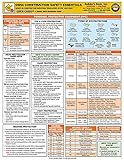
- 2024 OSHA Construction Safety Book is the seventh edition with the new OSHA HazCom final rule on 5/20/24. While the rule takes effect 7/19/24, the compliance dates don’t begin until 1/19/26 per 29 CFR 1910.1200(j).
- Construction Site Book offers quick access to essential OSHA regulations, jobsite hazards, and practical safety tips. It also helps employees identify hazards and prevent injuries and illnesses.
- Features easy-to-read format, full-color images, chapter quizzes with answer key, and comes in a compact size making it a convenient reference for employees.
- Critical topics include Confined Space Entry; Cranes & Derricks; Electrical Safety; Emergency Response; Ergonomics & Back Safety; Excavations; Fall Protection; First Aid & Bloodborne Pathogens; HazCom; Health & Wellness; Jobsite Exposures; Lockout/Tagout; Ladders & Stairways; Materials Handling/Storage; Motor Vehicles; PPE; Scaffolds; Site Safety & Security; Slips, Trips & Falls; Tool Safety; Welding, Cutting & Brazing; and Work Zone Safety.
- Specifications: 5 1/4” x 7 1/4", English, Soft bound. 7th Edition. Copyright 2024.
| Approach | What the team can see | Safety value | Important limitation |
|---|---|---|---|
| 2D drawings and written plans | Locations, notes and planned details at a fixed view | Useful for permits, details and formal procedures | Sequence and changing temporary conditions are difficult to visualize |
| 3D BIM model | Spatial relationships among building elements, access routes and work areas | Supports design-stage hazard review and clearer coordination | Does not show when a condition exists unless linked to a schedule |
| 4D BIM/VDC | Model geometry together with activities, dates and handoffs | Shows changing exposures, temporary facilities and work-area conflicts | Results depend on schedule quality, model detail and disciplined updates |
| Model plus field and worker input | Planned conditions alongside observations, near misses and current site status | Connects digital planning with real hazards and practical controls | Requires participation, data standards and field verification outside the model |
A VTT BIM Safety research project, based on seven field trials conducted from 2009 to 2011, recognized 4D BIM as a central technology for safety-related planning. It found that linking safety planning to construction planning made arrangements at different project stages easier to visualize and made site plans more illustrative. Those findings explain the workflow; they are not a current software benchmark or a guarantee of fewer injuries.
Start with Prevention through Design, not with a software menu
PtD moves a safety conversation upstream. Owners, architects, engineers, contractors, VDC managers and safety professionals review design choices while changes are still comparatively inexpensive. The objective is to eliminate a hazard or reduce its severity before it becomes a temporary site problem. Examples include selecting permanent maintenance access instead of requiring improvised work at height, locating equipment so future servicing avoids live traffic, and designing openings or penetrations with safe covers and edge protection in mind.
Bring the right people into the review
- Owner or client: states operational, public-interface and occupancy requirements that affect risk.
- Designers and engineers: identify hazards created by geometry, materials, sequencing or future maintenance.
- General and specialty contractors: explain means, methods, logistics and temporary works that the design team may not see.
- Safety professionals: interpret regulatory duties, exposure controls, emergency planning and verification needs.
- Supervisors and workers: test whether the planned control is usable in the actual work sequence.
Define the safety questions before modeling
Do not begin by modeling every object to the same level of detail. Write a short list of decisions the model must support: fall exposures, vehicle and pedestrian separation, lifting zones, temporary egress, excavation interfaces, public protection, hazardous-material boundaries, or trade stacking. For each question, specify the location, activity, time window, responsible party and evidence that will close the issue.
Build a safety-ready model
A safety review is only as reliable as the information it uses. Establish a common coordinate system, naming convention and update responsibility. Identify which model elements represent permanent work and which represent temporary conditions. Record the schedule version and the assumptions behind each safety review so a later change does not silently invalidate it.
Model openings, penetrations and edges
Floor and roof penetrations are a practical example from the historical Building Design + Construction coverage of BIM for safety. A coordination team can scan the model for openings, compare them with the work sequence, and ask when covers, guardrails or alternate access are required. This is a planning aid, not automatic hazard detection: a model may omit a field-created opening, contain a stale element, or fail to describe the strength and attachment of a cover.
Represent access, logistics and public interfaces
Map stairs, ladders, hoists, ramps, material routes, exclusion zones and emergency paths. Use the model to test whether a crew can reach its work without crossing a vehicle route or passing beneath suspended loads. For work near a public thoroughfare, 4D simulations can show when a sidewalk, lane, crane swing or temporary barrier changes. The simulation prompts a decision about protection and timing; it does not replace a traffic-control plan, inspection or competent person.
Include temporary safety facilities
Temporary facilities are often missing from design models even though they determine whether a work area is safe. Add the facilities called for by the hazard review, such as edge protection, access towers, temporary stairs, protected walkways, barriers, signage, lighting, rescue equipment locations or designated laydown areas. A 2020 case study of 4D-BIM-based workspace planning examined the installation and removal of temporary safety facilities around work activities and schedules. Its residential-project participants reported better understanding of safety measures in relation to the schedule; that case outcome should not be generalized into a measured injury reduction.
Do these 3 things before closing this tab:
1Clear out junk files and repair common Windows errors2Fix the driver behind crashes, sound loss and screen glitches3Repair Windows errors before they cause bigger problemsSet the level of information needed for a decision
Geometry alone may show that a guardrail exists, while safety planning also needs its installation date, responsible trade, inspection status and removal constraint. Attach only information that someone will use. A compact issue record normally includes the hazard, exposure, control, activity, location, start and finish dates, owner, verifier, status and supporting photograph or document.
Run a 4D safety review step by step
- Freeze the review inputs. Record the model version, schedule update, project phase, drawings included and known field changes. Mark information that is uncertain rather than presenting it as fact.
- Link activities to model elements. Connect demolition, excavation, structural, envelope, interior and commissioning activities to the spaces and components they affect. Include temporary works and access changes where they influence exposure.
- Play the sequence slowly. Review the project by phase and location, not only as a fast animation. Pause at mobilization, slab edges, vertical circulation changes, trade handoffs, material deliveries and demobilization.
- Ask exposure-based questions. At each pause, ask who is present, what can fall, where a person or vehicle can enter, how emergency egress works, what changes overhead, and whether two crews are competing for the same protected space.
- Record an actionable issue. Describe the hazard in plain language, identify the exact model location and activity, and state the proposed control. Do not close an issue merely because it has been colored or tagged in the model.
- Assign ownership and timing. Name the design lead, contractor, trade, supervisor or safety professional responsible for the decision. Set the installation date, inspection trigger and removal condition.
- Verify in the field. Compare the planned control with the actual site before work starts and during the exposure. Update the model or issue log when conditions diverge, and communicate the change to affected crews.
High-value BIM/VDC safety applications
Designing out fall and struck-by exposures
Use the model to identify permanent edges, temporary slab openings, roof access points, lifting paths and areas where materials can fall to a lower level. Review whether a permanent parapet, equipment location, prefabricated assembly or alternate sequence can remove the exposure. Where a temporary control remains necessary, show its location and the activity that triggers it. The model helps the team see the condition early; a competent person still selects, installs and inspects the control.
Planning work around public thoroughfares
Construction beside a road, sidewalk, occupied building or active facility changes risk as work progresses. A 4D review can display hoarding, protected walkways, delivery windows, crane or boom envelopes and temporary closures by date. Use that view to coordinate with the site logistics plan and public-protection requirements. Treat the model as a shared briefing aid, while permits, traffic controls, barriers and daily inspections remain separate obligations.
Rank #3

- 2024 OSHA Construction Safety Book is the seventh edition with the new OSHA HazCom final rule on 5/20/24. While the rule takes effect 7/19/24, the compliance dates don’t begin until 1/19/26 per 29 CFR 1910.1200(j).
- Construction Site Book offers quick access to essential OSHA regulations, jobsite hazards, and practical safety tips. It also helps employees identify hazards and prevent injuries and illnesses.
- Features easy-to-read format, full-color images, chapter quizzes with answer key, and comes in a compact size making it a convenient reference for employees.
- Critical topics include Confined Space Entry; Cranes & Derricks; Electrical Safety; Emergency Response; Ergonomics & Back Safety; Excavations; Fall Protection; First Aid & Bloodborne Pathogens; HazCom; Health & Wellness; Jobsite Exposures; Lockout/Tagout; Ladders & Stairways; Materials Handling/Storage; Motor Vehicles; PPE; Scaffolds; Site Safety & Security; Slips, Trips & Falls; Tool Safety; Welding, Cutting & Brazing; and Work Zone Safety.
- Specifications: 5 1/4” x 7 1/4", Spanish, Soft bound. 7th Edition. Copyright 2024.
Coordinating temporary access and egress
Temporary stairs, ladders, ramps and hoists move as floors and finishes change. Link each route to the phase in which it is available, its intended users and its inspection or housekeeping requirements. A sequence review can expose a gap between removal of one route and completion of the next. Resolve that gap before the affected activity starts; do not rely on workers to discover it while carrying materials.
Supporting renovation job hazard analysis
Renovation work often begins with incomplete as-built information and hidden conditions. A CPWR guide cataloged by NIOSH describes 4D modeling as a support for hazard identification in residential renovation, while scan-to-BIM can improve the team’s understanding of existing geometry. Use scans, photographs and exploratory findings to update the model, then connect the job hazard analysis to specific rooms, demolition stages, utilities and occupants. A scan is not proof that a concealed condition is safe; it is evidence to be checked against field investigation.
Mapping near misses and recurring locations
A separate research summary described mapping near-miss reports spatially in BIM. Recording the location, activity, time and contributing conditions lets the team see clusters that a spreadsheet can hide. Use the map to trigger a focused review of housekeeping, access, supervision, sequencing or control design. Protect personal information and avoid turning the map into a blame tool; its value is learning and prevention.
Turn model observations into controls that people can use
Every model finding should leave the digital review as a managed safety action. The following record structure keeps a visualization from being mistaken for a control.
| Record field | Required question | Example entry |
|---|---|---|
| Hazard and exposure | What can harm whom, and during which activity? | Unprotected roof edge during membrane installation; roof crew and nearby mechanical trade |
| Location and time | Where and when does it exist? | Grid C–F, level 4, from deck access through guardrail installation |
| Control decision | Can the hazard be eliminated, engineered out or isolated? | Install edge protection before material delivery; keep a protected route outside the lift zone |
| Responsible party | Who installs, communicates and maintains it? | General contractor’s site team; roofing supervisor confirms daily condition |
| Verification | What evidence closes the action? | Pre-start inspection, dated photograph and supervisor sign-off |
| Change trigger | What requires a new review? | Schedule shift, design change, weather event, route relocation or near miss |
Controls should follow the project’s applicable hierarchy and regulatory requirements. BIM can help compare alternatives and make responsibilities visible, but it does not decide whether a control is adequate for a particular exposure. That decision belongs to qualified project personnel using the governing standards, site conditions and manufacturer or engineer information where applicable.
What’s actually slowing this PC down?
Pick the symptom - the matching free tool is one click away.
Use the model as a communication tool, not a specialist-only artifact
Many safety failures occur when a control exists in a plan but is not understood at the point of work. Use short, task-specific views rather than asking crews to interpret the entire project model. A briefing view might show the work area, protected route, exclusion zone, access point, overhead hazard and the date when the arrangement changes.
- Show the current phase and the next planned change.
- Use consistent colors or symbols with a legend that appears on every safety view.
- Pair the visual with plain-language instructions and the responsible supervisor’s name.
- Invite workers to challenge assumptions about access, visibility, manual handling and emergency escape.
- Post or display the approved view where the task is briefed, then remove obsolete versions.
Worker input is particularly important for temporary conditions. A route that appears clear in a model may be impractical when carrying materials, wearing respiratory protection or working in poor weather. Capture that feedback as a design or sequencing change, not as an informal complaint that disappears after the meeting.
Independent reader supportYour contribution helps us test, update, and keep practical guides available for everyone.Quality checks that prevent a false sense of security
Check model completeness
Confirm that the review model contains the areas, openings, temporary works and interfaces relevant to the task. Compare it with current drawings, requests for information, field photographs and known changes. Record exclusions explicitly.
Check schedule fidelity
A 4D animation can look precise while using broad activity bars that conceal a short, high-risk operation. Break activities down enough to show the exposure and the control installation. Revisit the review when sequencing changes; a model linked to an obsolete schedule is not a current safety plan.
Check temporary-work ownership
Permanent elements often have a clear designer, while temporary barriers, stairs, covers and walkways may not. Assign design responsibility where required, installation responsibility to a named party, and inspection responsibility to a competent person. Include removal criteria so a temporary control is not taken away for convenience.
Best Value

- Updated Compliance: While the new rule takes effect on 7/19/2024, training and compliance dates don’t start until 1/19/2026, giving your team ample time to prepare with this thorough guide to OSHA regulations (29 CFR 1910.1200(j)).
- Comprehensive Safety Training Handbook: Prepares your employees for 25 of OSHA’s hottest safety topics, from Confined Space Entry to Workplace Violence, ensuring they are equipped with vital safety knowledge for a safer work environment.
- In-Depth, Easy-to-Understand Content: Each chapter tackles key workplace hazards like Electrical Safety, Lockout/Tagout, Respiratory Protection, and more, helping to prevent injuries and illnesses while promoting safe practices.
- Interactive Learning with Quizzes: Engaging chapter review quizzes reinforce safety concepts, making it easier for employees to retain and apply the knowledge, with downloadable answer keys for easy tracking.
- Specifications: English, Softbound, full-color pages (272 pages) offer clear, visually appealing safety information for a diverse workforce, with home safety details included throughout.
Check field reality
Before relying on a model view, walk the area. Verify dimensions, access, lighting, housekeeping, weather-related changes, equipment movement and the presence of other crews. A field check can invalidate an apparently perfect digital arrangement, and that is a successful discovery rather than a model failure.
What BIM cannot establish by itself
The available evidence supports planning, visualization, job hazard analysis and communication. It does not establish a universal percentage reduction in injuries caused by BIM. The VTT work, the temporary-facilities case study, the renovation guide and the near-miss mapping summary describe useful workflows and potential benefits, not a controlled causal estimate applicable to every project.
Do not claim that a clash-free model proves a site is safe, that a hazard tag means a control is installed, or that an animation replaces a competent-person inspection. A model can be incomplete, a schedule can be wrong, a control can be poorly designed, and workers can encounter conditions that were never modeled. Safety performance still depends on leadership, resources, supervision, training, communication, equipment, enforcement and the quality of field decisions.
Quick wins for a faster PC:
Repair Windows errors before they cause bigger problemsFix Now →Scan for outdated or missing drivers - takes under a minuteDriver Scan →Choose a method by decision need, not by the newest feature
| Decision need | Suitable method | When to add another layer |
|---|---|---|
| Designing out a permanent hazard | PtD workshop with a coordinated 3D model | Add contractor and safety-professional review when means and methods affect the decision |
| Showing changing work areas | 4D model linked to the current schedule | Add logistics and temporary-facility objects for access, protection and public interfaces |
| Investigating renovation hazards | Scan-to-BIM, photographs and room-by-room JHA | Add exploratory findings and worker input when as-built information is uncertain |
| Learning from near misses | Spatially mapped issue or near-miss records | Add trend review, corrective actions and field verification |
| Briefing a crew at the point of work | Small, phase-specific model views with written instructions | Add a supervisor-led discussion and worker feedback before the task |
Current software features, versions and prices change frequently, and the cited studies do not provide a basis for ranking vendors. Evaluate any platform against your project’s actual requirements: model exchange, schedule linking, issue assignment, offline or field access, audit history, permissions, data retention and the ability to publish simple views for workers who do not author models.
A practical rollout for a project team
- Select one high-consequence workflow. Start with a decision such as roof-edge protection, temporary access, public-interface logistics or renovation demolition rather than attempting to model every safety topic.
- Define the information contract. Agree on coordinates, naming, phase codes, issue fields, status values, update frequency and who may approve a control.
- Run a PtD and constructability workshop. Include the owner, designers, contractor, safety professional, superintendent and affected trade representatives. Record design-out options separately from temporary controls.
- Build the minimum useful 3D and 4D view. Add only the geometry, schedule activities and temporary facilities needed for the selected decision.
- Test the view with field personnel. Ask whether the route, exclusion zone, timing and responsibility are understandable and physically workable.
- Connect every finding to an action. Assign an owner, due date, verification method and change trigger. Keep unresolved hazards visible until verified in the field.
- Review performance and expand carefully. Examine overdue actions, repeated near-miss locations, late control installation and worker feedback. Expand to another workflow only after the first one is being maintained.
How to judge whether the process is working
Because the available studies do not provide a general BIM-attributable injury-reduction percentage, use process and exposure measures without presenting them as proof of causation. Useful indicators include the proportion of high-risk activities reviewed before mobilization, time between hazard identification and control assignment, controls verified before exposure, overdue actions, schedule changes that triggered a re-review, recurring near-miss locations, and worker-reported clarity of access and protection arrangements.
Pair those indicators with ordinary safety outcomes and qualitative learning. Look for whether hazards are being eliminated in design, whether temporary controls arrive before the crew, whether field conditions match the plan, and whether near misses lead to changed sequencing or protection. A decrease in reported incidents alone cannot prove that BIM caused the change, just as an increase in near-miss reports may indicate better reporting rather than worse work.
Bottom line for owners, designers and contractors
Use BIM/VDC to make safety decisions earlier, spatially specific and tied to the construction sequence. Begin with PtD, link model elements to activities, represent temporary facilities, use 4D reviews for changing exposures, map near misses and convert every observation into an assigned control with field verification. Keep the claim disciplined: the evidence supports better planning and communication, not a guaranteed injury reduction or a model that can replace competent safety practice.
Quick Recap
Product prices and availability are accurate as of the date/time indicated and are subject to change. Any price and availability information displayed on Amazon at the time of purchase will apply.

