Free tools Windows power users keep installed
One-click scans. No signup required.
For most measurements, put the black lead in COM and the red lead in the jack marked V/Ω or its equivalent. Select the matching function, then measure voltage across a circuit, resistance or continuity only with power off, and current in series. Most importantly, COM is the meter’s common terminal—not automatically earth ground.
What multimeter symbols mean
Symbols identify the quantity or signal being measured, the selected test function, the input jack, or a safety rating. Artwork and button colors vary by manufacturer and model, so confirm unfamiliar markings in the manual for your exact meter. Fluke’s guide to multimeter jacks and functions describes common functions and connections; its dial illustration combines functions from multiple meters rather than representing one universal layout.
As an Amazon Associate I earn from qualifying purchases.
| Marking | Meaning and typical use | Important qualification |
|---|---|---|
V |
Voltage: electrical potential difference between two points. | Select AC or DC as appropriate. |
~V, VAC, or a sine-wave mark |
AC voltage, such as utility power or a transformer output. | Waveform and frequency limits affect accuracy. |
⎓V, VDC, or a solid line over a dashed line |
DC voltage, such as a battery or power supply. | Polarity matters; reversed probes may produce a minus sign. |
A, mA, µA |
Current in amperes, milliamperes, or microamperes. | Use the corresponding jack and connect the meter in series. |
Ω |
Resistance. | Turn circuit power off before measuring. |
| Sound-wave or speaker mark | Continuity buzzer for a low-resistance path. | The beep threshold varies by meter and is not proof of a safe or adequate connection. |
| Diode symbol | Diode test, which displays a junction’s forward-voltage drop. | Results depend on the device, test current, temperature, and meter limits. |
F, µF, nF |
Capacitance. | Discharge the capacitor first; isolation may be needed for a reliable reading. |
Hz |
Frequency, or cycles per second. | Frequency range and signal requirements are model-specific. |
% |
Duty cycle of a repeating signal, often used with PWM. | The signal must meet the meter’s input and frequency requirements. |
Thermometer, °C, or °F |
Temperature with a compatible probe. | Probe type, contact, and range affect the measurement. |
hFE |
Basic transistor gain test on some meters. | May require a dedicated socket or adapter. |
NCV, antenna, or branded voltage-detection mark |
Non-contact voltage indication. | Use only as screening; it does not prove a circuit is de-energized. |
LoZ |
Low-input-impedance voltage mode, which can reduce misleading ghost-voltage readings. | It can load a sensitive circuit. |
AUTO or range values |
Auto-ranging or a manually selected measurement ceiling. | Auto-ranging may react more slowly; with manual ranging and unknown values, start high. |
HOLD, REL, MIN/MAX |
Display hold, relative/zero reference, or minimum and maximum capture. | Behavior is model-specific; a held display may not show the live condition. |
| Battery, fuse, warning, or double-square mark | Low battery, fuse protection, a warning to consult documentation, or double insulation. | Replace a fuse only with the specified type; insulation does not remove measurement hazards. |
CAT II, CAT III, or CAT IV |
IEC measurement category for the electrical environment. | Read the category and voltage rating together. |
AC, DC, and combined modes
The tilde (~) denotes alternating current or voltage, which periodically reverses direction. The solid-over-dashed mark denotes direct current or voltage, which has a defined polarity. Batteries, vehicle electrical systems, and many electronic power supplies provide DC; utility power is AC. Some meters offer an AC/DC combined mode, but that does not necessarily mean they identify the signal automatically. Check whether you must select the mode or use a separate Auto-V function. A wrong selection can give a misleading result, especially on low-voltage electronics or switching supplies.
Crashes, No Sound, or Screen Glitches?
Random freezes, missing sound and display glitches usually trace back to one bad driver. Find and replace yours safely.Free scan · under a minuteWindows Errors? Fix Them Before They Spread
Repair common Windows errors and clear accumulated junk for a smoother, more stable PC - no reinstall needed.Free scan · no reinstallColored and secondary functions
A dial’s main marking may be the primary function, while a colored marking is selected with a button such as FUNC or a secondary-function key. Depending on the model, one dial position may switch between resistance and continuity, diode and continuity, or frequency and duty cycle. Do not infer the button sequence from another meter; consult the exact model manual.
#1 Best Overall

- Additional Tips - The following incorrect operations may cause the multimeter not to show results: Firstly, the plugs of test leads are not fully inserted or not inserted into the correct sockets. Secondly, the manual rotary switch is not placed in the correct position. In addition, this meter can not test all AC Current and below 100mV AC Voltage. Please check the user manual carefully before measurement.
- Versatile Digital Multimeter - Accurately measures AC/DC Voltage, DC Current, Resistance, and Diode. This Multimeter is a really useful tool for solving industrial and household electrical issues. Suitable for Household Outlets, Fuses, Batteries (including Vehicles), Automotive Circuit Troubleshooting, Charging Systems, Testing electronics in Cars etc.
- Troubleshooting with Accuracy - This Multimeter has a sampling speed of 2 times per second; Built-in a backlight LCD display with 3 ½ digits (1999 count) 0.6”, and high polarity including negative and positive readings.
- Ensures Safety - Double fuse is anti-burn and protects from overloading. The silicone cover can protect the multimeter from failing damage and prevent electric shocks. And low battery indication will be displayed when battery power is low.
- Ease of Use - Support Data Hold and Continuity Buzzer. Includes Convenient feature like LCD Backlit Screen makes it easy to use in dimly light areas. Batteries/Set of Test Leads/User Manual are Included.
COM, circuit GND, negative, chassis, and earth ground
These terms can describe related connections, but they are not interchangeable. COM is the meter’s common or return terminal. It is normally where the black lead goes. It is a measurement connection, not by itself a statement that the point is bonded to a building’s protective earth. Fluke explains its COM and other input terminals in its multimeter jack guide.
| Term or symbol | What it means | What not to assume |
|---|---|---|
COM |
The meter’s common measurement terminal, usually connected to the black probe. | It is not automatically connected to earth. |
Circuit GND |
A circuit’s chosen reference node; it may be battery negative, a supply return, or a PCB signal reference. | It may be floating and need not be connected to protective earth. |
− or negative |
A point negative relative to a circuit’s chosen polarity. | It is not necessarily earth or chassis. |
| Chassis ground | A conductive enclosure or frame used as a reference or protective connection. | Do not assume every chassis or shield is bonded to earth or safe to touch. |
⏚ earth-ground symbol |
An earth reference or intended connection to earth/protective grounding. | It does not identify every electronic circuit’s GND as building earth. |
Fluke manuals list the earth-ground symbol separately from other electrical symbols, including AC and DC markings. See the Fluke 101 manual. On a voltage measurement, the meter reports the potential difference between the red and black probe tips. For a DC circuit, black is often placed on the circuit reference or negative terminal and red on the point being checked. Reversing the probes commonly changes the sign of the reading; a negative sign alone does not mean the circuit is faulty.
Choose the right jack before connecting probes
- COM: black lead for ordinary measurements.
- V/Ω: red lead for voltage and usually resistance, continuity, diode, capacitance, frequency, and other supported functions.
- mA/µA: red lead for low-current ranges when the meter specifies this input.
- A: red lead for higher-current ranges, within that jack’s rating.
The available functions, fuses, and current limits depend on the model. Before each measurement, check the lead positions, mode, range, and probe connection. Keep the red lead in the voltage jack by default, and return it there immediately after a current measurement. A red lead left in a current jack can create a short circuit during a later voltage measurement. The correct jack matters: Fluke warns that using a current input for voltage measurement can put the meter, equipment, and user at risk in its jack guidance.
Do these 3 things before closing this tab:
1Repair Windows errors before they cause bigger problems2Fix the driver behind crashes, sound loss and screen glitches3Clear out junk files and repair common Windows errorsMeasure voltage across a source or component
Voltage is measured in parallel: place the probes on the two points whose potential difference you want to know. The meter’s voltage input is designed to have high impedance, so it measures the difference without intentionally becoming the main current path.
Rank #2

- VERSATILE FUNCTIONALITY: Measures AC/DC voltage up to 600V, 10A DC current, 2MΩ resistance; additional features include continuity, diode test and battery test
- LEAD-ALERT PROTECTION: LEDs on the meter illuminate to indicate proper test lead placement, enhancing accuracy and safety during measurements
- BACKLIT DISPLAY: LCD shows clear readings in low-light conditions for enhanced visibility
- BATTERY TEST: Battery test mode can be used for checking if batteries are working
- CONVENIENT FEATURES: Test lead holders on the back of the meter, kickstand and optional magnetic hanger (Cat. Nos. 69445 or 69417) for hands-free operation
- Inspect the meter, leads, insulation, and probe tips. Do not use damaged equipment.
- Insert black in
COMand red inV/Ωor the designated voltage jack. - Select AC or DC voltage. If using manual ranging and the expected value is unknown, start on a range above the likely voltage.
- Touch the probes across the source or component. For DC, red is usually placed at the higher-potential point and black at the reference or lower-potential point.
- Read the displayed value and unit. A minus sign usually indicates that the probes are reversed relative to the meter’s reference orientation.
- Remove the probes before changing modes or moving the red lead to another input.
For example, measure a battery by touching one probe to each terminal, or check a DC supply between its output and return. Mains measurements are not a suitable first exercise: use only a meter and accessories rated for the installation and voltage, and only if qualified to work on that circuit. Never place a meter in current mode across a voltage source; that can short the source through the low-impedance current input.
Measure resistance and continuity only on de-energized circuits
Resistance
- Turn off circuit power and verify the circuit is de-energized with an appropriate method.
- Discharge capacitors safely. Isolate the component from surrounding circuitry when parallel paths could affect the result.
- Put black in
COM, red inV/Ω, and selectΩ. - Touch the probes across the component and allow the display to settle.
A near-zero value suggests a low-resistance path; a stable intermediate value may reflect the component; and OL may mean an open circuit or a value beyond the selected range. Changing readings can result from a charging capacitor, semiconductor behavior, parallel components, or inconsistent probe contact. Leads and contacts add resistance at very low values. A relative or zero function can subtract a reference such as lead resistance, but it does not improve the meter’s underlying accuracy or correct poor contact.
Continuity
Continuity mode applies a small test signal and beeps when resistance is below that meter’s threshold. It is useful for checking wires, fuses, switches, connectors, and PCB traces. A beep does not prove the conductor can carry its rated current, is bonded to earth, or is safe: a corroded, thin, or intermittent path may still trigger it. Nor does continuity establish that a circuit is de-energized. For a resistance or continuity test, unexpected voltage, a blank reading, or unstable contact is a reason to stop and recheck the setup rather than keep probing.
Test a diode with diode mode
Diode mode applies a test current and displays a forward-voltage drop. With power off and the part isolated when needed, place the probes across the diode, then reverse them and compare. A forward reading in one direction and OL or a much higher value in the other is consistent with a one-way junction. Low readings both ways can indicate a short; OL both ways can indicate an open device, poor contact, or a part outside the meter’s test limits. Forward voltage is not one universal number: it depends on the semiconductor, test current, temperature, and meter. Some LEDs may not light or test normally if the meter’s test voltage is insufficient.
Rank #3

- Versatile Digital Multimeter - Accurately measures AC/DC Voltage, DC Current, Resistance, and Diode. This Multimeter is a really useful tool for solving industrial and household electrical issues. Suitable for Household Outlets, Fuses, Batteries (including Vehicles), Automotive Circuit Troubleshooting, Charging Systems, Testing electronics in Cars etc.
- Accurate Battery Voltage Test - Includes 1.5V, 9V, and 12V battery test modes to easily test a wide variety of batteries. 1.5V and 9V modes will automatically detect and display battery status.
- Ensures Safety - Double fuse is anti-burn and protects from overloading. The silicone cover can protect the multimeter from failing damage and prevent electric shocks. And low battery indication will be displayed when battery power is low.
- Ease of Use - Support Data Hold, Auto Shutoff and Continuity Buzzer. Includes Convenient feature like LCD Backlit Screen makes it easy to use in dimly light areas. Batteries/Set of Test Leads/User Manual are Included.
- Additional Tips - This Multimeter is designed to troubleshoot a variety of automotive and household electrical problems safely and accurately. It's a suitable tool if you want to do some household or commercial improvements whether DIYers or Hobbyists. (NOTE: This meter can not test AC Current; Ensure your multimeter is set to the correct setting before testing)
Measure current in series
Unlike voltage, current measurement requires the meter to become part of the circuit. Turn power off, open the circuit, and connect the meter in series so the current flows through it.
- Turn off power. Move the red lead to the appropriate
mA/µAorAjack; leave black inCOM. - Select AC or DC current as appropriate. If the expected current is unknown, begin with the highest current range and the corresponding rated jack.
- Break the circuit and connect the meter across the break so the path runs through the meter.
- Turn on the circuit and read the result without exceeding the jack’s current, duration, or fuse limits.
- Turn off power, disconnect the probes, and return the red lead to the voltage jack immediately.
Never put current-mode probes directly across a battery, outlet, or supply. The input’s low resistance can cause a short, blow a fuse, damage equipment, create an arc, or injure someone. The mA/µA and A inputs may have different fuses and limits; a printed maximum is not necessarily a continuous rating. Current measurement also introduces burden voltage, which can alter a low-voltage or precision circuit. A suitably rated current clamp can avoid opening a circuit for some measurements, but its range and intended use must match the job.
Capacitance, frequency, duty cycle, and temperature
Capacitance
Turn off power, discharge the capacitor using an appropriate procedure, and isolate it if other components could affect the reading. Observe polarity for polarized components where applicable. A changing display can indicate charging behavior or an unstable measurement; it does not by itself establish that the capacitor is good or bad.
Recommended Free Tools
Frequency and duty cycle
Hz measures cycles per second. Duty cycle, often marked %, is the proportion of each repeating period that a signal is active. These modes can help with repeating and PWM signals, but the meter’s frequency range, input coupling, amplitude, waveform, and duty-cycle limits govern whether a reading is meaningful.
Rank #4

- Versatile Digital Multimeter - Accurately measures AC/DC Current, AC/DC Voltage, Capacitance, Frequency, Duty Cycle, Resistance, Diode, Continuity and Temperature.
- Thoughtful Design - Support Data Hold, Large LCD Backlit Screen, Auto Shut-off and Kickstand make the process of measurements easier. Professional level is reflected in some features include Auto-Ranging capability, and True RMS for measuring both AC Current and Voltage.
- Suitable For Many Occasions - This Multimeter is a golden partner to help to troubleshoot a variety of automotive and household electrical problems safely and accurately.
- Ensure Safety - Double ceramic fuse is anti-burn and protects from overloading,and it will be more secure and reliable; F400mA/600V and F10A/600V explosion-proof ceramic fuse tubes can protect the multimeter effectively.
- Additional Tips - Please take off the cap before using the test leads. Check the manual for more usage information.
Temperature
A thermometer or °C/°F marking normally requires a compatible probe, often a thermocouple. Check both meter and probe specifications; the meter’s stated range is not necessarily the probe’s usable range. Contact and probe accuracy affect the result.
Understand safety markings and CAT ratings
A warning triangle or exclamation mark generally means to consult the manual or heed a risk warning; a lightning or hazardous-voltage symbol calls for particular caution. One Fluke manual uses a warning for voltage above 30 V DC or AC peak, but that is a manufacturer marking—not a universal threshold below which electricity is harmless. See the Fluke 8808A manual for its safety symbols. A fuse mark identifies protection that must be maintained with the specified replacement fuse, not just any fuse that fits. A square within a square denotes double-insulated construction; it does not make unsafe probing safe.
As a high-level guide, IEC measurement categories describe where equipment is intended to be used in a low-voltage installation:
| Category | Typical context |
|---|---|
| CAT I | Measurements not directly connected to mains. |
| CAT II | Utilization points connected to a low-voltage mains installation, such as receptacles and similar outlets. |
| CAT III | Building distribution, including panels, feeders, and short branch circuits. |
| CAT IV | The source of the low-voltage installation, such as service entrance equipment, utility meters, and overhead or underground service. |
These descriptions appear in Fluke manuals, including the Fluke 101 manual and the Fluke 233 guide. Category and voltage must be considered together: CAT III 600 V is not equivalent to CAT IV 600 V. Meter, leads, probes, accessories, input protection, environment, and procedure all matter. For electrical selection beyond basic comparisons, Fluke lists factors such as true-RMS performance, accuracy, resolution, bandwidth, ranging, specialty functions, and safety category in its DMM selection guide.
Best Value
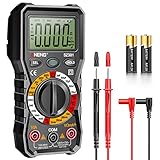
- Versatility: ANENG multi meter is a highly adaptable electronic tool that can be used to measure a wide range of electrical properties, including AC/DC voltage, current, resistance,continuity,diode and Live wire.This makes it an essential tool for anyone working with electronics or electrical systems,also widely used by hobbyists, students, and professionals in various fields, including engineering, automotive repair, and electricians.
- Precision: Multimetro typically have two probes that can be inserted into the circuit being measured, allowing for precise and accurate readings. This makes them ideal for detecting even small changes in voltage or current.
- User-friendly display: ANENG Multi Tester have a clear and easy-to-read display screen that shows the measurement values, as well as various settings and modes that can be adjusted to suit different measurement tasks. This Voltmeter makes it easy for users to quickly and accurately obtain the information they need.
- Safety & Portable: ANENG electrical tester is designed with safety features, such as anti-burn with double fuses,overload protection and insulated probes, to ensure safe and reliable use.Amp meter is compact and lightweight, making it easy to carry around and use on the go.
- Customer Service: ANENG offers exceptional customer service and after-sale support and technical assistance for their digital multimeter. This electrical tools comes equipped with two AA batteries that are pre-installed, and includes a silicone protective case and two high-quality cable leads for added convenience and protection.
Common problems and what to check
- Red lead is in a current jack: Do not make a voltage measurement. Switch off, move the lead to
V/Ω, and confirm the mode before connecting. Some meters add a lead-placement alert; for example, the Klein MM450 product page lists this feature, but it is not universal. - The display shows
OL: Check the selected range, contact, and whether the reading is beyond the meter’s limits. Depending on mode and context,OLcan indicate an open path, a reverse-biased diode, or an out-of-range signal; it does not always mean a broken component. - A DC reading is negative: The red probe is at a lower potential than the black probe, or the reference orientation is reversed. Swap probes if you want a positive display; the sign alone is not a fault diagnosis.
- The reading is unstable: Check probe contact, selected function, expected signal type, and whether surrounding components are influencing an in-circuit reading. Do not interpret a changing resistance or capacitance value without considering the circuit and test conditions.
- Continuity beeps unexpectedly: Check that power is off and identify any parallel path. The beep indicates a path below the meter’s threshold, not a verified protective-earth connection or a safe circuit.
- A reading appears when power should be off: Stop before touching conductors or changing connections. Use an appropriate method to verify the condition and investigate possible induced or residual voltage; a non-contact tester alone is not proof of absence.
- The current fuse has blown: Stop using that input. Follow the exact manual for fuse type, rating, and replacement procedure. Do not bridge the fuse or substitute a physically compatible but incorrect part.
Choose a meter for the work, not the number of dial symbols
For any meter, first match its category and voltage rating, leads, and protection to the environment. A basic feature list cannot establish suitability for an unknown or high-energy circuit.
- Household and basic DIY: Look for AC/DC voltage, resistance, continuity, diode test, fused current inputs, clear jack markings, and ratings appropriate to the intended work.
- Electronics and low-voltage circuits: Useful features may include DC resolution, capacitance and diode modes, frequency or duty cycle for control signals, and low burden voltage for current readings. Protection against accidental voltage on current inputs is valuable.
- Automotive work: DC voltage and resistance are core functions; frequency, duty cycle, and min/max capture may help with sensors and changing signals. Confirm that the meter and accessories suit the vehicle environment.
- Building and commercial electrical work: Choose a category and voltage rating suitable for the installation, along with appropriately rated probes and accessories. True-RMS and LoZ can be useful in relevant circumstances, but their specifications and trade-offs matter.
- Industrial troubleshooting: Consider appropriate category rating, waveform performance, min/max capture, filtering where required, environmental durability, calibration needs, and compatible accessories.
For illustration only, current manufacturer pages describe the capabilities of particular models—not a universal minimum. Fluke identifies the Fluke 117 as a True-RMS, CAT III 600 V meter with non-contact voltage detection and AutoVolt/LoZ features. Klein lists the MM450 as a TRMS auto-ranging meter with a range of electrical and temperature functions and CAT III 600 V rating. Verify the exact model, region, included leads, fuses, limits, and manual before relying on any specification.
Pre-measurement checklist
- What quantity am I measuring, and is it AC or DC?
- What voltage or current should I expect, and is the meter rated for this location?
- Is the black lead in
COMand the red lead in the correct jack? - Is the circuit powered? Resistance, continuity, diode, and capacitance tests generally require power off and appropriate discharge.
- Where is the reference point? Is it circuit GND, negative, chassis, or protective earth—and has that relationship been established rather than assumed?
- Am I measuring voltage across a circuit or current in series?
- Are the leads, probes, meter, and any accessories undamaged and appropriately rated?
- After current measurement, have I returned the red lead to the voltage jack?
For live service panels, unknown mains circuits, high-energy industrial equipment, damaged equipment, or any setup whose voltage and category you cannot identify, stop and use a qualified professional. Consult the exact meter manual before using a function or input whose markings you cannot interpret.
The Tool Desk
Outbyte Driver Updater FREEFix the driver behind crashes, sound loss and screen glitchesFind Drivers →Outbyte PC Repair FREERepair Windows errors before they cause bigger problemsFix Now →Quick Recap
Product prices and availability are accurate as of the date/time indicated and are subject to change. Any price and availability information displayed on Amazon at the time of purchase will apply.