The future of construction-site security is layered, connected and increasingly proactive. The most useful systems now combine AI-assisted cameras, access control, environmental sensors, local or cloud video management, cybersecurity and human monitoring. Some technologies are ready for residential and commercial projects today; others—such as autonomous patrol robots—remain best suited to large, controlled sites.
This guide covers eight important security-system categories for construction companies, homeowners, facilities teams and developers. “Trending” means growing adoption and strategic importance, not simply social-media popularity. The goal is to distinguish genuine protection from features that mainly add convenience.
As an Amazon Associate I earn from qualifying purchases.
Quick comparison
| System | Best construction use | Maturity | Main advantage | Primary limitation |
|---|---|---|---|---|
| AI video surveillance | Perimeters, equipment yards and active sites | Mainstream now | Prioritized alerts and faster review | False or missed classifications |
| Integrated smart security | Homes, offices and smaller projects | Mainstream now | One interface for cameras, alarms and sensors | Compatibility and subscription dependence |
| Cloud or hybrid video management | Multi-site contractors and developers | Mainstream/growing | Centralized remote administration | Recurring fees and connectivity risk |
| Mobile and biometric access | Site gates, offices and restricted areas | Mainstream/growing | Fast credential changes and audit trails | Privacy and fallback-access requirements |
| Cyber-physical security | Connected sites and commercial buildings | Increasingly necessary | Protects digital systems with physical consequences | Requires disciplined IT management |
| Drones and robots | Large or difficult-to-patrol sites | Early commercial | Automated perimeter and inspection coverage | Cost, regulation and human-supervision needs |
| Edge and local-first systems | Privacy-sensitive or connectivity-limited sites | Mature but fragmented | Local processing and outage resilience | More maintenance responsibility |
| Automated monitoring and SOCs | High-value or multi-site operations | Growing adoption | Alert triage and consistent response | Automation can amplify bad rules |
Industry direction supports this shift. The Security Industry Association’s 2026 megatrends forecast identifies AI, unified platforms, converged security and automated monitoring as major forces. A separate SafeHome.org consumer survey reported that 61% of surveyed U.S. households had at least one security camera and that 28% used AI person or package detection. Those are survey results, not official census figures.
What’s actually slowing this PC down?
Pick the symptom - the matching free tool is one click away.
1. AI-powered video surveillance
Modern cameras can do more than detect movement. Depending on the model and subscription, they may classify people, vehicles, animals and packages; detect line crossings; search footage using natural-language descriptions; recognize enrolled or familiar faces; or generate incident summaries.
#1 Best Overall
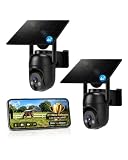
- 【4G LTE Network & No WiFi Needed】Cellular security camera include a pre-installed SIM card with 7-day unlimited trial data; auto-connects to the strongest U.S. network (Verizon/T-Mobile/AT&T). After the 7-day trial ends, subscribe to unlimited data for $19.90/month or $169.90/year via the UBox app to maintain remote access. Note: Each device requires a separate data plan subscription and cannot be shared. 100% wireless & no wifi needed—ideal for ranches, construction sites, vacation homes, or home security. (SIM card is non-replaceable)
- 【High-capacity Battery & Non-stop Solar Powered】 No wifi security camera that works without WiFi comes with a rechargeable battery and a 6W solar panel; the high-capacity battery and solar panel together provide continuous power for 365 days of uninterrupted operation, so you don't need to worry about it running out of power. Plus, with an IP65 weatherproof rating, this solar outdoor camera withstands rain, dust, heat, and cold, delivering reliable performance in harsh outdoor environments year-round. (Do not support WiFi)
- 【2K Color Night Vision & 360° Wide View】 This jobsite camera offers a 360° wide view and 4X digital zoom. You can remotely pan 355° and tilt 100° via the UBox App, which increases the flexibility of the 360 camera to get the broadest view without blind spots. By adopting color 2K HD night vision mode, the non wifi security camera could capture colorful footage up to 65ft. Even in the dark, the full-color night vision lets you always keep an eye on your assets. (Do not support auto-tracking)
- 【Smart Motion Detection & Real-Time Alerts】 Solar security cameras wireless outdoor features an advanced PIR motion sensor that detects movement and immediately sends an alarm notification to your mobile phone when humans or animals are detected. Built-in microphone and speaker let you listen and speak through the app to deter intruders. If you turn on white light alarm & siren alarm, solar camera will also emit dazzling lights and sirens, and you can customize detection zones and sensitivity to reduce unnecessary notifications.
- 【Flexible Dual Storage Options & Multi-Sharing】 Enjoy 30-day free trial cloud storage with easy playback anytime via the app— subscription is required after the 30-day trial ends. For added flexibility and data security, the 4g camera also supports local storage with a TF card up to 128GB (not included). Easily share cellular camera access with family members through the app, allowing remote property monitoring anytime, anywhere, even when abroad. (TF Card not included)
For a construction site, useful applications include identifying a person entering after hours, detecting a vehicle near a materials yard, monitoring a temporary perimeter and reviewing activity around plant or fuel storage. AI can reduce irrelevant alerts and help a manager find a specific event quickly, but it does not make a camera infallible.
Do not confuse these capabilities
- Motion detection: senses movement in a zone.
- Object classification: estimates whether movement involves a person, vehicle or other object.
- Behavior analytics: applies rules such as loitering, line crossing or entry into a restricted area.
- Facial recognition: compares a face with an enrolled database and remains subject to error, privacy rules and local law.
- Generative-AI search: helps locate or summarize footage; the original recording should still be reviewed for serious incidents.
Performance depends on lighting, camera height, angle, weather, dust, occlusion and model quality. Specify what the system detects, where processing occurs, whether it works offline and whether advanced functions require a monthly plan.
2. Integrated smart-home and building security
Integrated systems combine cameras, alarms, doorbells, locks, lighting, smoke and carbon-monoxide detectors, water sensors and mobile controls. In construction, the same principle can apply to a site office, completed development or temporary compound.
The Tool Desk
Outbyte PC Repair FREERepair Windows errors before they cause bigger problemsFix Now →Outbyte Driver Updater FREEFix the driver behind crashes, sound loss and screen glitchesFind Drivers →A system might turn on lighting when an intrusion sensor activates, lock an office after hours, alert a manager to water in a plant room or combine a door contact with camera footage for verification. The smart-home security market increasingly treats security and automation as one ecosystem.
Integration is not the same as completeness. A camera package may lack door contacts, glass-break detection, a siren, cellular backup, life-safety monitoring or professional dispatch. Before comparing products, decide whether you need a camera ecosystem, a self-monitored alarm, a professionally monitored alarm or a full building-security system.
Check compatibility between brands, voice-control safeguards, internet-outage behavior and subscription requirements. Voice commands may be acceptable for lighting but are a poor control method for high-risk actions such as unlocking a site gate.
Rank #2

- NO WIFI NEEDED — WORKS ANYWHERE WITH CELL SIGNAL — Connects over LTE cellular, not your home network, so it works at a remote gate, barn, or cabin with zero WiFi setup or dropped connections.
- 360° PAN, TILT & ZOOM FROM YOUR PHONE — Remotely rotate the camera to check any angle of your property on demand, instead of installing multiple fixed cameras to cover the same ground.
- SOLAR + RECHARGEABLE BATTERY — RUNS OFF-GRID — Solar charging keeps the built-in battery topped off, so the DEFEND 360 runs continuously anywhere, with no wall outlet required.
- 4K PHOTOS, 1080P VIDEO, INSTANT MOTION ALERTS — Get real-time notifications and imagery the moment motion is detected, sent straight to your phone.
- WEATHER-RESISTANT, BUILT TO STAY OUTSIDE — Handles rain, heat, cold, and years of exposure without missing a trigger.
3. Cloud and hybrid-cloud video management
Cloud video-management systems let teams administer cameras, users, footage and alerts through web and mobile dashboards. They are particularly useful for contractors, developers and property managers overseeing multiple locations.
Cloud management simplifies remote health checks, user administration, software updates, evidence sharing and centralized searching. Hybrid systems retain some recording or processing on site while using the cloud for administration, backup or selected analytics. Industry reporting from Genetec and Messe Frankfurt’s security-technology coverage points to hybrid architectures as an important direction.
Ask these questions before signing:
- Does recording continue locally when the internet fails?
- Are footage and event exports available without an active subscription?
- How are retention, encryption and data residency handled?
- What happens if the vendor changes pricing or discontinues the service?
- Can the system be migrated to another platform?
- Are firmware updates automatic, managed or optional?
Cloud is not automatically safer than local storage. It may improve centralized patching and management, but it introduces account, vendor-uptime and connectivity dependencies.
4. Mobile-credential and biometric access control
Commercial access control is moving beyond keys and fixed PINs. Smartphone credentials, NFC, Bluetooth, fingerprints, face recognition, temporary visitor passes and cloud-managed permissions can control who enters a site, building or restricted room.
For construction, temporary credentials can be issued to subcontractors and revoked when a project phase ends. Access logs can help investigate incidents and identify when a restricted area was entered.
Quick wins for a faster PC:
Clear out junk files and repair common Windows errorsFree Scan →Fix the driver behind crashes, sound loss and screen glitchesFind Drivers →Repair Windows errors before they cause bigger problemsFix Now →Biometrics should be treated as a convenience and risk-management tool—not infallible proof of identity. Biometric information is sensitive and difficult to replace if compromised. Face matching can produce false matches and may perform differently across demographic groups.
Rank #3

- Forever Power: Empower your viewing to go anywhere you desire. Enjoy off-the-grid freedom with the upgraded solar panel and a powerful 9,400 mAh battery.
- Seamless Connectivity with 4G and Wi-Fi: The Dual-Mode technology of eufy 4G LTE Cam S330 Ultimates security with uninterrupted access compared to traditional cellular no wifi cameras. If Wi-Fi signal is lost, the auto-switching 4G feature swaps to mobile data. Guaranteeing continuous use.
- Works with EIOTCLUB to Automatically Switch to the Strongest Network:eufy 4G LTE Cam S330 includes an EIOTCLUB SIM card, which is compatible with the three major U.S. networks: AT&T, T-Mobile, and Verizon. For consistent, reliable coverage, we recommend using the provided EIOTCLUB SIM, which supports cross-network roaming to connect to the strongest signal automatically. If you prefer using SIMs from AT&T, T-Mobile, or Verizon, please ensure they are data-only plans.
- 4K in Color, Day and Night: The color 4K camera gives you the clarity to identify a license plate 30 feet (10 meters) away. Shine a light on your surroundings with the 100-lumen spotlight to continue seeing colorful details up to 26 feet (8 meters) away, all through the night.
- 360° Viewing with AI Tracking:All-around viewing with pan and tilt. AI detects and tracks people, and vehicles, with an extensive range of motion.
A resilient installation should include appropriate PIN or badge fallback, a mechanical override where suitable, emergency egress, anti-tailgating measures, visitor procedures and clear retention and deletion policies. Always coordinate access control with fire, accessibility and building-code requirements.
5. Converged physical and cybersecurity
A camera, access controller or smart gate is also a networked computer. If it is compromised, the consequence may be physical: a gate could be opened, footage exposed or an alarm disabled. Conversely, an intruder who reaches network equipment in a site office may gain access to business systems.
The World Economic Forum’s 2026 cybersecurity outlook highlights AI-related vulnerabilities and the expanding security challenge created by autonomous and robotic systems.
Crashes, No Sound, or Screen Glitches?
Random freezes, missing sound and display glitches usually trace back to one bad driver. Find and replace yours safely.Free scan · under a minuteWindows Errors? Fix Them Before They Spread
Repair common Windows errors and clear accumulated junk for a smoother, more stable PC - no reinstall needed.Free scan · no reinstallMinimum protections include:
- Unique passwords and phishing-resistant administrator authentication
- Network segmentation for cameras, controllers and IoT equipment
- Least-privilege permissions and separate administrator accounts
- Managed firmware updates and a vendor vulnerability-disclosure process
- Encrypted communications and secure device onboarding
- Audit logs, credential rotation and backup administrator access
- Local or offline fallback modes for critical functions
Do not leave cameras exposed through unnecessary internet ports, retain default credentials or connect security hardware to the same flat network as sensitive business systems.
6. Autonomous drones, robots and robotic patrols
Drones and mobile robots can patrol large perimeters, inspect infrastructure, check remote areas, detect thermal anomalies and investigate alarms. They can be useful on industrial, infrastructure, warehouse, utility and unusually large construction sites.
The realistic model is human-supervised automation: the machine performs routine coverage, AI identifies a possible event, and an operator verifies and escalates it. These systems do not generally replace trained guards.
Rank #4

- 【Built-in SIM Card & Data Service】Comes with a pre-installed & pre-activated 4G LTE SIM card with a 7-day free data trial. Multiple flexible plan options are available, including unlimited data plans with both monthly and annual billing cycles. (For US use only)
- 【Wireless Solar-Powered & 4G LTE Network】: Forget about messy wires! This wireless camera no internet needed is completely wire-free in design, no need power or wifi connection, this Cell camera is powered by solar panel and rechargeable battery, connected to internet via its own SIM card, 100% wire-free, very easy to install.
- 【PTZ & 2K HD Color Night Vision】: This non wifi camera supports 270° pan, 90° tilt and 4x digital zoom, fully cover all around, the cellular camera has 2K HD image sensor and 4pcs spotlight, which can offer stunning clear color pictures for day and night.
- 【Human Motion Detection & Phone Notification】: The 4G camera is built-in sensitive PIR sensor, that can detect moving people, vehicles and animals, once it is triggered, the no wifi security camera outdoor will push instant alerts to your mobile phone. 4G Security camera no WIFI needed, allows you to leave one eye on what you care.
- 【Remote Playback & Two-Way Audio】: Ubox camera can save events to the local micro SD card (excluded) and free cloud storage(Need to apply), allows playback on the free Ubox phone app. Built-in speaker and microphone help you to talk to visitors under the LTE security camera through your mobile phone.
Costs, charging, weather, terrain, battery life, privacy, airspace rules and cybersecurity all matter. Drones may face additional aviation restrictions, while robots can misinterpret animals, dust, shadows or changing site conditions. Use a specialist integrator where the patrol system affects safety-critical operations.
Recommended Free Tools
7. Privacy-preserving edge and local-first security
Edge systems process video or sensor data on the camera, local hub, NVR or on-premises server rather than sending all raw data to a remote cloud. This can reduce latency, bandwidth use and exposure of footage, while allowing detection and recording to continue during an internet outage.
Local-first designs are attractive where construction footage, employee activity or sensitive facilities should remain under the owner’s control. They also give the buyer more control over retention and off-site backups.
Local processing does not automatically mean private. A device may still transmit thumbnails, metadata, diagnostics or account information. Review the privacy policy, encryption model, retention settings, remote-access method and whether AI models truly run locally.
Local systems also transfer responsibility to the owner: hardware must be patched, backed up, monitored and replaced. A hybrid design can provide local continuity with selective encrypted off-site backup.
8. Automated monitoring and security operations
Professional monitoring centers and security operations teams increasingly combine intrusion alarms, video verification, access events, environmental sensors, system-health data and AI-assisted triage.
Best Value

- 4G LTE outdoor security camera with included SIM card, ideal for construction sites, and storage areas where Wi-Fi is not available.
- Wireless surveillance powered by a frameless solar panel and high-capacity battery, delivering up to 6 months of autonomy with no external power.
- Detects motion up to 100 ft and sends instant photo alerts or 15-second video clips on demand, giving real-time visibility of your tools, equipment, and site.
- Integrated deterrent light signals the camera’s presence and repels intruders, protecting valuable materials, trailers, and storage containers.
- Rugged antenna, IP65 weather resistance, and durable solar design ensure continuous operation in rain, snow, dust, and harsh jobsite conditions.
This is valuable where a construction company has multiple sites or cannot watch cameras continuously. Automation can prioritize credible events, trigger predefined lights or sirens, create incident workflows and provide consistent reporting. It should support—not replace—human judgment.
Understand the response model:
- Self-monitoring: you receive the alert and decide what to do.
- Professional monitoring: a monitoring center assesses events and may contact emergency services under its procedures.
- Video verification: footage is used to assess whether an alarm appears credible.
- Automated response: predefined software actions occur, such as activating lights or sending notifications.
Professional monitoring does not guarantee police, fire or medical response. Outcomes depend on location, verification, dispatch procedures, false-alarm rules, connectivity and accurate account information.
How to choose a future-ready system
- Define the threat and property. Identify theft of tools, trespass, vandalism, unauthorized access, fire, flooding, cyber intrusion or safety risks. Map vulnerable gates, storage areas, plant rooms and temporary buildings.
- Choose the response level. Decide whether staff will self-monitor, use professional monitoring or combine both. A camera alone may document an event without stopping it or generating a reliable response.
- Design for outages. Specify battery backup, cellular communication, local recording, offline alarms, recovery after power restoration and backup for networking equipment.
- Set privacy rules early. Limit indoor cameras, establish retention periods, notify workers and visitors where required, control audio recording and assess biometric or facial-recognition legality.
- Calculate three-year ownership cost. Include hardware, installation, monitoring, cloud storage, licenses, cellular backup, batteries, maintenance, networking and replacement parts—not only the advertised device price.
- Test interoperability. Confirm compatibility with existing cameras, locks, alarms and building systems. Require exportable footage and documented APIs or standards where future migration matters.
- Plan administration. Use individual accounts, timely subcontractor offboarding, access logs and a documented process for lost phones, badges and keys.
- Check vendor continuity. Long-lived physical systems need support, security updates, replacement hardware and a migration plan. Genetec reported that 73% of surveyed end users considered long-term vendor viability and stability important when evaluating systems.
- Use professional design where consequences are high. Multi-building sites, life-safety systems, complex access control, drones, industrial environments and code-sensitive installations warrant qualified security, electrical and life-safety professionals.
Commercial options by buyer type
Consumer services illustrate different trade-offs, but none is a universal winner. ADT offers professionally monitored options and Google Nest integration; its product pages showed equipment and monitoring prices that vary by plan, minimum purchase and terms. See ADT’s products, monitoring information and residential terms for current details.
Ring is suited to DIY, camera-first buyers who accept cloud services and device-specific plans; its official plans page should be checked for current recording and feature terms. SimpliSafe offers DIY alarm equipment with optional professional monitoring; its support page lists plan options that may vary by date and geography.
For technically capable small organizations, Ubiquiti UniFi Protect can suit local video deployments, but it requires more owner maintenance and is not a substitute for guaranteed emergency dispatch. Verkada and Rhombus target cloud-managed business security, while Genetec is aimed at larger, integrator-led deployments. Enterprise pricing, licensing and hardware requirements should be obtained directly from each provider.
Quick Recap
Common mistakes to avoid
- Calling every motion-zone camera “AI-powered”
- Assuming AI eliminates false alarms
- Assuming cloud or local storage is automatically more secure
- Ignoring power and internet outages
- Buying a camera bundle when an alarm, access-control or life-safety system is needed
- Using facial recognition without a lawful purpose, notice and retention policy
- Assuming a robot replaces guards or a monitoring contract guarantees emergency response
- Comparing hardware prices while ignoring three-year subscriptions and maintenance
- Leaving former workers or subcontractors with active credentials
Product prices and availability are accurate as of the date/time indicated and are subject to change. Any price and availability information displayed on Amazon at the time of purchase will apply.




