Recommended Free Tools
Yes—you can self-monitor a home alarm system. The system detects an event, sounds a local alarm, and sends an alert to your phone or designated contacts. You then investigate from a safe location and contact police, fire, medical, or other emergency services when necessary.
The trade-off is responsibility. Self-monitoring can avoid professional-monitoring fees, but it does not guarantee that someone will notice an alert or call for help. Also, “no monthly fee” rarely means every feature is free: camera recordings, cellular backup, advanced detection, SMS alerts, and professional dispatch may require a subscription.
As an Amazon Associate I earn from qualifying purchases.
What self-monitoring means
In a self-monitored arrangement, there is no monitoring-center employee evaluating alarms for you. A typical sequence is:
- A door, window, motion, smoke, carbon-monoxide, leak, or other sensor detects a change.
- The hub or camera processes the event and may sound a siren.
- The system sends a push notification, text, email, phone call, or other alert, depending on the equipment and plan.
- You, a household member, or a trusted contact reviews the alert.
- You contact emergency services if the situation requires it.
Ring explains that self-monitored customers must contact emergency responders themselves. Wyze makes the same distinction: choosing self-monitoring does not mean Wyze or its monitoring partner automatically dispatches emergency services.
#1 Best Overall

- 【Door chimes when door opens】This wireless door chime can be a good reminder for you if you have toddler who try to sneak out of their bed room or help alert you the elderly with dementia who is trying to get out of the house.
- [Wireless door chime for business when entering]: This door entry chime can be used as a doorbell for your retail shop for your commercial to remind you when someone walks into your store, you will never miss any customers(visitors)
- 【Easy to Install】The door sensor chime and receiver are paired already,Just plug the receiver into standard outlet, tear the double-side adhesive tape of the entry alert chime and stick them to any door or window.
- [26 Music with Mute to 110dB]: The door chime for business/home has 26 chimes with 5 adjustable volumes. With LED indicators and memory function: Keep the previous set tune after re-plugging it
- 【Long Range & Expandable】The door chime wireless door sensor has 500feets far enough to cover every door in your house or store. And each door opening chime for business can be paired unlimited magnetic sensor, you can also pair different ringtone to each sensor, so that you can realize exactly which door is triggered
Self-monitoring does not guarantee police or fire response, replace local alarm registration, or remove the need to follow permit and false-alarm rules.
Self-monitoring versus professional monitoring
| Consideration | Self-monitoring | Professional monitoring |
|---|---|---|
| First alert | You or selected contacts | A monitoring center, often with alerts also sent to you |
| Who calls emergency services? | You or your designated contact | The provider follows its response procedure |
| Recurring cost | Often $0 for basic operation, but feature fees may apply | Monthly or annual monitoring fee |
| Main weakness | You may miss or delay an alert | Cost, false alarms, contracts, and local response limitations |
| Best suited to | People who are reachable and willing to maintain the system | Households wanting a 24/7 backup layer |
Professional monitoring is not automatically better. It adds another response layer when you are asleep, traveling, unreachable, or dealing with another emergency, but providers still operate under their own procedures and local rules. Ask about billing, contracts, cancellation, escalation, verification requirements, and local false-alarm charges. The Federal Trade Commission recommends checking these details before signing up.
What equipment do you need?
A reliable self-monitored system is more than a camera pointed at the front door. A practical setup normally includes:
Do these 3 things before closing this tab:
1Fix the driver behind crashes, sound loss and screen glitches2Repair Windows errors before they cause bigger problems3Scan for outdated or missing drivers - takes under a minute- Hub or base station: Connects sensors, manages arming modes, sounds the alarm, and communicates with the app or cloud service.
- Door and window sensors: Magnetic contacts for exterior doors and accessible windows.
- Motion sensors: Useful in hallways, rooms, and areas without entry sensors. Placement must account for pets, sunlight, furniture, curtains, and heating or cooling vents.
- Keypad: Allows local arming and disarming without relying entirely on a phone.
- Siren: A hub siren may not be loud enough for every room or outside area. Additional sirens can improve audibility.
- Phone and alert channels: Push notifications are common; text, email, or automated calls may depend on the system and subscription.
- Backup power: A hub battery can keep the alarm operating during a power interruption.
- Communication backup: Cellular backup can help when home internet fails, but it may require specific hardware and a paid plan.
- Environmental sensors: Smoke, carbon monoxide, water-leak, freeze, and temperature sensors cover risks that cameras and intrusion sensors cannot.
- Cameras: Useful for verification, but not a complete replacement for entry sensors, a local siren, or dedicated smoke and carbon-monoxide detectors.
Ring Alarm uses a base station and sensors to provide mobile alerts, while Ring Alarm Pro adds a built-in eero Wi-Fi 6 router and additional backup capabilities. Camera-only systems can be useful for awareness, but a camera may miss an intruder outside its view, behind an obstruction, in darkness, or entering through an unprotected window.
Does self-monitoring require Wi-Fi?
Not always. The answer depends on the system, hub, plan, and the event you are considering.
- Wi-Fi and cloud: Commonly used for app alerts, remote access, and cloud video.
- Cellular communication: May keep alarm signals connected when broadband fails.
- Local operation: The siren may still sound even if remote notifications or cloud access fail.
- Battery backup: Keeps the hub powered, but not necessarily the router, modem, or broadband service.
- Local storage: Can preserve recordings without cloud access when the system supports suitable hardware.
Do not assume that a battery-backed hub has cellular backup. Wyze says its Home Monitoring service does not support cellular backup. Ring advertises cellular backup for eligible hardware and plans. Even then, backup may cover alarm communication but not camera streaming or every connected device.
Rank #2

- 【Door Chime when Door Opens】 Keep your home or business secure with real-time door alerts when doors open. The wireless door chime system is perfect for all entry points, providing instant notifications whenever a door opens. This ensures home security and business entry alerts at all times, enhancing your protection and peace of mind.
- 【58 Chimes & 5 Volume Levels】 Enjoy a fully customizable door chime system with 58 melodies and 5 adjustable volume levels (0-110 dB). The system features a colorful LED indicator that’s visible even at 0 dB (mute), ensuring a visual alert for total awareness. Perfect for both business entry security and home use, it offers tailored notifications for every need.
- 【Easy to Setup】 The door alarm sensor is easy to install with 3M double-sided tape or screws. Out of the box, it’s pre-paired with the receiver, making setup quick and simple. Perfect for home alarm security and business entry alarm systems, it’s a plug-and-play solution with no complex wiring.
- 【500FT Range & Expandable】 With a wide 500FT range between the receiver and sensor, this system offers extended coverage for home and business security. It’s expandable, allowing you to add multiple sensors to cover different entry points or rooms, each triggering a unique door chime for enhanced security. Perfect for commercial spaces and large homes.
- 【Wide Usage Scenarios】 Whether you need to monitor your home, business, or protect kids, elderly, or dementia patients, this system is versatile for any environment. Ideal for kids safety, elderly care, and commercial security, it provides peace of mind across various locations, including front doors and windows.
What happens when an alarm is triggered?
- A sensor changes state—for example, a protected door opens.
- The system checks whether it is armed and whether an entry delay applies.
- The keypad may begin a countdown.
- If nobody disarms the system, the siren sounds.
- The hub or cloud service sends available alerts.
- You check the app, camera, live view, or a trusted contact if doing so is safe.
- You cancel a false alarm when appropriate.
- If there is evidence of a real emergency, you call the relevant emergency number from a safe location.
- Afterward, document the event, replace batteries if needed, and inspect the system only when it is safe.
The exact sequence varies by manufacturer, sensor, plan, and location. An alert does not always include a live video clip, and different sensor types may produce different notifications.
How to install and configure a self-monitored system
Plan before mounting anything
- List every exterior door and accessible window.
- Identify likely motion-sensor locations and account for pets.
- Choose a hub location within the recommended range of the router and sensors.
- Confirm support for smoke, carbon monoxide, water, glass-break, panic, or other sensors you need.
- Read the subscription comparison before buying hardware.
- Check local registration, permit, and false-alarm requirements.
Use a manufacturer-neutral installation workflow
- Create the vendor account with a unique password and multifactor authentication where available.
- Install the official app from the appropriate app store.
- Connect and power the hub, then add it to your account.
- Add each sensor individually.
- Give every device a meaningful name, such as “Kitchen back door” rather than “Sensor 4.”
- Mount contact sensors with the sensor and magnet aligned as directed.
- Install motion sensors at the recommended height and angle, away from likely false-trigger sources.
- Place keypads where users can reach them before entering a protected area.
- Add household members and trusted contacts with individual access where supported.
- Configure Home, Away, and Disarmed modes.
- Set entry and exit delays that allow occupants to use the system without rushing.
- Enable every useful alert channel and device-offline notification.
- Configure camera privacy, recording, and sharing settings.
- Install firmware and app updates.
- Add extra sirens or range extenders if the home layout requires them.
Test before relying on it
Use the vendor’s practice or test mode when available. Ring documents a practice mode for learning the alarm process without treating the exercise as a real emergency.
- Open every protected door and window.
- Walk through every motion zone.
- Arm and disarm from both the keypad and app.
- Trigger a controlled alarm with your phone nearby.
- Repeat while the phone uses cellular data rather than home Wi-Fi.
- Test with the router disconnected.
- Test with the hub’s primary power removed.
- Confirm that every shared user receives the expected alert.
- Check that the siren can be heard from bedrooms and exterior areas.
- Test smoke, carbon-monoxide, water, and panic devices according to their specific instructions.
Make notifications reliable
Receiving an alert is not the same as having a response plan. Configure at least two trusted contacts and define an escalation order. Enable alarm and device-offline notifications, and review the phone’s notification permissions, battery-saving settings, Do Not Disturb rules, and sleep schedule.
Prepare a written instruction sheet for housemates, children old enough to help, pet sitters, babysitters, and nearby contacts. Include the address, alarm cancellation procedure, entry instructions, pet information, and who should call emergency services. Give trusted people individual codes rather than sharing your main code when the system supports separate users.
Have a plan for travel, meetings, illness, a dead phone, poor mobile coverage, or a cloud outage. Do not rely on one person or one phone. Never enter a property or confront a suspected intruder merely to verify an alert. Leave by a safe route if possible and call emergency services from a safe location.
The Tool Desk
Outbyte Driver Updater FREEFix the driver behind crashes, sound loss and screen glitchesFind Drivers →Outbyte PC Repair FREEClear out junk files and repair common Windows errorsFree Scan →Current system options
The following are use-case comparisons, not a universal ranking. Prices and plan features change; the figures below were checked August 18, 2026.
Rank #3
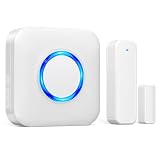
- 【Toddler & Dementia Care Safety】 Keep a watchful eye on your loved ones. This wireless door sensor chime triggers instantly when a door opens, perfectly alerting you if a toddler tries to sneak out of bed or an elderly family member with dementia attempts to wander out of the house
- 【Business Door Entry Chime】 Never miss a customer or visitor again. Ideal as a commercial retail shop doorbell, this door entry chime sounds the moment someone walks into your store or office, welcoming guests while adding a reliable layer of security during busy hours
- 【Ultra-Long 600FT Range & Expandable】 Powered by upgraded wireless tech, our signal reaches up to 600 FT—100 FT further than standard door chime. It easily penetrates walls to cover large homes, detached garages, basements, or deep warehouses. Expandable to pair up to 58 door sensors or receivers for full-home coverage
- 【58 Melodies with Memory Function】 Choose from 58 pleasant chimes and 5 adjustable volume levels (0-110dB). Crucially, you can assign a unique ringtone on this door alarm to different doors, so you know exactly which entrance is triggered. Features a silent LED flash mode for quiet offices or the hearing impaired, and a built-in memory to save your tunes when unplugged
- 【Easy 2-Minute Plug & Play Installation】 Skip the complex wiring. The wireless door alarm receiver and magnetic sensor are pre-paired out of the box. Simply plug the receiver into a standard outlet, peel the heavy-duty double-sided adhesive tape, and stick the contact sensor onto any front door, window frame, or patio slider
Ring Alarm: a fit for Ring and Alexa households
Ring says Alarm can be self-monitored with or without a Ring subscription, although the owner must contact emergency responders. The official store showed example kit prices of $199.99 for a five-piece kit, $249.99 for an eight-piece kit, $299.99 for an eight-piece Alarm Pro kit, $329.99 for a 14-piece kit, and $379.99 for a 14-piece Alarm Pro kit.
Ring’s listed plan signals were Solo at $4.99 per month or $49.99 per year, Multi at $9.99 per month or $99.99 per year, and Pro at $19.99 per month or $199.99 per year. The Pro plan includes 24/7 professional monitoring and cellular backup for eligible systems. Check the current plan page and hardware page before purchase.
Ring is attractive if you already use Ring cameras or Alexa and want a path to professional monitoring. It is less suitable if you want the fullest alarm functionality without recurring cost, need native Apple HomeKit alarm integration, or require cellular backup without a qualifying plan.
Windows Errors? Fix Them Before They Spread
Repair common Windows errors and clear accumulated junk for a smoother, more stable PC - no reinstall needed.Free scan · no reinstallOutdated Drivers Are Slowing You Down
One free scan finds every outdated or missing driver and matches the right update for your exact hardware.Free scan · exact hardware matchAbode: a fit for smart-home integration
Abode advertises basic self-monitoring without a paid plan and emphasizes compatibility with Apple HomeKit, Alexa, Google Home, Zigbee, and Z-Wave. Compatibility still depends on the exact hub, device, region, and software feature.
Abode’s listed plan signals were Standard at $8.49 per month or $79.99 per year and Pro at $245.99 per year. The paid plans add features beyond basic operation, with Pro designed to include professional monitoring and cellular backup. See the current plan comparison before assuming a particular sensor or automation is included.
SimpliSafe: a fit for a dedicated alarm ecosystem
SimpliSafe offers self-monitoring without a plan, a self-monitoring option with camera recordings for $9.99 per month, Standard professional monitoring at $22.99 per month, and Pro Plus at $79.99 per month, according to its official plan information.
Rank #4

- 120dB door and window alarm — Deters intruders instantly using a reliable magnetic sensor, with selectable siren or chime alerts when doors or windows open or close
- Simple alert control — Side OFF/chime/alarm switch lets you match security needs to daily use, includes six alarms for broader indoor entry point coverage
- Easy Install – Experience wireless and hassle-free mounting with the included double-sided tape; alarms must be installed indoors
- Battery-operated security alarm — Runs on four included LR44 batteries and features a front LED low battery indicator for dependable everyday protection
- Trusted home monitoring solution — Designed to add a layer of awareness and confidence in houses, apartments, dorm rooms, offices, RVs and campers; no apps or monthly fees required
The cited plan information describes Standard as including 24/7 emergency dispatch, built-in network backup, app control, live video, and push/SMS alerts. The self-monitoring camera plan includes 30 days of recordings for up to 10 cameras. SimpliSafe suits buyers who want a dedicated alarm system and an optional professional-dispatch path, but the hardware price alone does not reveal the total cost of useful camera and response features.
Wyze: a fit for camera-first, budget-conscious users
Wyze supports self-monitoring through its devices and app. Without Cam Plus, supported cameras can still provide snapshots and event notifications; paid plans add recordings, detection, and other features. Listed plan signals were Cam Plus at $2.99 per month for one camera, Cam Unlimited at $9.99 per month, and Cam Unlimited Pro at $19.99 per month. Check the current service plans.
Wyze may suit a camera-first household that accepts cloud and connectivity limitations. Its important drawback for outage resilience is that Wyze says Home Monitoring does not support cellular backup. It is therefore a weaker choice for homes that specifically require cellular alarm communication or a traditional alarm-first design.
Independent reader supportYour contribution helps us test, update, and keep practical guides available for everyone.Audit the real cost of “no monthly fee”
Separate the cost of:
- Hardware and replacement batteries.
- Installation or accessories.
- Basic app access and push alerts.
- Cloud video storage and AI detection.
- SMS or automated-call alerts.
- Cellular backup.
- Professional monitoring or emergency dispatch.
- Extended warranties and equipment replacement.
- Additional sensors, keypads, sirens, and range extenders.
- Local permits, registration, and false-alarm fees.
Before cancelling a plan, verify what remains active. A system may keep local sensor and siren functions while losing recordings, cellular backup, advanced alerts, or remote features.
Local registration and false alarms
Rules vary by city and county. Contact the local police and fire departments to ask whether the alarm must be registered, whether a permit or annual fee applies, how false alarms are charged, and whether verified and unverified alarms receive different responses. The FTC specifically recommends checking these requirements.
Quick wins for a faster PC:
Repair Windows errors before they cause bigger problemsFix Now →Fix the driver behind crashes, sound loss and screen glitchesFind Drivers →Common false-alarm causes include pets, inadequate entry delays, forgotten armed modes, misaligned contacts, weak batteries, unstable connectivity, steam near detectors, drafts, HVAC movement, sunlight, curtains, and users who do not know how to cancel an alarm. Correct the cause rather than simply lowering sensitivity across the entire system.
Best Value
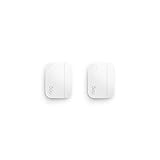
- Get instant mobile alerts when doors and windows open in your home with a Ring Protect subscription (sold separately).
- Now smaller to enable increased placement options.
- Easy installation with no tools required.
- Mounts to door and window frames.
- Includes two 3V CR2032 batteries.
Security and privacy safeguards
- Use a unique account password and multifactor authentication.
- Keep the app, hub, cameras, and firmware updated.
- Remove former occupants, contractors, and unused shared accounts.
- Limit permissions for shared users.
- Use a separate or well-secured Wi-Fi network for smart-home devices where practical.
- Avoid indoor cameras in bedrooms and other private areas.
- Review cloud retention, video sharing, and third-party integrations.
- Protect the keypad and do not display the disarm code where visitors can see it.
- Secure the account recovery email address and phone number.
A loud siren protects against one type of risk; it does not protect private footage from a compromised account. Physical alarm security and camera privacy must be managed separately.
Troubleshooting common failures
No notification arrives
Check phone permissions, Do Not Disturb, sleep settings, battery optimization, account login, hub connectivity, router and broadband service, sensor batteries, vendor service status, armed-mode assignments, and whether the alert requires a paid plan. Then run a controlled test and confirm delivery on every intended device.
The siren sounds but remote access fails
Possible causes include a broadband or router outage, cloud-service outage, disconnected hub, absent cellular backup, expired subscription, or an account-authentication problem. A local siren may continue working when remote access does not. Check the hub status indicators and the manufacturer’s support documentation.
Free tools Windows power users keep installed
One-click scans. No signup required.
False alarms continue
Replace weak batteries, realign contacts, adjust entry delays, reposition motion sensors, enable pet-aware settings where available, refine camera activity zones, and check for drafts, HVAC movement, sunlight, curtains, and insects. Retrain occupants and create a clear cancellation procedure.
A sensor is offline
Check its battery and placement, move the hub closer or add a compatible extender, reboot the device as directed, check firmware compatibility, and confirm that the sensor model is supported. Remove and re-add it only after recording its existing settings.
Is self-monitoring right for you?
Self-monitoring is reasonable when you are usually reachable, have reliable mobile service, are comfortable maintaining technology, can respond quickly, and have tested the system. It is less suitable if you travel frequently, sleep through alerts, live alone without backup contacts, have medically vulnerable occupants, or need dependable overnight smoke, carbon-monoxide, or water response while nobody is home.
For many households, a hybrid system is the practical middle ground: self-monitor the system at low cost, while retaining the option to activate professional monitoring for travel, illness, extended absences, or changing household needs. Whatever model you choose, prioritize a local siren, protected entry points, backup power, tested alerts, and a response plan over a low advertised monthly price.
What’s actually slowing this PC down?
Pick the symptom - the matching free tool is one click away.
Quick Recap
Product prices and availability are accurate as of the date/time indicated and are subject to change. Any price and availability information displayed on Amazon at the time of purchase will apply.

