Free tools Windows power users keep installed
One-click scans. No signup required.
The Noke Bluetooth padlock was a clever early smart-lock idea, but it is difficult to recommend as a dependable purchase in 2026. In its original 2015–16 form, it could replace a key or combination with a nearby phone, an optional fob, or a manually entered shackle-click code. That made it useful for shared sheds, gates, lockers and equipment. The trade-off was setup friction, Bluetooth-range limits, battery dependence, an awkward emergency code and a premium price. Today, uncertain app availability and support are the decisive concerns.
What the Noke padlock was designed to solve
Noke was aimed at people who were tired of carrying keys or remembering combination codes. Instead of turning a key or dial, an authorised smartphone could unlock the padlock over local Bluetooth.
As an Amazon Associate I earn from qualifying purchases.
That made the concept particularly appealing for a shared shed, gate, storage unit, locker or bicycle-and-equipment cable. An owner could share access digitally and revoke it later, rather than copying keys or changing a combination.
It was not presented as a substitute for a certified high-security commercial padlock. The contemporary reviews focused mainly on convenience and everyday physical security, not independent attack testing or an insurance-grade security classification.
#1 Best Overall
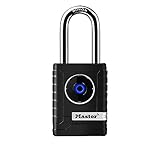
- CONNECTIVITY: Unlock this smart lock with Bluetooth from your smart phone (no wi-fi needed), or a manual direction-based code; Temporarily disable Bluetooth when storing your phone with other locked valuables, to prevent unauthorized access
- ALL-WEATHER SECURITY: Smart lock includes a 2-piece weather cover, to protect against the elements anywhere smart security is desired
- SHARED ENTRY: Bluetooth padlock allows for shared temporary or permanent access, via smart phone or keypad
- ACTIVITY MONITORING: Receive tamper and low-battery alerts via free Master Lock Vault Home and Master Lock Vault Enterprise apps for Android and iOS
- TOP-TIER SECURITY: Padlock uses military-grade Bluetooth authentication and encryption
How unlocking worked
The normal process was simple once everything had been configured:
- Install the Noke app and create an account.
- Add and pair the padlock over Bluetooth.
- Set up the backup Quick-Click code.
- Bring an authorised phone close to the lock.
- Press the shackle to wake it.
- Wait for the lock to detect the phone, then pull the shackle open.
- Press the shackle down again to relock it.
Depending on the setting, the lock could unlock automatically when it detected an authorised device, or the user could trigger unlocking from the app. Product material described a green flash for unlocking and a red flash for locking.
This was proximity unlocking, not remote unlocking from anywhere. Range varied with the setting and test conditions: WIRED reported successful operation at about 15 feet, while New Atlas described an adjustable range of roughly 5 inches to 6 feet. Those figures are best understood as different real-world measurements, not evidence of internet-based access.
The Tool Desk
Outbyte Driver Updater FREEFix the driver behind crashes, sound loss and screen glitchesFind Drivers →Outbyte PC Repair FREERepair Windows errors before they cause bigger problemsFix Now →The backup code was useful—but not quick
Noke did not rely entirely on a phone. Its Quick-Click fallback let the owner unlock the padlock by making a sequence of short and long presses on the shackle. The code was configured in the app and could be changed later. WIRED reported that it required between six and 16 presses.
That is better than having no fallback when a phone is dead, missing or unable to connect. It is also much less convenient than a key, a normal number code or a directional button sequence. It is difficult to memorise, slow in the rain or cold, and easy to get wrong when someone is trying to open a locked shed in a hurry. Tom’s Guide specifically criticised the code’s cumbersome operation.
Anyone using a Noke should test the Quick-Click sequence before attaching the lock to anything important. Store it securely—for example, in a password manager or another protected record—not visibly on the lock.
Setup and everyday use
The central gesture was intuitive, but first-time setup was not universally polished. WIRED paired a Noke with an iPhone 6 without major difficulty, and New Atlas found the app relatively restrained and straightforward. Other coverage reported unclear instructions about how long to press the shackle, uncertainty about the LED signals and frustrating packaging. Tom’s Guide also reported that the metal back plate came loose while the reviewer was fitting the lock to a shed handle.
Do these 3 things before closing this tab:
1Fix the driver behind crashes, sound loss and screen glitches2Repair Windows errors before they cause bigger problems3Scan for outdated or missing drivers - takes under a minuteThat distinction matters: the product idea was simpler than the ownership experience. Pairing the lock, granting permissions, setting the backup code and understanding what the light meant required more attention than using an ordinary padlock.
Sharing access and activity history
The app could share a lock with another person and later revoke that access. For a household or small construction project, that could be genuinely useful:
Rank #2

- 🔐【ADVANCED FINGERPRINT READER】: The fingerprint padlock uses advanced biometric technology, touch your finger to unlock within 0.2s, the unlocking speed is much faster than ordinary combo locks and key locks. Your finger is the key, no longer worry about losing the key or forgetting the password.
- 🔐【APP UNLOCK AND CONTROL】: The smart lock with App control through Bluetooth connection, easy fingerprint management, app check unlock records, and share unlock permission to your family and friends remotely, helping you create a smarter and more convenient life.
- 🔐【DURABLE AND HIGH-SECURITY】: The P6 medium-sized padlock is constructed with alloy steel and zinc alloy for strength and durability, a hardened steel shackle for cut resistance, and the keyless design avoid pick-resistance lock.
- 🔐【LONG BATTERY LIFE】: This electronic lock has low power consumption and built-in a 110mAh rechargeable lithium battery, which can last standby for 6 months and be unlocked about 2000 times after fully charged, and is equipped with a USB-C cable for fast charging.
- 🔐【EXCELLENT CUSTOMER SUPPORT】: Anweller offers a 12-month warranty and free lifetime technical support. It is hassle-free to get a replacement in 12 months and get a refund in 6 months. You are welcome to contact us if you have any queries.
- A family member could open a shed without receiving a physical key.
- A colleague could access equipment temporarily.
- A contractor or caretaker could be given access and removed later.
- The owner could review dates and times associated with lock use.
The activity history was a convenience feature, not necessarily a tamper-proof security audit. Sharing also depended on the recipient having a compatible app and account. Location-related functions described in contemporary reviews should not be interpreted as proof that the original padlock contained independent GPS or cellular tracking.
Battery dependence and failure scenarios
The Noke used a replaceable CR2032-style watch battery rather than a rechargeable pack. The expected life was approximately one year under normal use, but that was an estimate rather than a guarantee; usage, temperature and battery quality could change it.
There was an important practical restriction: historical product material says the battery could only be removed while the lock was unlocked. Replace it before the battery is exhausted, ideally while the lock is open and accessible. New Atlas reported that the app provided a warning but not a particularly useful precise battery meter.
The most difficult scenario is a dead phone combined with a dead lock battery. A dead phone alone can be handled with Quick-Click; a dead battery cannot necessarily be remedied while the lock is closed. That is why the battery warning should be treated as a maintenance task, not a notification to ignore.
The removable battery cover also raised outdoor-weather concerns. Opening the compartment outside can compromise confidence in the seal, particularly where the lock is exposed to persistent rain, snow, mud or grit.
Physical construction, fit and weather resistance
Contemporary specifications described a hardened-steel and boron construction, a boron-hardened shackle, anti-shim protection and weather resistance. The reported final weight was approximately 9 ounces, and B&H listed an operating range of −10°F to 150°F.
Those features suggest a substantial everyday padlock, but they do not establish independent high-security certification. WIRED reported the company’s claim that the lock rated around 7 on an informal 1-to-10 scale used by major lock manufacturers. That should not be confused with a recognised standards rating or independent laboratory result.
Use weather-resistant, not waterproof. The cited coverage does not establish a current IP rating or an independent environmental test. For a sheltered shed or locker, that may be acceptable. For direct exposure on a gate or site equipment left outdoors year-round, inspect the cover and shackle regularly and consider whether an electronic lock’s failure modes are worth the convenience.
The shackle was available in one length rather than several interchangeable options. Measure the hasp, chain or gate hardware first. Limited clearance can make the Noke unsuitable for thick hasps, awkward gate fittings or applications needing extra reach.
Rank #3

- SMART APP CONTROL FOR EASY ACCESS – This smart padlock supports APP control via Bluetooth, allowing you to unlock the lock, generate or delete passcodes, and check unlock history directly from your phone. Convenient keyless access for home, office, gym locker, gate, storage unit, and travel use.
- 6-DIGIT PASSWORD UNLOCK WITH LIGHT INDICATOR – Simply enter the 6-digit password to unlock. The indicator light lights up with each number entered, and all lights illuminate after the full code is completed, providing clear visual guidance for quick and easy operation, even at night.
- ONE-TAP BLUETOOTH UNLOCK – Open the APP and unlock instantly through Bluetooth without entering a password. This smart lock is easy for seniors, kids, and family members to use, offering a more convenient and user-friendly keyless experience.
- SUPPORTS UP TO 10 PASSCODES – Create up to 10 password combinations through the APP for family, Airbnb guests, plumbers, delivery personnel, dog walkers, cleaners, or temporary visitors. Easily delete temporary codes anytime with one tap for better security and flexible access management.
- DURABLE, COMPACT & PORTABLE DESIGN – Weighing only 0.24 lbs and measuring 3 x 1.8 x 0.9 inches, this lightweight smart lock is easy to carry and store. The lock body is made of durable zinc alloy, ABS, and PC materials, while the hardened 304 stainless steel shackle provides enhanced strength, durability, and anti-theft protection.
Historical price and value
When reviewed, the Noke cost roughly $60 for one lock. WIRED reported about $55 per lock in a two-pack; Tom’s Guide listed an optional fob at about $25, while other 2015 coverage put the lock around $70. These are historical prices, not current 2026 offers.
Windows Errors? Fix Them Before They Spread
Repair common Windows errors and clear accumulated junk for a smoother, more stable PC - no reinstall needed.Free scan · no reinstallOutdated Drivers Are Slowing You Down
One free scan finds every outdated or missing driver and matches the right update for your exact hardware.Free scan · exact hardware matchThe premium only made sense if phone-free keyless sharing was valuable. A conventional keyed or combination padlock was cheaper, easier to replace and independent of an app. The true cost of Noke also included replacement batteries, a compatible phone, account access and the possibility that future software support might disappear.
The 2026 ownership problem
The original consumer Noke padlock is now a legacy product. B&H lists the FNAPS consumer padlock as “No Longer Available”. Third-party app-tracking data reports that the original Android app was removed from Google Play on December 9, 2021. That does not prove every existing lock is unusable, but it makes app installation, phone compatibility and recovery options essential checks before purchase.
Nokē remains an active brand within Janus International’s commercial smart-entry ecosystem. Current material is aimed at self-storage and managed facilities, including controllers, facility administration, mobile access and newer commercial products. Those systems should not be assumed to work with the original lifestyle padlock.
Nor should the 2024 shutdown of Noke Pro commercial services be applied automatically to every original consumer Noke. It does, however, illustrate the broader risk of relying on a connected access product whose software ecosystem may change or be retired. Smartlox’s migration information concerns certain Noke Pro customers and warns that support depends on the exact model and circumstances.
Recommended Free Tools
Buying a used or old-stock Noke: essential checks
If you are considering one despite its legacy status, treat it as a device to verify—not an ordinary padlock to buy sight unseen.
- Confirm the exact model, ideally FNAPS, and ask whether the seller can demonstrate operation.
- Verify that the required app installs on your current phone before paying.
- Confirm that the previous owner can remove it from their account and that you can reset and pair it.
- Check whether an included fob is paired, functional and supplied with a working battery.
- Inspect the battery compartment, back plate, seals, shackle and body for corrosion or damage.
- Test local Bluetooth unlocking, relocking and the Quick-Click fallback.
- Confirm that the shackle fits your actual hasp or gate hardware.
- Do not use it first on valuables, critical access or anything that could create a safety problem if locked out.
Which access model is right for the job?
| Option | Best for | Main trade-off |
|---|---|---|
| Mechanical key padlock | Low cost, maximum independence | Keys must be carried, copied and managed |
| Mechanical combination padlock | Shared access without batteries | Codes can be forgotten, observed or shared permanently |
| Keypad smart padlock | Phone-free electronic access | Still needs batteries and code management |
| Current Bluetooth or NFC padlock | Modern app-based sharing | Requires verified support, battery warnings and offline recovery |
| Commercial smart-entry system | Managed storage or facility-wide access | More expensive and complex than an individual padlock |
Verdict
In its time, Noke was an interesting and usable early smart padlock. Its best features were the phone-based unlocking gesture, revocable sharing, activity history and replaceable battery. For a shared shed, locker, gate or ordinary equipment lock, those conveniences could justify paying more than the cost of a mechanical padlock.
But the weaknesses were substantial: setup could be confusing, the Quick-Click backup was awkward, Bluetooth required local proximity, the battery had to be maintained, the shackle fit was limited and weather resistance was not the same as waterproofing.
In 2026, the recommendation is narrower still. Buy or rely on an original Noke only if it is inexpensive, the app works on your phone, ownership can be reset, both unlocking methods pass a test and the use is non-critical. Do not pay a collector’s premium or depend on an unverified old unit for valuable tools, essential site access or anything where software failure could leave you locked out.
What’s actually slowing this PC down?
Pick the symptom - the matching free tool is one click away.
Quick Recap
Product prices and availability are accurate as of the date/time indicated and are subject to change. Any price and availability information displayed on Amazon at the time of purchase will apply.

