Leviton Decora Smart is not one gadget. It is a family of in-wall switches, dimmers, motion controls, scene controllers, fan controls, outlets, plugs, and companion switches designed to look and work like familiar Decora hardware. That practical, built-in approach is what makes it interesting—and what separates it from app-controlled novelty devices.
The catch is model selection. Neutral-wire requirements, product generations, Matter support, Wi-Fi dependence, and the optional bridge for older wiring all matter before you buy.
As an Amazon Associate I earn from qualifying purchases.
The short verdict
Leviton Decora Smart is a strong choice for homeowners who want normal-looking wall controls, broad room-by-room functionality, and compatibility with major smart-home platforms. It is especially useful for multi-room lighting, motion-activated areas, physical scenes, ceiling fans, lamps, and outdoor plugs.
Choose it when you value permanent electrical hardware that guests can use without an app. Consider Lutron Caséta, TP-Link Kasa/Tapo, or Aqara instead if you prioritize a dedicated lighting network, the lowest-cost Wi-Fi devices, or an existing sensor-and-hub ecosystem.
#1 Best Overall

- NEVER COME HOME TO A DARK HOUSE AGAIN – Schedule exterior lights to turn on at sunset for added safety, comfort, and convenience
- USE YOUR VOICE FOR HANDS‑FREE CONTROL – Works with Google Assistant, Amazon Alexa, and Apple Siri so you can adjust lights without lifting a finger
- CONTROL LIGHTS FROM ANYWHERE – Check if lights are on and adjust them remotely using your smartphone, whether you’re home, at work, or on vacation
- SET IT AND FORGET IT - Use the My Leviton app to schedule your lights to turn on and off when you want
- THE MOST CONNECTED – Works with Alexa, Google Assistant, Apple Home, SmartThings, Home Assistant, and is Matter ready out of the box
What “Decora Smart” actually means
“Decora” is Leviton’s broad wall-control design family. Decora Smart is the connected portion of that family, managed through My Leviton and compatible voice or smart-home platforms. The range includes:
- Smart on/off switches and dimmers
- Motion-sensing dimmers
- Scene-controller switches
- Fan-speed controllers
- In-wall smart outlets
- Plug-in switches and dimmers
- Outdoor smart plugs
- Wire-Free Anywhere companion controls
- No-neutral switches and dimmers
Leviton’s product-family information is available at Leviton’s Decora Smart overview and its smart-home product page.
Why it is more useful than flashy
The best feature is not a clever app. It is that the technology disappears into the house.
Windows Errors? Fix Them Before They Spread
Repair common Windows errors and clear accumulated junk for a smoother, more stable PC - no reinstall needed.Free scan · no reinstallOutdated Drivers Are Slowing You Down
One free scan finds every outdated or missing driver and matches the right update for your exact hardware.Free scan · exact hardware match- A physical paddle still works for family members and visitors who never open the app.
- A motion dimmer can automate a hallway, closet, bathroom, or laundry room.
- A scene controller can recall several lighting arrangements from one wall location.
- A Wire-Free Anywhere companion can add a second control point without running new traveler wires.
- Smart outlets and plugs extend control to lamps and small appliances.
- A fan controller adds smart control without replacing the room’s familiar wall interface.
In other words, Decora Smart is best understood as an infrastructure upgrade: ordinary-looking electrical controls with automation built in.
Rank #2

- NEVER COME HOME TO A DARK HOUSE AGAIN - schedule exterior lights to turn on at sunset
- USE YOUR VOICE FOR CONTROL WITHOUT LIFTING A FINGER - works with Google Assistant, Amazon Alexa, and Apple Siri
- MOST CONNECTED - works with Alexa, Google Assistant, Apple Home, SmartThings, Sonos, and Resideo. Matter support can be enabled with a firmware update via the My Leviton app
- KNOW IF LIGHTS ARE ON AND ADJUST WHETHER YOU'RE HOME, AT WORK, OR ON VACATION - control from anywhere
- MAKE IT LOOK LIKE SOMEONE'S HOME WHEN YOU'RE AWAY - turn on lights randomly for a lived-in look
Model numbers matter
| Model or family | Best suited to | Important qualification |
|---|---|---|
| D36HD | Newer Matter-ready dimmer | Neutral wire required |
| D315S | Newer Matter-ready switch | Neutral wire required |
| D26HD, D215S, D215P, D23LP | Second-generation Wi-Fi controls | Eligible models can receive Matter firmware |
| D2MSD | Motion-sensing dimmer | Neutral wire required |
| D2SCS | Physical scene controller | Neutral wire required |
| D24SF | Smart fan-speed control | Neutral wire required |
| DN-series | No-neutral retrofit installations | Requires the MLWSB Wi-Fi Bridge and a ground |
Do not assume that every product labeled Decora Smart has identical wiring, protocol, or Matter support. Check the exact model number, generation, load rating, companion requirements, and packaging before purchase.
Matter: the important distinction
Leviton’s Matter support is real but model- and generation-specific. Newer products such as the D36HD dimmer, D315S switch, D2710 0–10V dimmer, D2ELV dimmer, and D215O outdoor plug are identified by Leviton as Matter-ready out of the box.
Leviton also identifies several second-generation products as eligible for a Matter firmware update, including the D26HD, D215S, D215P, D23LP, D215R, D2MSD, D2SCS, and D24SF. First-generation Decora Smart Wi-Fi and HomeKit products are not being upgraded to Matter. See Leviton’s Matter overview for the current list.
The Tool Desk
Outbyte PC Repair FREEClear out junk files and repair common Windows errorsFree Scan →Outbyte Driver Updater FREEFix the driver behind crashes, sound loss and screen glitchesFind Drivers →How the firmware upgrade works
- Add the compatible second-generation device to My Leviton.
- Enroll in Leviton’s Matter Early Access Program, if required by the current process.
- Use the app’s System Updates tool to install the Matter-certified firmware.
- Add the updated device to a compatible Matter controller.
Apple Home users who previously used HomeKit may need to update the device, obtain its Matter pairing code in My Leviton, remove the old accessory, and add it again through Matter. A compatible Apple home hub, such as an Apple TV or HomePod, is required for Matter control and Siri.
Rank #3

- CREATE AN ELEGANT AMBIANCE - set the mood for dinner, dim the lights to create a movie theatre experience, turn the lights down low to wind down for bedtime
- PERSONALIZE YOUR LIGHTING - customizable fade rates that gradually turn lighting on or off, or preset light level options to make sure lights always come on at the level you want
- AUTOMATIC SOFTER LIGHTING AT NIGHT - perfect in your kitchen for a midnight snack or in your bathroom, using My Leviton Night Settings
- PREVENT FLICKERING LIGHTS - designed for compatibility with dimmable LED bulbs and fixtures with settings to fine-tune performance such as bulb type, min dim, and max bright
- USE YOUR VOICE FOR CONTROL WITHOUT LIFTING A FINGER - works with Google Assistant, Amazon Alexa, and Apple Siri
Matter can improve cross-platform compatibility and support local communication through a Matter controller. It does not guarantee that every advanced feature—such as manufacturer-specific settings, energy information, scenes, or companion behavior—will appear identically in every ecosystem. My Leviton may still be needed for account setup, firmware updates, remote access, or certain integrations.
Neutral wire or no neutral?
Neutral-required models
Many DWxxx and D2xxx Wi-Fi products require a neutral wire. They generally avoid the need for a separate smart-home hub or bridge, but they depend on suitable Wi-Fi and internet access for setup and normal My Leviton operation. Leviton explains the distinction in its neutral-wire support guide.
No-neutral models
DN-series products are intended for certain retrofit installations where the switch box lacks a neutral. They require an earth ground and the MLWSB Decora Smart Wi-Fi Bridge.
What’s actually slowing this PC down?
Pick the symptom - the matching free tool is one click away.
Leviton specifies support for up to 25 compatible no-neutral devices per bridge, approximately 2,500 square feet of coverage, central placement within 50 feet of devices, and 2.4GHz Wi-Fi. Those are manufacturer specifications, not independent range tests.
Rank #4
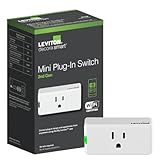
- NO HUB: control lights from anywhere - simply plug it in for On/Off control of lamps, electronics, and small appliances
- USE YOUR VOICE: works with Hey Google, Amazon Alexa or Apple Siri to turn connected devices on or off
- EASY TO INSTALL: 2.4 GHz, plugs into any 120V standard, AFCI or GFCI non-controlled outlet. 15A General Use, 5A LED/CFL, 1500W Incandescent/Halogen, 15A Magnetic, 3/4 HP Motor
- MY LEVITON APP: schedule lights to turn on when you want including sunrise/sunset, easily create lighting scenes with multiple devices, and control from anywhere
- THE MOST CONNECTED – works with Alexa, Google Assistant, Apple Home, SmartThings, and Sonos
Before working in a switch box, shut off the breaker and verify that the circuit is de-energized. Never identify conductors by color alone. If you cannot positively identify line, load, neutral, ground, and traveler wires—or if the box is crowded or damaged—use a qualified electrician. In-wall electrical work involves shock, fire, code, and equipment-damage risks.
Useful room-by-room applications
- Hallway, closet, or laundry room: Use a motion-sensing dimmer, provided automatic activation suits the space.
- Living room: Combine a dimmer with a scene controller for everyday, entertaining, and movie lighting.
- Bedroom: Use a dimmer with a wire-free companion near the bed.
- Bathroom: Motion control can be convenient, but consider privacy and whether automatic shutoff is appropriate.
- Office or media room: Use scenes for work, video calls, and viewing, with a smart outlet for a lamp.
- Ceiling-fan room: Choose the dedicated fan-speed controller rather than treating a fan motor like a standard light load.
- Outdoor area: The D215O outdoor plug is designed for outdoor plug-in lighting and seasonal loads within its rating.
Current examples and observed prices
Leviton’s U.S. store displayed the following prices on August 16, 2026. Promotions, availability, and regional pricing can change.
| Product | Use | Price observed |
|---|---|---|
| D36HD | Wi-Fi Matter dimmer | $39.99 |
| D315S | Wi-Fi Matter switch | $34.99 |
| D2MSD | Motion-sensing dimmer | $54.99 |
| D2SCS | Scene controller | $52.99 |
| D24SF | Fan-speed controller | $42.99 |
| D215P | Mini plug-in switch | $24.99 |
| D23LP | Mini plug-in dimmer | $26.99 |
| D215R | Tamper-resistant smart outlet | $34.99 |
| D215O | Outdoor smart plug | $59.99 |
See Leviton’s current Decora Smart store collection for product-specific details.
Key trade-offs
Wi-Fi is convenient, not dependency-free
Neutral-required products can avoid a dedicated hub, but they still depend on the home network. Weak 2.4GHz coverage, congestion, band steering, router changes, or segmented networks can complicate setup. “No hub” does not mean “no network dependency.”
Best Value

- Z-WAVE PLUS CERTIFIED - 800 Series provides the latest in reliability and performance including SmartStart enrollment, S2 Security, and Over-the-Air Updates
- REMOTE ACCESS, VOICE COMMAND, AND SCHEDULING - as part of a Z-Wave smart home solution, requires compatible Z-Wave hub
- NEVER COME HOME TO A DARK HOUSE AGAIN – schedule exterior lights to turn on at sunset
- ONE SWITCH DOES IT ALL – supports on/off switching of loads up to 15A and 3/4 HP for control of lights, ceiling fans, exhaust fans, motors, pumps, and more
- KNOW IF LIGHTS ARE ON AND ADJUST WHETHER YOU'RE HOME, AT WORK, OR ON VACATION – control from anywhere using a compatible Z-Wave hub
No-neutral installations add hardware
The no-neutral range helps older homes, but the bridge adds cost, placement requirements, and another wireless link. It is a useful retrofit solution, not a one-device installation.
Dimmers must match the load
LED fixtures can produce flicker, buzzing, poor low-end dimming, or failure to turn fully off when the fixture and dimmer are not a good match. Check the device’s compatibility information and configure minimum and maximum brightness where supported.
Three-way wiring is model-specific
Do not assume a standard dumb three-way switch can remain in place. Check the exact primary device, wired companion, or Wire-Free Anywhere accessory required for the intended locations.
Leviton versus alternatives
- Leviton Decora Smart: Best for broad Decora-style hardware, physical controls, Matter options, motion, scenes, fans, outlets, and companions.
- Lutron Caséta: A major choice for buyers prioritizing a mature lighting-focused system and willing to use Lutron’s hub and accessories. Visit Lutron Caséta.
- TP-Link Kasa/Tapo: Attractive for budget-conscious Wi-Fi shoppers, but verify the exact model’s Matter and platform support. See Kasa and Tapo.
- Aqara: A strong fit for users already invested in Aqara sensors and hubs; regional compatibility and hub requirements must be checked. Visit Aqara.
Who should buy it?
Buy Leviton Decora Smart if you want smart controls that look like conventional electrical hardware, prefer physical operation, and need more than a basic switch. It is particularly compelling when one project includes lighting, scenes, motion, fans, outlets, and additional control points.
Skip it if you want completely plug-and-play installation, have unreliable Wi-Fi, do not want a bridge for no-neutral wiring, or expect Matter to erase every manufacturer-specific feature and setup step.
The buying process is simple: identify the wiring, choose the load type, confirm the exact generation and Matter status, check three-way requirements, and verify platform compatibility. Done carefully, Decora Smart is less a flashy gadget than a practical way to make a house smarter without making it look more complicated.
Quick Recap
Product prices and availability are accurate as of the date/time indicated and are subject to change. Any price and availability information displayed on Amazon at the time of purchase will apply.
Free tools Windows power users keep installed
One-click scans. No signup required.