What’s actually slowing this PC down?
Pick the symptom - the matching free tool is one click away.
Yes—many IKEA TRÅDFRI Zigbee devices can work with Home Assistant without an IKEA hub, but you still need a compatible Zigbee coordinator. If you already own the older TRÅDFRI Gateway, you can connect that gateway instead; if you have DIRIGERA, Home Assistant documents HomeKit and Matter routes rather than a dedicated core DIRIGERA integration. Here, “hacking” means using documented software and standard Zigbee hardware—not modifying device firmware.
Choose the route that fits your IKEA hardware
First identify what you have: the older square TRÅDFRI Gateway, a DIRIGERA hub, or just the lights, remotes, sensors, and plugs. The best route depends on whether you need remote events in automations, want to keep an existing gateway, or are prepared to manage a Zigbee network yourself.
| Route | What you need | Useful for | Main trade-off |
|---|---|---|---|
| TRÅDFRI Gateway + Home Assistant | Existing gateway, local network, and its security key | Keeping the legacy gateway and controlling compatible connected lights | The integration does not provide remote or sensor events for automations; app groups are not imported. Home Assistant TRÅDFRI documentation |
| Direct Zigbee + ZHA | A compatible Zigbee coordinator connected to Home Assistant | Pairing supported devices directly without an IKEA hub | Support and exposed features vary by device; you must set up and maintain the Zigbee network. Home Assistant ZHA documentation |
| DIRIGERA + Home Assistant | DIRIGERA hub, using a supported HomeKit or Matter route | Keeping IKEA’s current hub in the system | Home Assistant’s documentation describes no dedicated core DIRIGERA integration; available devices depend on hub software and bridge support. Home Assistant DIRIGERA documentation |
| Python access with pytradfri | Legacy TRÅDFRI Gateway and Python environment | Programmatic access to supported gateway functions | It does not support DIRIGERA, and compatibility depends on model and firmware. pytradfri project |
Use the older TRÅDFRI Gateway with Home Assistant
Home Assistant’s TRÅDFRI integration connects to the legacy IKEA Gateway over your local network. It is a gateway integration, not a way to pair devices directly to Home Assistant.
- Connect the gateway to your router and make sure Home Assistant can reach it on the same local network.
- In Home Assistant, open Settings > Devices & services, select Add integration, and choose TRÅDFRI.
- Enter the security key printed on the underside of the gateway when prompted.
- If Home Assistant cannot connect, restart the gateway and assign it a permanent IP address in your router’s network settings. Home Assistant recommends this to avoid the gateway address changing.
After a gateway firmware update, you might need to repeat the integration setup. IKEA app groups are not imported because of stability issues; create native Home Assistant light groups instead. The integration also does not expose remote-control or sensor events for automations. Its documented battery-status support is limited to shortcut buttons, remotes, and motion sensors. Home Assistant points users needing those device events toward ZHA or HomeKit. Home Assistant TRÅDFRI integration details
#1 Best Overall
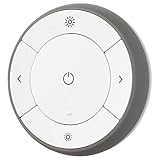
- You can use TRÅDFRI remote to control up to 10 LED light bulbs at a time - dim, switch on and off, choose colors and step by step change from warm to cold light.
- You can use TRÅDFRI gateway and app to create several groups of light sources and control them in different ways.
- The remote control works with TRÅDFRI bulbs.
- With TRÅDFRI remote control you can dim your lights without a hardwired installation.
- A magnet makes it easy to attach the remote control to the wall bracket.
Pair devices directly with Home Assistant ZHA
ZHA lets Home Assistant manage a Zigbee network through a compatible coordinator, often a USB Zigbee coordinator attached to the Home Assistant host. This removes the requirement for an IKEA gateway, but it does not mean every IKEA device or feature is guaranteed to work.
- Choose a coordinator supported by Home Assistant ZHA and connect it to the Home Assistant system.
- In Home Assistant, open Settings > Devices & services, choose Add integration, and select Zigbee Home Automation.
- Follow the prompts to select the coordinator and create the Zigbee network.
- Put the IKEA device into its pairing mode, then use ZHA’s add-device flow. Consult the instructions for the specific model if its reset or pairing sequence is unclear.
- Check the device page and test the controls, sensor readings, or automation triggers you actually need before relying on them.
ZHA provides tools for device management, binding, network backups, and coordinator migration, but Zigbee behavior is device-specific. Binding and coordinator forwarding constraints can affect whether a remote controls a light directly or through Home Assistant. Confirm the required behavior for the exact device combination in the ZHA documentation before rebuilding a working setup.
Keep DIRIGERA and connect through a supported route
IKEA says DIRIGERA supports older IKEA smart products as well as Matter, Thread, and Zigbee. IKEA UK describes DIRIGERA as connecting to the router over Ethernet, with setup guided by the IKEA Home smart app. Home Assistant’s documented paths are through HomeKit or Matter integrations, rather than a dedicated core integration for DIRIGERA.
Rank #2

- Powered by SmartThings: Connect, monitor, and automate your home through the SmartThings app. Build a reliable, unified smart home using Samsung's proven ecosystem
- Matter + Zigbee Smart Home Hub: Supports the newest Matter standard plus Zigbee for lighting, sensors, plugs, switches, thermostats, and more - thousands of compatible devices. PLEASE NOTE: Z-Wave not supported
- Easy Setup with Wi-Fi or Ethernet: Get started in minutes using Wi-Fi or a wired Ethernet connection for apartments, houses, and expanding smart home systems - Z-Wave not supported
- Automations That Work for You: Create custom routines for security, lighting, comfort, and energy savings. Many local automations continue working even if your internet goes offline
- Wide Device Compatibility: Connect compatible smart devices from Aeotec and many other brands to build a unified system for lighting, voice control, energy management, and climate settings
Home Assistant documented Matter bridge device support for DIRIGERA hub version 2.615.8 in September 2024. That is a dated, version-specific statement, not a guarantee about the full feature set of later releases. Check the current Home Assistant and IKEA documentation for the hub version and device types you use. IKEA’s UK guidance also says some bulbs, remotes, and motion sensors can pair directly to one another without the app or Wi-Fi; its guidance calls for DIRIGERA for app control, routines, multi-room setups, voice control, and mixing older and newer devices. Those statements describe IKEA’s UK support guidance, not a universal feature guarantee for every region or model.
Home Assistant’s DIRIGERA page says the hub was released in October 2022 and that there is currently no dedicated core integration. Because hub and Home Assistant capabilities can change, confirm the available HomeKit or Matter route for your setup in the DIRIGERA documentation.
Independent reader supportYour contribution helps us test, update, and keep practical guides available for everyone.Use pytradfri only for the legacy gateway
pytradfri is a Python library for programmatic interaction with the older TRÅDFRI Gateway, not a DIRIGERA integration. Its README gives verified compatibility examples for a TRÅDFRI Gateway E1526 on version 1.19.32, a TRÅDFRI remote on 2.3.014, and a wall plug on 2.0.022. These are project-listed examples, not a promise that every device or current firmware version is compatible.
Rank #3

- ZigBee Smart home hub Control your ZigBee devices and monitor and manage your property through the ERIA hub & APP when combined with ZigBee sensors, ZigBee lights, ZigBee plugs, ZigBee curtains ZigBee blinds, ZigBee thermostats, ZigBee locks and more.Control your devices directly from your smartphone while you are at home or are away through the ERIA App or by Voice Controls when combined with Amazon Alexa or Google Assistant.
- Add ZigBee wireless smart lights to enable you to pick your colors, change the brightness, store and play your favorite lighting scenes, set timers, and control your lighting through the ERIA App or through your Voice with Amazon Alexa or Google Assistant. Compatible with ERIA, Hue, Sylvania, Cree, Tradfri, GE and Sengled ZigBee smart bulbs. (Note. Does Not work with Zwave devices!). (see a detailed compatibility list on our website).
- Add ZigBee wireless smart sensors: Monitor your home while you are at home and away and be alerted and receive notifications on your smart phone when there is a situation that requires your attention. Compatible with ERIA, Centralite, Iris, Sylvania, Sengled & SmartThings ZigBee sensors. (Note! Does Not work with Zwave devices!). (Find a detailed Compatibility list on our website).
- Add ZigBee wireless smart plugs to control your appliances through the ERIA App or through your Voice with Amazon Alexa or Google Assistant or Set timers or create automations to automate your switching. Compatible with ERIA, Centralite, GE, IKEA, Iris, Leviton, Sylvania, Sengled, SmartThings ZigBee smart plugs.
- Add a ZigBee wireless Smart lock to open, manage and monitor access to your Smart lock remotely through the ERIA app or through your Voice with Amazon Alexa or Google Assistant Compatible with Yale, Schlage and Kwikset ZigBee smart locks. (Note! Does Not work with Zwave devices!).
The project maintainers report that IKEA announced in July 2024 it would stop providing gateway updates in favor of DIRIGERA, which pytradfri does not support. They say they will continue maintenance for security patches and bug fixes. This report is from the project README, rather than a directly cited IKEA announcement.
Be deliberate about Zigbee firmware updates
Home Assistant’s ZHA documentation lists IKEA among manufacturers for which over-the-air firmware may be available. Availability depends on public firmware images supplied by the manufacturer and support for the particular device; it does not mean every IKEA device has an update available through ZHA.
The Tool Desk
Outbyte Driver Updater FREEFix the driver behind crashes, sound loss and screen glitchesFind Drivers →Outbyte PC Repair FREEClear out junk files and repair common Windows errorsFree Scan →Home Assistant warns that an update can break functionality, such as group binding, require changes to ZHA, or, rarely, brick a device. Before updating, check the device-specific support information and make sure you can tolerate losing a feature or restoring the network. Do not treat an available update as automatically beneficial. ZHA firmware and device guidance
Which approach should you choose?
- Keep the old Gateway if it already controls your lights and its documented limitations suit your automations.
- Choose direct ZHA pairing if you want to avoid an IKEA hub and are willing to buy and configure a compatible Zigbee coordinator, then verify support device by device.
- Keep DIRIGERA if you want IKEA’s hub and app ecosystem, and your required Home Assistant devices are exposed through the HomeKit or Matter route available to your hub version.
- Use pytradfri when you specifically need Python access to a supported legacy gateway, not as a path to DIRIGERA.
These routes are documented software and hardware options; the cited documentation does not establish comparative reliability or performance through head-to-head testing.
Quick Recap
Product prices and availability are accurate as of the date/time indicated and are subject to change. Any price and availability information displayed on Amazon at the time of purchase will apply.




