To update a Samsung soundbar, use the method supported by your exact model: install the firmware from a USB drive, update through SmartThings on Wi-Fi-capable models, or let a connected model update automatically. Start at Samsung’s support page for your model code, since firmware files, ports, menu labels, and update steps vary. Before updating, note your settings; the process may erase them.
Before you update: check your model and settings
- Find the exact model code. Use the label on the soundbar or its documentation, then open that model’s Samsung support page. Download only firmware listed for that model; do not assume files work across soundbars.
- Check the model-specific instructions. Confirm which update methods it supports, where the USB connects, whether an adapter is needed, and whether the soundbar must be switched to USB source.
- Write down your settings. Samsung Singapore warns that the update function erases previous user settings. That is regional support guidance, so check the instructions for your model and market.
Firmware releases and supported models can change. Use the current download and instructions on Samsung’s page for your specific soundbar.
Update with a USB drive
Samsung’s US instructions use a USB flash drive for manual firmware updates. The exact file structure and connection details can vary by model.
- On the Samsung support page for your soundbar, open the model’s Downloads section and download its firmware.
- Unzip the downloaded file. Open the extracted folders and locate the update files required by the model instructions.
- Copy the required files to the USB drive. Samsung US says not to put the files inside a folder on the drive; follow your model’s instructions if they specify a different arrangement.
- Connect the drive to the soundbar’s designated USB port. Some models use microUSB and may need an adapter. Turn on the soundbar and select USB source if the instructions require it.
- Wait for the update to run. The display may show “UPDATE.” Keep the soundbar powered and leave the USB connected until the process finishes and the unit restarts or powers off as described for your model.
Samsung’s instruction is explicit: “DO NOT turn off the power or remove the USB during the update.” See Samsung US’s firmware update instructions and Samsung Singapore’s update guide.
Quick wins for a faster PC:
Repair Windows errors before they cause bigger problemsFix Now →Fix the driver behind crashes, sound loss and screen glitchesFind Drivers →#1 Best Overall

- 6.6ft Freedom – No More Port Strain: Short 3FT cables yank your USB ports, forcing hard drives and cooling pads into awkward spots. Over time, that tugging damages ports. This 6.6FT USB A to USB A cable gives you slack to route cleanly across any desk, reach a floor KVM, or connect a distant hub. Place devices where they belong, not where a short USB to USB cable dictates. Zero port stress.
- Never Rupture & Nylon Braided – Hydrophobic & Anti-Pilling: Unique SR anti-break design, tested 400,000+ bends for extreme durability. Sturdy dual-shade braided nylon jacket of the USB-A to USB-A cable offers stronger protection, flexibility, anti-pilling, and tangle resistance. Hydrophobic nylon layer repels water and resists sticky residue — spilled drinks won't affect connection. No cable breakage worries, even on messy desks.
- 5Gbps Data Transfer Speed – 9-Core Tinned Copper: Transfer large files in seconds with 5Gbps speed, 10x faster than USB 2.0. Inside: a premium 9-core tinned copper matrix with triple shielding (foil+braid) blocks EMI/RFI interference for signal clarity. The 24K gold-plated connectors of the USB to USB cable ensure stable, oxidation-resistant conductivity for many years. Backward compatible with USB 2.0/1.1 ports.
- Huge Output For Your Cooling Pad: The maximum output of this USB A to USB A male to male USB 3.0 cable is up to 3A, providing enough power for your laptop cooler to perform at its best. No more worry about your laptop getting hot — ensures stable operation of your devices without low-power lag.
- Wide Compatibility: Connects USB peripherals with USB 3.0 Type-A port to a computer for speedy file transfer. Compatible with Laptop, Laptop Cooling Pad, Smart TV, USB in car, DVD player, USB 3.0 hub, Monitor, KVM, Camera, Wacom, Blu-ray Drive, Set Top Box, 2.5-Inch External Hard Drive Enclosure, and most USB 3.0 external hard drives with Type-A port.
Update through SmartThings
Use SmartThings if your soundbar supports Wi-Fi and is connected to the app. Samsung’s documented route is:
- Open the soundbar’s device tile in SmartThings.
- Tap More options, then Information.
- Select Firmware Update, then Update Now if an update is offered.
Samsung UK’s guide says SmartThings can show the installed firmware version and search for updates. The guide was updated in 2020, so current app labels may differ. If you cannot find the same route, consult the app and model-specific Samsung instructions. Samsung UK’s SmartThings guide.
Rank #2
![OMNIHIL 5FT USB 3.0 A to USB-3.0 A [ Male-to-Male] Cable Compatible with Samsung HW-T550 SOUNDBAR](https://m.media-amazon.com/images/I/41hlrRroaIL._SL160_.jpg)
- High Speed 3.0 USB Cable
- OVP, OCP, SCP Protection (OVP: Over Voltage output Protection. OCP: Over Current output Protection. SCP: Short Circuit output Protection)
- 5 YEAR FREE WARRANTY
- 3RD PARTY NON OEM PARTS
- Does Not Contain: Alkaline / Nickel / NIMH or Lithium Ion Batteries.
Can a Samsung soundbar update automatically?
Samsung says supported soundbars connected to the internet can receive updates automatically, including while turned off. This depends on the model’s Wi-Fi capability and network connection. A power interruption or unplugging can break that connection; if automatic updating is unavailable, check the model’s support page for another supported method. Samsung Singapore’s guide to soundbar updates.
Why is my soundbar not finding the USB update?
- Check the model and download. Confirm the firmware belongs to the exact model code, and that the download has been extracted.
- Check file placement. Samsung US says to place the update files on the USB drive, not inside a folder. Follow any model-specific instructions.
- Check the connection and source. Use the designated port and select USB source if required. Some models need a different connector or adapter.
- Try another USB device. Samsung Singapore advises trying another USB device if installation fails.
- Consider whether an update is needed. Samsung Singapore notes that no update occurs if the latest version is already installed.
These checks are not universal fixes: use the instructions for your soundbar and market. See Samsung Singapore’s troubleshooting guidance.
Recommended Free Tools
Rank #3

- Reversible USB-C connector
- 2a charging output
- The cable also supports up to 3 Amps of power output for charging USB-C devices
- Official Samsung Cable Comes in Retail Packaging
If a 2023 Q-Series soundbar has an update issue
Samsung US identifies some 2023 Q-Series models as potentially affected by an automatic firmware update issue. For the issue described on its support page, Samsung directs users to unplug the soundbar, subwoofer, and rear speakers for 30 seconds, reconnect them, and retry the update through SmartThings or USB. The page refers to improved firmware version v1004.0 or later on Samsung.com; this is specific to the documented models and issue, not a universal version recommendation. Check the firmware listed for your exact model and follow Samsung’s current instructions.
Quick Recap
Best Value

- Ultra High Speed Data Transfer: USB 3.0 A male cable supports data transfer speeds of up to 5Gbps, which is 10 times faster than USB 2.0 cables, providing excellent cable performance and error free data transfer. Backward compatibility, supporting USB 2.0 and USB 1.1 standard devices.
- Universal Compatibility: USB 3.0 male cable compatible with laptops and windows PC desktops; Laptop cooling pad, car Bluetooth speaker, DVD player, USB 3.0 hub, modem, monitor, camera Wacom、 Blu ray drives, set-top boxes HTC Vive; Compatible with 2.5-inch external hard drive enclosures with Type a USB 3.0 ports and most USB 3.0 male ports. Attention: This is not a charging cable.
- Secure & Reliable: USB 3.0 Cable unique aluminum alloy shell strengthens the connector. The tangle free nylon weave design makes the USB 3.0 A to A cable stronger than other cables. After 10000 insertion and bending tests, the maximum durability has been ensured.
- Plug and Play: USB 3.0A cable does not require a driver. Hard disk drives, printers, modems, cameras, and other SuperSpeed USB peripheral devices only need to be plug and play.
- Quality Assurance: We provide a 12 month worry free warranty and friendly customer service for the USB 3.0 Cable. If you have any questions about this product, please feel free to contact us through Amazon messaging. We will solve your problem within 24 hours.
Rank #4
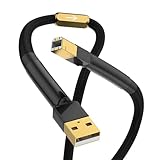
- The hifi USB cable type A to B is designed with a 24K gold plated USB2.0 (480Mbps) that provides high-quality audio and video transmission.
- This Hi-end A-B USB cord features a unique structure with 4 cores and 40 strands x 0.08mm for each core, ensuring rapid data transfer.
- Audiocrast hifi USB cable is crafted with a 4N 99.998% OFC copper conductor containing 3% silver Senju soldering for superior connectivity.
- The audiophile USB cable is protected by an aluminum foil/braided shield and covered with a 6.0±0.15 mm black PVC and braided sleeve sheath, making it durable and long-lasting.
- Our 365 days return and money-back warranty ensures customer satisfaction with their purchase.
Product prices and availability are accurate as of the date/time indicated and are subject to change. Any price and availability information displayed on Amazon at the time of purchase will apply.




