The Tool Desk
Outbyte Driver Updater FREEScan for outdated or missing drivers - takes under a minuteDriver Scan →Outbyte PC Repair FREERepair Windows errors before they cause bigger problemsFix Now →To tune up a miter saw, check the blade against the table at zero bevel, then check the blade against the fence at zero miter. Correct the saw’s mechanical alignment using the procedure for its exact model; set its angle pointers afterward. Unplug the saw before adjusting it, check the full travel of a sliding saw, and verify the result with a test cut.
What you need before adjusting the saw
Use an accurate square, such as a combination square, to check the flat plate of the blade. The Bosch 4412 and Harbor Freight item 57608 manuals both use a square for alignment checks. Keep the square away from the teeth; the teeth can give a misleading reference and are sharp.
- Find the manual for your exact make and model before loosening bolts or changing stops. Adjustment locations, tools, and sequences differ.
- Unplug the saw before adjustment or repair. Bosch and Harbor Freight both specify disconnecting power in their manuals.
- Secure the head, table, and slide as your manual directs. Keep hands and measuring tools clear of the blade.
Check blade-to-table squareness at zero bevel
- With the saw unplugged, set the bevel to the saw’s zero position and secure it as the manual directs.
- Place the square on the table and against the flat plate of the blade, not the teeth. Check that the square meets the blade consistently.
- If the blade is not square to the table, use only the model-specific stop or adjustment described in the manual, then check again.
The Bosch 4412 manual describes this check with a combination square; Harbor Freight item 57608 describes the same basic geometry with a framing square. Their adjustment procedures are model-specific, not interchangeable.
Check blade-to-fence alignment at zero miter
- Set the miter table to zero and lock it as specified by the manual.
- Place the square against the fence and the blade plate, clear of the teeth. Check whether the blade is aligned with the fence.
- If alignment is off, adjust the fence or the designated mechanism according to your saw’s manual.
On a sliding saw, a check at one position may not confirm alignment throughout the slide. Check across the full travel. The Bosch 4412 manual specifically calls for checking the complete slide cut; it describes loosening fence bolts to align the fence before setting the miter-scale indicator.
PC Slower Than It Used to Be?
A free scan shows the junk files, broken settings and background clutter dragging Windows down - then fixes them in one click.Free scan · Windows 10 & 11Crashes, No Sound, or Screen Glitches?
Random freezes, missing sound and display glitches usually trace back to one bad driver. Find and replace yours safely.Free scan · under a minute#1 Best Overall

- A Better Way to Measure: The M1 Caliber is a professional‑grade miter saw measuring tool designed to help professionals across trades achieve faster, more consistent, and more accurate cuts than traditional measuring methods
- Digitize Your Miter Saw Workflow: Converts manual measuring into a digital process by clamping to a saw fence and displaying real‑time cut measurements (English and Metric) on a large, backlit LCD screen as material slides beneath the measuring wheel
- Eliminates Measuring & Marking: Removes the need for a tape measure and pencil by delivering instant length readings directly at the saw, simplifying measuring and cutting for repeatable results
- Broad Saw Compatibility: Compatible with most miter saws, cut‑off saws, chop saws, and vertical band saws. Make miter, bevel, compound, and straight cuts on both flat and round materials including boards, composites, and pipe
- Increased Safety: Centralizes measuring activity at the saw fence, helping reduce repeated handling, repositioning, and manual measuring tasks during cutting operations
Set bevel stops only after the zero setting
If your saw has a 45-degree bevel stop, check it after the zero-degree bevel is correct. Harbor Freight’s item 57608 manual specifies setting zero before adjusting its 45-degree bevel; Bosch provides separate procedures for its 45-degree stops. Follow the instructions for your own model rather than applying either procedure to another saw.
Align the pointers after the saw’s geometry
Once the blade, table, and fence are mechanically aligned, set the miter or bevel pointer to the scale as the manual directs. A pointer shows the scale setting; changing it does not make the blade square. Both Bosch and Harbor Freight place fence or geometry checks before miter-indicator calibration.
Rank #2
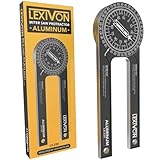
- ACCURATE - Crafted from CNC-machined Anodized Aluminum Alloy Steel. Features easy-to-read precision laser engraved scales.
- DESIGN - Internal Teflon O-ring mechanism swivels during operation and ensures smooth & precise read on inside/outside corners.
- FORGET ABOUT THE GUESSWORK - Two scales transfer your work angle directly to the miter saw for an accurate Miter cut, and Single cut.
- DO IT RIGHT THE FIRST TIME! - Perfect for crown molding, trim work, plumbing, and a variety of other carpentry applications.
- QUALITY - The 1/4-Inch thick aluminum alloy is stronger and won't bend like the plastic ones | Backed by our Lifetime Limited Warranty for your complete peace of mind!
Check clearance and verify with a cut
- With the saw unplugged, move the blade and head through their full range of motion. On a sliding saw, confirm the blade clears the sliding fence throughout its travel. Harbor Freight’s item 57608 manual specifically warns users to check this clearance.
- Restore power only when all adjustments are complete and the manual’s safety conditions are met. Make a test cut in scrap using the manual’s procedure.
- Check the cut with a square. Harbor Freight also recommends bringing two cut ends together after rotating one piece 180 degrees; a gap can make a small angular error easier to see.
Why the exact saw manual matters
There is no single bolt-by-bolt tune-up procedure that applies to every miter saw. For example, Bosch’s 4412 instructions address fence bolts and the full slide cut, while Harbor Freight item 57608 uses a specified zero-degree adjustment bolt and gives a separate sequence for its 45-degree setting. A Bosch 5412L manual mirror also describes checking blade-to-table squareness with a combination square, but it concerns a different model. Use the manual for your saw to identify adjustment points and tools before making changes.
Quick Recap
Best Value
- Fits Most 7-1/4, 8, 8-1/4, 10, And 12-Inch Miter, Sliding Compound Miter, Chop, And Portable Saws
- New Recessed Laser Design To Protect The Laser From Hitting The Material On Deep Cuts
- New Thinner Design To Fit More Saws
- New Brighter And More Accurate Laser Line
Rank #4

- Premium Aluminum Alloy Construction: This table saw alignment gauge is made of high-quality aluminum alloy, featuring excellent sturdiness, wear resistance and rust prevention. CNC-machined for stable structure, solving the problem of flimsy tools affecting calibration accuracy and ensuring long-term reliable use
- Precise Parallelism Correction: The table saw dial indicator delivers accurate measurement for saw blade parallelism calibration. It effectively eliminates blade wobble and alignment errors, ensuring precise cutting and protecting workpieces & blades from damage, a must-have table saw accessory.
- Wide Compatibility: Designed to fit standard 3/4 inch (19mm) miter slots, this table saw gauge is compatible with most table saws, band saws and router tables. Solves the hassle of mismatched tools, meeting diverse woodworking machinery calibration needs.
- Easy Setup & Operation: No complex tools required! Simply slide the gauge into the miter slot, adjust to fit tightly, and align the dial indicator with the saw blade or rip fence. Quick calibration saves time, suitable for both professional carpenters and DIY beginners.
- Optimal Size for Versatile Use: With 9.13*6.1inch compact dimension, the table saw alignment tool is easy to store and carry. Perfect for workshop calibration, woodworking projects and machinery maintenance, providing consistent performance in various scenarios.
Rank #3
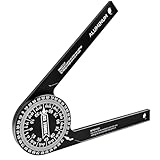
- MASTER PRECISION CUTS: Machined from a single piece of anodized aluminum; this CNC miter saw protractor features high-contrast laser engraved scales; maintains clarity even in dusty job sites while resisting rust and wear for professional workshop use
- AVOID CALCULATION ERRORS: Transfer angles directly to your miter saw without complex math; the intuitive system helps you achieve perfect gaps-free corners; ideal for crown molding and trim work where precision is critical for seamless joints
- LOCK ANGLES SECURELY: Engineered with a smooth O-ring hinge mechanism; this angle finder supports a stable and no-slip transfer from any wall corner directly to the saw; the internal pivot provides precise resistance for inside or outside measurements
- ULTIMATE PORTABILITY: Weighing only 5.3 oz, this compact 7.2-inch aluminum angle finder slips easily into your tool belt. Its lightweight design reduces fatigue during full-day trim carpentry or renovation tasks without sacrificing durability.
- VERSATILE MEASURING KIT: Includes a conversion chart and a hex key for instant use in various woodworking or metalworking layouts; excellent for DIYers and professional contractors; fits perfectly with your existing essential carpenter tools
Product prices and availability are accurate as of the date/time indicated and are subject to change. Any price and availability information displayed on Amazon at the time of purchase will apply.
Do these 3 things before closing this tab:
1Fix the driver behind crashes, sound loss and screen glitches2Repair Windows errors before they cause bigger problems3Scan for outdated or missing drivers - takes under a minute



