The Tool Desk
Outbyte Driver Updater FREEScan for outdated or missing drivers - takes under a minuteDriver Scan →Outbyte PC Repair FREERepair Windows errors before they cause bigger problemsFix Now →On most Samsung ranges, press Clock, enter the current time, then press Clock or START/SET to save. If your control panel uses a Smart Dial or touch screen, the steps are different; use the matching instructions below. Samsung says the exact procedure varies by model.
Set the clock on a conventional Samsung range
- Briefly press Clock on the oven control panel. It may appear as a clock icon.
- If prompted, press Clock again to choose AM or PM. Skip this step if the range uses a 24-hour display or does not prompt you.
- Enter the hour and minutes using the number pad or directional buttons. For example, Samsung’s US instructions use 1, 3, and 0 to enter 1:30 on a number pad.
- Press Clock or START/SET to save. If you entered the wrong time, press Clear and start again.
- Check that the display shows the correct time.
Use a brief press for ordinary clock entry. Samsung warns that holding Clock for three seconds on some models opens the Settings menu instead.
Set the time on a Samsung Smart Dial range
Samsung Canada’s instructions for Smart Dial controls say the panel can enter Sleep mode after two minutes without activity. If the controls appear inactive, push or turn the dial to wake them.
- Tap the Menu icon.
- Select Set time.
- Turn the dial to enter the time, then push the dial to confirm.
To switch between 12-hour and 24-hour time, open the Time format menu. These instructions are for Samsung products sold in Canada; settings may differ in other regions.
#1 Best Overall

- Samsung DE92-02588G Range Oven Main Control Board + Clock monitors the oven temperature and controls the oven heating functions in the range, and includes the digital display for the time and temperature settings
- Samsung DE92-02588G is a genuine Original Equipment Manufacturer (Authorized OEM) part. Compatible Brands: Samsung
- Samsung DE92-02588G is a perfect fit within various supported Samsung brand models
- Samsung DE92-02588G is quality tested for excellent performance as per Samsung's standards
- It is recommended to either refer to your appliance service manual, contact your appliance manufacturer, or contact a service professional to validate the needed part number for your appliance prior to purchasing
Set the time on a Samsung touch-screen wall oven
For the touch-screen wall ovens covered by Samsung Canada’s guide, open Settings > Date & Time. To set the clock manually, turn off the automatic time option, then enter the time zone, date, and time. To use automatic time setting, turn on Wi-Fi and enable the automatic option in the same menu.
Samsung notes that the time display on the touch-screen models described in that guide turns off after one hour of inactivity. The instructions apply to the Canadian market, and settings can vary by region and model.
Rank #2
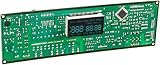
- Oven / Range Control Board and Clock DE92-02588G monitors the oven temperature and controls the oven heating functions in the range, and includes the digital display for the time and temperature settings.
- Works with these Gas Range Models:
- NX58F5300SS NX58F5500SB NX58F5500SS NX58F5500SW NX58R4311SG NX58R4311SS
Reset the clock after a power outage
A power outage can leave the clock needing to be set again. Use the procedure that matches your controls: the Clock-button steps for conventional ranges, the dial menu for Smart Dial models, or the Date & Time settings for the touch-screen wall ovens described above. An accurate clock also supports automatic functions such as delayed cooking and Sabbath mode.
Independent reader supportYour contribution helps us test, update, and keep practical guides available for everyone.Find the right instructions for your model
Samsung documents several control styles, and there is no single button sequence for every Samsung stove. If your panel does not match these steps, look up the appliance’s model-specific manual through Samsung’s US clock-setting instructions or Samsung Canada’s clock-setting guide. The Canadian guide covers Smart Dial and touch-screen interfaces; the US article gives general instructions for most ranges.
Do these 3 things before closing this tab:
1Repair Windows errors before they cause bigger problems2Scan for outdated or missing drivers - takes under a minute3Clear out junk files and repair common Windows errorsQuick Recap
Best Value
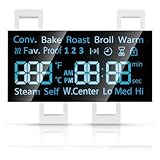
- [Precise Compatibility]: DG07-01005A Range LED Display Board Designed specifically for Samsung Electric Range Models NE59R6631ST/AA, NE59R6631SG/AC, NE59R6631SG/AA, NE59R6631SS/AC, NE59R6631SS/AA, NE59N6630SS/AA, NE59N6630SG/AA for precise compatibility
- [Upgraded LED Display]: Features a high-definition LED screen that delivers bright, clear, and anti-glare visuals, allowing easy reading of temperature, time, and cooking mode even under low-light conditions. The upgraded panel ensures excellent visibility from multiple angles, improving your overall cooking experience
- [Exceeds OEM Quality]: Built with premium-grade electronic components and upgraded soldering technology for enhanced durability, brightness, and long-term stability. Manufactured to exceed OEM standards, ensuring consistent performance, longer service life, and reduced risk of flicker or failure over time
- [Fixes Common Issues]: ①Blank or flickering display screens; ②No power to the range; ③Oven not heating properly; ④Oven not responding to controls; ⑤Oven temperature sensor errors
- [Easy Installation]: Plug-and-play design allows quick replacement of the old LED board without special tools or professional assistance. You can find the installation video on youtube, follow it, and you will easily complete the installation
Rank #4
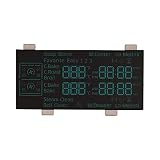
- Replacement compatible for Samsung DE07-00130A Led Display 7S 14D Ne7000J_Flex($1499) I
- REPAIR SOLUTIONS: Upgrade your appliance with ForeverPRO, the top choice for DIYers seeking high-quality maintenance. As a Proud USA Based Company, we provide durable OEM-spec parts—from aluminum mesh filters and stainless steel elements to plastic knobs and gaskets. Whether fixing a clogged pump, leaking valve, noisy motor, or broken sensor, our universal compatible components offer a genuine fit for kitchen, laundry, and HVAC units. From circuit boards and heaters to seals, racks, or handles, our parts fix malfunctioning or worn-out systems for a long-life home or commercial repair. Trust ForeverPRO for an efficient DIY install to get your machine working again.
- PRO Grade Premium Led Display 7S 14D Ne7000J_Flex($1499) I - Meets or Exceeds OEM Specifications Quality. Comes Brand New in Original Retail Packaging
- ForeverPRO Range Led Display 7S 14D Ne7000J_Flex($1499) I
- Check Description for Model Compatibility. Compatible With Most Samsung Ranges including NE59J7750WS/AA NE59J7750WS/AA NE59J7750WS/AA NE59J7750WS/AA NE59J7750WS/AA NE59J7750WS/AA NE59J7750WS/AA NE59J7750WS/AC NE59J7750WS/AC NE59J7750WS/AC NE59J7750WS/AC NE59J7850WG/AA NE59J7850WG/AA NE59J7850WG/AA NE59J7850WG/AA NE59J7850WG/AA NE59J7850WG/AA NE59J7850WG/AA NE59J7850W
Rank #3

- Electric
- Multicolor
- Replacement for Samsung DE92-02588E
Product prices and availability are accurate as of the date/time indicated and are subject to change. Any price and availability information displayed on Amazon at the time of purchase will apply.




