Recommended Free Tools
To set an air conditioner timer, choose the ON, OFF, program, or sleep function on the unit’s remote or control panel, set the requested time or delay, and confirm it if the model requires confirmation. Button names, timer behavior, and available settings vary by model, so check the AC’s model number and manual whenever the controls differ from these general steps.
Understand which timer you need
Timer controls do not all do the same thing. Choose the function that matches what you want the AC to do:
As an Amazon Associate I earn from qualifying purchases.
- ON timer: starts the AC at a chosen time or after a delay.
- OFF timer: stops a running AC at a chosen time or after a delay.
- Program timer: schedules both a start and a stop. Some systems indicate which action comes first.
- Sleep timer: may adjust the temperature while the AC runs before switching it off. It is not necessarily the same as a plain OFF timer.
Also check whether the setting is a countdown from now or a clock time. For instance, a portable AC may ask how many hours until it starts or how long it should run, while another controller may offer scheduled ON and OFF modes. Do not assume one type of timer behavior from another model.
Crashes, No Sound, or Screen Glitches?
Random freezes, missing sound and display glitches usually trace back to one bad driver. Find and replace yours safely.Free scan · under a minuteWindows Errors? Fix Them Before They Spread
Repair common Windows errors and clear accumulated junk for a smoother, more stable PC - no reinstall needed.Free scan · no reinstallSet the timer on your AC
- Identify the model and timer controls. Find the model number on the unit or its documentation, then consult the matching manual if the remote’s labels or sequence do not match these steps. Remote designs and supported functions vary; an unsupported button may beep without activating anything, as LG explains in its timer guide.
- Check the AC’s current state. Some timers can only be programmed when the unit is on; others require it to be off for a delayed start. De’Longhi’s portable AC instructions distinguish between setting a delayed start while the unit is off and setting its run time while it is operating. Haier’s window AC instructions give an example that requires the unit to be on.
- Select the intended mode. Press TIMER, TIMER MODE, ON, OFF, or the equivalent control. Some remotes use one timer button to cycle through modes rather than separate ON and OFF buttons.
- Choose the time or delay. Use the arrow, plus/minus, or timer buttons to set the desired value. The available increments and maximum vary. LG describes one remote with ON/OFF settings in one-hour increments from 1 to 24 hours; its cited sleep timer starts at 30 minutes and then uses hourly increments up to 12 hours. Haier’s cited ductless timer uses half-hour increments through 12 hours, then hourly increments through 24 hours. These are examples for the specified models, not settings to expect on every AC.
- Confirm or let the setting register. Press CONFIRM, SET, or the equivalent if the manual calls for it. Some controllers save automatically after a short pause: Fujitsu General says its UTY-LNHY controller stores a setting after about five seconds. The cited Haier ductless instructions instead require CONFIRM/CANCEL.
- Check for acknowledgment. Look for the timer indicator or selected time on the remote or unit display. Aim the remote at the indoor unit if required; Fujitsu General says a beep indicates that its indoor unit received a signal from the wireless controller.
Cancel or reset a timer
Cancel a scheduled action
Use the cancel procedure for the specific remote rather than simply changing modes at random. On Fujitsu General’s UTY-LNHY controller, cycle TIMER MODE to CANCEL. Haier’s cited ductless instructions cancel the selected timer with CONFIRM/CANCEL. Other remotes may use a dedicated CANCEL button or a different sequence.
#1 Best Overall

- Multifunctional: thanks to its 3-in-1 design, this timer can do daily on-off timer, countdown and turn on/off timer, and short on-off cycle timer, making it much more versatile than other models
- Good Helper and Money Saver: helps to streamline your daily routines, reduce energy use and save on your energy bills by automatically powering your appliances on and off as needed
- User-Friendly Design: large screen for clearer view of digits and numbers; built-in battery to memorize your programs during power outages; completely silent and ideal for home use
- Protect Your Electronics: countdown and turn off mode can be extremely helpful to limit the charging time for your expensive electronic devices and prolong their service lives
- Buy with Confidence: V0 fireproof housing plus its child lock function make this timer safe to use and operate; each timer is backed by lifetime support
Reset after power loss or battery replacement
A timer may need to be programmed again if the AC loses power or the remote batteries are replaced. Haier says its cited ductless timer needs resetting after either event, and TCL’s multi-split manual says its timer must be set again after power off. Follow the manual for your model rather than assuming the schedule survived.
If the timer will not set
- Nothing happens: Check that you selected the correct ON or OFF function and that the unit is in the state required for programming.
- The display changes but the AC does not respond: Complete any confirmation step, then check for a timer icon or other acknowledgment from the indoor unit.
- The remote beeps but the function does not activate: The control may not be supported on that model. Verify the remote and unit instructions; LG notes that unsupported functions can produce a sound without activating.
- The schedule disappeared: Re-enter it after a power interruption or battery replacement if the model requires a reset.
- The timing seems wrong: Confirm whether the setting is a delay from now or a time-of-day schedule, and check the increments supported by that model.
Sleep timers can change the temperature
A sleep timer may gradually change the set temperature before switching the unit off. For the Fujitsu General UTY-LNHY controller, the documented behavior is a 1°C rise per hour up to +2°C in cooling or dry mode, and a 1°C drop every 30 minutes up to -4°C in heating mode. These figures apply to that controller’s documented sleep function, not to air conditioners generally.
Quick Recap
Best Value

- 【Daily Repeating Light Timer】: 48 ON/OFF setting options in 24 hours; each pins means 30 minutes interval; daily repeat your setting.
- 【Compact Design Plug Timer】:This product minimizes size while maintaining functionality and safety, with the output ports designed underneath to help you save space in your outlets.
- 【Automate Your Home】: Set the time of day when you want to turn your device on and off, the timer will help you to control your device automatically every day, saving your time and energy.
- 【Easy to Use】: No complicated programming required, just pull the pins up for OFF time, and push down the pins for ON time, the timer can automatically control your device for your setting time, save your time and energy.
- 【Safe & Reliable】: ETL Listed; If you have any questions, our professional and reliable after-sales service will help you within 6 hours.
Rank #4

- This heavy-duty, grounded, plug-in outlet timer by Intermatic automatically controls 220 or 240 Volt air conditioners, heaters, heavy-duty appliances and lamps
- Easily program 2 ON/OFF settings per day with movable trippers
- Provides a three-prong, grounded plug
- Suitable for loads of up to 5000 Watts, or a 2HP motor
- This product requires a 20 Amp outlet
Rank #3

- ✓ VERSATILE & CUSTOMIZABLE: Easily set up to 8 on/off programs for the timer’s two grounded outlets. Outlets are controlled simultaneously, and settings can be as short as one minute.
- ✓ JUST SET & GO: Choose your own individual days or simply select one of the convenient pre-set combination days. Switch to Daylight Savings mode with a press of a button. Our long-lasting backup battery keeps your settings even in the event of a power outage.
- ✓ PROTECT YOUR HOME: Activate the “Random” Vacation mode to randomize your programmed lights. Make your home look “lived in” even when you’re away.
- ✓ SAVE ENERGY & MONEY: Save costs on electricity. Digital heavy duty timer use for lights, coffee machines, fans.
- ✓ SAFE & RELIABLE: This timer is ETL listed and rigorously controlled for quality and safety. Rating: 120V, 60 Hz, 15A/1725W
Rank #2
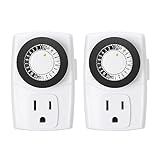
- ✓ SIMPLE TO USE: Pins UP means timer is OFF. Pins DOWN means timer is ON. Please note that your timer’s pins will come pressed DOWN new of the box. Pull the pins UP to begin setting your timer
- ✓ AUTOMATE YOUR HOME OR OFFICE: Turn on and off lamps, small appliances, Christmas trees, and other electrical devices with a handy timer
- ✓ DESIGN YOUR OWN SCHEDULE: With up to 24 on and off settings per day, you can program your devices to turn on/off in as small as 30-minute intervals. Settings will repeat daily once programmed and plugged-in
- ✓ CONVENIENT AND COMPATIBLE: Each package includes 2 mini outlet timers that can be used in 2 locations.This light timer is compatible with compact fluorescent lighting, LED bulbs, and most small appliances
- ✓ RATINGS: 125-Volt, 60 Hz./15-Amp, 1875-Watt resistive/8-Amp, 1000-Watt tungsten/5 Amp ballast
Product prices and availability are accurate as of the date/time indicated and are subject to change. Any price and availability information displayed on Amazon at the time of purchase will apply.




