The Tool Desk
Outbyte PC Repair FREEClear out junk files and repair common Windows errorsFree Scan →Outbyte Driver Updater FREEFix the driver behind crashes, sound loss and screen glitchesFind Drivers →An ESP8266 NodeMCU can report whether a garage door is open or closed and publish garage temperature and humidity to a home-automation system. Use a magnetic contact switch for the door and a separate compatible temperature/humidity sensor, such as a DHT22. The NodeMCU does not measure humidity by itself. Add a relay only if you also want to send an opener command.
What the project needs to measure
Door position and garage climate are separate measurements. A magnetic reed or contact switch changes state when the door reaches its closed position; a temperature/humidity sensor supplies the climate readings. The controller reads those inputs and can send the values to Home Assistant, for example through MQTT.
- Door: a magnetic contact switch, mounted so the magnet and switch align when the door is closed.
- Temperature and humidity: a compatible sensor such as the DHT22. The ESP-MQTT-GarageDoorSensor project documents DHT22 reporting; OpenGarage firmware lists AM2320, DHT11/DHT22, and DS18B20 options. Those lists establish supported choices, not a comparative accuracy ranking.
- Controller and connection: an ESP8266-class NodeMCU with firmware configured for the selected sensors and an integration path such as MQTT.
Choose a door-sensing approach
Magnetic contact switch
A reed/contact switch is a direct way to tell whether the door has reached the position you define as closed. GarHAge documents normally-open and normally-closed switches, so configure the firmware to match the switch actually installed. Its example connects one switch between NodeMCU D5 and GND, and a second door switch between D6 and GND. These are project-specific assignments, not universal pin requirements; check the board and firmware configuration before wiring.
Distance sensing or a combined approach
OpenGarage firmware documents magnetic-switch and distance-sensor options, including configurations that combine them. With AND logic, the door is regarded as open only when both sensors report open; this can make the system more conservative about declaring the door open, but it also means a disagreement or failed sensor can change the reported state. Select logic deliberately and understand what each sensor can observe in your installation.
Free tools Windows power users keep installed
One-click scans. No signup required.
#1 Best Overall

- Not only it is easy to program for this controller by using the CP2102-USB interface,but also unnecessary to press the flash and reset buttons before each flash operation.
- NodeMcu is an open source Lua based firmware for the ESP8266, ultra low cost wireless modules, development boards for rapid prototyping, integrated with ESP8266 chips.
- The ESP8266 has powerful on-board processing and storage capabilities, and can be integrated with sensors and other application-specific devices through its GPIOs.
- It is compatible with Arduino IDE,works great with the latest Mongoose IoT/Micropython.
- Modern Internet development tools can use the built-in API to instantly put your idea on the fast track.
Connect the readings to Home Assistant
The ESP-MQTT-GarageDoorSensor project describes publishing door state and temperature/humidity over MQTT. GarHAge also documents MQTT status and action topics and Home Assistant MQTT cover or binary-sensor configuration. Whichever firmware route you use, verify that the published state and the Home Assistant entity agree with the physical door.
For a Home Assistant binary sensor with device class garage_door, the official state convention is on = open and off = closed (Home Assistant binary sensor documentation, updated September 14, 2026). Map the contact logic accordingly; normally-open versus normally-closed wiring can invert the raw signal.
Rank #2

- The ESP8266 NodeMCU board has all the features of the traditional ESP8266 module,with the same exact size and peripheral ports,offers seamless integration with a 0.96-inch OLED display, eliminating the need for frustrating wires and breadboards.Display features a high-resolution 128x64 with SSD1306 driver and is compatible with I2C,SPI interfaces. Plus,It uses Micro usb cable to connect. Say goodbye to messy setups and hello to hassle-free electronics with the ESP8266 NodeMCU board
- This board uses I2C to connect to an OLED display via the SDA (D6 / GPIO12) and SCL (D5 / GPIO14) pins. With this board,it's easy to display a variety of information and data
- To install the new version driver for CH340,simply search for the keywords "CH340 Driver" on Google.com or Bing.com and follow the installation instructions provided.Recommended for Win10 Operating System
- ESP8266 NodeMCU board is equipped with ESP-12E module,which contains the Tensilica Xtensa 32-bit LX106 RISC microprocessor powering the ESP8266 chip. This microprocessor supports RTOS and operates at a clock frequency that can be adjusted between 80MHz and 160 MHz. It also boasts 128 KB of RAM and 4MB of Flash memory, providing ample storage for data and programs. With its high processing power, built-in Wi-Fi, and Deep Sleep Operating features, It's is an excellent choice for IoT projects
- This board is an outstanding option for various Internet of Things (IoT) projects. It can be used to display network connection status,monitor information, power levels, and other relevant data. Additionally, it's suitable for building Internet Weather Stations, News Stations, Clocks, and Other similar applications
Home Assistant’s Garage door integration documentation supports binary sensors with device class garage_door and covers with device class garage. It documents open/closed triggers and conditions for automations, and identifies the integration as introduced in Home Assistant 2026.4 (Home Assistant Garage door integration). If you run an earlier release, check the options available in that version rather than assuming this integration is present.
Use the status for alerts and automations
Once Home Assistant receives a correctly mapped entity, its garage-door open/closed triggers and conditions can support automations such as a reminder when the door remains open or a light action tied to door state. Temperature and humidity can be displayed or used separately in climate-related automations. The usefulness of either depends on the sensor being correctly positioned and the device continuing to report over Wi-Fi and MQTT.
PC Slower Than It Used to Be?
A free scan shows the junk files, broken settings and background clutter dragging Windows down - then fixes them in one click.Free scan · Windows 10 & 11Crashes, No Sound, or Screen Glitches?
Random freezes, missing sound and display glitches usually trace back to one bad driver. Find and replace yours safely.Free scan · under a minuteRank #3

- ESP8266 Breakout Board GPIO 1 into 2 Terminal Screw Board is Fully Compatible with ESP8266 ESP-12E
- GPIO 1 into 2: ESP8266 Breakout Board Can Expand 1 GPIO Pin to 2, Which is Convenient for Users to Reuse Pins for Large-Scale Smart Home Projects
- Double-Layer PCB: ESP8266 Breakout Board is a Double-Layer Board. One Pin is Wired On Both Sides. Therefore, the Circuit is Stable and Highly Reliable
- 2 Type Connections:ESP8266 Breakout Board Designed with Two Connection Methods: Pin Header Connector & Screw Terminal. Just Select Connection According to Your Need
- Convenient to USE: Compared with the Previous Version, Updated Version ESP8266 Breakout Board Has Been Soldered Completely. No Need to Solder Parts,Very Convenient to Use
Monitoring does not require opener control
A contact switch and climate sensor are enough for monitoring; a relay is optional. GarHAge documents a relay that momentarily closes the same circuit as the opener’s pushbutton terminals, but that is an example for its setup, not a compatibility guarantee for every opener. Confirm the particular opener’s interface before attempting control. This guidance does not cover connections to mains wiring.
Quick Recap
Best Value
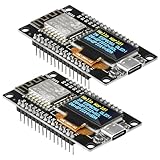
- The ESP8266 NodeMCU development board has a built-in 0.96-inch OLED display (128x64, SSD1306) and supports the I2C interface. It can be directly integrated without additional wiring, making it an ideal choice for quickly building ESP8266-based visual display projects
- The development board is equipped with the ESP8266 ESP-12E module, using the Tensilica Xtensa 32-bit LX106 CPU (80-160MHz), equipped with 128KB RAM and 4MB Flash, which can provide stable performance for demanding ESP8266 IoT applications
- The onboard OLED uses the I2C interface through the SDA (D6/GPIO12) and SCL (D5/GPIO14) pins on the ESP8266 NodeMCU, which can easily display real-time network status, sensor data, and other ESP8266 project information
- The ESP NodeMCU development board has built-in Wi-Fi, supports deep sleep, and is compatible with RTOS. It is ideal for low-power IoT solutions such as ESP8266 weather stations, clocks, and smart monitoring systems
- This ESP8266 development board uses a Type-C port for power and data transmission. The CH340 driver can be easily installed by searching online. It is fully compatible with Windows systems and is an ideal choice for ESP8266 beginners and professionals
Rank #4

- Built-in Micro-USB, with flash and reset switches, easy to program
- Arduino compatible, works great with the latest Arduino IDE/Mongoose IoT/Micropython
- Data download access to the website: http://www;nodemcu;com
Check the reported state against the installation
- Confirm that the magnet and contact align in the door’s closed position and remain separated when it opens.
- Check normally-open or normally-closed switch configuration and the selected GPIO mapping against your specific firmware and board.
- Verify that Home Assistant interprets the entity as open when the door is physically open and closed when it is physically shut.
- Check that MQTT and Wi-Fi connectivity are available when readings are expected; a stale or missing update is not proof of the door’s current position.
- Keep this DIY monitor separate from the opener’s built-in safety systems. A sensor report is not a verified safety state.
Product prices and availability are accurate as of the date/time indicated and are subject to change. Any price and availability information displayed on Amazon at the time of purchase will apply.