Recommended Free Tools
Create a separate record for each identifiable tool or piece of equipment, with its make, model, serial or identification number, purchase information, photos and ownership documents. That organized record can help you answer an insurer’s questions after theft or damage; it does not guarantee coverage or payment. Your policy and insurer’s instructions control what a specific claim requires.
What to include in a construction tool inventory
Start with tools and equipment your business owns and may need to identify after a loss. Include larger machinery and, where useful, identifiable attachments or components. Record whether an item is owned, rented or otherwise held by the business as an internal tracking convention; the sources do not establish this as a universal insurer-required field.
As an Amazon Associate I earn from qualifying purchases.
Make one entry for each identifiable item. Allstate recommends documenting value, purchase date, receipts and serial number or make and model; MapTrack’s construction-focused guidance also calls for make, model, serial number, photos and purchase documentation. The U.S. Department of Justice-hosted historical theft-prevention report recommends recording equipment and component identification numbers accurately and keeping them accessible.
Free tools Windows power users keep installed
One-click scans. No signup required.
- Item description and category: Use plain language, such as “cordless impact driver” or “tracked excavator.”
- Brand and exact model: Copy the information from the item or its documentation.
- Serial or other identification number: Transcribe the marking from the physical item when possible.
- Purchase date and price or recorded value: Keep the related invoice or receipt with the entry.
- Photo: Save a clear image that helps identify the item.
- Ownership evidence: Link a receipt, invoice or other existing record to the correct item.
- Optional internal details: Note the item’s location or custodian and any attachment or component identifiers.
There is no single template established by the cited sources. Use a spreadsheet, paper log or asset register that lets you capture these details and retrieve the supporting records.
#1 Best Overall

- 【Sufficient Quantity】You will receive 1 Roll of inventory stickers,600 pcs per Roll,each sticker measuring 2 x 2inches/ 5 x 5cm,in sufficient quantity to meet your inventory gift record needs.
- 【Quality Material】Our inventory organizer stickers are made of high-quality paper that's been professionally printed with a matte surface that's easy to write on and won't smear.Strong self-adhesive ensures this labels sticks and stays secure on virtually any flat and dry surface.
- 【Simple and Clear Design】Each inventory control label is printed with "NO,COUNT,DATE,BY"and corresponding blank areas,there is enough space to write the information you need,making inventory management easier.In addition,bright green color is eye catching,useful for being able to inventory your products.
- 【Widely Used】Our inventory labels suitable for companies,warehouses,fabric stores,logistics companies,retail stores or organizing inventory in production,quality control,warehousing,shipping/receiving,and storage etc.These stickers can be applied directly to various surfaces,make your inventory much easier.
- 【Easy to Use】These inventory stickers are easy to use,without the need for additional bonding tools.Simply peel and stick them onto the inventory items to help you maintain an orderly inventory.
How to find and record serial numbers
Inspect the item and copy the number exactly as marked. For large or complex equipment, ask the dealer to show you the identification numbers on the machine and relevant components, attachments and parts. That recommendation comes from a historical government-hosted theft-prevention report, not a current insurer mandate. Compare your transcription with the marking before saving it, then keep the record somewhere responsible staff can retrieve it quickly.
If the number is missing or unreadable, do not guess or invent one. Mark it unavailable, preserve the other identifying details and photos, and ask the dealer or manufacturer for help identifying an official number if needed. Claim guidance also recognizes detailed descriptions, technical descriptions and photographs as potentially useful documentation; no universal procedure for unreadable serial numbers is established in the cited materials.
Rank #2

- Asset tags feature a strong, industrial-grade permanent adhesive and the durable metallic material is chemical resistant, waterproof and abrasion resistant
- Easily customize your own asset label tags using the free Avery Design & Print software that features free designs, templates and barcode generator on the Avery website
- Print on demand as many labeling tags as you need, avoiding high minimum order quantities and long lead times
- Create your own security asset tags, barcode labels, equipment tags, property tags, name tag labels and more with blank labels optimized for laser printers
- Accurately record and monitor valuable assets such as electronics, equipment, tools, furniture, containers and more with chemical resistant and waterproof printable labels
Attach photos and proof of ownership
Save a copy of the purchase invoice or receipt with the matching inventory entry. If you do not have one, gather other existing records that may help document ownership, such as a bank statement, registration or photos. Allstate lists these as examples of proof of ownership, but no substitute is guaranteed to satisfy every insurer.
Photograph tools and equipment while they are in your possession. Make the item identifiable and store each image with its record. Refresh the photo when the item changes materially. The cited guidance does not prescribe a required camera angle or photo schedule.
Rank #3

- Custom printed barcode tags with your company or family name make it easy to organize everything
- Each tag has a unique, 7 or 8 digit barcode - we never print the same barcode twice!
- High durability polypropylene construction, printed with high quality resin for long life
- Industry-standard Code 39 barcodes (not UPC/EAN compatible)
If equipment is damaged, photograph it and follow the insurer’s instructions about retaining it for inspection. Insurer claim guidance may request photographs of damaged property, purchase documents or other supporting records, depending on the claim.
Keep the register current and retrievable
Update entries after purchases, disposals, transfers or changes to identifying details. Keep a backup and limit access to personnel who need the records. The cited historical report supports keeping identification numbers readily accessible, but the sources do not prescribe an update schedule or backup method.
Rank #4
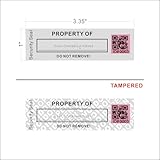
- 【Protect Your Assets with High Security】- Unlike normal asset tags in market, we added TAMPER EVIDENT SECURITY to these asset ID labels: security hidden messages (“VOID/OPEN”) will appear if tamper labels are removed, this irreversible change can protect your tool and equipment 100% secured
- 【Easily Customize Your Own Asset Label】- With the write-on/printable area, you can sign your own company name or print any custom texts permanently on this property label, providing non-duplication with unique QR code for MAX SECURITY of your assets
- 【Most Durable Labels for Your Control of Inventory】- Heavy-duty Metalized Polyester Material that offers excellent water, fade, and scratch resistance. Industrial-strength adhesive bonds to metal, plastic, and textured surfaces. Ideal for IT equipment, tools, and machinery
- 【Strong Adhesive & Clear Away】- Featuring a powerful adhesive for a permanent bond on various surfaces, these tamper labels provide clear evidence of unauthorized access and prevent reapplication, and you can use an ADHESIVE REMOVER to clear away the residue of adhesive if the applied packages (equipments) are reusable or expensive
- 【Faster Speed & More Efficiency for QR Code】- The 2D structure of QR code allows faster decoding, smaller physical footprint for the same data, and omnidirectional scanning (360°) without alignment
For a small inventory, a spreadsheet or paper log may be enough if you can link or store the evidence and find it when needed. For larger inventories or multiple sites, asset-register software may make records easier to organize; it is a convenience, not an insurer requirement. MapTrack describes associating invoices, serials, make and model, and photos with asset records. Whichever method you use, assess whether it captures accurate identifiers, links evidence, can be updated by the responsible people and remains accessible during a claim.
What to do if tools are stolen or damaged
Use the policy and your insurer’s actual instructions as the authority for notice, forms and deadlines. The steps below reflect examples from named insurers in different markets, not universal requirements.
Best Value

- Fast, One Click Labels: REEKON P1L construction label printer pairs with the BOLDR Pro App via Bluetooth to print custom labels with one click using pre built templates, connecting physical materials and locations to digital plans and documents
- Built for Jobsite Use: The P1L is fully portable, battery powered, and connects directly to your phone. A rugged rubber case enhances durability, while a robust mounting clip secures to work belts or carts. Recharge easily with USB C charging
- Reduce Human Errors and Wasted Material: Jobsite labels provide a fast, cost effective way to organize tools and materials, replacing handwritten labels to improve project accuracy and reduce confusion, mistakes, and material waste
- Durable Adhesive Thermal Labels: Fast printing, tear resistant thermal labels ideal for jobsite use, with high performance adhesives that hold through dust, moisture, temperature changes, and daily handling from delivery to final install
- Automatically Generated QR Codes: Bluetooth printer automatically generates QR codes that link directly to BOLDR Pro features. A suite of utilities allows for linking and customization to generate labels for almost any application and website
- Notify the insurer or broker: Follow the notice requirements in your policy. MSIG Singapore’s construction and engineering procedure says to contact its agent, broker or insurer at the occurrence; that instruction should not be treated as every policy’s deadline.
- Report theft where applicable: Make a police report if required or appropriate, and keep the report or reference details. Claim-document examples from Allstate, Berjaya Sompo Malaysia and MSIG Singapore include police reports for theft or burglary.
- Prepare an itemized list: Identify affected property using your inventory details, values, purchase records and available photos. Depending on the claim, insurer materials may also call for technical descriptions or claim forms.
- Prevent further loss and document damage: Take reasonable steps to limit additional damage, photograph affected property and retain damaged items for inspection when the insurer instructs you to do so.
- Submit requested documents: Provide the insurer’s claim form and supporting records, then respond to requests for additional information.
An internal inventory is not necessarily the same as a formal proof-of-loss form. Do not assume that an inventory alone satisfies a claim requirement, or that following these general steps establishes coverage; policy wording and the insurer’s directions govern.
Quick Recap
Sources and scope
- Allstate, “What are proof of ownership and proof of loss in insurance claims?” (updated May 2026).
- Berjaya Sompo Insurance Malaysia, “Assets — Claims and Support.” Claim-document guidance; page date not stated.
- MSIG Singapore, “File Your Construction & Engineering Insurance Claims.” Claim procedure; page date not stated.
- MapTrack, “Theft Prevention Playbook for Job Sites.” Vendor resource.
- U.S. Department of Justice Office of Justice Programs (host), “Construction and Farm Equipment Theft Prevention Techniques.” Historical report.
Product prices and availability are accurate as of the date/time indicated and are subject to change. Any price and availability information displayed on Amazon at the time of purchase will apply.