Start by confirming the current access plan with the project engineer or construction liaison. Then give customers one clear, current set of directions: whether you are open, which entrance to use, where to park, how to reach the door on foot, and what has changed. Put the same update on your website and other customer channels, add a simple map when words are not enough, and use signs only where they are permitted. Recheck everything whenever the work moves to a new phase.
A road closure does not always mean a business is inaccessible. Through traffic may be detoured while local access remains available, so verify the specific project rather than relying on the word “closed.”
As an Amazon Associate I earn from qualifying purchases.
How do I let customers know my business is still open during road construction?
Make the first message unmistakable: “Open during construction” or an equally direct status. Follow it with the route a customer can actually use today. A useful update answers the immediate questions in this order: where to enter, where to park or stop, how to reach the entrance as a pedestrian, whether hours or pickup arrangements have changed, and where to check for updates.
Free tools Windows power users keep installed
One-click scans. No signup required.
Do not assume customers know the difference between a road closed to through traffic and a site that cannot be reached. The Minnesota Department of Transportation says a road being worked on can still be available for business access while through traffic is detoured; the exact access arrangements depend on the project. MnDOT’s business construction guidance is one example of why the project-specific plan matters.
#1 Best Overall

- Will never rust or need repainting.
- Ordering a 2-Pack White "Signicade Deluxe" saves money
- Base can be filled with sand or water to add weight for wind resistance / Lift Up/Drop In feature to hold your sign panel
- No tape, screws or Velcro needed because of drop-in sign holder
- Holds two 24" x 36" signs (Signs not included with stand)
Use consistent language across your website, social profiles, email, voicemail, window notice, and any printed handout that customers are likely to see. A person who reads one version online and another on a door should not have to guess which is current. Date an update when useful, particularly if several access phases are expected.
What to include in the first update
- Your current open or closed status and any temporary hours.
- The street, side, or entrance customers should use, described with recognizable landmarks where possible.
- Where customers can park, whether parking has moved, and whether a pickup point is available.
- Whether the route from parking or the public sidewalk to the door is open and usable on foot.
- Any change to curbside pickup, deliveries, transit access, or the way customers should contact you.
- A link or instruction for checking the latest information.
Keep the first sentence short enough to work in a social post or a sign; put route detail and a map below it or on a linked page. Avoid broad claims such as “easy access” if the route involves a detour, a different entrance, or a walk around the work area. Tell customers what to do instead.
A reusable message structure
Adapt this sample to confirmed conditions, then use the same core wording wherever customers look:
We are open during construction. Please enter from [street or entrance]. Customer parking is [location]. The pedestrian route to our door is [route]. [Hours or pickup change, if any.] Check [website or contact channel] for the latest access update.
Replace each bracketed item with information verified for the current phase. If an item does not apply, remove it rather than leaving a blank or sending customers to an unconfirmed route.
Rank #2

- Versatile Poster Placement: Our A Frame Sidewalk Sign features a push-in design, allowing for easy poster placement from top to bottom or bottom to top. This exquisite and convenient design streamlines the process of replacing ads effortlessly (Frame Only).
- Optimal Size Compatibility: Designed to accommodate 24 x 36 inches boards and posters up to 8mm thick, our A-Frame sandwich board sidewalk sign maximizes advertising impact. Displaying two signs simultaneously attracts attention from multiple directions.
- Robust and Weather-Resistant: Coated with classic black paint and constructed from high-quality painted iron, our sign holder boasts a sturdy and durable design. Its all-metal construction ensures resilience against the elements, making it resistant to dust and weather conditions.
- Portable and Easy to Store: The foldable design of our Sidewalk Sign makes it highly portable and easy to carry, fitting seamlessly into your car boot. With a structure that doesn't break the ground, changing posters becomes a breeze, making it perfect for on-the-go advertising.
- Wide Range of Applications: With its solid construction, worry less about stability. Suitable for outdoor placement on pedestrian streets, outside restaurants, bars, museums, and ideal for indoor displays. Its versatility ensures effective advertising in various settings.
How to confirm the route before publishing directions
Get the project facts before writing directions. A construction schedule is not enough on its own: customers need the current, usable approach, and it can change when work shifts. Business Queensland recommends keeping in contact with project managers and updating customers and suppliers as access changes. Its guidance on reducing disruption from major infrastructure work also addresses communication and access planning.
- Find the right contact. Ask the local authority, project website, or project team for the engineer, construction liaison, or business-coordination contact who can confirm access. Keep that contact information where the manager on duty can find it.
- Ask what is open now and what changes next. Confirm the current phase, expected phase changes, road closures, driveway restrictions, sidewalk closures, and any access changes that may happen at short notice. Ask how the project will announce updates.
- Check each way people arrive. Ask about vehicle access, customer parking, pedestrian approaches, transit changes, deliveries, and any alternate pickup arrangement. Do not assume a route that works for a car also works for someone walking or using a mobility device.
- Clarify sign permissions. Ask who can authorize temporary signs and which rules apply to the road, sidewalk, detour route, construction fence, and your own premises. Ask who is responsible for placement and removal.
- Verify the route on the ground. Before directing customers to an alternate entrance or pickup point, confirm that it is open and that the route is safe and usable. If conditions do not match the plan, contact the project team before publishing instructions.
- Share the confirmed plan internally. Give staff and suppliers the same directions customers receive, including any delivery or arrival changes. Tell staff who will confirm future updates and where the current version is kept.
MnDOT advises businesses to discuss access needs early and notes that local business access can remain open even when through traffic is detoured. That is useful context, not a guarantee that a particular driveway, sidewalk, or entrance will remain available. Confirm your site’s arrangement with the people managing the work.
Recommended Free Tools
How to guide customers to the correct entrance, parking, and pedestrian route
Describe the route as a sequence a first-time visitor can follow. Name the approach street or side of the building, the entrance to look for, and where to park or stop. If customers must walk around a closure or enter from a side or rear door, say that plainly before they set out. A simple map can make a route easier to understand than a paragraph of turns.
Keep vehicle directions separate from walking directions. A driveway may remain open while the adjacent sidewalk is closed, or a car route may lead to a parking area that does not connect to the open door. Check the route from the customer’s starting point through to the entrance, not just the road leading to the property. Business Queensland recommends considering pedestrian and disability access when assessing disruption.
Use a map for routes that are difficult to explain
Make the map simple: mark the business, open entrance, customer parking, and the approach customers should use. Show an affected street or closed approach only when it helps explain what to avoid. Label the map with the phase or date when useful, and revise it when the route changes. MnDOT specifically suggests simple maps and distributing them through doors, social media, and mailings.
Rank #3

- Stand Only, capable of holding two signs 24" wide 36" tall
Check the map against the current project plan and the route on the ground. Do not draw a path through a work zone or imply that a blocked sidewalk is open. If the project’s route is unclear, ask the project contact before publishing the map.
Make alternate access easy to recognize
If the regular entrance is obscured or restricted, coordinate an alternate route with the construction contact. Depending on what is approved and available, that might be a side entrance, a route from another street, or a clearly identified pickup point. Toronto’s retailer guide recommends planning for customer parking and curbside pickup and considering a back door or laneway when regular entry is restricted. Federal Highway Administration work-zone planning material also identifies temporary entrances and signs for obscured entrances as possible access strategies.
These are options to evaluate, not instructions to use a particular entrance without checking it. A route that is convenient for the business may not be open, safe, or accessible to every customer. State only what you have confirmed, and change the message promptly if the arrangement changes.
Where should I put signs when construction blocks my entrance?
A sign on your own premises is different from a sign on a public sidewalk, road, detour route, or construction barrier. A window notice or portable sign on business property can identify that you are open, point to the entrance, or indicate parking, subject to applicable local rules. Do not assume that a public right-of-way or work zone is available for business signs.
Before placing anything beyond your premises, contact the project engineer or the relevant local authority. Placement can be restricted for visibility and work-zone safety, and the approval process depends on who owns the road and who is managing the project. The Wisconsin Department of Transportation advises coordinating sign locations with project staff, who can account for detours, driveway access, visibility, and safety requirements. Toronto’s retailer guide recommends prominent directional, parking, and “open for business” signs and describes wayfinding as a collaboration among retailers, contractors, and business associations.
PC Slower Than It Used to Be?
A free scan shows the junk files, broken settings and background clutter dragging Windows down - then fixes them in one click.Free scan · Windows 10 & 11Crashes, No Sound, or Screen Glitches?
Random freezes, missing sound and display glitches usually trace back to one bad driver. Find and replace yours safely.Free scan · under a minuteRank #4
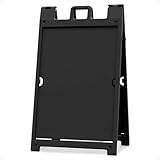
- QUICK CHANGE FEATURE - Change signs by easily sliding in and out of Stay Tabs, no adhesive required to attach display panels
- INTERNAL WEIGHT CAPABLE - Each sign frame has four fill holes. Remove plug from fill hole and fill each hole with up to 2.5 pounds of sand for added weight
- DOUBLE-SIDED - Display signs on both sides of frame to maximize exposure. Each side holds one 24" x 36" sign, up to 3/16" thick
- PORTABLE AND STORABLE - Sign frame easily folds down for convenient transport and storage. Hinges lock in open position to prevent over-extending
- NO MAINTENANCE - All plastic construction is weather resistant and made for indoor and outdoor use. Weighs 20 lbs with an overall folded size of 45" x 28" x 4"
Match the sign to the location
- On your own premises: Put the message where an arriving customer can see it, such as near the usual entrance or the route to an alternate door. Make sure it points to an entrance that is actually open.
- On a public sidewalk or road: Ask the local authority and project team before placing a sign. Their permission and placement rules govern; a sign that seems helpful can still obstruct access or create a visibility hazard.
- On a construction fence or inside the work area: Do not attach or place a sign without the project team’s approval. The contractor or authority may need to manage anything in the work zone.
- On a detour route: Coordinate with project staff rather than placing a sign independently. Detour signage must serve the official traffic plan and meet its safety and visibility needs.
The Wisconsin program guide is specific to its own context: it describes a temporary-sign policy for state highway work, says local street projects may differ, assigns sign costs to business owners under that program, and requires its covered signs to be removed within 48 hours after the work concludes. These are not general rules for every jurisdiction or project. Ask which requirements apply where your business is located.
How to keep online directions and customer communications in sync
Choose a primary place where customers can find the latest access details, such as a prominent page on your website. Update that page when hours, entrances, parking, or pickup arrangements change, then use social accounts, email, voicemail, and other relevant customer channels to point to the same information. Business Queensland advises updating websites and social channels when access or hours change; MnDOT also recommends sharing maps on doors, social media, and mailings.
Check your business’s map and directory listings for accuracy, including the entrance or parking details you control. Do not assume a consumer navigation app will show a project detour promptly. MnDOT notes that navigation apps may choose the fastest route rather than the official detour and that the agency does not control app routes. When an app conflicts with current official road signs or project guidance, tell customers to follow the official signs and project instructions.
Make the update usable on a phone: put the open status and route detail near the top, use plain directions, and link directly to the map or access page rather than asking customers to search for it. If you use several channels, assign one person to update them from the confirmed version so they do not drift apart.
What to do when construction changes phase
Access information is temporary. A route that was correct last week may be wrong after crews move barriers, close a driveway, or reopen a sidewalk. Assign one person to check for project updates and review customer directions on a regular schedule and after every announced phase change. Keep a simple record of the current directions, when they were verified, and which channels were updated.
Best Value

- 【The A Frame Sidewalk Sign】Our A Frame Sidewalk Sign push-in design, posters can be placed into the slot from top to bottom or from bottom to top , which is exquisite and beautiful and helps you replace ads in a much easier and more convenient way (Frame Only).
- 【Double-Sided Display】A-Frame sandwich board sidewalk sign 24"W x 36"H and the thickest poster that can be placed is 8mm , maximizes advertising from multiple directions and angles,Displaying two signs simultaneously attracts attention from multiple directions. bring you excellent advertising effect.
- 【Wide Range of Applications】With its solid construction, worry less about stability. Suitable for outdoor placement on pedestrian streets, outside restaurants, bars, museums, and ideal for indoor displays. Its versatility ensures effective advertising in various settings.
- 【Robust and Weather-Resistant】Our a frame sign holder 24x36 outdoor Coated with classic black paint and coupled with high-quality painted iron frame. All metal construction, durable, keep the dust out, resistance to weather.
- 【Portable Structure】The Sidewalk Sign is foldable design, easy to carry and storage, can easily fit into your car boot. It does not break the ground structure, and is easy to Change posters, perfect for advertisement display.
- Confirm the new arrangement. Ask the project contact what changed and when it takes effect. Verify the entrance, parking, pedestrian route, hours, and pickup or delivery arrangements affected by the phase.
- Check the route and map. Make sure signs and directions still lead to an open, usable path. Revise maps and remove details that no longer apply.
- Update digital channels together. Change the main access page first, then the business’s social profiles, directory information, email or other notices, and voicemail where needed.
- Replace or remove physical signs. Update signs on your premises and coordinate any public or work-zone signs with the responsible project staff.
- Tell staff and suppliers. Give them the effective date and the new route or delivery arrangement so they can answer questions consistently.
- Tell customers when normal access returns. Remove temporary directions and signs, correct online details, and clearly announce that the usual route is available again.
Queensland guidance recommends keeping customers, staff, and suppliers informed during the work and communicating when it is complete. Wisconsin’s program guide likewise advises notifying customers when access returns to normal. A clear end-of-work update helps prevent temporary instructions from lingering after they are no longer useful.
How to track the effect on your business
Wayfinding and communication can reduce confusion, but they do not guarantee unchanged traffic or revenue. Toronto’s retailer guide recommends monitoring sales, revenue, and traffic and cautions that mitigation can reduce negative financial impacts without necessarily eliminating them.
Keep a simple record of sales or revenue, customer counts or traffic, and the dates access arrangements changed. Use the same measures consistently so you can see whether a change coincides with a construction phase. The records will not by themselves prove that construction caused a particular result, but they can help you decide whether to adjust hours, staffing, inventory, pickup, delivery, or promotions.
The Tool Desk
Outbyte Driver Updater FREEFix the driver behind crashes, sound loss and screen glitchesFind Drivers →Outbyte PC Repair FREERepair Windows errors before they cause bigger problemsFix Now →No general numeric estimate establishes how much a sign, map, or customer update will improve sales. Treat these steps as ways to make access clearer and manage disruption, not as a promised financial outcome.
Common access problems and the practical response
- Customers say the road is closed, so they assume they cannot come: Confirm whether local access remains available, then state the distinction in your opening message and explain the route customers should use.
- The usual door is hidden or blocked: Confirm an approved alternate entrance or pickup point with project staff, then update the map, online directions, and on-premises signs.
- The driving route works but the walk to the door does not: Check pedestrian and disability access separately. Do not direct customers to a route that is not open and usable on foot.
- A navigation app sends customers to the wrong approach: Keep your own directions current, direct customers to official road signs and project guidance when they conflict with an app, and avoid promising that consumer map routes will update on a particular schedule.
- A temporary sign or map is out of date: Remove or revise it as soon as access changes, and update all customer channels from the same confirmed information.
- Staff and suppliers are giving different directions: Share one current plan internally, identify who owns updates, and give everyone the same effective date and contact channel.
Project-specific guidance and permissions
Local rules, road ownership, public right-of-way permissions, and construction phases differ. Use the project team and relevant authority to confirm the access plan and sign requirements for your location; examples from another city or state do not override local instructions. The following public guidance provides additional context:
Quick Recap
- Business Queensland: Reducing business disruption from major infrastructure work
- City of Toronto: Construction Mitigation Strategies Retailer Guide
- Minnesota Department of Transportation: Helping Businesses During Construction
- Wisconsin Department of Transportation: In This Together: Business Construction Coordination Program Guide
- Federal Highway Administration: Module 5: TMP Strategies – Developing Transportation Management Plans for Work Zones
- Colorado Department of Transportation: Stay Open with Minimal Impact
Product prices and availability are accurate as of the date/time indicated and are subject to change. Any price and availability information displayed on Amazon at the time of purchase will apply.




