What’s actually slowing this PC down?
Pick the symptom - the matching free tool is one click away.
If your Bosch power tool battery won’t charge, first check the outlet and charger, then let a hot or cold battery return to the temperature range specified in its manual. Check the exact battery and charger model before interpreting indicator lights or cleaning contacts; Bosch’s instructions vary by model. If these checks do not restore charging, have the battery and charger evaluated by Bosch service rather than opening the pack or trying to bypass its protections.
Why won’t my Bosch battery charge?
Start by identifying the battery and charger model from their labels and finding their manuals. Bosch 12V and 18V systems and older charger models are not interchangeable, and a light pattern or temperature limit for one model may not apply to another.
- Check the outlet. Plug another device into it to confirm it has power. If the charger is plugged into a switched outlet, check whether a wall switch controls it. If the charger’s lights are off, use the manual for that charger to interpret the condition. Bosch’s manual downloads can help locate product instructions.
- Let the battery return to its specified charging temperature. A battery that is too hot after heavy use or too cold after storage may not fast-charge until it returns to the acceptable range. Let it warm or cool naturally, then retry. Do not apply heat or try to force charging.
- Check the contacts only as the manual directs. Look for visible dirt on the battery and charger terminals. The 2015 BC630/BC660/BC1836 manual says to clean dirty terminals with a cotton swab and alcohol. That is model-specific advice, not a universal instruction for every Bosch battery; follow your own equipment’s manual.
- Read the charger indicators using its manual. Bosch indicator meanings differ across charger models. Do not assume a red or blinking light has the same meaning on every charger.
- If charging still fails, arrange service. Bosch recommends taking or sending the tool, battery, and charger to a service center when proper charging cannot be restored.
Could temperature be stopping the charge?
Yes. Bosch specifies different limits for different products, so use the range in the manual for your battery and charger. For example, the 2024 GBA37V30 battery manual gives a safe charging temperature range of +50°F (+10°C) to +95°F (+35°C) and says charging begins automatically once the battery returns to that range. The older BC630/BC660/BC1836 charger manual specifies 32°F (0°C) to 113°F (45°C). These are product-specific figures, not one universal Bosch range.
If the pack is outside its model’s stated range, allow it to return naturally to the permitted temperature before trying again. Bosch also advises letting an overheated battery cool before continuing. Do not charge a pack by placing it against a heater or otherwise trying to speed the temperature change.
#1 Best Overall
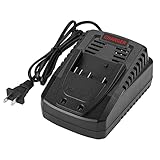
- Brand new, This quick battery charger is for Bosch slim pack and fat pack 14.4V 18V Li-Ion battery BAT609 BAT609G BAT618 BAT618G BAT614 2607336236, Replacement for Bosch BC660 BC1880 BC630 1018K battery charger
- Input: 100V-260V 50/60Hz 0.6A, Output: 14.4V-18V 3A, Fast charge 1.5Ah Lithium batteries full charged in 45 minutes or less thus minimizing downtime.
- Built-in charger diagnostic program checks batteries with every charging cycle, LED indicators accurately communicate charging status: charged, charging, battery too hot or too cold.
- Made with quality fire and heat resistance materials to promise safe use. Integrated cooling system protects the electronic components inside and extend charger’s life.
- Come with 18 months extended warranty, lifelong prompt customer service and technical support. Any other questions about our charger pls fell free to contact us.
Why is my Bosch battery charger blinking?
A blinking light is not enough to diagnose the fault without the charger model and its manual. Check the model label, then find the indicator chart in that charger’s instructions before deciding whether the light signals temperature, battery failure, interrupted charging, or another condition. For example, Bosch describes an error indicator on the GAL18V-40 as alerting to interrupted charging due to temperature and/or battery failures; that description should not be applied to other chargers.
Can I fix a Bosch battery that won’t charge?
You can safely try external checks: confirm outlet power, allow the battery to return to its specified temperature range, and inspect or clean contacts only if the relevant manual allows it. Do not open a lithium-ion battery pack, short its terminals, force-charge it, bypass protection electronics, or use an improvised charger. Bosch advises against adapters. A damaged or persistently faulty battery or charger should go to Bosch service for evaluation.
Rank #2

- FAST 18V CHARGING: Charges a spent Bosch 18V 4 Ah battery to 80% in 32 minutes and to 100% in 50 minutes
- 8-AMP CHARGING CURRENT: Delivers 4x the charging current compared to the GAL18V-20 standard charger
- 6-BAY CHARGING CONVENIENCE: Allows users to sequentially charge six Bosch 18V batteries
- REGULATED DUAL-MODE CHARGING: Charges the first 80% fast, while the remaining 20% charges in long-life mode
- ACTIVE AIR-COOLING: Features a charger-cooling fan that optimizes charging
When might the battery need replacement?
A substantial drop in runtime per charge may mean the battery is nearing the end of its life and should be replaced, according to Bosch’s GBA37V30 manual. That symptom is evidence of possible battery aging; it does not by itself prove why a battery will not charge. If the battery’s runtime has not noticeably declined, use the outlet, temperature, and model-specific checks before assuming the pack is worn out.
Independent reader supportYour contribution helps us test, update, and keep practical guides available for everyone.How to choose a replacement charger
Confirm the battery’s voltage platform and chemistry, then verify compatibility with the charger’s specifications before buying. Bosch lists the GAL18V-40 as compatible with Bosch 18V lithium-ion batteries, but it is not a universal Bosch charger. If compatibility is unclear or the existing charger may have failed, Bosch service can assess the battery and charger together. Bosch’s service page provides tool-repair information and a service-center locator.
Windows Errors? Fix Them Before They Spread
Repair common Windows errors and clear accumulated junk for a smoother, more stable PC - no reinstall needed.Free scan · no reinstallCrashes, No Sound, or Screen Glitches?
Random freezes, missing sound and display glitches usually trace back to one bad driver. Find and replace yours safely.Free scan · under a minuteQuick Recap
Best Value

- ♣ rand: For Bosch 14.4V-18V Compatible with Li-ion Chemistry: Battery Charger Model No.: BC660
- ♣Replacement P/N. : 2 607 336 091, 2 607 336 092, 2 607 336 169, 2 607 336 170, 2 607 336 236, BAT609, BAT609G, BAT618, BAT618G
- ♣Compatible with : 17618,17618-01,24618-01, 25618,25618-01,25618-02, 26618,26618-01,3601H61S10, 36618 02, 37618, 37618-01 BSH180, CAG180-01, CCS180, CCS180B, CCS180K, CFL180, CFL180B CRS180, CRS180B, CRS180K, DDS180-01, DDS180-03, DGSH181, FHN180, HDS180-03 HTH181-01,HTH182-01, IWH181-01, IWHT180-01, IWHT181-01,JSH180-01, PB360S,RHH180-01, RHS181-01 GBH 18V-LI,GBH 18 VH, GCB 18V-LI, GDR 18V-LI,GDR 18V-LI MF,GDR 18-LI, GDS 18V-LI,GDS 18V-LI HT, GKS 18V-LI, GSA 18V-LI, GSB 18V-LI
- ♣No memory effect, charing at any time ,not affect the using life. 100% Compatible with original manufacturer equipments and chargers
- ♣QUALITY WARRANTY: 30 Days Money Back and 24 hours prompt customer service. If you have any problems, please feel free to contact us by email and we will reply with help!
Rank #4

- 【Wide Compatility】 - Dual Charger charges for Bosch slim pack and fat pack 14.4V 18V BAT609 BAT609GBAT618 BAT618G BAT614 2607336236 Lithium battery. Replace for Bosch BC660 BC1880 BC630 1018K charger
- 【DUAL CHARGER】: Input: 100v to 240v, Output: 20v Max,Type: Compatible with boash 14.4V 18V Li-ion Battery.
- 【Intelligent protection system】: With 6 protection of over-charge, over-voltage, under-voltage, over-current, over-temperature, and Automatically Cut off when Short-circuit.
- 【With LED indicators】LED temperature gauge lighting, Indicator lights that show the status as batteries are charged and maintained.
- 【Warm After-sales Service】: 1 year warranty. Please feel free to contact us if you have any questions about our replacement for battery charger station.
Rank #3
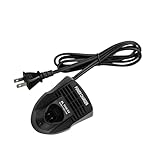
- Product Parameters: Product Parameters: Applicable product Li-ion Battery Batteries Charger, 10.8 Volt and 12 Volt batteries
- Compatible Models: for Bosch Power Tools Battery Charge 10.8V BAT411 BAT412A GSC 10.8 V-LI GSR 10.8 V-L GSR 10.8 V-LI-2 GSR 10.8 V-LI2 GSR 10.8 V- LIQ GSR 10.8-2-LI GSR 10.8-LI GUS 10.8 V-LI GWB 10.8- LI GWI 10.8 V-Li PS10-2 PS10-2A PS20-2 PS20- 2A PS20B PS21-2A PS30-2A PS30B PS31- 2A PS40 PS40-2 PS40-2A PS40B PS41- 2A PS50-2A PS50-2B PS50B PS70-2A GDR12-LI GDB12V-15 2607336013 2607336014 replacement power tool battery charger
- Safety Performance: Built-in multiple protection systems to prevent overvoltage, overload, overcurrent, overtemperature and short circuit. Stable at work to ensure safe charging
- Charging Tips: Charging mode Base charger No assembly required Batteries are not included, Built-in charging indicator for easy use, The long cord provides the flexibility to charge the battery at different locations, Can be mounted on the wall for easy compact storage
- Note: Please purchase according to your product model, only applicable to the above models
Product prices and availability are accurate as of the date/time indicated and are subject to change. Any price and availability information displayed on Amazon at the time of purchase will apply.




