To crimp a coaxial cable, cut the damaged end square, strip it to the connector manufacturer’s dimensions, fold the shield back, seat a compatible connector fully, and complete the correct crimp or compression-tool cycle. For most residential RG6 and RG59 repairs, a properly matched compression connector is usually the best default because it provides consistent mechanical retention and shielding. Hex-crimp connectors remain suitable when the connector and die are designed to work together.
“Coaxial cable” is not one universal size. The connector, cable construction, stripping dimensions, and tool must match. The procedure below covers the common F-type connectors used for cable TV, cable modems, satellite equipment, antennas, and some CCTV systems.
As an Amazon Associate I earn from qualifying purchases.
What you need
- Coaxial cable cutter
- Coaxial cable stripper
- A connector matched to the cable and equipment
- The correct hex-crimp tool or compression tool
- A coax continuity tester or suitable multimeter
- Eye protection
- Weather-sealing materials for outdoor connections
A coaxial stripper is safer and more consistent than a utility knife because it removes the jacket and dielectric at controlled depths without nicking the braid or center conductor. Do not use ordinary pliers to crimp the connector. They do not form the intended profile, and poor cutters can deform the cable.
Before cutting, disconnect the cable from the modem, television, antenna amplifier, satellite receiver, camera, or other equipment. Coax tools are not insulated and do not protect against electrical shock; do not use them on or near unknown or energized wiring. Klein’s safety guidance makes the same warning.
#1 Best Overall

- Portable and Convenient Tool Bag for Carrying Everywhere: Coax Cable Crimper Tool Kit it is safe in a convenient tool bag, which include an adjustable coaxial compression tool for RG6, RG59, RG11, a coaxial cable stripper, RG6 Connectors, RG59 Connectors, Female to Female RG6 Connectors; a screwdriver
- Sturdy Crimping Tool can Precise Extrusion F-Connector: Compatible with RG-6, RG-59 and RG-11 coaxial cables; portable size, handle made of the special soft material for non-slip, comfortable and firm operation
- High-Carbon Steel Blades for Fast Cutting and Stripping: Equipped with coaxial cable stripper, round cable stripper, cutter and flat cable stripper; Cassette is reversible, one side is available for RG 59/6 and another side for RG 7/11; Adjustable stripping blade for different insulation thickness, prevents damage of shielding and conductors
- Premium F-Connectors for Dual-Shielded RG6/RG59 Cables: Delivers professional, secure connections exclusively for double-shielded RG6/RG59 coaxial cables (not compatible with quad-shielded RG6/rg59 coaxial cable); Designed for indoor use to ensure reliable signal transmission.
- Lightweight and Portable for Indoor Applications: Ideal for indoor tasks including satellite TV dish/CCTV installation, move cable tv and cable modem, as well as in-home wiring for new house
Identify the cable and connector first
Read the printing on the cable jacket rather than relying only on appearance. RG6 is normally thicker and is common in modern broadband, satellite, cable, and antenna installations. RG59 is thinner and is common in older installations and some CCTV systems. RG6Q means quad-shield RG6, which requires different shield preparation from ordinary dual-shield cable.
| Application | Common connector |
|---|---|
| Cable TV, cable modem, satellite, antenna equipment | F-type |
| CCTV and some video equipment | BNC |
| Consumer audio/video equipment | RCA |
| Radio, networking, and specialty RF equipment | Various specialized RF connectors |
Do not force an RG6 connector onto RG59 or assume that every RG6 connector fits every RG6 cable. Cable diameters vary within nominal cable categories. For example, Belden publishes specific jacket, dielectric, and center-conductor limits for its DB6U-25 RG6 connector.
Connector compatibility also depends on termination style. A traditional hex-crimp connector needs a hex-crimp die. A compression connector needs the matching compression tool and stroke. These operations are not interchangeable.
Quick wins for a faster PC:
Scan for outdated or missing drivers - takes under a minuteDriver Scan →Repair Windows errors before they cause bigger problemsFix Now →Fix the driver behind crashes, sound loss and screen glitchesFind Drivers →Hex crimp or compression?
| Method | Advantages | Limitations | Best use |
|---|---|---|---|
| Hex crimp | Inexpensive connectors and familiar technique | Highly dependent on the correct die size and crimp position | Occasional indoor repair with a matched connector and tool |
| Compression | Generally more consistent retention and shielding | Requires compatible connectors and tool geometry | Preferred for many residential RG6/RG59 F-connector jobs |
| Twist-on | Requires little equipment | More vulnerable to loosening and inconsistent shield contact | Temporary or low-demand repair |
Belden describes its F compression connectors as providing 360-degree compression and improved shielding compared with twist-on connectors. That is a general recommendation, not an absolute rule: a correctly installed hex-crimp connector is preferable to a poorly matched compression system.
How to crimp an F connector onto RG6 or RG59
- Disconnect the cable. Disconnect both ends if practical and leave enough slack for a gentle bend and a service loop.
- Cut back to sound cable. Use a coax-appropriate shear-type or rounded-blade cutter. Make a square cut. If the cable is crushed, kinked, corroded, or ovalized, cut back until its cross-section is round and undamaged.
- Strip the cable. Use the connector’s specified stripper setting. Remove the jacket and dielectric without nicking or bending the center conductor.
- Prepare the shield. Fold the braid backward over the jacket or as the connector instructions specify. Keep every braid strand away from the center conductor. Do not remove foil that is intended to remain attached to the dielectric.
- Push on the connector. Slide it straight onto the prepared cable. The dielectric should reach the connector’s internal stop or specified flush reference, while the braid is captured by the connector.
- Crimp the connector. Place the correct section of the connector in the correct die cavity and complete the tool’s full ratchet cycle. Do not crimp the connector body above its shoulder ring.
- Inspect the termination. Look for a loose sleeve, cracked body, crushed jacket, exposed braid in the center-contact area, incomplete seating, or a bent, short, or excessively long center conductor.
- Test it. Check for continuity and shorts, then reconnect the equipment and verify the actual service.
How much should you strip?
Strip dimensions are connector-specific. For one common IDEAL F hex-crimp connector system, the instructions specify approximately 1/4 inch of exposed center conductor and 1/4 inch of exposed braid, with the dielectric fully seated. The same guide identifies different die cavities for standard RG6/RG59 and RG6 quad-shield. These measurements must not be treated as universal.
Rank #2
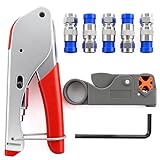
- Product material:Coaxial cable crimping tool set is made of high-hardness materials, non-slip handle, comfortable grip, providing professional and safe connection;
- Applied range:Suitable for rg59, rg59 quad, rg6, rg6 quad, and rg58, 3V, 2V, 4C, 5C,Suppress 75-5-7 Metric and Imperial F-Head.Suitable for satellite TV antenna/CCTV,mobile cable TV and cable modem, which is convenient for wiring new houses;
- Method of application:Rotary Coaxial Cable Stripper, According to the thickness of insulated wire, lock the tool on the cable, then 3 to 7 clockwise circle, finally peel off the unnecessary part;
- Connectors:F Connectors provides safe connection for RG6 coaxial cable,O-type sealing system can prevent water vapor from entering the joint,360 degree radial compression provides integrity and excellent RF performance;
- Product packaging:1PCS Crimping Tool,1PCS Stripping Tool,5PCS Blue Connectors.
IDEAL’s installation guide provides its exact preparation, die, crimp-zone, and inspection requirements. Klein’s VDV110-295 instructions show different 1/4-inch and 5/16-inch stripping references for its compatible preparation system. Always follow the instructions supplied with your connector and tool.
How to install a compression F connector
- Strip the cable to the connector manufacturer’s dimensions.
- Fold the braid and foil as directed.
- Push the connector straight onto the cable until the dielectric is correctly aligned and fully seated.
- Place the assembly into the compression tool against its stop or plunger.
- Close the tool completely and complete its full compression cycle.
- Release the tool and inspect the sleeve. It should be in its final position, with the connector tight and undamaged.
Compression connectors use a specific sleeve movement and tool stroke. Do not use a hex-crimp die on one, and do not assume that a compression tool from one manufacturer fits every connector. PCT’s tool instructions and preparation guide illustrate the required seating and compression sequence. Southwire also provides product-specific crimp, compression, and quad-shield instructions.
Handling braid, foil, and quad-shield cable
The shield is part of the electrical circuit. It must remain continuous while being kept away from the center conductor.
- Fold braid backward as directed rather than bunching it inside the connector.
- Keep loose strands away from the center-contact opening.
- Do not remove foil that the connector requires to remain on the dielectric.
- For quad-shield RG6, follow the connector’s layer-by-layer preparation instructions.
Quad-shield cable may require folding back one braid layer, removing a specified outer foil, folding back another braid layer, and retaining an inner foil. Copying an ordinary RG6 preparation can prevent the connector from seating or reduce shielding performance.
How to tell whether the connector is installed correctly
A finished connector should pass this checklist:
- The connector is tight and does not slide or wobble.
- The dielectric reaches the internal stop or specified flush reference.
- The center conductor is centered and the correct length.
- No braid strand touches the center conductor.
- The braid is captured evenly by the connector.
- The jacket is held far enough inside the connector for mechanical retention.
- The sleeve is fully crimped or compressed.
- The connector body is not cracked, pinched, or crushed.
For a common IDEAL system, the dielectric should be flush with the bottom of the connector nut/body when fully seated. The visible result alone is not enough: test the cable.
Rank #3
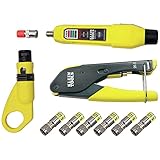
- COMPLETE COAX CABLE TOOL KIT: Includes all essential tools to prepare, connect, and test coax cables, providing a comprehensive solution
- EASY CABLE PREPARATION: 2-Level Radial Stripper allows for easy single-operation coax cable preparation, saving time and effort
- RELIABLE CRIMPING: Compact Crimper ensures quick and reliable crimping of compression F-connectors (6-Pack included), ensuring secure connections
- CONNECTION VERIFICATION: Coax Explorer 2 tests and verifies connections, providing clear indications of good, open, or short connections for efficient troubleshooting
- FAST INSTALLATION: Patented universal sleeve compression F-connectors (RG6/6Q) enable up to 5 times faster installation, increasing productivity
Testing the finished cable
First perform a visual inspection. Then use a coax tester to check for continuity, an open circuit, or a short circuit. Klein’s coax installation and test kit describes this basic good/open/short check.
Free tools Windows power users keep installed
One-click scans. No signup required.
Reconnect the cable and confirm the real-world result: modem link, television channels, antenna reception, camera video, or satellite signal. A basic continuity pass does not prove low signal loss, good return loss, or reliable performance at every RF frequency. Professional CATV, satellite, broadband, and high-frequency work may require specialized RF test equipment.
Troubleshooting common failures
The connector will not slide on
Likely causes include the wrong connector size, excessive braid folded forward, incorrect strip dimensions, retained foil in the wrong position, or cable that has been crushed. Do not force it. Remove the connector and compare the cable diameter and strip pattern with the product instructions.
The connector slides on too easily
The connector may be designed for another cable diameter, too much jacket may have been removed, or the shield may have been stripped away. A connector that pushes on easily is not necessarily correctly installed.
The center conductor is too short or too long
A short conductor may not make reliable contact. A long conductor can bend, contact an unintended part, or protrude dangerously. Cut the cable back and re-strip it to the specified dimension rather than trying to compensate with excess exposed conductor.
Do these 3 things before closing this tab:
1Repair Windows errors before they cause bigger problems2Scan for outdated or missing drivers - takes under a minute3Clear out junk files and repair common Windows errorsRank #4

- Multi-Purpose Coax Crimper: Our coaxial cable crimper kit is perfect for a wide range of applications, including small DIY projects and large electrical repairs in marine and automobile industries. Whether you need to install a satellite TV dish or CCTV, move cable TV and cable modems, or wire up the cables for your new house, our multi-purpose coax crimper has got you covered
- High-Quality Coaxial Cable Crimper: The coax crimper tool is made of high-hardness and precision materials, making it light, portable, durable, and long-lasting. Coax compression tool features a high-quality, sharp blade that is easy to cut with and adjustable stripping blade for different insulation thicknesses, preventing damage to shielding and conductors
- Durable RG6 Compression Tool: This RG6 compression tool equipped with adjustable F-screws and crimping F-joints, can crimp RG59, RG6, RG7, and RG11 compression connectors, as well as 75-5/75-7 metric and imperial F-heads. RG11 compression tool features a non-slip handle that is soft and comfortable for ease of use
- Coax Cable Crimper Kit: This coax cable crimper kit includes one coaxial cable crimper and one coaxial cable stripper, both with stripping and cutting functions. Depending on the thickness of the insulator wire, place them in the "U" slot in the front seat of the tool, then press the pointer and rotate the tool
- After-Sales Service: We are dedicated to offering satisfactory service. If you have any questions or concerns about our coax crimper tool within 30 days, please contact us, and we will provide you with a satisfactory solution within 24 hours
The modem or TV still has no signal
- Confirm that the connector is fully seated.
- Check for a center-conductor-to-shield short.
- Check continuity end to end.
- Inspect the opposite connector.
- Inspect splitters, barrel adapters, wall plates, and couplers.
- Bypass a wall plate or test with a known-good cable.
- Confirm the cable is connected to the correct port.
- For cable internet, ask the provider to check signal levels if the line remains faulty.
- For satellite or antenna systems, check powered components and alignment separately.
A connector may pass continuity while still performing poorly at high frequencies.
The connection works when the cable is moved
This usually indicates an incomplete crimp or compression, a loose connector, a broken center conductor, an uncaptured shield, or damage immediately behind the connector. Cut it off and re-terminate farther back on undamaged cable.
The connector cracks or becomes pinched
Common causes are the wrong die cavity, excessive force, incorrect tool seating, or using a hex-crimp die on a compression connector. Replace the connector rather than straightening or reusing it.
Independent reader supportYour contribution helps us test, update, and keep practical guides available for everyone.Outdoor and in-wall considerations
Indoor connectors may not be suitable outdoors. Use a connector rated for the cable and environment, then weather-seal the joint with an appropriate self-fusing tape, sealing boot, or manufacturer-approved material. Keep the connection positioned so water cannot run directly into the equipment port, and avoid creating a water pocket.
The Tool Desk
Outbyte PC Repair FREERepair Windows errors before they cause bigger problemsFix Now →Outbyte Driver Updater FREEFix the driver behind crashes, sound loss and screen glitchesFind Drivers →Weatherproof F-compression connectors are sold separately from standard universal connectors. Replace the cable rather than only its connector if water has entered the jacket, the braid is corroded, or the cable has been repeatedly exposed to moisture.
Best Value

- Coax Cable Crimper: Made of heavy duty materials, more solid and sturdy; Perfect for Satellite TV, CATV, Home Theater, and Security
- Advanced Rotating Head: Quickly and easily alternates for compression of RG-6, RG-11, RG-7, RG-58, RG-59 connectors in one tool
- Adjustable Compression Tool: Ensure every fitting is installed perfectly with the adjustable compression feature
- Compression Distance: 15.5mm~22.6mm for RG58/59/6, 30.5mm~37.3mm for RG11/7
- Warranty & Support - Worry-Free 18-Month Warranty and Toll-Free Tech Support, and friendly customer service
In-wall work may involve firestopping, access problems, building requirements, or powered equipment. Hire a professional for building-wide systems, satellite multiswitches, high-frequency testing, unknown powered lines, lightning-exposed outdoor work, or installations where service-provider equipment could be damaged.
When to replace the entire cable
Install a new cable when it has repeated kinks or crushing, water damage, severe corrosion, damage farther along the center conductor, insufficient slack for a sound termination, repeated connector failures, or an unsuitable jacket or cable type. A new connector cannot restore damaged coax along its length.
Choosing tools and kits
For one or two indoor F-connector repairs, a compact compression crimper and compatible connectors are usually the simplest purchase. A complete starter kit is more practical if you also need a cutter and stripper. A kit with a continuity tester is useful when the fault is not yet confirmed.
Recommended Free Tools
- Klein VDV212-008-SEN: specified for common RG59, RG6, and RG6Q F compression fittings.
- Klein VDV026-211: includes a cutter, stripper, compression crimper, connectors, and pouch.
- Klein VDV002-818: adds a coax tester for basic continuity, open, and short testing.
- Southwire CCF-C1: designed for specified F compression connectors used with RG59, RG6, and RG6Q.
Before buying, check cable compatibility, connector style, supported cable sizes, whether the stripper and connectors are included, whether testing is included, and whether replacement blades or connectors are available. Tool compatibility—not brand recognition alone—determines whether the finished connection will be reliable.
Quick Recap
Product prices and availability are accurate as of the date/time indicated and are subject to change. Any price and availability information displayed on Amazon at the time of purchase will apply.




