Recommended Free Tools
Do not price an AI-generated estimate until a person has traced its quantities back to the current contract documents. Treat every AI output as a proposed measurement. Verify the drawing set and revisions, define the measurement basis, test for omissions and duplicates, recalculate the quantities, and then review the estimate’s assumptions, risk and scope coverage. A believable grand total can hide missing work that happens to be offset by duplicated work elsewhere.
The workflow below gives estimators, contractors, quantity surveyors and reviewers a repeatable audit trail. It also explains what “accuracy” can realistically mean, how to test a tool on completed projects, and which controls apply to major public or covered federal work.
As an Amazon Associate I earn from qualifying purchases.
Start with the source documents, not the AI total
An AI takeoff is only as reliable as the documents it interpreted. Before checking a single dimension, create a fixed record of the information that was available to the tool and the information that was not.
Freeze the drawing and specification set
- Record the project drawing index, sheet numbers, revision dates, addenda, schedules and relevant specifications.
- Mark which documents were uploaded to the AI system and list every unavailable document. An estimate based on architectural plans without structural, civil or finish schedules has a defined limitation that must remain visible.
- Separate current sheets from superseded sheets. Check that a revised plan did not get combined with an earlier detail, schedule or model.
- Keep a marked PDF, screenshots or another digital reference to the exact source sheets. A second reviewer should be able to reproduce the quantity without relying on the AI interface.
Use the document register as the baseline for every later exception. If a wall, door, finish or equipment item cannot be traced to a sheet, detail, schedule, model or specification, classify it as an assumption or an unverified item rather than silently accepting it.
#1 Best Overall

- ADVANCED CONSTRUCTION MATH SOLUTIONS: Solve all your dimensional math quickly and accurately with the award-winning CM Pro construction calculator's powerful built-in solutions for completing layouts, plans, bids, estimates and more, directly in the building units you prefer
- EFFORTLESS UNIT CONVERSION: Work in and convert between all common building dimension formats including feet-inch-fractions, decimal feet-inches, yards and metric, with area and volume calculations, plus weight-per-volume and D:M:S to decimal degree conversions
- TIME-SAVING RIGHT ANGLE FUNCTIONS: Built-in functions for right angles provide instant solutions for square-ups, rafters (common, hip, valley, jacks), rake-walls, slopes, angles and more, plus complete stair layout and advanced solutions for arcs, arches, circles, and columns
- PREVENTS COSTLY MATERIAL WASTE: Built-in solutions for roofing, drywall, studs, blocks, concrete footings and board-feet lumber estimating, plus compound miter functions help you avoid errors when working with crown molding and other pricey millwork
- COMES COMPLETE: Comes with a rugged Armadillo Gear protective case, pocket reference guide, two long-life batteries and a full one-year limited warranty for daily professional use
Why revision control matters
AI systems can read a superseded plan just as confidently as a current one. A changed room layout may alter floor area, partitions, doors, ceilings, finishes, mechanical distribution and electrical devices at the same time. The review therefore starts by proving which revision governs, not by checking whether the output “looks about right.”
Define the scope and measurement basis
Write the rules of measurement before reviewing quantities. State inclusions, exclusions, deductions and assumptions for each trade or cost code. For example, clarify whether wall quantities include openings, whether concrete is net of penetrations, whether waste is included, and whether a finish is measured by plan area or developed surface area. The correct basis depends on the contract, estimating standard and company practice; the important control is that it is explicit.
Check scale and units against known dimensions
Verify the drawing scale and units using dimensions that are already stated on the sheet. Compare at least two known dimensions where practical: a grid bay, room dimension, door width or structural span. A plan imported at the wrong scale can produce consistently wrong areas while still generating tidy arithmetic.
Confirm that the AI has not mixed feet and metres, square feet and square metres, linear feet and metres, or cubic units and area units. Check the precision used for feet-inch-fraction dimensions and the rounding rule applied to extensions. Keep the raw measured value separate from later allowances, waste factors and estimating assumptions.
Trace high-risk lines to their governing source
Prioritize items that are large, expensive, unusual or recently changed. Trace each one to the governing plan, detail, schedule, model or specification. A line such as “concrete slab” is not auditable until its thickness, footprint, openings, steps, thickened edges and specified strength or finish requirements are identified. The same principle applies to rebar, curtain wall, roofing, fire stopping, ductwork and equipment schedules.
Run a four-part quantity check
Use separate checks for completeness, duplication, arithmetic and assumptions. Combining them into one visual scan makes offsetting errors easy to miss.
1. Search for omissions
Compare the estimate’s scope list with the documents, not just with the total. Walk through every room, elevation, detail and schedule. Look for work that is specified only in text, appears on a detail rather than a plan, or is carried by another discipline. Typical blind spots include accessories, backing, transitions, edge conditions, temporary works, penetrations, fire stopping and items called out in general notes.
Rank #2

- LCD DISPLAY WITH FRACTIONS & DECIMALS: The LCD screen displays numbers in fractions or decimals, for clearly viewing the results of the construction-related equations.
- BATTERY POWERED: Operates on a battery-powered system requiring 2 LR44 batteries, keeping the calculator ready to use on the job site.
- MATERIALS & COST ESTIMATOR: Solves construction equations to find costs and estimate items needed to complete a project, including bricks/blocks, concrete, gravel, boards, fencing, lumber, flooring, studs, drywall, tiles, and paint.
- UNIT CONVERSIONS & PROTECTIVE CASE: for working with imperial or metric units to save time and convert between units of measurement like feet, inches, yards, and meters, all while housed in a shock-resistant and spill-proof protective case.
- CONSTRUCTION SOLUTIONS: With a plastic/rubber enclosure, this yellow calculator includes an online manual PDF, video series, and a pocket user guide that stores in a back pocket.
Perform a trade-by-trade and sheet-by-sheet sweep. Record each suspected omission as an exception with its source reference and an action owner. Do not “fix” it by adding a lump sum without documenting what was missing and how the quantity was derived.
2. Search for duplicates
Run a separate duplicate check. The same wall, opening, finish or equipment item may have been counted once from a plan and again from a schedule, detail or reflected ceiling plan. Compare location identifiers, grid references, room numbers and markups. A duplicate can be hidden when two line items use different descriptions or cost codes.
Missing and duplicated work can cancel in the grand total. That is why a plausible total is not evidence of a complete takeoff.
3. Recalculate extensions and conversions
Reperform the arithmetic for each high-value line and sample lower-value lines. Check length × width, area × thickness, count × unit cost, unit conversions, deductions and roll-ups. Confirm that rounding occurs at the intended stage and that negative deductions have not been dropped.
Crashes, No Sound, or Screen Glitches?
Random freezes, missing sound and display glitches usually trace back to one bad driver. Find and replace yours safely.Free scan · under a minutePC Slower Than It Used to Be?
A free scan shows the junk files, broken settings and background clutter dragging Windows down - then fixes them in one click.Free scan · Windows 10 & 11A construction calculator, including a feet-inch-fraction model, can help independently check dimensional arithmetic and conversions. It cannot determine whether the drawing revision is current, whether scope is complete, whether a measurement is correct or whether work was omitted. Use it as a calculation aid only.
4. Separate measured quantities from assumptions
Label every quantity as measured, scheduled, derived or assumed. Record waste, laps, overlaps, production factors, escalation, contingency and other allowances in distinct fields. If an AI inferred a value from a typical condition, retain the inference and the reason for accepting or changing it. Reviewers can then challenge the assumption without rebuilding the entire takeoff.
Reconcile the estimate in a controlled worksheet
After the four checks, reconcile the estimate from source quantity to priced amount. A useful exception record contains the sheet or specification reference, original AI quantity, corrected quantity, unit, calculation, cost-code impact, reviewer, date and disposition.
Rank #3

- Construction Calculator with Writing Tablet:Equipped with a flip-page writing pad for quick note-taking, it requires no paper or pen, making it both eco-friendly and convenient. The thick, phone-like material provides strong, phone-level protection, keeping your calculator safe from drops and harsh construction environments
- 200+ Engineer Functions: For Mixed Dimension Calculations and Conversions,Area & Volume,Brick and Block,Concrete, Boards, Flooring, and Wall Stud,Drywall Sheet Count,Circle Area, Circumference, and Arc Properties,Compound Miter,Polygon Tiling,Roofing Material,Foundation Correction,Right Angle and Rafter,Roof Pitch and Angle Conversions,Common Rafter Length,Common/Hip/Jack Rafter and Spacing,Stair Layout,Rake Wall Calculations
- Precision for Every Construction Mind: More than 200 functions, designed specifically for engineering professionals, has 45 fast rebound hard PC buttons are reasonably distributed, more than other engineering calculator.It supports custom parameters.and has 3 storage registers for more convenient and smooth use
- Big Screen & Energy-Saving:With a 3" 12 digits large screen,Higher clarity and lager than other calculators.Clearer reading, fewer errors,8-12 minutes of no operation automatically shut down without worrying about energy consumption
- All-in-One Fit: Suitable for most people including builders, carpenters, concrete workers, contractors and DIY home renovators, roofers, architects, interior decorators, construction estimators, engineering students, etc
| Reconciliation area | What to verify | Evidence to retain |
|---|---|---|
| Quantity arithmetic | Extensions, subtotals, deductions, conversions and roll-ups | Independent calculation and corrected worksheet |
| Scope coverage | Plans, details, schedules, specifications and addenda represented in the estimate | Checked document register and exception log |
| Unit and basis | Measurement unit, scale, inclusion rule and rounding convention | Basis-of-measurement note and sample dimensions |
| Change impact | Items affected by each revision or addendum | Revision comparison and marked sheets |
| Cost build-up | Quantity, rate, crew or production assumption, waste and allowances | Rate source and assumption register |
Prioritize review time by exposure: large quantities, high unit costs, unusual assemblies and recently changed areas deserve deeper tracing than repetitive low-value items. Record unresolved exceptions rather than allowing them to disappear into a contingency.
The Tool Desk
Outbyte PC Repair FREEClear out junk files and repair common Windows errorsFree Scan →Outbyte Driver Updater FREEScan for outdated or missing drivers - takes under a minuteDriver Scan →Review the cost estimate beyond the takeoff
A correct quantity can still produce an unreliable estimate if the scope, risk and commercial assumptions are weak. Review the estimate at the level of the whole project as well as the line-item level.
Scope consistency
Confirm that the priced scope matches the current project definition, procurement package and contract boundaries. Check interfaces between trades and between design packages. An item should have one clear owner; shared or split responsibility needs an explicit allocation.
Documentation and traceability
Require a reviewer to follow a material cost from the priced total back to the quantity, then to the measurement and finally to the source document. If that chain breaks, the line is not independently verifiable.
Risk, uncertainty and escalation
Identify risks such as incomplete design, site conditions, market volatility, long-lead equipment and unresolved interfaces. State whether escalation or inflation is included, for which period and under which assumption. For planning or conceptual estimates, a range can communicate uncertainty better than a single false-precision number.
Independent validation and milestone review
The Federal Highway Administration’s major-project cost-estimating guidance places quality assurance and quality control inside the estimating process. It calls for reevaluation at significant milestones, multidisciplinary review, independent validation, scope consistency, documentation, risk assessment, contingencies and consideration of a range for planning or conceptual estimates. That guidance is written for major highway projects; use its controls as a framework, not as a universal rule for every private building estimate.
How accurate is AI takeoff?
There is no independent, universal accuracy percentage for AI-generated construction takeoffs. Performance varies by item type, drawing quality and tool. Clean vector floor plans may behave differently from scanned drawings, hand markups, revisions or work described only in text. A vendor demonstration, one comparison project or one tool’s internal test cannot establish a general error rate.
Rank #4

- FRACTIONS OR DECIMALS: An 8-digit LCD with fraction display shows results in fractional or decimal form, so measurements read the same way they appear on a tape measure or blueprint.
- BUILT-IN JOB SITE SOLUTIONS: Rafter, roofing, framing, stair layout, right-angle, and circular functions solve common construction equations in a few keystrokes, cutting down on hand calculations in the field.
- MATERIALS AND COST ESTIMATES: Estimates blocks, drywall, footing, and concrete with a margin of waste setting, and calculates material costs to keep project budgets on track.
- IMPERIAL AND METRIC UNITS: Works in yards, feet, inches, fractions, and pounds or metric units, converts between dimensions, and handles area, volume, perimeter, and weight calculations.
- THOUGHTFUL WORKSPACE SOLUTIONS: Victor Technology Brands creates practical products built around the way people work, learn and organize every day. Across our growing portfolio, Thoughtful Innovation means useful improvements that make spaces easier, clearer and more efficient.
Answer the accuracy question for a defined workflow instead: a named tool, trade, drawing type, revision set, measurement basis and tolerance. Report missed items separately from differences on items the system did measure. Also measure the size and cost of deviations, performance by trade and drawing type, behavior after revisions, and the human time needed to review and correct the output.
Test the tool before using it on a live bid
Use completed projects with trusted manual takeoffs or other accepted quantities. The goal is not to produce a flattering percentage; it is to discover where the workflow fails and whether review savings outweigh correction effort.
Free tools Windows power users keep installed
One-click scans. No signup required.
- Select representative jobs. Include the building types, trades, drawing qualities and document formats you actually estimate.
- Lock the reference quantities. Preserve the completed takeoff, source revisions and the measurement basis used at the time.
- Set tolerances in advance. Define acceptable differences by item type and decide how omissions, duplicates and unit errors will be scored.
- Include a revision case. Run an original set and a revised set so you can see whether changed areas are detected and whether old quantities remain.
- Compare line by line. Count misses separately from measurement differences. Record the quantity and cost impact of each deviation.
- Time the human review. Measure setup, tracing, correction, exception logging and final approval, not only the time the tool takes to generate output.
- Decide by risk and repeatability. Adopt the workflow only where results are acceptable for the trade and the review burden is understood.
| Test dimension | Question to answer |
|---|---|
| Item coverage | Which trades, assemblies and item types are consistently recognized? |
| Omissions | Which required items were absent, and what were their cost impacts? |
| Duplicates | Which items were counted twice or carried under different descriptions? |
| Measurement difference | How far did measured quantities deviate from the trusted reference? |
| Revision response | Did the output update correctly when drawings or addenda changed? |
| Reviewer effort | How much human time was required to find, explain and correct errors? |
Keep the test results by trade and drawing type. A tool that performs well on clean architectural plans may not be suitable for scanned civil sheets or detail-heavy interiors.
Independent reader supportYour contribution helps us test, update, and keep practical guides available for everyone.Common failure modes and the appropriate response
Wrong scale or unit
Symptom: many dimensions are consistently high or low by a similar factor. Response: verify sheet units and scale against two known dimensions, then rerun the affected measurements. Do not correct every line with a blanket multiplier until the source of the error is documented.
Stale revision
Symptom: quantities match an earlier layout, while current markups or addenda are absent. Response: freeze the governing index, isolate changed sheets and remeasure every affected trade. Retire superseded outputs so they cannot be reused in pricing.
Text-only requirements missed
Symptom: notes, schedules or specifications contain obligations that do not appear in plan-based quantities. Response: perform a text and schedule sweep, assign each requirement to a cost code and trace the resulting quantity or allowance to its source.
What’s actually slowing this PC down?
Pick the symptom - the matching free tool is one click away.
Plan and schedule counted twice
Symptom: counts are high in areas represented both graphically and in a schedule. Response: reconcile by unique location or identifier and designate one governing source for the count.
Best Value
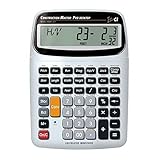
- SOLVE ALL YOUR DIMENSIONAL MATH: Quickly and accurately with the award-winning CM Pro-Desktop construction calculator's powerful built-in solutions for building; and full trig functions with sine, cosine, tangent, arcsine, arccosine and arctangent
- EFFORTLESS CONVERSION BETWEEN BUILDING FORMATS: Work in and convert between all common building dimension formats: feet-inch-fractions, decimal feet-inches, yards and metric -- including area and volume. Plus weight-per-volume and D: M: S to decimal degree conversions too
- TIME-SAVING BUILT-IN FUNCTIONS: Right angles give you instant solutions for square-ups, rafters (hip, valley, jacks), rake-walls, slopes, angles and more. Plus complete stair layout, advanced solutions for arcs, arches, circles, columns and more
- PREVENT COSTLY MATERIAL WASTE: Built-in solutions for roofing, drywall, studs, blocks, concrete footings and board-feet lumber estimating. Plus compound miter functions help avoid errors when working with crown molding and other millwork
- PROFESSIONAL CONSTRUCTION TOOL: Reduces headaches, saves time and prevents expensive material errors on your projects, from the office to the field. Comes with a large digits on easy-to-see multi-position tilt display LCD, easy-to-follow user's guide, plus a pocket reference guide in Spanish, full-size keys, long-life battery
Offsetting errors hide in the total
Symptom: the grand total appears reasonable despite unexplained line-item variances. Response: review omissions and duplicates as separate populations, then inspect the highest-cost exceptions before approving the total.
Compare tools on auditability, not on a headline score
When evaluating multiple AI takeoff or estimating products, use the same drawings and acceptance criteria for each. The relevant comparison axes are:
- Trade and item coverage.
- Drawing types and quality supported, including scans and markups.
- Handling of revisions and addenda.
- Traceability from each output item to its source location.
- Detection or exposure of omissions and duplicates.
- Output units, cost-code structure and integration with your estimating process.
- Item-level results on your completed jobs.
- Reviewer effort and correction workflow.
- Commercial terms and total cost for the volume you estimate.
Options identified in current software coverage include Togal.AI, Beam AI, Kreo and Autodesk Forma. Those names are not an independent ranking or proof of performance. Test any option against your own drawings, revisions, tolerances and review capacity.
Know which formal controls apply
Major-project public guidance
For major highway projects, Federal Highway Administration guidance calls for quality assurance and quality control, milestone reevaluation and multidisciplinary estimate reviews. Its checklist covers independent validation, consistency with scope, documentation, risk-based assessment, contingencies and a range for conceptual estimates. Private building teams can borrow the review discipline while recognizing that the guidance is not a blanket legal requirement for every project.
Covered federal estimating systems
DFARS 252.215-7002, shown with a January 2025 revision, applies only to contracts and contractors within its stated scope. It requires documented estimating sources and methods, timely detection and correction of errors, protection against cost duplication and omissions, management review, and comparison of projected results with actual results. One applicability branch covers a large business that received DoD prime contracts or subcontracts totaling $50 million or more in the preceding fiscal year when certified cost or pricing data were required. A separate branch covers $10 million to less than $50 million when the Contracting Officer provides written notification. These are regulatory applicability thresholds, not accuracy statistics for AI takeoffs.
The clause includes the requirement: “Provide for detection and timely correction of errors.” Use that as a practical control objective even when the clause itself does not apply, while checking counsel or contracting guidance for the requirements that govern your project.
Quick Recap
Final approval checklist
- The governing drawing index, revisions, addenda, schedules and specifications are recorded.
- Superseded and current documents are separated.
- Unavailable documents and resulting limitations are listed.
- Inclusions, exclusions, deductions, units, scale and measurement rules are written down.
- High-risk quantities trace to a plan, detail, schedule, model or specification.
- Omissions and duplicates were searched for separately.
- Arithmetic, conversions, deductions and roll-ups were independently checked.
- Measured quantities are distinguished from assumptions, waste and allowances.
- Exceptions have an owner, disposition and source reference.
- Scope, interfaces, risk, escalation, contingency and uncertainty are reviewed beyond the takeoff.
- Any claimed tool performance comes from representative completed jobs, with misses, deviations and reviewer time reported separately.
- An authorized reviewer signs off before the estimate is used for pricing or a bid.
Product prices and availability are accurate as of the date/time indicated and are subject to change. Any price and availability information displayed on Amazon at the time of purchase will apply.
Do these 3 things before closing this tab:
1Repair Windows errors before they cause bigger problems2Fix the driver behind crashes, sound loss and screen glitches3Clear out junk files and repair common Windows errors
