Home Builder 5, including its 5.1.x releases, is a free, open-source Blender add-on for planning and visualizing residential interiors. It can help design rooms, kitchens, bathrooms, closets, and cabinets with configurable assets, 2D layouts, dimensions, and export-preparation tools.
It is not a standalone cabinet CAD application. You must install Blender first, and the free core add-on should be treated primarily as a design, layout, and visualization tool—not automatically as a complete estimating, cut-list, nesting, or CNC-production system.
As an Amazon Associate I earn from qualifying purchases.
What Home Builder 5.1 actually is
The project is generally branded Home Builder 5; “5.1” refers to its 5.1 release line, including versions such as 5.1.0, 5.1.1, and 5.1.2. The official site describes it as a free, open-source Blender add-on rebuilt for Blender 5+.
Recommended Free Tools
Home Builder adds purpose-built tools and assets to Blender for residential design. Its focus includes:
#1 Best Overall
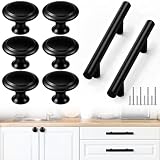
- Worry-free Matching: you will get 15 pcs black cabinet pulls and 15 pcs round black cabinet knobs, which can be matched in many ways and are suitable for many types of cabinets, making the use of cabinets more convenient
- Sleek Black Matte Finish: stainless steel cabinet pulls and knobs set in a modern matte black finish bring a touch of sophistication and elegance to any space, complementing perfectly with contemporary, industrial or minimalist interior styles while being easy to clean and maintain
- Cabinet Handle Size: the drawer knobs measures approximately 1.2 inches/30 mm in diameter and 0.92 inches/23.4 mm in height; The drawer pulls standard about 3 inches hole spacing, total length about 5 inches, The length of the small screw is about 0.8 inches/20 mm; The length of the large screw is about 1.77 inches /45 mm
- Nice Material: these cabinet pulls and knobs for kitchen are crafted from stainless steel, not easy to peel off or rust, while the screws are also sturdy, ensuring strong, long-lasting, and rust-proof
- Use Widely: our drawer pulls and knobs are designed for a wide range of furniture, including bookcases, cabinets, wardrobes, dressers, and kitchen drawers, providing a cost-effective solution for large-scale renovations or multiple installations, these handle add a stylish touch to any space; Transform your home with a sleek new look
- Rooms, floor plans, walls, doors, windows, and stairs
- Kitchens, bathrooms, closets, and built-in cabinets
- Materials, finishes, appliances, and decorative objects
- Configurable cabinet components and asset libraries
- 2D plan and elevation views with dimensions and annotations
That makes it useful to DIY remodelers, woodworkers, interior designers, makers, and small shops that want to explore a design in three dimensions before buying materials or beginning construction. Users who are new to Blender should expect a learning curve: even with Home Builder installed, you still need to understand Blender’s interface, files, scenes, units, and project organization.
The project’s public GitHub repository contains the source code and release history. The releases page showed v5.1.2 as the latest visible 5.1.x release in the supplied research; check that page for the current version before installing.
What changed in the 5.1 release line?
The 5.1.x releases focus on both new design capabilities and workflow reliability.
Quick wins for a faster PC:
Repair Windows errors before they cause bigger problemsFix Now →Scan for outdated or missing drivers - takes under a minuteDriver Scan →Clear out junk files and repair common Windows errorsFree Scan →Home Builder 5.1.0
Version 5.1.0 added or identified support for Blender 5.1, updated Pillow wheels for Blender 5.0’s Python 3.11 and Blender 5.1’s Python 3.13, and added Windows ARM64 support. It also introduced a stair product type with adjustable width, total rise, riser height, tread depth, and material thickness. Stair counts and total runs can be calculated automatically.
Other notable changes included a reference-image panel for tracing floor plans, a Prepare for Export command, quick Imperial/Metric unit switching, cabinet-material and clearance fixes, asset-shelf changes, and a fix for unsafe Principled BSDF node access. Details are documented in the official release notes.
Home Builder 5.1.1
Version 5.1.1 improved floor and ceiling generation, wall drawing, and snapping. It added clearer snap indicators and better wall-endpoint behavior, with fine snapping available using Shift. Door and window placement was improved, including numeric width entry and door-swing changes using the arrow keys. Plan fills and room-label annotation tools were also added or refined.
Home Builder 5.1.2
Version 5.1.2 added tracking points while drawing walls, corrected default wall-type sizing, and introduced two-point width setting for doors, windows, and openings. It also included floor and wall cutter features, improvements to L-shaped and U-shaped stairs, a new linked-rooms interface, more consistent 2D-layout text sizing, export-preparation fixes for doors and windows, placement fixes after applying geometry nodes, and asset-library registration fixes.
Free tools Windows power users keep installed
One-click scans. No signup required.
What can it do for a DIY cabinet project?
Plan the room before modeling cabinets
You can draw a room from measurements or trace an existing floor-plan image. Walls, doors, windows, and other architectural elements provide context that a cabinet-only model lacks. This helps reveal conflicts involving appliance locations, door swings, windows, corners, soffits, and circulation paths.
Rank #2
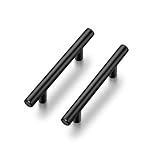
- 365-Day Evaluation: We believe you'll find value in your Ravinte handles. Use them for a full year, and if they don't meet your needs, we're here to help
- MODERN: Functional & elegant, These matte black pulls suitable for different styles of cabinets, wardrobe, chest and cupboard
- Enduring & STRONG: 30 bar pulls made of stainless steel finished with classic matte black coordinates well with other appliances and accessoriess
- Simple look: The black cabinet handles have a wide appeal across a range of kitchen cabinet doors and drawers The matte black handles have a clean and timeless look that works with farmhouse, vintage, traditional and transitional styles
- MEASUREMENT: Hole centers(CC):3 Inch(76mm), Total Length:5 inch(127mm), Diameter:1/2 inch(12mm) Projection:1-1/4 inch(32mm)
Start with accurate measurements rather than modeling an idealized room. Record wall lengths, ceiling height, door and window positions, outlets, plumbing, HVAC, soffits, and other obstructions. Use appliance dimensions from the manufacturer whenever possible. Decide at the beginning whether the project will use Imperial or Metric units.
A polished model based on incorrect measurements can create more false confidence than a rough sketch. Home Builder cannot correct a bad site survey.
Configure cabinets instead of modeling every part manually
The cabinet-focused workflow is Home Builder’s main advantage over ordinary Blender modeling. Configurable assets let you experiment with cabinet widths, heights, depths, styles, materials, doors, drawers, finishes, and arrangements without building every cabinet from primitive geometry.
The Tool Desk
Outbyte Driver Updater FREEScan for outdated or missing drivers - takes under a minuteDriver Scan →Outbyte PC Repair FREEClear out junk files and repair common Windows errorsFree Scan →You can place cabinets alongside appliances and other room elements, then inspect the result in 3D. That is particularly useful when comparing layouts for a kitchen, closet, bathroom vanity, or built-in storage project.
Parametric geometry still does not make every construction decision automatically. You remain responsible for panel thickness, joinery, hardware, reveals, edge-banding, grain direction, fillers, scribes, toe-kicks, installation tolerances, and the construction method.
Create plans and elevations
Home Builder supports 2D plan and elevation layouts with dimensions and annotations. These views can be valuable for communicating a proposed design and checking relationships between cabinets, walls, openings, and appliances.
Review every important dimension manually. Generated drawings are design documentation, not an unquestionable construction contract. Check their scale, annotations, cabinet orientation, door swings, wall interpretation, and any changes made after applying geometry nodes or other transformations.
Is Home Builder really open source and free?
The official project describes the core add-on as free and open source, and its source code is publicly available on GitHub. “Open source” means the code can be inspected and, subject to its license, modified and contributed to.
Rank #3
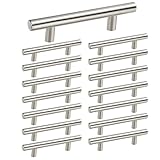
- Measurements: 3 inch Center to Center with 5 in Overall Length..Please measure your cabinet HOLE CENTERS is 3in before you purchase cabinet handles.
- Material: homdiy cabinet pulls made of high quality Stainless Steel with brushed nickel finished,hollow construction but durable and hard to get rusty
- Simple But Classic: This brushed nickel cabinet pulls are simple but depending on your application, can be very key in bringing the design together. The arc of this nickel handle is round and it has no corners, which can effectively prevent your child from bumping and injured.
- SCREWS: Free screws of 1in(25mm)& 1.57in(40mm) included are suitable for board thickness of cabinets.If you need other length screws, please feel free to contact us !
- PERFECT SERVICE: Best quality and service is our goal, If you are not satisfied with this brushed nickel drawer pulls, please contact us. We promise to leave you without any worries, please buy with confidence.
That does not necessarily mean every model, texture, appliance, or decorative asset has identical licensing. Read the repository’s license and the terms for any separate content before redistributing modified code, project files, or bundled assets.
Free software also does not mean a zero-cost project. You may still need a capable computer, time to learn Blender, paid asset content, separate CAM or cut-list software, and materials. Measurement or fabrication mistakes can cost considerably more than the software.
How to install Home Builder
Home Builder is installed as a Blender add-on. Download the release intended for your Blender generation from the official releases page or the project’s official download location.
Do these 3 things before closing this tab:
1Clear out junk files and repair common Windows errors2Fix the driver behind crashes, sound loss and screen glitches3Repair Windows errors before they cause bigger problems- Install a compatible Blender version.
- Download the Home Builder add-on ZIP.
- Leave the ZIP compressed unless the release instructions specifically say otherwise.
- In Blender, open Edit → Preferences.
- Open Add-ons.
- Choose Install…. In some Blender versions, this command is inside a drop-down menu.
- Select the downloaded Home Builder ZIP.
- Install and enable the add-on.
- Restart Blender if the interface does not refresh.
- Open or create a project and locate the Home Builder controls, asset library, and Prompts Interface.
The older official getting-started documentation discusses Blender 4.x and newer, while the current Home Builder 5 branding and 5.1 release notes target Blender 5+. Do not assume that one archive works with every Blender version; match the add-on release to the Blender generation specified by its documentation.
Use the Prompts Interface
Home Builder assets do not always behave like ordinary Blender objects. The documentation warns that standard Blender hotkeys may not produce the expected result for Home Builder assets. For asset-specific operations, use the add-on’s Prompts Interface rather than assuming that G, R, S, X, or Tab will always work as they do in a conventional Blender workflow.
Is the Extended Asset Library required?
No. The paid Extended Asset Library is optional. It adds ready-made materials, decorations, and other content, but it is separate from the free core add-on. You can use the core software and create custom assets without purchasing the library.
To add it, follow the official asset-library instructions:
- Purchase and download the Extended Asset Library.
- Open Blender and go to Edit → Preferences → Add-ons.
- Locate Home Builder and choose the option to add an external library.
- Select the folder containing the library’s
materialsanddecorationsfolders. - Accept the folder selection and click Refresh.
- Find the assets in the asset shelf and drag them into the 3D viewport.
If assets are missing, first check that you selected the correct library root and refreshed the library. Also confirm that the content was made for your Home Builder generation. Avoid mixing older PyClone-era assets with Home Builder 5 unless the project documentation confirms compatibility.
Rank #4

- Cabinet Knobs size: Each drawer knobs measures approximately 1.2inch/30mm in diameter and 0.92inch/23.4mm in height; The length of the small screw is about 0.98in/25mm. The length of the large screw is about 1.57in/40mm.
- High quality material: The black cabinet knobs are made of stainless steel as the main material, and the screw is made of aluminum alloy, rust-proof and durable
- Round design: The drawer knobs are round in design. Matte black dresser knobs are beautiful in appearance, and delicate in touch. The middle of the cabinet knobs is a concave design for easy pushing and pulling.
- Wide application: Cabinet knobs can be applied to bookcase drawers, cabinet drawers, closet drawers, dresser drawers, kitchen drawers, shoe cabinets, and other drawers. Drawer knobs can beautify your entire home and give your home a whole new look!
- You will get: 18 Pieces 30mm black drawer knobs, 18 Pieces 25mm Screws, 18 Pieces 40mm Screws. Our 7*24 friendly customer service, so you can rest assured.
A practical cabinet-design workflow
1. Measure and define the room
- Measure every wall and the ceiling height.
- Locate doors, windows, outlets, plumbing, HVAC, soffits, and obstructions.
- Record appliance dimensions from current manufacturer specifications.
- Choose Imperial or Metric units.
- Photograph or scan the existing room if you plan to trace it.
2. Build or trace the room
Draw the walls manually or use a reference image as a tracing guide. Check wall thickness, room closure, ceiling height, and openings before adding cabinets. Use snapping and numeric entry deliberately, then compare the model with the original measurements.
3. Place and configure cabinets
Choose suitable base, wall, tall, corner, and specialty units. Adjust dimensions, doors, drawers, interiors, hardware, and finishes through the prompts workflow. Add appliances and inspect clearances, countertop relationships, fillers, toe-kicks, wall intersections, and door swings.
Do not assume the add-on enforces every building-code requirement, manufacturer clearance, accessibility rule, or structural condition. Those checks still require informed review and, where appropriate, a qualified professional.
What’s actually slowing this PC down?
Pick the symptom - the matching free tool is one click away.
4. Produce and review drawings
Generate plan and elevation views, add dimensions and room labels, and inspect cabinet-to-wall and cabinet-to-appliance relationships. Confirm critical dimensions manually before treating the drawings as a basis for construction.
5. Prepare for fabrication
For manual construction, convert the design into a separate cutting and assembly plan. Add material thickness, joinery, edge-banding, hardware, grain direction, fillers, and installation allowances. Create a labeled cabinet schedule and verify each part against the selected construction method.
Independent reader supportYour contribution helps us test, update, and keep practical guides available for everyone.Can Home Builder produce CNC-ready cabinet files?
The project supports export preparation, and independent coverage has described technical drawings for manual cutting and digital-file workflows for CNC use. That is useful, but it should not be confused with a universal, production-ready cabinet-CAM pipeline.
Before sending anything to a machine, confirm that the export contains the geometry, layers, dimensions, units, and object information required by your CAM software. In the CAM stage, verify stock size, origin, tool diameters, drilling conventions, tabs, feeds, speeds, and postprocessor compatibility. Open the file in the intended downstream application and run a test with a noncritical project or sample material.
A parametric cabinet model is not automatically a verified cut list, hardware-drilling file, sheet-good nest, edge-banding schedule, or CNC program. The release notes document export-preparation improvements, including fixes involving doors and windows, but a specific shop workflow still needs to be tested.
Best Value

- ⭐【Unique Advantages】- In order to avoid drilling directly with an electric drill will cause the jig to shake, we provide an "Automatic Center Punch". Use jig finded the location, you just need to use the "hole punch" to directly punch the small holes, and then use the electric drill to punch the big holes on have already been punched small holes. It is a very ingenious way.
- ⭐【Metric + Imperial Scale】- Contains metric + imperial double sizes. Super high-definition tick board marks made of ABS, and the ruler is made from stainless steel. Ensure the jig’s premium durability, high corrosion resistance, high strength.
- ⭐【Detachable & Portable】- Cabinet hardware installation template quick-release '' drill guide'' sliders can be split into small parts by taking a small Space to easily carry. The storage bag we present will solve all your troubles of carrying.
- ⭐【Time Saver Quick Drilling】- Cabinet hardware template tool a full day of measuring and re-measuring. Set it up once and use it repeatedly with no further measurements, A good accessory, and helper for woodwork or DIY. The installation efficiency is greatly improved.
- ⭐【Jig Widely Application】- Cabinet hardware jig is ideal for installing pulls or handles and knobs on DRAWERS, CABINETS, DOOR and so on. Works on any cabinet door stile and rails including shaker doors & recessed drawer fronts. The product size is 16 inches, please confirm your cabinet/door size before purchasing
Strengths and limitations
| Strength | Limitation |
|---|---|
| Free and open-source core | Requires Blender and its learning curve |
| Cabinet and interior-design focus | Not automatically a complete shop-production system |
| Configurable parametric assets | Construction details still require human decisions |
| Floor-plan tracing and snapping | Measurement errors remain the user’s responsibility |
| 2D plan and elevation layouts | Drawings require review for accuracy and completeness |
| Customizable libraries and materials | Optional assets may have separate licensing terms |
Who should use Home Builder?
Home Builder is a strong candidate if you want a no-license-cost core tool for interior visualization, cabinet layout, floor-plan tracing, and configurable design. It is especially appropriate for DIY remodelers, woodworkers, interior designers, Blender users, and small shops that need design documentation before fabrication.
It is a weaker fit if you need a standalone application, automatic professional estimating, guaranteed code compliance, mature cut-list optimization, sheet nesting, automated hardware drilling, integrated CNC postprocessors, vendor-specific manufacturing libraries, purchasing, or shop scheduling.
Those needs point toward specialized cabinet-manufacturing platforms such as Cabinet Vision, Mozaik, Microvellum, or similar systems. They are generally more production-oriented and may be more expensive and complex. Their current pricing and feature packaging vary, so compare the relevant vendor editions directly.
Common problems and fixes
The add-on does not appear
Check Blender’s exact version, download the matching Home Builder release, install the ZIP through Preferences, and enable the add-on. Restart Blender if necessary. If the problem continues, review the release notes and issue tracker before changing versions.
Assets are missing
Recheck the external-library path, select the folder containing materials and decorations, refresh the library, and confirm that the asset set matches Home Builder 5. Blender may also need time to index the library.
Snapping or dimensions behave unexpectedly
Confirm the scene units, use numeric entry and deliberate snapping, and work through the Prompts Interface. Check whether the object is still a parametric Home Builder asset or has been converted or applied. Recheck wall endpoints and room closure.
An export does not match the model
Check doors and windows, geometry-node state, and the release’s export-preparation fixes. Open the export in the intended downstream application and compare it with known dimensions before fabrication.
PC Slower Than It Used to Be?
A free scan shows the junk files, broken settings and background clutter dragging Windows down - then fixes them in one click.Free scan · Windows 10 & 11Outdated Drivers Are Slowing You Down
One free scan finds every outdated or missing driver and matches the right update for your exact hardware.Free scan · exact hardware matchThe bottom line
Home Builder 5.1 is compelling when you want an open-source, Blender-based way to design and visualize cabinets, kitchens, closets, bathrooms, and other residential spaces. Its greatest value is fast, configurable layout and clear design exploration without buying a dedicated cabinet-design license.
For a real build, use it as one part of the process: measure carefully, review drawings, create or verify your cut and assembly information, and test any export in your CAM workflow. If your shop requires automatic estimating, nesting, machining, and production management, a specialized cabinet system will likely be a better fit.
Quick Recap
Product prices and availability are accurate as of the date/time indicated and are subject to change. Any price and availability information displayed on Amazon at the time of purchase will apply.

