Home Assistant Connect ZBT-2 launched on November 19, 2025, with a $49 recommended U.S. price and a €45 European price. It replaces the discontinued Connect ZBT-1 (formerly SkyConnect) with an external antenna, a newer Silicon Labs MG24 radio, an ESP32-S3 USB bridge, and a 460,800-baud interface.
The important limitation is easy to miss: the ZBT-2 is a Zigbee-or-Thread adapter, not a simultaneous multiprotocol radio. It is a strong choice for a new Home Assistant installation or a network that needs better radio placement, but a stable ZBT-1 network does not automatically need replacing.
As an Amazon Associate I earn from qualifying purchases.
What is the Home Assistant Connect ZBT-2?
The Connect ZBT-2 is a USB-C radio adapter for Home Assistant hosts including Home Assistant Green, Home Assistant Yellow, Raspberry Pi installations, and other supported systems. It can operate as either a Zigbee 3.0 coordinator or a Thread radio used with Home Assistant’s Thread, Matter, and OpenThread Border Router integrations.
The Tool Desk
Outbyte Driver Updater FREEFix the driver behind crashes, sound loss and screen glitchesFind Drivers →Outbyte PC Repair FREEClear out junk files and repair common Windows errorsFree Scan →Nabu Casa designs and builds official Home Assistant hardware. According to Home Assistant, purchases support the Open Home Foundation and projects including Home Assistant and ESPHome. The official product information and buying details are available on the Connect ZBT-2 product page.
#1 Best Overall

- Next-Gen TI CC2674P10 – Flagship chip supporting large Zigbee/Thread devices. Built for heavy automation & large mesh networks.
- 20 dBm High Power + 4.5 dBi High Gain Antenna – Providing stronger signal strength and more stable network connection, especially suitable for long-range use and weak signal environments.
- Open Source Multi-Platform – Works with Home Assistant, Zigbee2MQTT, and OpenThread BorderRouter(OTBR). Enables local control for Zigbee or Thread devices.
- Firmware Flexibility – Plug-and-play with pre-installed Zigbee Coordinator firmware. Easily update or flash Zigbee Router or Thread RCP firmware using the SONOFF Dongle Flasher.
- Reliable Build & 2‑Year Warranty – Made of corrosion‑resistant and moisture‑proof aluminum alloy + PC material, rigorously tested for durability, and comes with a 2‑year manufacturer's warranty.
Although the product is often described as a Matter adapter, that needs qualification. Matter can use Wi-Fi, Ethernet, or Thread. The ZBT-2 is relevant specifically to Matter-over-Thread devices; it is not a standalone universal Matter hub.
Why is the ZBT-2 much bigger?
The ZBT-2 is not simply a larger USB stick. Its radio is connected to a freestanding base and an external antenna, allowing the antenna to be placed away from the Home Assistant computer and other sources of interference.
Home Assistant says the antenna is tuned for the 2.4-GHz spectrum used by Zigbee and Thread. The included 1.5-meter USB-C cable makes it possible to position the radio away from USB 3.0 ports, SSDs, hubs, Wi-Fi equipment, metal enclosures, and the host computer itself. This is particularly useful when the Home Assistant server is installed in a utility cupboard, communications cabinet, or equipment room where radio conditions may be poor.
The product specifications list a 24-mm antenna diameter, 164-mm antenna height, 4.16-dBi peak gain, and an omnidirectional radiation pattern. Those specifications may improve practical coverage and reliability, but they do not guarantee a fixed range increase. Walls, floors, metal, interference, antenna placement, powered mesh routers, and the capabilities of individual end devices remain important.
ZBT-1 versus ZBT-2
| Feature | Connect ZBT-1 / SkyConnect | Connect ZBT-2 |
|---|---|---|
| Radio SoC | Silicon Labs MG21 | Silicon Labs MG24 |
| USB interface | Silicon Labs CP2102N | ESP32-S3 USB-serial bridge |
| Advertised baud rate | 115,200 | 460,800 |
| Antenna | Small internal antenna | External freestanding optimized antenna |
| Protocol operation | Zigbee or Thread | Zigbee or Thread |
| Status | Discontinued; software support continues | Current successor |
Home Assistant describes the ZBT-2 as offering faster operation and improved sensitivity for weak signals. Its “4× faster” headline refers to the adapter’s serial interface: 460,800 baud instead of 115,200 baud. It does not mean that every light, sensor, or automation will respond four times faster.
The improvement is most relevant when the coordinator is handling multiple devices or simultaneous commands. Real-world responsiveness still depends on the mesh, device firmware, interference, routing, and the workload placed on Home Assistant.
Rank #2

- Matter Bridge for Smart Home Integration: Bridge Zigbee, BTHome, and eWeLink devices to Matter platforms such as Alexa, Google Home, and Apple Home. Connect different smart home ecosystems and enjoy seamless cross-platform device control.
- Local Web Console, No Cloud Required: Access the local Matter Bridge web interface directly from your LAN without downloading an app or relying on cloud services. Configure and manage device bridging while keeping your data private and secure.
- Smart Home Security Protection: Pair with Zigbee sensors to create a local home security system. When intrusion is detected, the built-in 90 dB alarm and instant mobile notifications help keep you informed and your home protected.
- Support Home Assistant: Easily integrate Zigbee devices with Home Assistant through MQTT or bridge Home Assistant devices to Matter-compatible platforms, enabling greater flexibility across your smart home setup.
- Zigbee Hub with Broad Compatibility: Works as a Zigbee Hub and Zigbee Gateway, supporting SONOFF and a wide range of third-party Zigbee devices. Create local automations and build a reliable, connected smart home experience.
The ZBT-1 is discontinued, but Home Assistant says software support continues. Owners of a stable network should therefore view the ZBT-2 as an upgrade option rather than an immediate compatibility requirement.
What’s actually slowing this PC down?
Pick the symptom - the matching free tool is one click away.
The biggest catch: Zigbee or Thread, not both
A single ZBT-2 cannot run Zigbee and Thread simultaneously in Home Assistant’s supported configuration. Home Assistant tested multiprotocol operation and recommends dedicating a radio to one protocol because combined operation was inconsistent.
Choose Zigbee if you already have a substantial Zigbee installation, want the broadest selection of affordable sensors, bulbs, switches, plugs, and routers, or use ZHA or Zigbee2MQTT.
Choose Thread if you are building around certified Matter-over-Thread devices and understand that Thread is the low-power network transport while Matter is the application layer.
If a property needs active Zigbee and Thread networks at the same time, plan for two radios: two ZBT-2 units, one ZBT-2 plus another compatible radio, or a network architecture with separate adapters. Buying one ZBT-2 does not provide two active networks.
Specifications
| Launch date | November 19, 2025 |
| Recommended price | $49 in the U.S., before taxes; €45 in Europe, including applicable taxes |
| Radio | Silicon Labs MG24 |
| USB controller | ESP32-S3 |
| Protocols | Zigbee 3.0 or Thread |
| Connector | USB-C |
| Power | 5 V DC, 500 mA |
| Cable | 1.5-meter USB-C cable |
| Dimensions | 83 × 83 × 179 mm |
| Weight | 157 g |
| Frequency | 2,400–2,483.5 MHz |
| Transmit power | 10 dBm in Europe; 8 dBm elsewhere |
| Operating environment | Indoor use; 0–65 °C |
| Firmware at shipment | Zigbee |
Home Assistant lists the complete specifications on its official ZBT-2 page. The device is intended for indoor use and is not a Power over Ethernet or independently powered network appliance.
Rank #3

- ZBT-1 Compatible Connection: Pre-flashed EZSP 7.4.5 firmware enables pop-up recognition with Home Assistant without requiring manual code input
- Multi-Protocol Flashable Support: Supports openthread and zigbee protocols via official Home Assistant platform for flexible smart home integration
- Wide Device Compatibility: Supports ZigBee 3.0 standard and works with most ZigBee devices regardless of brand, managing smart sensors, switches, bulbs and more
- Extended Range Antenna: Features 3dBi antenna with 250m open-space range that penetrates 2 walls to cover attics and basements throughout your home
- DIY Zigbee USB Coordinator: Requires technical knowledge and configuration via Home Assistant ZHA and Home Assistant Zigbee2MQTT, not a plug-and-play consumer hub
Setup for a new Home Assistant network
- Connect the included USB-C cable to the ZBT-2 and the Home Assistant host.
- Place the antenna in open space, away from USB 3.0 equipment, SSDs, hubs, Wi-Fi routers, metal, and the host computer.
- Allow Home Assistant to discover the Connect ZBT-2 integration.
- Choose Zigbee or Thread before pairing devices.
- Complete the relevant Home Assistant setup wizard and confirm the selected network channel.
- Pair devices only after confirming that the desired protocol and firmware are installed.
ZBT-2 units ship with Zigbee firmware. Native firmware updates are supported in Home Assistant 2025.11 and newer when the adapter is used with ZHA or OpenThread Border Router. Switching protocols requires installing the corresponding firmware; it is not an additive feature.
Installing Thread firmware means the adapter can no longer control Zigbee devices. Installing Zigbee firmware means it can no longer control Thread devices. Back up the relevant network before changing modes.
Migrating an existing ZHA network
The official ZHA migration process requires Home Assistant 2025.11 or newer, the old adapter, the ZBT-2, its extension cable, and a free USB port or hub.
- Connect the ZBT-2 using the extension cable.
- Open Settings > Devices & services.
- Add or open the discovered Connect ZBT-2 integration.
- Select Migrate Zigbee to a new adapter.
- Choose the recommended installation and allow Home Assistant to back up the old adapter and transfer network settings.
- Wait for devices to rejoin before removing the old adapter.
Devices may not become controllable immediately. Home Assistant says they normally rejoin within about an hour; power-cycling mains-powered devices can speed up discovery. Follow the official ZHA migration guide for the current interface.
Independent reader supportYour contribution helps us test, update, and keep practical guides available for everyone.Migrating from Zigbee2MQTT
Zigbee2MQTT migration requires more careful expectations. If the old adapter is available, Home Assistant documents a route through ZHA and then to the ZBT-2. This can transfer network information, but it is not a complete transfer of every Zigbee2MQTT setting.
Device names, customizations, automations, groups, entities, and application-specific settings may require manual rebuilding. Powered devices may rediscover over time, while battery-powered devices may need to be rejoined. If only a Zigbee2MQTT backup file remains, Home Assistant provides a separate backup-file migration route, but higher-level settings such as names are not transferred.
Rank #4
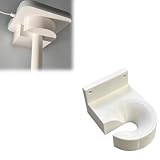
- Optimized for Better Signal Positioning: Compatible with Nabu Casa, this Home Assistant for Wall Mount is designed to support for adapters in an upside down configuration, helping improve antenna placement for more stable smart home connectivity
- Upside Down Mounting Design for Flexibility: Designed for ZBT-2 ZWA-2 Wall Bracket allows flexible upside down installation, enabling improved signal orientation while keeping your smart home hub area organized and free from desk clutter
- Space Saving Wall Mounted Setup: The Upside Down Mount keeps your adapter securely fixed on the wall, helping reduce surface clutter and creating a cleaner, more efficient home automation environment in offices, studios, or server areas
- Reinforced Carbon Fiber Construction: Made using durable 3D printed technology with carbon fiber reinforced material, this wall holder provides strong structural support and long-term stability for continuous indoor use in smart home installations
- Simple Installation and Clean Cable Management: Designed for quick and easy mounting, this bracket supports straightforward installation while helping organize cables neatly. It improves the overall appearance of your setup with a clean, minimal look
In other words, network migration and application migration are different tasks. Preserve your Zigbee2MQTT configuration and prepare for cleanup even if you avoid pairing every device from scratch.
Free tools Windows power users keep installed
One-click scans. No signup required.
Thread and Matter setup
For Thread-based Matter devices, the ZBT-2 must be dedicated to Thread and used with Home Assistant’s Thread, Matter, and OpenThread Border Router components. A Thread network and a Matter controller are separate functions, even though Home Assistant can coordinate them.
When migrating from another Thread adapter, Home Assistant’s Thread documentation calls for the existing adapter, current Home Assistant software, the new adapter, a USB extension cable, and Thread devices. Confirm the firmware: a multiprotocol adapter may ship with firmware that is not suitable for the intended Thread setup.
The ZBT-2 is not intended to operate as an independent Thread border router outside Home Assistant. If you switch an existing ZBT-2 from Zigbee to Thread, keep another Zigbee coordinator if the Zigbee network must remain active. The reverse applies when switching from Thread to Zigbee.
Who should buy the ZBT-2?
It is a good fit for:
- New Home Assistant installations starting a Zigbee network.
- Users building around Matter-over-Thread devices.
- Homes where the coordinator needs to be placed away from the server or electrical equipment.
- Large or busy Zigbee networks that may benefit from newer coordinator hardware and a faster interface.
- Users who value official discovery, firmware updates, and Home Assistant migration tools.
- Experienced Zigbee2MQTT users who want an officially supported adapter.
It is less compelling for:
- ZBT-1 owners whose network is stable and has no range or responsiveness problems.
- Anyone expecting one adapter to run Zigbee and Thread concurrently.
- Users requiring PoE or a network-attached radio.
- Users who need a radio to operate independently of Home Assistant.
- Anyone expecting a Zigbee2MQTT migration to preserve every entity, name, automation, and customization automatically.
- People seeking the smallest possible bare USB dongle.
Alternatives and complementary hardware
The existing ZBT-1 remains a practical option for owners who already have one and do not need the ZBT-2’s external antenna or newer hardware. Its discontinued status does not mean software support has ended; see Home Assistant’s ZBT-1 information page.
Cost-focused, Zigbee-only users may also consider supported SONOFF dongles through SONOFF. Experienced users who want Zigbee2MQTT flexibility should check the project’s adapter compatibility documentation.
For installations where the radio must be located far from the Home Assistant server, SMLIGHT’s network-attached SLZB products may be relevant; see SMLIGHT’s official site. Ethernet, Wi-Fi, and PoE add flexibility but also configuration and network dependencies. Current prices for these alternatives vary and are not included here.
Home Assistant’s Connect ZWA-2 is a complementary Z-Wave adapter, not a substitute for Zigbee or Thread.
Quick Recap
Important caveats
- Range: The antenna and sensitivity improvements may help, but no universal range figure applies to every building.
- Repeating: Home Assistant’s official FAQ currently says the ZBT-2 cannot be used as a repeater. Experimental community firmware should not be treated as a stable official feature.
- Zigbee 4.0: Home Assistant says it is reviewing support, but future support is not a current compatibility promise.
- Device compatibility: Zigbee-certified devices should generally work, but unusual or newer devices may require integration-specific configuration.
Product prices and availability are accurate as of the date/time indicated and are subject to change. Any price and availability information displayed on Amazon at the time of purchase will apply.
Quick wins for a faster PC:
Repair Windows errors before they cause bigger problemsFix Now →Scan for outdated or missing drivers - takes under a minuteDriver Scan →
