The Tool Desk
Outbyte Driver Updater FREEFix the driver behind crashes, sound loss and screen glitchesFind Drivers →Outbyte PC Repair FREEClear out junk files and repair common Windows errorsFree Scan →A dependable clap-activated light uses a microphone to detect sound peaks, a microcontroller to recognize two peaks in quick succession, and a transistor or MOSFET to switch a low-voltage LED. For a beginner-friendly build, use an Arduino-compatible board with a 5 V or 12 V LED strip. Do not put an exposed hobby relay or breadboard circuit directly on household 120/230 V wiring.
What you are actually building
This project does not automatically identify a human clap. Most inexpensive microphone modules measure sound amplitude. A clap, dropped tool, slammed door, shouted word, barking dog, or loud music transient can produce a similar signal.
As an Amazon Associate I earn from qualifying purchases.
The practical solution is pattern detection: require two short sound peaks within a defined time window. When the controller recognizes that double-clap pattern, it toggles the light. A minimum gap and a post-trigger lockout prevent one clap from being counted several times.
PC Slower Than It Used to Be?
A free scan shows the junk files, broken settings and background clutter dragging Windows down - then fixes them in one click.Free scan · Windows 10 & 11Outdated Drivers Are Slowing You Down
One free scan finds every outdated or missing driver and matches the right update for your exact hardware.Free scan · exact hardware matchThe recommended version controls a low-voltage LED strip or lamp. It is safer to construct, easier to troubleshoot, and suitable for a classroom, workshop demonstration, cabinet light, or temporary project enclosure.
#1 Best Overall
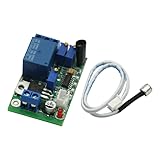
- Sound and light control Optional: You can only use Sound control, sound and light control can also be used simultaneously, but the light control cannot be used alone.
- The two-stage amplification sound, adjustable magnification 100-5000 times, (corresponding to about 10 to 90 decibels sound), adjustable sound intensity threshold.
- The light intensity threshold 10-10000LX adjustable sensitivity (roughly equivalent to the full black to sunny midday brightness varies the shade);
- Pull 3-60S adjustable delay time (non-precision delay, delay capacitor charging and discharging, with sound trigger a relationship).
- Reverse polarity protection, power supply reverse does not work, will not burn module.
Choose the right architecture first
| Approach | Best for | Advantages | Trade-offs |
|---|---|---|---|
| Arduino, microphone, MOSFET and LED strip | Learning electronics and low-voltage lighting | Adjustable, inexpensive and comparatively safe | Requires wiring, coding and calibration |
| Circuit Playground Express with MakeCode and an enclosed relay controller | Beginners who want minimal coding | Integrated sound input and browser-based programming | Less flexible and more expensive than discrete parts |
| Arduino and servo-operated pull-chain lamp | A mains-lamp demonstration without mains wiring | Keeps the electronics outside the utility-power path | Mechanical, bulky and limited to pull-chain lamps |
| Commercial smart plug or smart bulb | Everyday household use | Product enclosure and electrical protection are already addressed | Turns the project into a smart-home integration rather than a self-contained clap detector |
Safety: keep household voltage out of the beginner build
A 5 V or 12 V LED circuit is not equivalent to a wall-switch installation. Household mains can cause fatal shock and fire, and a relay’s printed contact rating does not make a complete assembly safe. Creepage, clearance, enclosure, strain relief, grounding, fusing, overcurrent protection, load current, inrush current and local electrical rules all matter.
Do not place exposed 120 V or 230 V terminals on a breadboard, leave bare relay contacts accessible, or install a hobby circuit in a wall box unless the device and installation are appropriate for that purpose and the work is performed by a qualified person where required.
For a plug-in lamp, use a commercially enclosed smart plug or purpose-built power-switch product within its stated ratings. Adafruit’s comparable project uses a dedicated power-switch relay controller with switched and always-on outlets; its guide describes a 12 A thermal safety circuit breaker, but that information applies to that particular product and does not approve every relay board or load. Check the current product documentation before use: Adafruit’s relay-project overview.
Another mains-safe demonstration is SparkFun’s servo arrangement, which mechanically operates a lamp’s existing pull chain instead of switching the lamp’s 120 VAC conductors: SparkFun’s clap-on lamp introduction.
Recommended build: Arduino and a low-voltage LED
Parts
- An Arduino Uno, Nano or compatible 5 V board
- An analog microphone or sound-detector module
- A logic-level N-channel MOSFET rated for the LED current and gate voltage
- A 100–220 ohm resistor for the MOSFET gate
- A 10 kilohm resistor from the gate to ground
- A 5 V or 12 V LED strip or manufactured LED lamp matched to its power supply
- A DC power supply with enough current capacity for the LED load
- Breadboard, jumper wires and, preferably, an enclosure
- Optional pushbutton for manual control and an indicator LED for status
Identify the exact sensor before wiring it. Some inexpensive modules provide only a digital comparator output; others expose both analog and digital outputs. Pin labels, supply voltage, output behavior and the adjustment potentiometer vary by model. Do not assume that a pinout from one sound board applies to another.
Why the MOSFET is necessary
An Arduino pin supplies a control signal; it is not a power supply for a long LED strip or lamp. The MOSFET acts as the electronically controlled switch while the external LED supply provides the load current. For a single small LED, use the correct current-limiting resistor. For a manufactured strip, use the strip’s specified voltage and connection method.
Rank #2

- Wide Voltage Range: Operates from DC 3V to 30V, compatible with LED lights, small lamps, and circuits.
- Sound Sensitive: Activates lights with sound, ideal for corridors, toilets, warehouses, and stairs.
- Adjustable Sensing: Detects sounds around 20 decibels, triggering lights only when needed.
- Time Delay Function: Keeps lights on for a short period after activation for convenience and energy saving.
- Dual Pack: Includes 2 sound-activated switch modules for versatile installation in multiple locations.
There is no single useful “maximum current” rule for every Arduino-compatible board and operating condition. The practical rule is to use a driver stage for anything beyond a small indicator LED and to select the MOSFET, wiring and power supply for the actual load.
Low-voltage wiring
For a typical common-ground, low-side-switched circuit, connect the parts as follows:
- Sound sensor
VCCto the Arduino5V - Sound sensor
GNDto ArduinoGND - Sound sensor analog output to
A0 - MOSFET source to
GND - Arduino digital pin
9to the MOSFET gate through approximately 100–220 ohms - 10 kilohm resistor from the MOSFET gate to
GND - LED negative lead to the MOSFET drain
- LED positive lead to the external LED supply positive terminal
- External LED supply negative terminal to the Arduino
GND
That shared ground is essential for a conventional logic-level MOSFET connection. Verify the MOSFET’s drain, source and gate pinout from its datasheet or product documentation; package layouts are not universal. Keep the high-current LED wiring short and physically separate from the microphone wiring where practical.
Program the double-clap detector
The following sketch assumes an analog sound signal on A0 and a MOSFET gate on pin 9. The value 620 is only an example. It must be calibrated for the particular sensor, room and operating distance.
const int soundPin = A0;
const int lightPin = 9;

const int threshold = 620;          // Tune for your sensor and room
const unsigned long minGap = 120;   // Ignore near-duplicate peaks
const unsigned long maxGap = 800;   // Double-clap window
const unsigned long lockout = 700;  // Ignore sound after a valid trigger

bool lightOn = false;
bool aboveThreshold = false;

unsigned long firstPeakTime = 0;
unsigned long lastPeakTime = 0;
unsigned long lockoutUntil = 0;

void setup() {
  pinMode(lightPin, OUTPUT);
  digitalWrite(lightPin, LOW);
  Serial.begin(115200);
}

void loop() {
  unsigned long now = millis();
  int level = analogRead(soundPin);
  bool isAbove = level >= threshold;

  // Detect a rising crossing, not every high sample.
  if (isAbove && !aboveThreshold) {
    if (now >= lockoutUntil &&
        (lastPeakTime == 0 || now - lastPeakTime >= minGap)) {

      if (firstPeakTime == 0 || now - firstPeakTime > maxGap) {
        firstPeakTime = now;
      } else {
        lightOn = !lightOn;
        digitalWrite(lightPin, lightOn ? HIGH : LOW);
        firstPeakTime = 0;
        lockoutUntil = now + lockout;
      }
      lastPeakTime = now;
    }
  }

  if (firstPeakTime != 0 && now - firstPeakTime > maxGap) {
    firstPeakTime = 0;
  }

  aboveThreshold = isAbove;
  Serial.println(level);
  delay(2);
}
The logic records only a rising threshold crossing. The first qualifying peak starts a waiting period; a second qualifying peak between 120 and 800 milliseconds later toggles the output. Afterward, the 700-millisecond lockout ignores additional sound.
Do these 3 things before closing this tab:
1Scan for outdated or missing drivers - takes under a minute2Clear out junk files and repair common Windows errors3Fix the driver behind crashes, sound loss and screen glitchesUseful starting ranges are a minimum separation of 80–150 ms, a double-clap window of 600–900 ms and a lockout of 500–1,000 ms. These are tuning values, not universal specifications. Room acoustics, microphone gain, sensor design and distance will change the result.
Rank #3

- AUTOMATIC DAY/NIGHT MODE: Dormant in daylight and activates by sound at night to save energy without manual operation
- FLAME RETARDANT SAFETY: Built with V0 shell and copper conductors to handle 220V loads while resisting fire risks
- PRECISE SENSING RANGE: Detects noise within 6 meters to keep lights on for 45 seconds before auto shutoff
- for versatile INDOOR FIT: Perfect for corridors, bathrooms, and stairwells where hands-free lighting control is needed
- READY TO INSTALL: Includes voice sensor switch for concealed wiring with stable performance in varied temps
Calibrate it before connecting the full light
- Upload the sketch with the strip disconnected or with a small indicator LED connected instead.
- Open the serial monitor at
115200baud. - Watch the readings while the room is quiet.
- Clap from the intended operating distance and note the readings.
- Choose a threshold above ordinary background noise but below a normal clap.
- Test from different positions and with typical room sounds.
- Raise the threshold if speech, tools, music or doors cause false triggers.
- Lower it if ordinary claps are missed.
- Adjust
minGap,maxGapandlockoutto suit the room.
Microphone boards behave differently. Some bias their analog output around mid-supply, some provide an amplified or rectified envelope, and some expose a rapidly varying waveform. On certain modules, the onboard potentiometer changes only the digital comparator output. That is why copying a threshold from another tutorial is unreliable.
Improve reliability
Add hysteresis
Use a higher threshold to recognize a peak and a lower threshold to decide that the signal has returned to normal. This prevents repeated transitions when the signal hovers around one threshold.
Use an envelope or peak detector
Raw microphone audio oscillates rapidly. A rectified and smoothed envelope is easier to threshold. If your module offers an envelope output, use that rather than a raw waveform. Otherwise, average or otherwise smooth short samples in software.
Recommended Free Tools
Require more than amplitude
A more selective detector can consider peak amplitude, time above threshold, energy in a short window and the interval between peaks. That can reject sustained sounds such as a fan or speech more effectively, although it still will not guarantee perfect clap recognition.
Provide manual control and feedback
A pushbutton or physical switch keeps the light usable when the room is noisy, the microphone is disconnected, the controller has rebooted, or silence is preferred. A status LED can indicate power, the first detected peak, the waiting period, a successful toggle and the lockout period. Adafruit’s sound-activation example uses onboard LEDs for trigger feedback: see its sound-activation example.
No-code alternative: Circuit Playground Express
A Circuit Playground Express provides integrated sound sensing and can be programmed through Microsoft MakeCode in a browser. Adafruit’s comparable project demonstrates sound activation with a dedicated power-switch relay controller. The downloaded program can be transferred to the board by dragging it to the CPLAYBOOT drive, as described in Adafruit’s MakeCode instructions.
Rank #4

- 👍.1,A self powered wireless light switch that does not require a battery. In the absence of a battery or WiFi, you can press the switch panel to convert the kinetic energy of finger pressing into electrical energy, and send a wireless 433MHz signal to the receiver to turn on or off the lights.
- 👍.2,Easy to install, the switch panel does not require rewiring. Simply connect the receiver to the live and neutral wires of the desired light, and press the switch panel to control the light on and off (the original wall switch must be powered on)
- 👍. 3, A self powered wireless switch with strong RF signals, which can transmit strong RF signals through walls and doors to control lighting fixtures in areas around 30 meters indoors (100 meters outdoors). Metal doors can shield signals and prevent penetration. It is very suitable for controlling lighting fixtures in homes, garages, external lighting, and gardens
- 👍. 4, DIY your wireless light switch system, which can control a receiver with multiple switch panels, such as up and down stairs, entrance and bedside, requires multiple switch panels to control the lighting scene. Different wireless light switch kits will not interfere with each other and will not cross code Can create a perfect home lighting control system
- 👍. 5,Waterproof self powered wireless light switch, due to the milliampere level of electricity emitted by the switch panel, there will be no circuit break, and it can be used even in damp environments such as bathrooms and courtyards. Simply press the switch panel to remotely turn on/off indoor lighting equipment, ceiling lights, plug-in chandeliers, lighting fixtures, difficult to reach lights, and other appliances.
This is a convenient route for students and first-time makers, but it remains a sound-level trigger rather than an automatic acoustic classifier. Use the enclosed relay product only within its own load and installation ratings. “No soldering required” applies to the specific documented setup, not necessarily to an Arduino/MOSFET build or its final enclosure.
Quick wins for a faster PC:
Scan for outdated or missing drivers - takes under a minuteDriver Scan →Clear out junk files and repair common Windows errorsFree Scan →If you need to control a mains lamp
The safest choices are:
- Control a low-voltage LED instead.
- Use an enclosed, purpose-built smart plug or relay controller and keep the mains side intact.
- Use a servo to pull an existing lamp chain, following the type of mechanical approach documented by SparkFun.
- Have a qualified electrician install a listed wall-control device suitable for the load and local requirements.
Do not assume that a relay module is suitable merely because its contacts are marked for household voltage. Load type, motor or lamp inrush, enclosure, insulation, terminal protection, heat, grounding and code compliance all affect safety. Never work on energized wiring.
A switched outlet also does not guarantee that an electronic appliance will start operating when power returns. Adafruit notes that many modern devices remain in standby after being re-energized. Demonstrate this project with a simple lamp or LED, not a television, computer, heater or other appliance unless its behavior and ratings are known: Adafruit’s project overview.
Independent reader supportYour contribution helps us test, update, and keep practical guides available for everyone.Troubleshooting
The light triggers randomly
Raise the threshold, reduce microphone gain, move the sensor away from vibration and switching hardware, shorten or twist sensor wires, and add hysteresis or a longer lockout. Speech, pets, music, dishes and impacts can all trigger a basic amplitude detector.
One clap toggles twice
The signal is crossing the threshold repeatedly. Detect only rising crossings, increase minGap, smooth the signal, reduce gain and retain the post-trigger lockout.
What’s actually slowing this PC down?
Pick the symptom - the matching free tool is one click away.
Claps are detected but the LED stays off
Check the MOSFET pinout, common ground, LED polarity, strip voltage, supply polarity and MOSFET gate-voltage suitability. Confirm that the external supply can provide the LED’s required current.
Best Value

- 8M MEMORY CAPACITY: Features 8 megabytes of storage space allowing you to record up to 10 minutes of personalized audio messages, music, or voice greetings for your DIY projects
- LIGHT SENSING ACTIVATION: Automatically plays your recorded message when the card is opened, triggered by the built-in light sensor for a delightful surprise every time without requiring buttons or switches
- CLEAR SOUND QUALITY: Equipped with a high-quality speaker that delivers clear and loud audio playback, ensuring your personalized messages, songs, or greetings are heard perfectly by recipients
- EASY RECORDING PROCESS: Simple one-button recording operation makes it effortless to capture your voice messages - just press, record, and release, perfect for users of all ages and technical skill levels
- VERSATILE DIY APPLICATIONS: Ideal for birthday cards, holiday greetings, anniversary cards, thank you notes, and various craft projects - perfect gifts for women, men, moms, kids, and loved ones on special occasions
The LED flickers
Look for an undersized supply, a floating MOSFET gate, electrical noise or repeated software toggles. Confirm the 10 kilohm gate pull-down, use an appropriately rated MOSFET, separate load and sensor wiring, and test with a small LED first.
The controller resets when switching
Disconnect the load and test the controller alone. Supply dips and electromagnetic interference from a relay or lamp can cause resets. Use suitable separate supplies where appropriate, add decoupling near the controller and sensor, keep relay wiring away from the microphone, and prefer an enclosed product with proper suppression over an improvised mains circuit.
Finish the installation carefully
Before putting the circuit into service, secure the microphone so it cannot rattle, cover all exposed conductors, provide a physical power disconnect, label the power-supply voltage, and keep high-current wiring away from the sensor. An enclosure should prevent accidental contact while leaving the microphone opening acoustically usable. Test the system with the intended load only after the low-voltage control circuit behaves correctly.
Commercial parts worth considering
For the shortest beginner path, the Adafruit Circuit Playground Express combines a microcontroller, onboard sound sensing and MakeCode support. For a separate sensor and more control over signal processing, SparkFun’s Sound Detector is designed for Arduino-style projects, but it detects sound level rather than guaranteeing clap recognition. SparkFun’s Inventor’s Kit v4.0 is useful when a beginner needs a broader set of Arduino components, but may be unnecessary if the required board, breadboard and wiring are already available.
For plug-in lamp control, review the current enclosed products in Adafruit’s power-switch category and verify availability, load rating, required accessories and regional suitability on the individual product page. Product numbers and tutorial links are not proof that a product remains in stock or suitable for every installation.
When not to build a clap switch
Choose a commercial smart bulb, smart plug or conventional switch if the priority is dependable daily control, remote access, silent operation or integration with an existing home system. Build this project when the priority is learning about sensors, timing, MOSFET switching, low-voltage lighting and embedded control.
Quick Recap
Product prices and availability are accurate as of the date/time indicated and are subject to change. Any price and availability information displayed on Amazon at the time of purchase will apply.
Free tools Windows power users keep installed
One-click scans. No signup required.

