Marlin Unified Bed Leveling (UBL) builds a height map of your 3D printer’s bed and adjusts Z during a print so the nozzle follows repeatable surface variation. It is not a universal hardware standard, and it does not replace mechanical bed tramming. To use it reliably, confirm that your firmware was compiled with AUTO_BED_LEVELING_UBL, calibrate the nozzle-to-probe offset, create and save a mesh at a repeatable temperature, then load and activate that mesh after homing.
This is a generic Marlin workflow. Exact menus, boundaries, EEPROM behavior, and command support vary by firmware build.
As an Amazon Associate I earn from qualifying purchases.
What UBL actually solves
A printer can be mechanically “level” and still have local high and low areas caused by a slightly warped bed, mounting pressure, a removable build plate, or small geometric errors. UBL represents those variations as a grid of height measurements. Marlin interpolates between the points and makes small Z adjustments while the first layers print.
Windows Errors? Fix Them Before They Spread
Repair common Windows errors and clear accumulated junk for a smoother, more stable PC - no reinstall needed.Free scan · no reinstallOutdated Drivers Are Slowing You Down
One free scan finds every outdated or missing driver and matches the right update for your exact hardware.Free scan · exact hardware matchThat is different from:
- Mechanical tramming: adjusting screws, spacers, or the gantry so the bed and nozzle move in a consistent relationship.
- Planar or matrix leveling: treating the bed as a plane and compensating for its overall tilt.
- Ordinary mesh leveling: measuring multiple points and applying height correction.
- UBL: Marlin’s more flexible mesh system, with automatic and manual probing, smart filling, mesh editing, EEPROM slots, topology reports, mesh tilting, and validation tools.
UBL compensates for measured, repeatable variation. It cannot reliably correct a loose bed, a sagging gantry, a shifting build plate, or a probe mount that moves between measurements.
#1 Best Overall
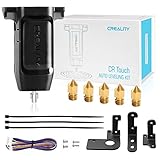
- 【Wide Application】This Creality cr touch auto-leveling kit is equipped with 3 mounting brackets and is only suitable for the following 3D printers with V4.4.2/V4.2.7 motherboards (Ender 3/Ender 3 Pro/Ender 3 V2/Ender 5/Ender 5 Pro/cr 10), other machines are not compatible. Please confirm your machine and motherboard version before purchasing.
- 【About Reflash the Firmware】1. Download the corresponding firmware from the Creality official website. 2. copy it to the SD card. 3. Rename it to 123.bin, 4. Insert the SD card into the printer, 5. When the power is on, the cr touch firmware will be updated. (Note: Check your motherboard version and download the correct CR touch firmware).
- 【Independent research and development Stable function】CR Touch is a Creality 3D research institute self-developed 3D printer platform leveling solution based on hundreds of millions of user data used by the creators. Compared with the traditional automatic leveling , it is compatible with more 3D printer platforms, more stable and cose-effective. With stable quality and long service life, it can be reused for more than 100,000 times.
- 【Multi-point detection Smart compensation】CR Touch performs multi-point detaction on the printing platform and records the heigh of each detaction point. The system builds a virtual plane based on the height of each point and calculates the tilt angle between the nozzle and the platform to automatically compensates for different points.
- 【Strong compatibility】Creality CR Touch auto leveling kit Compatible with PEI / sticker / glass / metal platform.
Marlin’s technical description is in its Unified Bed Leveling overview and UBL G-code reference.
Before you begin: the compatibility gate
Do not paste UBL commands into a printer until you know which leveling system it uses. In Marlin, G29 has different behavior under UBL, bilinear automatic bed leveling, manual mesh leveling, and other configurations.
Confirm all of the following:
- The printer runs Marlin and supports
AUTO_BED_LEVELING_UBL. - EEPROM support is enabled if the mesh must survive a power cycle.
- You have a correctly installed, repeatable Z probe, or an LCD/controller that supports Marlin’s manual probing workflow.
NOZZLE_TO_PROBE_OFFSET, probe margins, and probeable boundaries are correct.- The bed, gantry, wheels, belts, Z hardware, springs, and probe mount are mechanically stable.
- The bed surface is clean, securely seated, and heated consistently.
Marlin documents G29 P2 manual probing as requiring an LCD controller. A printer without a probe or suitable LCD cannot necessarily follow the same workflow; it may need manual mesh leveling or a printer-specific interface.
Quick wins for a faster PC:
Fix the driver behind crashes, sound loss and screen glitchesFind Drivers →Clear out junk files and repair common Windows errorsFree Scan →Scan for outdated or missing drivers - takes under a minuteDriver Scan →See Marlin’s probe configuration and general configuration documentation before changing firmware.
Tram the bed before building a mesh
Use mechanical adjustment for large, systematic errors and UBL for residual surface variation. Before probing:
- Check frame and gantry squareness.
- Remove debris from the bed, carriage, and mounting surfaces.
- Check eccentric wheels, belts, bed mounts, springs, spacers, and Z hardware for excessive looseness.
- Adjust the bed or gantry until it is reasonably parallel to the nozzle’s travel.
- Make sure the removable plate seats in the same position every time.
A dense mesh over a mechanically unstable printer only records one temporary state. If the bed shifts after probing, Marlin is applying accurate compensation to outdated geometry.
Why calibration temperature matters
Heating can change a bed’s dimensions and shape. For repeatable results, probe with the bed at the temperature used for normal printing, or at the temperature specified by the printer and firmware maker. The target is not universally 65 °C.
The Tool Desk
Outbyte PC Repair FREERepair Windows errors before they cause bigger problemsFix Now →Outbyte Driver Updater FREEFix the driver behind crashes, sound loss and screen glitchesFind Drivers →If a separate probe measures the bed, a cold, clean nozzle may be safer. If the nozzle itself is involved in the Z-offset procedure, heat it according to that procedure and remove any filament residue. Do not copy example PLA temperatures for PETG, ABS, TPU, or another material without adapting them to your printer.
Rank #2

- ♡【Perfect Design】CR Touch auto bed leveling sensor fulfilled simple structure and high precision. Performs multi-point detection on the printing platform and records the height of each detection point. Stable quality, long service life, and can be reused more than 100,000 times.
- ♡【Strong compatibility】Compatible with traditional automatic leveling, it is compatible with more 3D printer platforms, more stable and cost-effective. Compatible with PEI /sticker bed/glass bed/metal bed and more 3D printing platform materials.
- ♡【Easy to Install and Use】Download the CR Touch program and copy it to the TF/SD card from the Creality official website, directly insert into the 3D printer card slot to update the program. You don’t need to use an ISP burner, which is more convenient to use.
- ♡【Widely Application】CR Touch works for Ender 3 / Ender 3 V2 / Ender 3 Pro/ Ender 3 Max / Ender 5 / CR-10 3D Printers with 32 Bit V4.2.2 / V4.2.7 Mainboard.
- 【After-sales Service】Our package was included 1 set of auto-leveling Kit and a replacement probe. If you encounter unsolvable problems during installation and use, please feel free to contact us through “ Ask a question ", our after-sales technical team will provide you with detailed solutions within 24 hours.
The four measurements you must keep separate
- Z offset: the relationship between the probe’s trigger point and the nozzle tip. A wrong offset can cause poor adhesion and dimensional errors.
- Mesh shape: relative height differences from one X/Y location to another.
- Mesh vertical shift: moving the entire mesh up or down. This is not a substitute for calibrating the actual Z offset.
- Fade height: the height at which bed compensation gradually reduces as the print rises.
A plausible-looking mesh cannot rescue an incorrect probe offset. Conversely, changing the entire mesh height to hide a bad offset makes the setup harder to understand and less portable between firmware configurations.
Build a first mesh
First establish a reliable Z reference:
- Clean the nozzle.
- Heat the bed to the chosen calibration temperature.
- Heat the nozzle if the printer’s Z-offset procedure requires it.
- Home the printer.
- Calibrate the nozzle-to-probe Z offset using the firmware’s supported method.
- Run a small centered first-layer test. A small disk or cylinder is useful because it tests Z offset without relying heavily on the outer bed area.
Once the reference is trustworthy, a typical probe-equipped sequence is:
M190 S65        ; Example only: use your calibration temperature
M104 S210       ; Example only: heat nozzle if appropriate
G28             ; Home the printer
G29 P1 T        ; Probe automatically and report topology
G29 P3 T        ; Smart-fill unpopulated points, if needed
G29 T           ; Display the mesh topology
G29 S0          ; Save the mesh to EEPROM slot 0
G29 F10.0       ; Example fade height: 10 mm
G29 A           ; Activate UBL
M500            ; Save settings to EEPROM
The temperatures, mesh slot, grid density, and fade height are examples, not universal requirements. The command sequence also depends on the firmware build. Marlin warns that saving settings can leave UBL active at power-up, which matters if your startup sequence assumes the printer will home before leveling is enabled.
Recommended Free Tools
When the probe cannot reach every point
A probe is offset from the nozzle, so it may not be able to reach every location the nozzle can print. Probe boundaries must account for that physical offset. Inspect the topology rather than assuming every missing point is a failed measurement.
Where supported, manually measure unreachable points with:
G29 P2 B TThis documented workflow requires an LCD controller. The B option uses a business-card or shim-style procedure. A non-compressible shim or feeler gauge is preferable to a compressible card because it gives a more consistent reference.
Alternatively, let UBL estimate missing values:
G29 P3 TG29 P3 does not complete the mesh with new measurements. It fills unpopulated locations using constant or smart extrapolation. Treat those values as estimates and inspect the resulting topology.
Preserve a baseline mesh
Before manual edits or extrapolation, save the directly probed result in another EEPROM slot:
Rank #3

- The 3D Touch auto leveling sensor is a device that uses the Hall defect to achieve leveling .The position of the point can be obtained by touching the point on the heated bed ,and then compensated by adjusting the Z-AXIS height during printing ,Printing can also be achieved even though the platform is not flat .
- Features simple, smart and precise. It could work with nearly any kind of bed materials, such as glasses, woods, metals and so on. The position of the point can be obtained by touching the point on the heated bed, and then compensated by adjusting the z-axis height during printing.
- The main functions and controls of 3D touch are the same as most auto bed leveling sensors, which consists of a RC servo and a micro switch,thus,3D printer touch can be used on almost every 3D printer control board.
- NOTE: Pulling/pushing hardly on the push-pin may damage Touch sensor and make it less accurate. Any problem when you receive the order, CONTACT US FIRST please!
- By using progressively designed solenoid and hall sensor, it can integrate high precision in such a simple structure.To make it more user-friendly and to bring you more enjoyable printing experience.
G29 P1 T
G29 S2          ; Preserve the initial probed mesh

G29 P3 T        ; Fill remaining points if required
G29 T           ; Inspect the refined mesh
G29 S0          ; Save the working mesh
The slot numbers are arbitrary. The useful practice is preserving a known baseline so you can compare or reload it if later edits make the first layer worse.
Validate before trusting the mesh
Use Marlin’s optional validation pattern:
G26You can also use a full-bed first-layer test. Keep a hand near the stop control during the first run; a bad offset or bad mesh value can drive the nozzle into the bed.
Read the topology as evidence, not merely as a picture:
Do these 3 things before closing this tab:
1Repair Windows errors before they cause bigger problems2Fix the driver behind crashes, sound loss and screen glitches3Clear out junk files and repair common Windows errors- A broad, smooth gradient may indicate bed tilt or incomplete tramming.
- A single isolated spike may indicate probe noise, dirt, a loose plate, or an incorrect point.
- A repeated ridge or trough can point to the bed, mounting surface, or gantry rather than the firmware.
- Large changes after reheating or re-seating the plate indicate poor repeatability.
- The first layer should improve in the areas predicted by the mesh. If it does not, check coordinate limits, offsets, activation, and temperature.
For cautious manual refinement, use:
G29 P4 TThen validate again and save only after the result is safe:
G29 S0
M500
Manual mesh editing can cause a crash if an incorrect value is entered. The M421 command can edit individual points on firmware builds that support it, but use it only when you understand the mesh coordinate system and the effect of the change.
Important UBL commands
| Command | Purpose | Important qualification |
|---|---|---|
G28 |
Home the printer | Homing may disable leveling. |
G29 P0 |
Zero the mesh and disable compensation | Destructive to the current mesh state. |
G29 P1 |
Automatically probe | Requires a configured probe. |
G29 P2 |
Manually probe points | Marlin’s documented path requires an LCD. |
G29 P3 |
Fill missing points | Values are estimated or constant, not newly measured. |
G29 P4 |
Fine-tune points manually | Incorrect edits can cause a crash. |
G29 P5 |
Report mean height and standard deviation | Useful for judging overall variation. |
G29 P6 C... |
Shift the mesh vertically | Not a replacement for correct Z-offset calibration. |
G29 T |
Display topology | Use after probing and edits. |
G29 Snn |
Save mesh slot nn |
The slot must match the later load command. |
G29 Lnn |
Load mesh slot nn |
Loading does not necessarily activate compensation. |
G29 A |
Activate UBL | Use after loading and homing when required. |
G29 D |
Disable UBL | Equivalent in purpose to turning compensation off. |
G29 J |
Probe three points and tilt an existing mesh | Useful for small bed-position changes, not major changes. |
G29 F10.0 |
Set a 10 mm fade height | Example only; choose a value appropriate to the printer. |
M500 |
Save settings to EEPROM | Persistence behavior varies by firmware build. |
M502 |
Restore firmware defaults | May erase desired configuration values; do not use casually. |
The complete behavior is documented in Marlin’s UBL command reference.
Load and activate the mesh in start G-code
A stored mesh is not automatically active in every startup sequence. Homing may disable leveling, and a slicer profile or vendor macro may load another mesh or rebuild one.
What’s actually slowing this PC down?
Pick the symptom - the matching free tool is one click away.
A common pattern is:
G28
G29 L0          ; Load mesh slot 0
G29 A           ; Activate UBL
If the bed shifts slightly between prints, you may use:
Rank #4

- Creality 3D Printer Auto Bed Leveling Kit - The Creality cr touch auto bed leveling kit fulfilled simple structure and high precision. Performs multi-point detection on the printing platform and records the height of each detection point. Stable quality, long service life, and can be reused more than 100,000 times.
- The Firmware Download - According to your 3D printer Model, select a mounting bracket to install it on your 3D Printer, then remove the Z-axis limit switch. Download the corresponding firmware from the Creality official website and copy it to the SD card. When the power is on, the cr touch firmware will be updated. (Note: Check your motherboard version and download the correct cr touch firmware).
- Wide Application - The Ender 3 upgrades cr touch is compatible with Creality Ender 3 V2/ Ender 3/ Ender 3 Pro/Ender 5/Ender 5s/Ender 5 Pro and CR-10 3D Printer. (Note: Our ender 3 v2 upgrades can only be compatible with 32-bit V4.2.2/V4.2.7 mainboard 3D Printers).CR Touch Automatic Bed Leveling Sensor Kit does not fit SKR Mini E3 V3 on Ender 5 plus
- Durable and Strong Compatibility - The cr touch kit is compatible with PEI/sticker/glass/metal bed. Ender 3 auto bed leveling kit works perfectly with any surface, especially the design of the metal push pin allows for longer service life.
- Easy Installation - 3 different kinds of mounting brackets allow for installation on multiple 3D printers. The Ender 3 bed leveling kit is simple in structure, and it is convenient for printing when connected. Automatic compensation of the Z-axis so as to stabilize print.
G28
G29 L0
G29 J           ; Probe three points and tilt the stored mesh
G29 A
Use G29 J only for small, repeatable positional changes. Rebuild the mesh after replacing the plate, moving the probe, changing major mechanical components, or correcting substantial tramming errors.
M420 S1 is a Marlin command for enabling leveling when a valid mesh exists, but it is not wise to assume that it is interchangeable with every UBL-specific workflow. For UBL, G29 A states the intended operation more clearly.
Avoid adding M501 blindly to start G-code. Loading saved configuration values can interact with firmware-specific startup behavior and may replace or clear expected UBL data on some third-party builds. Confirm the behavior of your exact firmware.
How many mesh points should you use?
A 7×7 grid is a practical starting example for many printers, not a Marlin requirement. More points can describe complex variation more accurately, but they also increase probing time, EEPROM or memory demands, and exposure to probe noise.
- Use fewer points on a small, rigid, repeatable bed.
- Consider more points on a large bed with smooth, meaningful variation.
- Do not increase density to compensate for a loose or badly warped bed.
- Check probe repeatability before assuming that more samples improve accuracy.
Start with a moderate grid, inspect its topology, and increase density only when first-layer evidence shows that the current grid is missing meaningful local variation.
Troubleshooting
The nozzle crashes during probing
Stop the printer immediately. Check that the probe deploys and triggers, inspect wiring and connectors, verify the probe mount, confirm safe Z height and probe offsets, and ensure all probe coordinates are physically on the bed. Re-home and test at the center before probing a full grid. If the mesh may contain invalid edits, start again from a zeroed mesh.
Some points remain unpopulated
Run G29 T. The cause may be a probe offset, excessive margins, incorrect probe boundaries, or a restricted probeable area. If the locations are genuinely reachable, correct the firmware limits. Otherwise use G29 P2 where an LCD supports manual probing, or G29 P3 with the understanding that the values are estimates.
Free tools Windows power users keep installed
One-click scans. No signup required.
The center is good but the edges are bad
Recheck mechanical tramming, bed temperature, probe offsets, probeable boundaries, removable-plate seating, and mesh activation. A centered test validates only the center. Use G26 or a full-bed first-layer test to evaluate the edges.
Best Value

- 【BL-Tocuh with 4 Mounting Brakets】Geeetech 3D touch with 4 mounting brakets, it can compatible with ender 3 series, ender 5, ender 5 Pro, ender 5s, CR10 Printer. The bed leveling sensor kit includes adapter pinboard so it can be used for 8 or 32 Bit motherboard.
- 【Wide Application】Geeetech 3D touch is equipped with new structural design for higher precision, it’s Standard Deviation in repeatability is around 0.003mm,can be widely used in various FDM 3D printers and give you an enjoyable experience. BL-Touch V3.2 auto bed leveling senor is controlled by hall effect, providing high-precision. Thus the bed material can be selected freely, glasses/ wood/ metal, etc.
- 【2 Types Extension Cables】The auto bed leveling kit includes 2 different length cables (18cm/100cm) easy to disassembleset when the distance between your printer interface and the 3D Touch installation position is different, meet the wiring length needs of different printers.
- 【Smart】The push pin of the 3D Touch sensor is operated two times to test when the power is on. The LED light blinks if a problem found on a self-test or on an operation.
- 【After-sales Service】If you encounter unsolvable problems during installation and use the 3D Touch V3.2, please feel free to contact us, our after-sales technical team will provide you with detailed solutions within 24 hours.
The mesh appears active but dimensions are wrong
Check NOZZLE_TO_PROBE_OFFSET, mesh vertical shifts, fade height, coordinate configuration, and any firmware changes made during flashing. Marlin specifically warns that an incorrect nozzle-to-probe offset can produce dimensional errors.
The mesh disappears after a power cycle
Verify EEPROM support, save the mesh with G29 S0, and commit settings with M500:
G29 S0
M500
After restarting, verify the result with the sequence appropriate to your firmware:
G29 L0
G29 T
G29 A
A firmware update may reset or invalidate stored EEPROM data.
The first layer changes from print to print
UBL depends on repeatable geometry. Check bed temperature, plate seating, bed springs or mounts, probe repeatability, nozzle cleanliness, and startup-code order. A surface that moves unpredictably cannot be corrected reliably with a stored mesh.
UBL versus other approaches
Choose UBL when you need mesh slots, manual probing for unreachable areas, smart fill, individual point editing, validation, or mesh tilting—and you are comfortable configuring Marlin.
Choose ordinary bilinear automatic bed leveling when a probe reaches the relevant bed area and you want a simpler probe-and-print workflow. It may be the better choice for vendor firmware that already supports it.
Choose manual mesh leveling when there is no probe, the printer has a suitable LCD, and the bed is small and stable. Marlin documents this mode separately in its manual mesh leveling reference.
Choose hardware repair or replacement when the bed is severely warped, the plate is damaged, the gantry sags, the mounts are loose, or the frame shifts. A flatter plate, more stable mount, or rigid spacer can outperform an increasingly dense software mesh.
Quick Recap
Final checklist
- UBL mode is confirmed in the firmware.
- EEPROM support and mesh storage behavior are understood.
- The bed and gantry are mechanically trammed and stable.
- The probe is secure, repeatable, and correctly offset.
- The bed is heated consistently for calibration.
- The mesh topology has been inspected.
- A baseline mesh has been preserved.
- The working mesh has been saved to the intended slot.
- Startup G-code loads the correct slot after homing.
- UBL is explicitly activated.
G26or a full-bed first-layer test confirms the result.
Product prices and availability are accurate as of the date/time indicated and are subject to change. Any price and availability information displayed on Amazon at the time of purchase will apply.

