Do these 3 things before closing this tab:
1Clear out junk files and repair common Windows errors2Fix the driver behind crashes, sound loss and screen glitches3Repair Windows errors before they cause bigger problemsIf a Genie boom lift will not start, move, lift, or respond to controls, begin with the operator-level checks in the manual for that exact machine. Identify its model, configuration, and serial number first; Genie manuals and fault responses can vary by serial range and configuration. Stop using the lift if a warning persists, it behaves unpredictably, or troubleshooting would require electrical or hydraulic repair.
Why won’t my Genie boom lift move?
Do not assume a single cause from the symptom. Operating mode, a warning, slope conditions, or a machine fault can affect functions differently on different models. Start with observation and the instructions in the matching operator manual—do not bypass an interlock or try adjustments to make the lift move.
Check the machine identity and operating instructions
- Read the identification plate and record the model, serial number, and configuration.
- Open Genie’s manuals portal and select documentation that applies to those details. The S-60/S-65 manual index, for example, separates documents by serial-number range and configuration. An approximate model match may not be sufficient.
- Use the operator manual’s pre-use inspection and function-test instructions. Observe the display and indicators, confirm the expected operating mode, and check emergency-stop and function-enable behavior only as the manual directs.
Check function-enable behavior only as specified
For the S-60/65 XC, S-60/65 HF, and S-60/65 TRAX, Genie’s operator manual says that when testing function buttons without pressing the function-enable button, “No boom and platform functions should operate.” This is a model-family-specific test, not a universal instruction for every Genie lift. Follow the manual for your machine rather than applying this example elsewhere. Read the S-60/65 XC, S-60/65 HF, and S-60/65 TRAX operator manual.
Why won’t my Genie boom lift start?
Use the matched operator manual’s pre-use checks and instructions for the machine’s controls and indicators. Record what appears on the display and whether the attempted start produces any response. Do not open energized electrical systems, bridge switches, or continue trying to start a machine that is showing a persistent fault. The available instructions do not establish one start-up checklist or cause that applies to every Genie boom lift.
#1 Best Overall
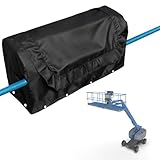
- Custom-Engineered & Universal Fit: This cover is tailor-made for the Genie Boom Lift Control Box, ensuring a perfect, close-fitting design. It guarantees full compatibility with all fuel-powered RT Genie boom lift models, providing complete and hassle-free protection.
- Military-Grade All-Weather Defense: Constructed from heavy-duty 600D polyester and a triple-layer laminated fabric with a waterproof coating. It creates an impenetrable barrier against rain, snow, dust, and harmful UV rays, while the plush lining prevents scratches and resists punctures and abrasions.
- Smart Anchoring System for Maximum Security: Features a locking eye at the bottom that can be easily secured with included (or your own) zip ties or ropes. This innovative system tightens the base seal, effortlessly conforms to irregular shapes, and prevents wind uplift—eliminating flapping covers and protecting your equipment from exposure.
- Easy On, Easy Off & Built to Last: Designed for simplicity in the toughest environments. The secure fit allows for quick installation and removal. With sealed seams that block moisture intrusion, this cover keeps your control box rust-free and fully operational in any season, year after year.
- our Satisfaction is Guaranteed: We stand behind the quality of our Wavecover. Your purchase is backed by a 1-year warranty and dedicated customer support. If you have any questions, we are happy to assist you to ensure a 100% satisfying shopping experience.
What does a Genie boom lift fault code or warning mean?
A code or indicator is a clue to interpret using the documentation for the exact model and serial range, not a diagnosis on its own. Record the exact message or code and follow the model-specific response rather than relying on a general code list.
Malfunction indicator
For the S-60 J, Genie describes the malfunction indicator as signaling a system fault and instructs the operator to lower and retract the boom, tag the machine, and remove it from service. Apply that direction to the documented S-60 J instructions; other models may have different procedures. See the Genie S-60 J operator manual.
Rank #2

- Product Condition: Brand new replacement part ready for installation
- Part Name: Genie decal, platform control panel for boom lift equipment
- Part Number: Compatible with part numbers 82238 and 82238GT for easy identification and replacement
- Applicable Models: Compatible with GENIE Articulating Boom Lifts Models Z-45/25IC, Z-45/25J (Jib)IC, Z-51/30J, and Z-60/34
- Installation Recommendation: Verify the part number matches the part you are replacing before installation to ensure proper fit and function
Tilt alarm and slope-related restrictions
The S-60 J manual also describes conditions in which an active tilt alarm and incline indication can disable drive functions; when the machine is stowed on a slope, lift functions can be disabled. These are specific S-60 J behaviors. Consult the matching manual for your lift’s warnings and restrictions rather than assuming the same response applies across the Genie range. See the Genie S-60 J operator manual.
How do I lower a Genie boom lift if it stops working?
Use only the emergency or ground-control lowering procedure specified in the operator manual for the exact machine. The available model examples do not establish one safe lowering procedure for all Genie booms, so do not improvise, bypass controls, or treat another model’s steps as interchangeable. If the machine is elevated and the documented procedure is unclear, or the controls do not respond as expected, keep people clear and contact qualified service support for instructions.
Free tools Windows power users keep installed
One-click scans. No signup required.
Rank #3

- Compatible for Genie Boom Lift Control Box Cover
- This cover is designed to fit all Fuel Powered RT Genie boom lifts.
- New aftermarket part
When should I stop troubleshooting and call service?
Operator checks are not a substitute for service diagnosis. Genie’s Z-34/22 Bi-Energy service manual states that troubleshooting and repair procedures are for a person trained and qualified on that machine. See the Z-34/22 Bi-Energy service manual.
- Stop using the lift if a fault indicator or warning persists, or the controls behave unpredictably.
- Do not attempt electrical, hydraulic, or component diagnosis unless you are trained and qualified for that machine.
- Follow any model-specific instruction to lower and retract the boom, tag the lift, or remove it from service.
- For unresolved problems, contact your local Genie distributor for parts, service, or training. Genie’s support page provides a route to support resources.
To make the service call more useful, have the model and serial number ready. Describe the symptom, the function you were attempting, the exact displayed message or indicator, and relevant conditions such as whether the lift was on a slope or had recently been serviced.
Rank #4

- Part number: 122514gt 122514GT 122514
- Part name: Genie Emergency Stop Switch, Genie lift electrical parts.
- Application: Used for GENIE Boom Lift Models S-40 S-60 S-80 Z-20/8 Z-30/20 Z-45/22 Z-60/34...
- Description: E-Stop Switch 122514GT 122514GT KIT,ESTOP SVC LARGE BOOM Switch 122514GT Emergency Stop
- 【After Service 】All of the parts we sell are in stock and ready for ship,please tell us if you have any needs about aerial vehicle parts,we will provide assistance within 24 hours.
How to find the right Genie troubleshooting information
Use documentation in this order: the operator manual that matches the machine for pre-use checks and function tests; model-specific fault instructions for interpreting a warning; and the service manual for diagnosis by qualified personnel. Match documentation by model, configuration, serial-number applicability, region, and revision. Genie’s technical tips also address particular products and symptoms—for example, a TZ34 boom that will not come down—so confirm that a tip applies to your equipment before using it.
Quick Recap
Best Value
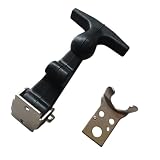
- Product Condition: Brand new replacement part ready for installation
- Part Name: GENIE FLEXIBLE LATCH, Genie Lift Latch, Genie Rubber Hood Latch, Genie Boom Lift Latch
- Part Number Compatibility: Replaces Genie part numbers 45363GT and 45363
- Applicable Models: Compatible with Genie Boom Lift, Genie Manlift, Genie Man Lift models S-60, S-65, S-80, S-85, S-100, S-105, S-120, and S-125
- Installation Recommendation: Verify the part number matches your existing component before ordering to ensure proper fitment
Product prices and availability are accurate as of the date/time indicated and are subject to change. Any price and availability information displayed on Amazon at the time of purchase will apply.




