Free tools Windows power users keep installed
One-click scans. No signup required.
Effective laser scanning starts with a project decision, not a scanner. Define the decision the point cloud must support, the areas that must be visible, the coordinate system, the final file or model, and the date the result is needed. Then plan field coverage, registration, processing and review as one workflow.
The nine practices below turn a scan into usable construction information: choose the use, set expectations about line-of-sight limits, study the site, define scope, agree on the deliverable, establish survey control, collect enough coverage, protect the schedule and assign an experienced team. The guidance comes from Trent Nichols, Vice President and National BIM Director at JE Dunn Construction, in a February 24, 2015 article; his project examples are practitioner experience from that period rather than a current technical standard. Read the original Building Design + Construction article.
As an Amazon Associate I earn from qualifying purchases.
What effective laser scanning means on a construction project
A terrestrial laser scanner records surfaces it can see and produces a registered point cloud. It does not look through a wall, slab or ceiling. That simple limitation determines whether a scan can answer a particular question. A scan may document exposed structure and services accurately while revealing nothing about a concealed pipe or a hidden connection.
Recommended Free Tools
The field work is only one part of the result. A typical workflow has three stages: data collection, scan registration and post-processing or model generation. Some projects need only collected and registered data; others need a cleaned point cloud, CAD files or a modeled environment that designers and trade contractors can use. Treating those stages as separate decisions is a common reason a technically successful scan arrives too late or in the wrong format.
#1 Best Overall

- 【Industrial-Grade Accuracy】Achieve single-frame accuracy up to 0.03 mm and volumetric accuracy of 0.03 mm + 0.05 mm x L(m), faithfully reproducing the finest surface details and complex geometries with exceptional consistency. Full-Field Structured Light accuracy reaches 0.08 mm; VCSEL mode delivers 0.10 mm @ 300-500 mm and 0.20 mm @ 500-800 mm. Engineered to meet the demanding requirements of 3D printing, reverse engineering, and precision modeling applications.
- 【Ultra-Fast Scanning & Robust Frame Rate】Multi-line Laser mode delivers up to 105 fps with NVIDIA GPU acceleration. Full-Field Structured Light mode achieves up to 5,000,000 points/s. The high frame rate ensures a smooth, uninterrupted scanning experience, especially suited for rapidly capturing large objects and complex scenes, significantly boosting overall workflow efficiency.
- 【AI-Powered & Photo-Grade Retopology】 AI object segmentation (Windows only) identifies your target in one click, tracks it throughout the scan, and auto-filters background noise — delivering clean data and streamlining post-processing. The patented 3D Gaussian Splatting converts point cloud and RGB data into true-to-life 1:1 photorealistic models; import photos from your phone or camera to apply real textures, then export in splat format for gaming, animation, and VR.
- 【All-Weather Outdoor Scanning】Multi-line Laser mode operates reliably up to 50,000 lux; with an outdoor filter attached, scanning remains stable in lighting conditions of up to 100,000 lux; VCSEL mode operates reliably in up to 100,000 lux ambient light. Designed to overcome lighting challenges, it provides consistent all-weather performance for construction sites, archaeological digs, and industrial fieldwork.
- 【5 Scanning Modes】NIR band supports Full-Field HD Scanning (markerless, fine structured light), Hybrid HD Scanning (dual projectors, fast high-quality modeling), and VCSEL Rapid Scanning (high-density pattern, fast markerless capture). Blue light band supports 30-Cross Laser Lines Scanning (handles high-reflectivity metals & dark objects) and Single-Line Deep Hole Scanning (captures from deep holes & narrow grooves). Five modes for comprehensive indoor and outdoor coverage.
Plan the scan around a named project action: verify existing conditions before design, coordinate MEP work during construction, support prefabrication, document a post-construction as-built condition, or provide another defined purpose. The purpose controls where you scan, how much detail you need, who reviews it and what “complete” means.
1. Identify the intended use before anyone scans
Write the decision the data must support in one sentence. “Capture the building” is too broad to guide field work; “verify column locations before issuing contract documents” gives the team a checkable outcome. Nichols describes uses ranging from design documentation and existing-condition verification to MEP coordination, post-construction as-built verification and multiple uses on one project.
Connect the scan to a decision
- Design documentation: expose the conditions a designer must rely on when preparing drawings.
- Existing-condition verification: test whether modeled elements, such as column locations, match the built space.
- Construction coordination: provide spatial information for MEP routing, clash review and prefabrication.
- As-built verification: record installed systems at the stage when the owner needs evidence of what was built.
- Multiple purposes: state which uses have priority if one scan cannot economically satisfy every request.
For each use, identify the decision owner, the area, the required date and the acceptance check. A structural designer may need column geometry before a contract package; a trade contractor may need coordinated ceiling-space information before fabrication; an owner may need a record after hospital renovation work. These are different questions even when they concern the same room.
Set the information boundary
Mark the elements that must be measured and the elements that can remain outside scope. Include adjacent spaces when they affect the decision: a plant room may matter to a corridor redesign, and a ceiling void may matter to a prefabricated service module. Record whether the scan is intended for measurement, visual reference, coordination, a model, or a permanent record. That statement becomes the basis for coverage and deliverable acceptance.
2. Educate the customer about capability and limits
Owners and project teams often assume that a dense point cloud is a complete picture. Explain before mobilization that scanning is line-of-sight technology. Walls, slabs, ceilings, insulation, finishes and equipment can block the surfaces behind them. A scan cannot certify concealed conditions simply because the visible point cloud looks detailed.
Explain the three-part workflow
- Data collection: operators place the scanner at positions that can see the required surfaces and capture the site.
- Registration: individual scans are aligned into a common point-cloud coordinate system.
- Post-processing or model generation: the registered data is cleaned, classified, exported or modeled to match the agreed use.
Some jobs need only collection and registration. For example, a contractor may want a registered cloud for internal coordination. A design team may instead require a CAD background or a building-information model, which adds interpretation and production time. Put that distinction in the scope and fee rather than assuming modeling is included.
Rank #2
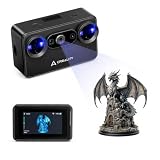
- Pocket-Sized & Wireless Freedom: At only 260g and 1006035mm, Pika fits in your palm. Features Wi-Fi 6 wireless PC mode, 3-inch HD touchscreen (500 nit), dual swappable 3350mAh batteries for extended sessions, and supports outdoor scanning up to 110,000 lux - scan anywhere, anytime without cables
- Dual-Mode Scanning with Blue Laser & NIR Structured Light: Switch between 7-line blue laser mode for fine detail capture and NIR structured light mode for full-body scanning with 24-bit true color. Scan objects from 101010mm to 200020002000mm - from tiny miniatures to life-size body scans - all with one device
- Ultra-High Precision 0.03mm Accuracy: Equipped with 7 parallel blue laser lines, Creality Pika delivers up to 0.03mm scanning accuracy and 0.1mm 3D resolution, capturing intricate details on small parts, figurines, mechanical components, and collectibles with professional-grade precision for 3D printing and reverse engineering
- AI-Powered Smart Features: Built-in AI Body Completion generates full-body 3D models from just a face scan and photos in as little as 10 seconds (10 faster). AI Retexturing maps real photo textures onto scanned models for lifelike results. AI Hole Filling automatically repairs incomplete scans for cleaner, print-ready output
- Scan Black & Metal Without Spray and Multi-Platform Export: Directly scans dark and metallic surfaces without scanning spray. Exports STL/OBJ/PLY/ASC formats compatible with all major 3D printing and CAD software. Works with Windows, macOS, iOS, and Android via CrealityScan app. Includes tripod, turntable, calibration board, and full accessories
Use a visibility briefing
Walk the customer through representative blind spots: behind a finished partition, above an intact ceiling, below a slab and inside a closed shaft. Explain how access, furniture, stored materials and active work can create additional occlusions. Ask whether those areas can be opened, scanned from another position or documented by another method. The purpose is not to reduce expectations; it is to prevent a visible point cloud from being mistaken for proof of hidden construction.
The Tool Desk
Outbyte Driver Updater FREEFix the driver behind crashes, sound loss and screen glitchesFind Drivers →Outbyte PC Repair FREEClear out junk files and repair common Windows errorsFree Scan →3. Understand the physical space and choose the timing
Site conditions determine how many scanner positions are needed and whether the intended surfaces are visible. Before setting a date, classify the work area as interior or exterior, occupied or unoccupied, and finished or demolished. Note active trades, temporary protection, stored materials, safety restrictions, weather exposure and access hours.
Match timing to the construction state
An occupied, finished space may contain furniture, people and equipment that hide the geometry needed for design. A demolished space may expose structure and services, reducing the number of positions and the time needed in the field. Nichols notes that planning a scan after demolition can reduce time when the demolition sequence is known in advance. That saving depends on the information required: postponing a scan can also remove evidence of conditions that will soon be covered.
Use the project schedule to choose the useful window, not merely the first available appointment. If the scan supports demolition planning, collect before removal. If it supports replacement routing, collect when relevant structure and services are exposed. If it documents the finished installation, wait until the systems are in place but before access is lost. Record what will change between the scan and the decision date.
Prepare access and safety controls
- Confirm who can unlock rooms, roofs, plant areas and restricted zones.
- Define working hours for occupied facilities and isolate areas where moving equipment is unsafe.
- Remove or relocate obstructions only when the responsible party approves the change.
- List spaces that will remain inaccessible and explain how that affects the intended use.
- Coordinate with demolition and temporary-works plans so the scanner is not exposed to avoidable hazards.
4. Know the scope, including work beyond complex MEP systems
Laser scanning is not only an MEP coordination tool. Scope should follow the geometry that controls the decision, whether that is a hospital ceiling, a structural grid, a façade, a floor layout or an exterior hardscape. Nichols describes a project where scanning guided a complex concrete paver layout. Crews could work from opposite ends while using the captured geometry as a common reference.
Define boundaries and detail
Draw or describe the scan limits in project language: rooms, elevations, grid lines, floors, roofs, courtyards or specific systems. State the smallest feature that must be resolved and the tolerances or review method the team will use, if the project has established them. Do not promise a level of detail merely because the scanner can record many points; the useful resolution depends on position, occlusion, surface condition, registration and the final output.
Rank #3

- Wireless Scanning & Interactive Streaming: Built-in WiFi 6.0 enables on-the-go, structured light mobile scanning or real-time PC-to-mobile interactive scan streaming for seamless remote operations and more flexibility.
- Scan Challenging Surfaces Without Scanning Spray: Easily capture details on reflective or dark surfaces with 11 infrared laser lines, no scanning spray needed.
- Dual Scanning Modules: Boost scanning efficiency with INSPIRE 2's infrared structured light and multi-line laser scanning modes, making it easy to handle different materials, sizes, and environments.
- Accurate Models & Advanced Calibration: Create highly detailed models with an accuracy of up to 0.05 mm and precision of up to 0.03 mm. A high-precision calibration board boosts point cloud accuracy by 75%, ensuring consistent, precise data for 3D printing, reverse engineering, and detailed modeling.
- Outdoor Scans & Lightweight Design: Scan in outdoor environments with up to 20,000 lux lighting, ensuring reliable performance in shaded or semi-bright conditions. At only 190g, the INSPIRE 2 is lightweight, and its aerospace-grade aluminum alloy front panel offers increased durability and portability.
Capture adjacent information that prevents a return visit
Once the use and deliverable are agreed, ask what nearby information could become necessary while the crew is already on site. A column face outside the nominal room, a route into an adjoining corridor or the opposite end of a paving pattern may be inexpensive to include and difficult to recapture later. This is the practical meaning of “more is more”: collect additional relevant coverage, not indiscriminate data with no defined use.
5. Agree on the deliverable before field work
The output must fit the team’s actual software, review habits and contractual need. A registered point cloud, a CAD file and a modeled environment are different deliverables with different processing effort. Nichols contrasts a Revit workflow with a CAD-based deliverable and notes that some teams may prefer raw scan data. Revit is an example, not a universal requirement.
| Deliverable choice | Best fit | Planning implication |
|---|---|---|
| Registered point cloud | Teams that need scan data for their own measurement or coordination workflow | Define coordinate system, file structure, registration quality checks and viewing software. |
| CAD-based output | Projects whose drawings and coordination process are CAD-centered | Define layers, views, extracted geometry, naming and the review responsibility for interpretation. |
| Revit-based model | Design or coordination teams working in a Revit workflow | Define model scope, element categories, level of development expected and who validates modeled geometry against the cloud. |
| Scan model for presentation | Uses such as showcasing data-center space to potential tenants | Specify navigation, visual content, areas included and the audience’s access method. |
Put the acceptance criteria in writing: file type, coordinate system, naming, areas covered, registration reports or checks, model scope, review date and handoff method. Clarify whether the customer receives raw scans in addition to processed files. A deliverable that opens in the wrong software or omits the source data can be unusable even when the field collection was complete.
PC Slower Than It Used to Be?
A free scan shows the junk files, broken settings and background clutter dragging Windows down - then fixes them in one click.Free scan · Windows 10 & 11Outdated Drivers Are Slowing You Down
One free scan finds every outdated or missing driver and matches the right update for your exact hardware.Free scan · exact hardware match6. Establish survey control first
Tie the scan to established project control before collecting the main data. Shared control gives the point cloud a known relationship to the project coordinate system and lets later scans align with earlier work. It also creates a common work point that contractors, designers and surveyors can use instead of maintaining separate local references.
Include control in the pre-scan brief
- Identify the project’s approved control points, coordinate system and elevation datum.
- Confirm which points are accessible, protected and suitable for the scan area.
- Agree how the scanner data will be checked against that control.
- Record the control information with the scan package so future teams can reproduce the relationship.
- Plan how new areas or later phases will connect to the same system.
Do not leave control as a processing detail. A cloud that is internally consistent but disconnected from the project’s established coordinates may force rework in design and layout. Resolve responsibility for control with the surveyor, general contractor and scanning team before mobilization.
7. Collect sufficient coverage while the crew is on site
Holes in coverage often appear only when someone tries to use the data. Nichols’ “more is more” advice is a warning against avoidable return visits: once the use, scope and deliverable are known, gather the additional views needed to close likely gaps.
Rank #4

- Industrial-Grade Accuracy: Flawlessly capture intricate geometric details with up to a 0.01 mm single-frame precision and 0.015 + 0.04 mm x L (m) volumetric accuracy. Powered by advanced blue laser technology, the MetroY Ultra produces 3D is ideal for tight tolerance measurement, reverse engineering, and industrial inspection.
- 5 Versatile Scanning Modes: Handle every scenario, from small parts to medium-sized objects, with Metro Ultra's 5 scanning modes: 34 laser cross-lines for rapid scans, 15 parallel lines for fine details, a single-line mode for deep holes, full-field blue structured light for marker-free scans, and one-click automatic turntable scanning.
- Ultra-Fast 90 FPS Scanning Speed: Get scans done fast at up to 90 fps (NVIDIA GPU) or 60 fps (CPU). MetroY Ultra's 34-laser cross-line mode enables quick, large-area scans, reducing data acquisition time and boosting productivity without compromising data quality.
- No-Spray Scanning for Dark or Shiny Surfaces: Scan black, high-gloss, and metallic industrial components directly without scanning spray. Protect delicate parts from spray, save prep time, and keep a clean, professional inspection environment for sensitive equipment.
- Scan Outdoors: Capture industrial parts even in harsh sunlight up to 100,000 lux with MetroY Ultra's powerful laser-scanning modes.
Plan positions around visibility
For each required surface, ask where the scanner must stand to see it and what can block that view. Use overlapping positions so individual scans can be registered and so a temporary obstruction in one position does not erase the only view. Include transition spaces, access routes and the reverse side of features when the final use depends on them.
Run a field completeness check
- Compare the captured area with the marked scope before leaving.
- Inspect ceilings, corners, shafts, behind exposed services and the edges of openings for occluded areas.
- Confirm that control points and registration targets needed for the agreed workflow were captured.
- Collect useful adjacent information identified during the site walk, provided it supports a stated project decision.
- Record areas that could not be seen and the reason, so the limitation is visible in the handoff.
Extra coverage is not a substitute for a clear scope. It is a deliberate hedge against blind spots and changed questions, made while access and equipment are already available.
Independent reader supportYour contribution helps us test, update, and keep practical guides available for everyone.8. Assess delivery time against the project deadline
A scan has little value if the output arrives after the decision it was meant to support. Schedule the entire chain: site access, field collection, registration, quality review, post-processing or modeling, customer review and corrections. The available time must be tested against site conditions, scope and deliverable complexity.
Build a date-driven plan
- Write the date and meeting or issue that the scan must inform.
- Work backward to allow customer review and correction, not just production.
- Reserve field time for access delays and a completeness check.
- Separate the handoff date for registered data from any later model or drawing date when those are different deliverables.
- Escalate a scope or format change that would consume the review buffer.
When the deadline is fixed, reduce ambiguity before reducing coverage. A smaller, clearly defined deliverable delivered on time can be more useful than an expansive model that misses the coordination window. Conversely, do not promise a rapid turnaround without checking whether the site is occupied, obstructed or spread across multiple areas.
9. Use an experienced, dedicated team
Scanning requires more than operating equipment. The team must recognize line-of-sight limitations, understand construction methods and translate a project question into field coverage and a usable handoff. Assign named responsibility for site planning, control, field collection, registration, modeling or processing, quality review and stakeholder coordination.
What’s actually slowing this PC down?
Pick the symptom - the matching free tool is one click away.
Why construction knowledge matters
A construction-aware team can anticipate which surfaces will be covered, which temporary conditions will disappear and which dimensions affect fabrication or installation. It can also communicate with designers, owners and trade contractors in the language of the decision rather than treating the point cloud as an isolated file.
Best Value

- Wireless Scanning & Interactive Streaming: Built-in WiFi 6.0 enables on-the-go, structured light mobile scanning or real-time PC-to-mobile interactive scan streaming for seamless remote operations and more flexibility.
- Scan Challenging Surfaces Without Scanning Spray: Easily capture details on reflective or dark surfaces with 11 infrared laser lines, no scanning spray needed.
- 【AI-Powered & Photo-Grade Retopology】 AI object segmentation (Windows only) identifies your target in one click, tracks it throughout the scan, and auto-filters background noise — delivering clean data and streamlining post-processing. The patented 3D Gaussian Splatting converts point cloud and RGB data into true-to-life 1:1 photorealistic models; import photos from your phone or camera to apply real textures, then export in splat format for gaming, animation, and VR.
- Dual Scanning Modules: Boost scanning efficiency with INSPIRE 2's infrared structured light and multi-line laser scanning modes, making it easy to handle different materials, sizes, and environments.
- Accurate Models & Advanced Calibration: Create highly detailed models with an accuracy of up to 0.05 mm and precision of up to 0.03 mm. A high-precision calibration board boosts point cloud accuracy by 75%, ensuring consistent, precise data for 3D printing, reverse engineering, and detailed modeling.
Coordinate stakeholders deliberately
JE Dunn reported that general-contractor leadership helped coordinate designers, owners and trade contractors and made scanning information available to project stakeholders. That is a reported company experience, not a universal rule that every scan must be led by a general contractor. The transferable lesson is to give one accountable party authority to resolve access, scope, control, format and delivery conflicts.
Use a dedicated team when the scan affects multiple disciplines or a critical deadline. Check that its members can explain limitations, document exclusions, work safely in the site environment and support the agreed deliverable through review. A specialist who only collects points may not be the right resource for a model-dependent coordination decision.
How to turn the nine practices into one scan brief
Before procurement or mobilization, issue a short scan brief that a field crew, surveyor, designer and owner can all read the same way. It should identify:
Do these 3 things before closing this tab:
1Scan for outdated or missing drivers - takes under a minute2Repair Windows errors before they cause bigger problems3Fix the driver behind crashes, sound loss and screen glitches- the decision and date the scan must support;
- the rooms, systems, elevations or site features included;
- the visible and concealed conditions that the scan cannot establish;
- the site state and access window;
- the project control and coordinate system;
- the required file, model or presentation output;
- the coverage check and known exclusions;
- the registration, processing, review and handoff milestones; and
- the person accountable for resolving questions.
Use the brief at the kickoff, during the field completeness check and at delivery acceptance. If a stakeholder asks for a new use, decide whether it changes the scope, coverage, format or deadline before the crew proceeds.
What the published examples do—and do not—prove
JE Dunn reported 1,450 hours of laser-scanning data collection in the two years before the article was published in 2015. That figure describes the company’s reported activity; it is not an industry total, adoption rate or productivity benchmark.
Dave Leonard, identified in the article as chief data officer of data-center provider ViaWest, said: “We have probably saved hundreds of thousands of dollars in [reduced] change orders due to using laser scanning early in the process,”. This is Leonard’s estimate as quoted in the article, not an independently measured or generalizable return on investment. Project teams should measure their own avoided rework, change orders, coordination time and schedule effects if they need a business case.
The source provides no independent industry-wide statistic for scanning accuracy, speed, cost savings, adoption or return on investment. Those values depend on the scanner workflow, site, scope, control, deliverable and team, so a responsible plan uses project-specific acceptance criteria rather than borrowing a universal percentage.
Final decision rule
Approve a laser scan when the team can name the decision it supports, the surfaces that must be visible, the coordinate system, the deliverable, the coverage check, the delivery date and the accountable experienced team. If any of those are unresolved, the next step is planning—not collecting more points. When they are aligned, scanning becomes a coordinated construction information process rather than an expensive file-generation exercise.
Quick Recap
Product prices and availability are accurate as of the date/time indicated and are subject to change. Any price and availability information displayed on Amazon at the time of purchase will apply.

