Crashes, No Sound, or Screen Glitches?
Random freezes, missing sound and display glitches usually trace back to one bad driver. Find and replace yours safely.Free scan · under a minuteWindows Errors? Fix Them Before They Spread
Repair common Windows errors and clear accumulated junk for a smoother, more stable PC - no reinstall needed.Free scan · no reinstallThe Ecovacs Winbot W1 Pro is a capable window-cleaning robot, but it is not a cordless, hands-off appliance. It does a good job on large, flat glass and can reduce dangerous exterior window work. However, normal operation requires its 4.7-meter power cable, plus a safety tether, setup, supervision and post-cleaning maintenance. Buy it when difficult-to-reach rectangular windows justify that effort; skip it if cordless convenience, silent operation or perfect coverage of every window is the priority.
What the Winbot W1 Pro is—and is not
The W1 Pro is a robot for cleaning flat glass, not a general household vacuum or an autonomous home-maintenance robot. It adheres to the window using suction, travels on rubberized driving treads, sprays water or cleaning solution, and wipes the surface with a removable microfiber pad.
As an Amazon Associate I earn from qualifying purchases.
According to Ecovacs’ US specifications, it measures 270 × 270 × 77.5 mm, weighs 1.53 kg, uses claimed 2,800 Pa suction, and is intended for windows at least 30 × 40 cm. It offers Fast Clean, Deep Clean and Spot Clean modes, automatic route planning, cleaning-path memory, voice reports, power-off protection and automatic return to its starting point.
The Tool Desk
Outbyte PC Repair FREEClear out junk files and repair common Windows errorsFree Scan →Outbyte Driver Updater FREEFix the driver behind crashes, sound loss and screen glitchesFind Drivers →The manufacturer lists an operating speed of approximately 2 minutes 50 seconds per square meter, plus or minus 10 seconds. Its stated working time per charge is 60 minutes plus or minus 10 minutes, but that figure should not be mistaken for cordless operating time: the robot normally remains connected to mains power while cleaning. The internal battery is primarily a safety and power-loss backup.
#1 Best Overall
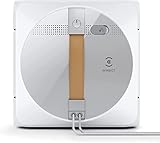
- Effortless cleaning - The robot attaches well with 2,800Pa suction power , which frees your hands and time out of the annoying window cleaning work and avoids the risk of standing and working at height.
- Cross water spray technology - The unique cross spray in dual directions effectively keeps a constant mopping humid status, dissolving stubborn stains as easy as anything.
- Highest safety - The internal drive system ensures non-slip steady movement and protection against power failure, thanks to high-quality materials and precise gravity settings, which can’t be safer.
- WIN SLAM 3.0 - The robot cleans the window completely and thoroughly with an effective forward-reverse motion in 3 adaptive modes: quick cleaning, deep cleaning and spot stain removal.
- Edge detection - Even frameless glasses cleaning is nothing difficult due to the high precision coupling sensor, which detects edges and fits the cleaning path within 0.02 seconds.
Does it clean well?
On suitable glass, yes. Independent testing suggests the W1 Pro is more than a novelty.
In hands-on testing, Techlicious used it on seven full-size sliding doors. The robot removed ordinary dirt, grime, smudges, insects, cobwebs and bird-dropping residue, generally without visible streaks after an appropriate cleaning pass. It could not remove polyurethane overspray, which required a razor blade and manual work.
CHOICE likewise found that the W1 Pro cleaned very dirty interior and exterior windows, a large glass partition and a heavily soiled rectangular window. After a deep clean, only small, faint patches remained in its testing.
That distinction matters. The Winbot is an automated maintenance cleaner. It is not a substitute for scraping hardened mineral deposits, paint, adhesive, calcium buildup or overspray. A neglected window may need a preliminary manual clean before the robot can maintain it effectively.
The cord is the central drawback
The W1 Pro’s approximately 4.7-meter power cord must stay connected during normal cleaning. It also uses a 1.5-meter safety tether on the current US specification page. Those are two separate lines to route, secure and keep clear.
In practice, the outlet needs to be reasonably close to the window. Techlicious reported using an extension cord for some second-floor windows. That can be workable, but it adds setup time and creates another potential snag. The cable can catch on furniture, window handles, frames or nearby objects, and sideways tension can interfere with the robot’s movement.
The arrangement is especially awkward on upper-floor exterior glass. The robot may be on the outside of the window while the outlet is inside, requiring careful routing through the opening. Moving between panes or sliding doors also means manually repositioning the robot and managing the cable and tether again.
Use a properly rated extension cord only in accordance with the regional manual, local electrical rules and the manufacturer’s guidance. Keep connections dry, prevent slack from hanging into the robot’s path, and make sure the cable cannot pull the machine sideways. If cable management takes as much effort as the cleaning, the W1 Pro’s main advantage is substantially reduced.
Is it safe for upper-floor windows?
The W1 Pro is designed to reduce risk, not eliminate it. Ecovacs describes an eight-level safety system involving suction adhesion, edge detection, power-loss protection and other safeguards. The robot must still be secured with its tether above ground level.
Rank #2

- Dual Power Modes for Flexible Charging - WINBOT W2 PRO OMNI offers two power modes for flexible use: Battery mode and Plugged-in mode. Battery mode: Ideal for areas without outlets, like balconies or bathrooms, providing up to 110 minutes of cleaning , equivalent to 55 square meters of coverage on a full charge. Plugged-in mode: Perfect for large glass areas in rooms with sockets, allowing continuous cleaning. This feature extends battery life by preventing frequent full discharges, making it reliable even in critical, time-sensitive situations.
- 6-in-1 Multifunction Station - WINBOT W2 PRO OMNI introduced the state-of-the-art window cleaning station - an all-in-one multi-purpose attachment, which makes window cleaning more convenient, safe and easy to handle. It can serves as a control panel, changer, stabler and the portable storage room for your window cleaning task.
- 3 Nozzles Wide Angle Spray Technology - A fully upgraded 3 nozzles wide angle spray technology, together with the wet cloth ensure efficient and effective cleaning.The water pressure is increased by 100% with an improved function time of 90%, all dirt dissolves and is eliminated in one stroke.
- Intelligent Path Planning Technology - The WINBOT W2 PRO OMNI has a brand-new upgraded brushless motor which, combined with WIN-SLAM 4.0 intelligent path planning, can increase cleaning efficiency by 30%. Through intelligent path planning, the cleaning pattern is optimised to enable efficient turning and enhanced edge detection, so it can adapt to a wide range of window types and scenarios – whether that's floor-to-ceiling, small-sized, frameless or tilting windows.
- 12-Stage Protection for Added Peace-of-Mind - With the 12-stage protection system from both hardware and software support, WINBOT W2 OMNI offers the highest level of window cleaning safety. ECOVACS stands firmly behind our product's safety. WINBOT W2 OMNI comes with insurance protection that offers financial security and worry
Never rely on suction alone over a drop. Attach the carabiner to a genuinely secure, fixed anchor—not a weak, movable or unsuitable object. Keep people away from the area below an exterior window, and inspect the tether, power cable, connectors, pad, treads and sensors before use.
Do not use the robot in rain, strong wind or freezing conditions. Techlicious reports Ecovacs’ restriction below 32°F/0°C. Wet or greasy glass can also compromise adhesion and traction. The robot must be placed on the glass manually, so an exterior window is not truly accessible if you cannot safely reach its starting position.
Quick wins for a faster PC:
Scan for outdated or missing drivers - takes under a minuteDriver Scan →Clear out junk files and repair common Windows errorsFree Scan →For the manufacturer’s detailed procedures and warnings, consult the official English instruction manual.
Which windows are suitable?
| Window type or condition | Practical assessment |
|---|---|
| Large, flat, rectangular glass | Best use case. |
| Sliding glass doors and large partitions | Well suited if the robot can be placed safely and the cable can reach. |
| Flat mirrors or suitable frameless panels | Potentially suitable, subject to dimensions, gaps and obstructions. |
| Curved glass | Unsuitable because the suction seal may fail. |
| Mullioned or divided windows | Problematic where sections are smaller than 30 × 40 cm or rails interrupt travel. |
| Double-hung windows with center rails | May require manual repositioning or leave sections incomplete. |
| Handles, locks or protrusions | Can block the robot, which is about 77.5 mm thick. |
| Frameless glass gaps | Small gaps may be traversable; larger gaps may be detected and avoided. CHOICE reports Ecovacs advised that gaps under 3 mm may be workable. |
| Stickers, decals, grease or wet surfaces | May interfere with sensors, adhesion or coverage. |
Ecovacs’ phrase “all flat glass” should therefore not be read as “every glass installation.” Frames, rails, gaps, decals, access and surface condition determine whether a particular window is practical.
Setup and operation
- Charge the backup battery. CHOICE reports approximately two hours for the initial charge.
- Fill the reservoir. Use water or the manufacturer’s recommended cleaning solution.
- Prepare the pad. Wet the microfiber pad and wring it to the recommended moisture level before attaching it correctly.
- Connect the power system. Follow the manual’s sequence for connecting the robot, adapter and plug. Ecovacs warns that incorrect connection can cause charging abnormalities or battery damage.
- Attach the tether. This is essential for exterior or elevated windows.
- Place the robot on the glass. Hold it against the surface until its suction and voice confirmation indicate that it is attached.
- Select a mode. Use Fast Clean, Deep Clean or Spot Clean on the robot or through the ECOVACS HOME app.
- Monitor the first pass. Watch how the robot handles unfamiliar frames, gaps and obstructions.
- Remove it properly. Let it return to its starting point, then use the handle and button procedure rather than pulling on the cable.
- Clean the equipment. Rinse and dry the pad, and wipe the sensors, rollers and driving treads.
The app adds mode selection, pausing and directional control. App labels, permissions and account requirements can change by region and over time; CHOICE reported that account creation and acceptance of privacy and user agreements were required in its testing.
Edges and corners
The evidence is mixed, so expectations should be moderate. Techlicious reported that the robot reached corners without visible streaks in its test windows. Another specialist review reported residual uncleaned border areas in a particular double-hung-window test, but that result is not corroborated by Ecovacs or the other independent testing cited here.
The fair conclusion is that the W1 Pro can clean close to edges and corners, but it does not guarantee perfect frame-to-frame coverage. Results depend on frame geometry, sensor clearance, pad condition and window shape. If spotless corners are essential, expect to touch up manually or consider a newer model with a dedicated edge-cleaning feature.
Independent reader supportYour contribution helps us test, update, and keep practical guides available for everyone.Noise, cleaning fluid and ongoing maintenance
The Winbot is clearly audible. Ecovacs lists 72 ± 2 dBA, CHOICE reports approximately 73 dBA, and Techlicious measured about 68 dB. Different meters, distances, surfaces and modes explain some variation. The practical takeaway is that it sounds more like a stick vacuum than a quiet appliance.
The reservoir holds approximately 60 mL. CHOICE reported that the supplied solution ran out after about half an hour in its test and estimated an Australia-specific solution cost of about $8.50 per hour under those conditions. That is not a universal operating cost; prices, dispensing and cleaning duration vary.
Rank #3

- GET A MORE COMPLETE EDGE-TO-EDGE CLEAN – TruEdge 2.0 uses four edge brushes with high-density felt bristles to reach along frames and into corners, helping remove buildup from areas conventional window cleaning robots may miss.
- CLEAN MORE WITH FEWER INTERRUPTIONS – The enlarged 4.1 fl oz water tank provides up to 807 sq. ft. of coverage per fill, letting you clean more windows without stopping repeatedly to refill.*
- ENJOY CLEARER, STREAK-FREE VIEWS – Three precision spray nozzles loosen stuck-on dirt with a fine mist, while an ultra-fine microfiber pad lifts away dust, pollen, water spots, fingerprints, smudges, and pet marks.
- SPEND LESS TIME MANAGING EACH CLEAN – WIN-SLAM 4.0 intelligently plans efficient routes, detects frames and obstacles, and helps reduce interruptions. Six modes let you quickly choose the right approach for everyday touch-ups, edges, zones, or stubborn dirt.
- CLEAN HARD-TO-REACH WINDOWS WITH GREATER PEACE OF MIND – Powerful 10,000 Pa suction and a multi-layer protection system help keep the robot securely attached. The portable OMNI station integrates battery power, cable management, controls, storage, and anti-drop protection for convenient use around the home.
Use Ecovacs’ recommended solution or plain water. Do not casually substitute household glass cleaner, soap, vinegar mixtures or automotive products, since unsuitable chemicals may affect rubber, seals, sensors, pads or warranty coverage. CHOICE found plain water left only a few small, faint patches after a deep clean on its test window.
What’s actually slowing this PC down?
Pick the symptom - the matching free tool is one click away.
After each use:
- Rinse the reusable microfiber pad and let it dry fully.
- Clean the spherical sensors.
- Remove dirt from the side rollers and driving treads.
- Check the reservoir and spray nozzles.
- Inspect the cable, connector and tether.
- Replace worn or damaged pads.
As observed on Ecovacs’ US store on August 18, 2026, a two-pack of replacement W1 Pro pads was listed at $29.99. The official US product page did not display a current purchase price for the robot in the accessible information at that date. The frequently quoted $399.99 price comes from a July 2023 Techlicious review and is historical, not a current US price.
Common problems and practical responses
The robot loses suction or stops
Possible causes include wet or greasy glass, dirty sensors, an incorrectly fitted or overly wet pad, blocked treads, an unsuitable frame or gap, cable tension, tether tension or a power interruption. Stabilize the robot, use the tether, check the power connection and follow the voice or app instructions. Do not yank the power cable. The exact recovery sequence should come from the current regional manual.
It leaves streaks or water marks
Check pad moisture, pad cleanliness, the amount and type of fluid, spray-nozzle condition and residue left by previous cleaning products. Very dirty glass may need a preliminary wipe. Ecovacs’ support materials include troubleshooting for water marks, pad moisture and whether dusty glass should be pre-cleaned.
It cannot finish the window
Look for center rails, mullions, handles, narrow sections, frameless gaps, decals, curved surfaces or unsuitable frame geometry. The solution may be manual repositioning—or accepting that the W1 Pro is a maintenance tool rather than a complete replacement for manual cleaning.
Who should buy the W1 Pro?
- Homeowners with large, flat rectangular windows or sliding doors.
- People who struggle to reach upper-floor exterior glass safely.
- Users with a practical nearby outlet, or who accept careful extension-cord management.
- Households seeking recurring maintenance cleaning rather than restoration work.
- Users willing to attach a tether, supervise operation and wash the pad afterward.
Who should skip it?
- Anyone whose main requirement is cordless operation.
- Homes with curved, heavily divided, greasy, wet or obstructed windows.
- Users who cannot attach the safety tether to a secure anchor.
- People expecting removal of paint, adhesive, mineral deposits or overspray.
- Anyone wanting silent, unattended operation or guaranteed perfect corners.
- Homes where extension-cord routing would erase the time and safety benefits.
Alternatives
Newer Ecovacs Winbot models
The WINBOT W2/W2 Pro Omni family is the most relevant alternative when the W1 Pro’s cable is the deal-breaker. Secondary coverage describes newer station-based designs that allow cordless cleaning, with additional capabilities in the Pro Omni version. Availability, pricing and exact differences vary by market, so check the current regional Ecovacs store before buying.
Manual tools
For reachable ground-floor windows, a quality squeegee, microfiber washer, extension pole and suitable glass-cleaning solution are usually quieter, cheaper and faster to deploy. They are less attractive when the main problem is ladder work or hazardous exterior access.
Professional cleaning
A professional is the better choice for many windows, dangerous elevations, curved or specialty glass, frames, screens, tracks and sills, or a one-time deep clean. Buying a robot makes more sense when you want recurring maintenance on suitable glass.
Verdict
The W1 Pro is a good cleaner with an outdated-feeling power arrangement. It genuinely removes ordinary dirt and grime from suitable flat glass and can reduce risky manual work. But the cord, tether, setup, noise, maintenance and window restrictions prevent it from being a universal “set and forget” solution.
Free tools Windows power users keep installed
One-click scans. No signup required.
If your large windows are flat, reachable for initial placement and close enough to power, the W1 Pro can be a valuable labor- and safety-saving tool. If your main reason for buying is cordless convenience—or your glass is curved, divided, obstructed or heavily stained—the cord changes the answer from excellent to situational.
Quick Recap
Product prices and availability are accurate as of the date/time indicated and are subject to change. Any price and availability information displayed on Amazon at the time of purchase will apply.




