Free tools Windows power users keep installed
One-click scans. No signup required.
Some links on this page are affiliate links: if you buy through them we may earn a commission, at no extra cost to you.
Sometimes. Solar panels connected only to a conventional grid-tied inverter normally shut down when utility power fails, even in full sun. The shutdown prevents energized lines from endangering utility workers and protects equipment. A home can keep using solar electricity during an outage only when it has an island-capable inverter and control system, energy storage, and backup circuits wired to operate separately from the failed grid. The battery’s usable charge, inverter output, selected circuits, and household demand determine what stays on and for how long.
The U.S. Department of Energy (DOE) describes the distinction clearly: “Technically, residential solar panels alone are not enough to make your home resilient.” In a properly configured photovoltaic-plus-battery system, equipment detects grid loss and switches the home to an electrically isolated, or islanded, mode within seconds. See the DOE explanation of solar and resilience basics and its overview of inverters and grid services.
As an Amazon Associate I earn from qualifying purchases.
Recommended Free Tools
Why ordinary rooftop solar turns off in an outage
Most residential solar-only systems are designed to follow the utility grid. The inverter uses the grid’s voltage and frequency as its reference, converts the panels’ direct-current output to alternating current, and synchronizes that electricity with the utility supply. When the utility voltage disappears or moves outside permitted limits, the inverter disconnects automatically. This anti-islanding behavior means a house cannot keep feeding a supposedly de-energized distribution line.
Sunlight on the panels does not change that safety requirement. A panel can be producing electricity while the inverter remains shut down because the system has no approved way to control where that electricity goes. Trying to bypass the shutdown, backfeed a panel, or connect a portable cable to a home circuit can create lethal shock and fire hazards and can damage the array or inverter.
Popular on Amazon

- System Components:Delivers up to 10kW power output with 120V/240V single-phase split-phase support, making it suitable for smoothly running common household appliances. The system includes 5 × 590W solar panels with a total PV capacity of 2950W, capable of generating up to 11.8 kWh per day under optimal conditions, along with one 48V 314Ah portable LiFePO₄ battery offering 16.1 kWh of energy storage. Complete with necessary cables, this all-in-one solar solution is designed for convenient setup and reliable home power support.
- Upgraded Integrated Battery:ECO-WORTHY 48V 314Ah lithium battery combines advanced safety, high capacity, and smart system compatibility. It features a PACE 200A Battery Management System with multi-layer protection and dual breakers for reliable circuit safety. With a 16.076 kWh energy capacity and support for up to 15 units in parallel (up to 241 kWh), it delivers scalable and dependable power. A 7-inch full-color display, along with Bluetooth, Wi-Fi, and PC connectivity, enables convenient real-time monitoring. Designed to work seamlessly with mainstream inverters via RS485 and CAN communication, the battery also includes built-in wheels and handles for easy installation and mobility
- Keep Home Running 10kW:ECO-WORTHY 10kW AIO solar charge inverter features 48V DC pure sine wave output with 120V or 120V/240V split-phase support, delivering 10,000W continuous power and up to 20,000W peak output. Equipped with dual MPPT controllers, up to 200A battery charging, built-in WiFi monitoring, multiple charging and output modes, time-slot energy management, and comprehensive protection functions, it is compatible with AGM, Gel, Flooded, and lithium batteries, supports battery-free operation, and allows parallel connection of up to six units
- High Power Solar Panel:590W Mono-crystalline Solar Panel (Black). Low power loss in cell connection compared to conventional modules. Improved shading tolerance. Lower internal current, lower hot spot temperature. Heat-strengthened glass minimizes micro-crack impact.
- Shipping Notice: Due to its large size and weight, the 5pcs 590W solar panel/1pc 48V 314Ah battery is securely packed and shipped on a pallet using a truck to ensure safe transportation. Please ensure your delivery address can accommodate truck deliveries.
DOE says residential photovoltaic systems with battery storage can detect loss of grid power and switch to an islanded mode. In that mode, the backup inverter creates a controlled local electrical reference, disconnects the home from the utility, and balances changing solar production with changing loads. The transfer and isolation functions must be designed, installed, and commissioned for the specific equipment and local interconnection rules.
What a solar-battery backup system needs
An island-capable inverter and controls
The inverter is the part that determines whether solar energy can be used safely after grid failure. A standard grid-following inverter cannot independently establish a stable home electrical network. Backup equipment must detect the outage, open the grid connection, regulate voltage and frequency for the home, and coordinate battery charging and discharging. DOE’s inverter guidance explains why these control functions are different from ordinary grid-connected operation.
Battery storage with usable energy
The battery supplies electricity when the sun is down, clouds reduce production, or household demand is greater than the panels’ instantaneous output. The nameplate capacity is not the same as energy available to appliances: reserve settings, conversion losses, temperature limits, and the system’s state-of-charge limits reduce usable energy. DOE’s solar integration and storage overview notes that stored energy can be discharged when demand is high and that solar charging can extend operation during a prolonged outage.
Isolation and transfer equipment
A backup gateway, automatic transfer switch, or equivalent controls physically separate the backed-up portion of the home from the utility. Some installations use a dedicated critical-load panel; others use equipment rated for whole-home backup. The transfer arrangement must prevent any possible connection between the islanded home and the failed grid. It is not a homeowner rewiring task.
Circuits assigned to backup
Many systems are designed for selected loads such as refrigeration, lighting, internet equipment, heating controls, or a well pump. Circuits left on the non-backup side will go dark even while the battery is operating normally. The DOE discussion of resilience systems identifies critical-load panels and transfer equipment as common design elements; your panel labels, single-line diagram, and installer handover documents should identify exactly which circuits are supported.
Also popular on Amazon
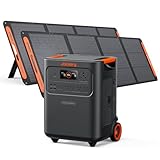
- Essential Home Backup: The Jackery HomePower 3600 Plus delivers 3600W output (7200W in parallel) to run pumps, heaters, and dryers with ease. With dual voltage (120V & 240V in parallel) and 3584Wh capacity expandable to 21kWh per unit or 43kWh with multiple units, it can power a 3-person household for over 2 weeks.
- Safe Power That Lasts: Built with high-temp resistant ceramic membrane battery cells tested at 302 °F, the Jackery HomePower 3600 Plus Portable Power Station prevents thermal runaway from heat or overcharge. Offering 6,000 cycles and a 10-year lifespan, it delivers safe, reliable even in -4 °F blizzards.
- Plug-and-Play: With its easy plug-and-play design, the Jackery HomePower 3600 Plus, paired with MTS, powers your home effortlessly—no complex installation required. Whether at work, in the kitchen, or with family, simply plug in, press "Power-On" and keep life running smoothly through any outage.
- 4 Charging Options: With 4 convenient ways to charge, the Jackery HomePower 3600 Plus solar generator can be fully recharged from 0–100% in just 2 hours via hybrid AC+DC. It also supports charging via AC in 2.5 hours, solar in 4 hours, or a gas generator in 2.5 hours —delivering a full day of quiet, clean energy.
- Ultra-Portable & Lightweight: The Jackery HomePower 3600 Plus, the lightest 3.6kWh LFP power station, boasts automotive-grade CTB tech and is 34% smaller and 29.3% lighter than other models. Its luggage-style design with wheels and a telescopic handle allows effortless rolling from kitchen to garage or beyond.
How common system designs behave
| System design | What happens when utility power fails | What determines the result |
|---|---|---|
| Grid-tied solar without storage | Solar inverter normally shuts down; the house has no solar supply during the outage. | Whether the inverter detects acceptable grid voltage and frequency. Sunlight alone cannot provide safe islanded power. |
| Solar plus battery with partial-home backup | The battery and inverter energize only the circuits connected to the backup or critical-load panel. | Which circuits were selected, battery state of charge, inverter output, and appliance demand. |
| Solar plus battery with whole-home backup | The system can energize the home’s designated main loads after isolating from the grid. | Whole-home equipment rating, service-panel configuration, continuous and surge capacity, and the loads running at the same time. |
“Whole-home” does not mean unlimited power. A service may be connected to the backup side while large electric heating, cooking, water-heating, charging, or pumping loads are restricted by the inverter’s continuous output or by load-management controls. An installer must size the equipment for the actual circuits and motor-starting requirements rather than relying on the battery’s energy capacity alone.
Do these 3 things before closing this tab:
1Repair Windows errors before they cause bigger problems2Scan for outdated or missing drivers - takes under a minute3Clear out junk files and repair common Windows errorsHow long will a solar battery last?
There is no honest universal runtime. Duration depends on usable stored kilowatt-hours, the inverter’s conversion efficiency, the continuous wattage of the loads, short-duration motor surges, outdoor temperature, reserve settings, and whether the panels can recharge the battery while islanded. A nearly full battery supporting a refrigerator and lights can behave very differently from the same battery supporting electric resistance heat, a well pump, or vehicle charging.
Solar generation can extend an outage, but only when the inverter and controls permit charging in islanded mode and the array is producing enough energy to cover current loads and replenish storage. Cloud cover, snow, shade, season, and a tripped or faulted solar inverter can prevent meaningful charging. The cited DOE material explains the principle of ongoing solar charging but does not establish one recharge rate or runtime for every product.
To estimate your own situation, obtain the system’s usable energy figure from its model documentation, list the wattage or running current of the circuits on the backup panel, and account separately for startup surges from motors and compressors. An installer can model those loads and set a reserve level for overnight or multi-day outages. Do not convert a manufacturer’s laboratory or nominal capacity into a guaranteed number of hours for every household.
Common backup problems and safe fixes
1. The panels are sunny, but solar output is zero
Likely explanation: The home may have grid-tied solar without islanding equipment, or the backup function may be unavailable or incorrectly commissioned. A panel’s DC output is not usable by the home until an approved inverter and isolation system provide a stable local grid.
Quick wins for a faster PC:
Clear out junk files and repair common Windows errorsFree Scan →Fix the driver behind crashes, sound loss and screen glitchesFind Drivers →Repair Windows errors before they cause bigger problemsFix Now →Also popular on Amazon

- Powerful yet Compact: Boasting a 1,500W AC output and a 3,000W surge peak, the Solar Generator 1000 V2 can power multiple appliances, including AC units, fridges, and electric pots. With a 1,070Wh capacity and a lightweight build of only 23.8 lbs, along with a foldable handle, it makes an excellent companion for outdoor camping, road trips, and emergencies.
- One Hour Fast Charging: Charge your Explorer 1000 v2 Portable Power Station from 0% to 100% battery level in just one hour with emergency charging activated via the Jackery App. It defaults to 1.7 hours for a full charge to optimize battery health. Alternatively, reach a full charge in 3 hours with a 600W Alternator Charger, or charge to 80% in 6 hours using a 200W solar panel.
- 10 Year Lifespan: The Explorer 1000 v2 portable power station is equipped with a durable LFP battery, maintaining over 70% of its original capacity even after 4,000 charge cycles, offering longevity exceeding 10 years.
- Tailored for Versatility: Featuring two USB-C ports, one USB-A port, one DC car port, and three pure sine wave AC ports, along with LED lights, the Solar Generator 1000 V2 is capable of charging multiple devices simultaneously, meeting power needs in various scenarios. PD 100W fast USB-C charging ensures a rapid charging speed, even without power adapters.
- Smart App Control: Effortlessly switch between different charging modes with Jackery’s App—including one hour emergency charging from 0 to 100%, 30 dB quiet overnight charging mode, and energy efficiency mode. Maximize the freedom to adjust the power station to meet your needs.
Safe next step: Check the installation contract, one-line diagram, monitoring app, and panel labels for an outage-backup designation. Ask the installer whether the system was designed and tested for islanded operation and which circuits are included. Do not bypass the inverter shutdown, connect a generator inlet to a solar circuit, or alter utility-side wiring.
2. The battery is on, but parts of the house are dark
Likely explanation: The installation probably provides partial-home backup, and the dark appliances are on circuits outside the backed-up panel. A normally operating battery does not energize every circuit automatically.
Safe next step: Compare the dead outlets and appliances with the circuit list supplied at commissioning. Look for clear labels identifying the backup panel or protected loads. If you need additional circuits, have a licensed installer evaluate the transfer equipment, conductor sizing, protection, and battery capacity; do not move breakers or rewire panels yourself.
3. Backup starts, then browns out or stops
Likely explanations: Total demand may exceed the inverter’s continuous rating, a motor may draw a large starting surge, a load breaker may have opened, or the battery may have reached its reserve or low-charge limit. A failing communication link or equipment fault can produce similar symptoms.
Tesla’s Powerwall 3 owner guidance states: “If a brownout or blackout is experienced during backup operation, reduce the loads and check that the load breakers have not opened.” That instruction is specific to the Powerwall family; its numerical limits must not be treated as universal sizing rules for another manufacturer’s system.
Also popular on Amazon

- Portable Generator with 60W Solar Panel Included: with a big battery pack, ZeroKor 300W solar powered generator are powerful enough to charge smartphones,tablets,laptops,headphones or other outdoor small camping supplies(Tips:Using electrical appliances over 300W may damage the portable solar generator, especially some devices that are prone to heat or built-in air compressor such as coffee maker,Hair dryer, water pump etc )
- Multiple Charging outlets for camping gear with SOS Flashlight: with 2* 300W Max wall AC outlets, 1* DC port (9V-12.6V/10A max ), 3* 5V/3A Max USB ports, 1*quick charge USB port (5V/3A 9V/2A Max), Flashlight with reading mode and SOS mode for your outdoor Adventures, our portable solar power station offers a versatile charging solution,allowing you to charge your outdoor smart devices directly from a wall AC outlet
- Multiple Charging Optional, Solar Panel Charger 60W Included: ZeroKor portable power bank generator can be recharged by Home AC outlet, DC5521 13V-23V Solar Panel (Portable Power Station built-in MPPT), 12V Carport. Take the portable solar power bank generator with you on-the-go and never worry about power shortage,the portable AC outlet design makes it more suitable for Tent camping OFF-Grid
- Built in BMS(Battery Management System) : ZeroKor portable power station features short circuit protection, over-current protection, over-voltage protection, overload protection and overheating protection. The built-in cooling fan system will automatically start and stop according to the portable battery pack internal temperature during use. Acting as a portable solar power bank, it accommodates multiple devices simultaneously, making it perfect for indoor and outdoor use
- HIGH CONVERSION EFFICIENCY: ZeroKor solar panels 60W monocrystalline solar cell have a high conversion efficiency of 20.5%, and its performance is better than that of polycrystalline solar panels under the condition of insufficient light
Safe next step: If conditions are safe, switch off discretionary high-demand appliances such as ovens, resistance heaters, large pumps, compressors, and vehicle chargers. Check only accessible breaker positions and only as described in the exact owner manual. If the system still drops out, record the time, loads operating, state of charge, and displayed alert, then contact the installer or manufacturer.
4. The battery charge is low or not recovering
Likely explanations: The stored energy has been consumed faster than it is being replenished, sunlight is insufficient, the system has reached a reserve setting, or islanded charging is disabled by the equipment design or an active fault. Not every model behaves identically during an outage.
Safe next step: Use the manufacturer’s app or display to check state of charge, solar production, operating mode, and alerts. Reduce nonessential loads and preserve energy for critical circuits. Consult the model-specific manual or support team about charging behavior. Do not remove covers or manipulate an isolation switch to force charging.
Crashes, No Sound, or Screen Glitches?
Random freezes, missing sound and display glitches usually trace back to one bad driver. Find and replace yours safely.Free scan · under a minutePC Slower Than It Used to Be?
A free scan shows the junk files, broken settings and background clutter dragging Windows down - then fixes them in one click.Free scan · Windows 10 & 115. The gateway, inverter, or battery shows a fault
Likely explanations: Fault codes can indicate communication loss, temperature protection, an inverter shutdown, commissioning problems, or a condition on the utility side. The meaning and reset procedure are model-specific.
Safe next step: Photograph or write down the exact alert, equipment model, and indicator lights. Follow only the owner documentation for that model. Tesla’s Powerwall 3 backup troubleshooting guidance and its Powerwall/Powerwall+ load troubleshooting page direct owners to reduce loads and check accessible breakers for relevant symptoms. Tesla also warns that some components are not user-serviceable; its Powerwall+ troubleshooting manual cautions against incorrect manual-override operation. Other brands may use different procedures.
Also popular on Amazon

- One Powers All. The unit of DELTA Pro Ultra whole house generator includes an inverter and a battery. One inverter supports 120V & 240V and has an exceptional 7200W output, allowing you to run almost any heavy household appliance, even a 3-ton central air conditioner. Triple the inverters for an incredible 21.6kW AC output, allowing you to live life to the fullest even during an outage. The electric generator achieves a total 7200W output even during charging.
- Strong Power Security. Scalable from one battery of 6144Wh, two days of essential power, all the way to 15, it multiplies the energy to a gigantic 90kWh. For a standard North American household, that's over 30 days of essential power secured.
- Customize Your Home Power. Use the EcoFlow app to priolritize specific circuits in your home, extending your backup even longer. For more than just blackouts, it intelligently analyses your home power usage to offset peak rates while utilizing solar to lower energy bills.
- Multi Ways to Charge. One battery of 6144Wh can be fully recharged in 2 hours. Faster than any other 6kWh solar generator. Users can choose among electric vehicle piles, solar, wall outlets or outdoor generators for charging.
- Uninterrupted Life. Online UPS with 0-ms transfer time, offering 24/7 protection for sensitive electrical devices against power disturbances or grid failure. All fans are off for the first half hour of outputting 2000W, giving you absolute silence for tranquility in everyday life.
A safe outage troubleshooting sequence
- Confirm the system type. Determine whether the property has solar-only equipment or solar plus a battery and island-capable controls. Use the commissioning paperwork and monitoring app rather than assuming that visible panels provide backup.
- Identify protected circuits. Find the backup or critical-load panel and compare its labels with the appliances that lost power. If no documentation exists, ask the installer to identify the protected side.
- Check operating status. Read the app or inverter display for state of charge, grid status, solar production, and fault messages. Record the information before attempting any reset described by the model manual.
- Reduce demand. Turn off optional high-wattage loads and avoid starting several motors at once. Keep essential refrigeration, medical equipment, communications, and heating controls within the system’s configured capacity.
- Inspect only accessible breakers. If the owner manual identifies a user-accessible load breaker, verify whether it has opened. Do not remove covers, touch service conductors, operate utility equipment, or repeatedly reset a breaker that trips again.
- Escalate persistent faults. Contact the manufacturer or qualified installer with the model, alert code, state of charge, and sequence of events. Stop troubleshooting at gateways, transfer switches, inverter enclosures, batteries, wiring, and manual overrides.
How to plan or improve outage backup
Start with critical loads
Write down the circuits that matter during an outage and their running and starting demands. Refrigerators, freezers, lighting, internet equipment, security systems, sump pumps, well pumps, medical devices, and heating controls may be priorities, but each property is different. Decide which loads can be shed automatically or switched off manually.
Match power ratings, not just battery size
Energy capacity, measured in kilowatt-hours, describes how long a battery can supply a given load. Inverter power, measured in kilowatts or amperes, describes how much can run at once. A pump or compressor can require several times its running power for a brief starting surge. Obtain model-specific continuous and surge ratings and have the installer compare them with the service, panel, and largest motor loads.
What’s actually slowing this PC down?
Pick the symptom - the matching free tool is one click away.
Verify islanded solar charging
Ask whether the array can recharge the battery while the utility is unavailable, under what state-of-charge conditions, and how the system behaves when the battery is full. Confirm where solar production is displayed and what alerts indicate that charging has stopped. Treat any claimed runtime or recharge time as conditional on weather, load, and equipment settings.
Document the installation
Keep the final circuit schedule, single-line diagram, equipment model numbers, commissioning date, warranty contacts, and emergency shutdown instructions together. Labels should distinguish utility-side equipment, backup circuits, and user-accessible breakers. This documentation lets a responder or installer diagnose an outage without opening energized equipment.
When professional service is required
Call the installer or manufacturer when the system repeatedly faults, the battery will not communicate, backup power never transfers despite a documented backup design, a breaker trips again after one permitted reset, equipment is hot or damaged, or the displayed state conflicts with the actual circuits. Electrical work on service panels, transfer switches, gateways, batteries, and inverter enclosures belongs to qualified personnel familiar with the product and local code.
Rules for interconnection, emergency isolation, and permitted equipment vary by jurisdiction. The DOE material cited here is U.S.-focused residential guidance; local utility requirements and the exact product manual control the installation. DOE reports more than two million solar generators on the U.S. distribution system, representing about 40% of total photovoltaic capacity, but that statistic does not mean every installation provides outage backup.
The practical answer
Solar batteries can work during a power outage, but only as part of a system engineered to separate the home from the grid. Solar-only homes generally lose power when the grid fails. Battery homes may keep only designated circuits running, and runtime is governed by usable charge, appliance demand, inverter limits, and the weather-dependent opportunity to recharge. Start by identifying your system’s backup design and protected circuits, reduce loads during brownouts, and leave isolation equipment and persistent faults to the installer or manufacturer.
Quick Recap
Product prices and availability are accurate as of the date/time indicated and are subject to change. Any price and availability information displayed on Amazon at the time of purchase will apply.

