Quick wins for a faster PC:
Scan for outdated or missing drivers - takes under a minuteDriver Scan →Clear out junk files and repair common Windows errorsFree Scan →The most practical DIY soldering station is a low-voltage, temperature-controlled T12 station powered by an enclosed external DC supply. It offers plentiful tips, inexpensive compatible handles, and a manageable electronics project without putting mains wiring inside a homemade enclosure. If you mainly need a portable iron, however, buying a Pinecil is usually better value; if you need certified professional equipment, choose an established Hakko or Weller station.
This guide explains the build levels, parts, power requirements, wiring, testing, grounding, safety, and the point at which buying is smarter than building.
As an Amazon Associate I earn from qualifying purchases.
What are you actually building?
“DIY soldering station” can mean several different projects:
Windows Errors? Fix Them Before They Spread
Repair common Windows errors and clear accumulated junk for a smoother, more stable PC - no reinstall needed.Free scan · no reinstallCrashes, No Sound, or Screen Glitches?
Random freezes, missing sound and display glitches usually trace back to one bad driver. Find and replace yours safely.Free scan · under a minute- DIY workbench: You buy a finished iron and build the stand, lighting, fume extraction, ESD provisions, storage, and board-holding setup.
- Module-based station: You combine a controller PCB, handpiece, tips, DC supply, enclosure, switch, connectors, and wiring.
- Fully open-source station: You build or assemble the controller, firmware, sensor circuit, heater driver, interface, enclosure, and protection features.
For a beginner, the first option is the safest and often the most useful. For an electronics hobbyist who wants a genuine project, a module-based T12 station is the sensible starting point. A fully custom controller is a control-systems and power-electronics project, not merely an enclosure exercise.
#1 Best Overall
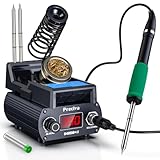
- Professional 75W Soldering Station with Rapid Heating Technology: Experience consistent performance with our soldering station kit that reaches working temperature in just 5 seconds and melts solder in 6 seconds. The 75W high-power system ensures rapid heat recovery for reliable operation. This digital soldering station features precise temperature control from 200°C to 480°C, making it suitable for electronics repair and PCB work
- Advanced Thermal Management & Ergonomic Design: Engineered with strategic rear ventilation ports that promote effective heat dissipation, supporting extended product service life. The compact and lightweight design enhances portability while maintaining professional performance. This soldering iron station features heat-resistant housing during operation, ensuring safety and comfort during extended use
- Innovative Integrated Heating Cartridge System: Featuring an efficient all-in-one heating cartridge design that delivers responsive heat transfer and consistent performance. The plug-and-play tip replacement system allows for straightforward changes without tools. Compatible with T12 series tips, this soldering kit for electronics includes 2 different tips to handle various soldering tasks
- Versatile Application for Professional & DIY Use: The 75W output accommodates a range of tasks from mobile phone repair and micro-soldering to computer motherboard and appliance soldering tasks. Whether you're an electronics technician, PCB specialist, or DIY user, this soldering station with temperature control adapts to various applications
- Intelligent Features for Enhanced Operation: Benefit from multiple functions including Celsius/Fahrenheit conversion, selectable sleep mode (0/5/10/30 minutes), temperature calibration, operation alerts, automatic shutdown, and three temperature memory settings. For optimal performance, we recommend operating on appropriate surfaces and allowing proper cooling before storage
Choose the build level before buying parts
| Build level | What you do | Best for | Main drawback |
|---|---|---|---|
| Workbench setup | Buy a finished low-voltage iron or station and build the surrounding workspace | Beginners and people who need to solder immediately | Less electronics learning |
| Module-based T12 | Connect a documented controller, handpiece, tips, supply, and enclosure | Most DIY builders | Compatibility and wiring mistakes are possible |
| Fully custom | Design hardware, firmware, control logic, protection, and mechanics | Experienced electronics builders | Highest risk, testing burden, and total cost |
| Finished professional station | Buy a supported commercial product | Production, paid repair, and reliability-critical work | Higher purchase price and less customization |
How a temperature-controlled station works
A cartridge contains a heater and temperature-sensing element. The controller reads the sensor, compares the measured temperature with the setpoint, and switches heater power through a MOSFET. A display and encoder or buttons provide user control. Better designs also detect motion or whether the handpiece is in its stand, then reduce temperature during idle periods.
Certified AC/DC supply
        │
        ├── protected DC input
        ├── DC switch
        └── controller board
              ├── temperature measurement
              ├── heater MOSFET driver
              ├── display and controls
              ├── motion or stand detection
              ├── sleep / standby logic
              └── handpiece connector
                         │
                         └── T12 or JBC-style cartridge handpiece
Closed-loop control is essential. A label such as “PID” does not by itself prove accurate temperature, rapid recovery, safe fault handling, or good ergonomics. Those depend on the complete sensor, cartridge, firmware, power supply, wiring, and mechanical design.
T12 versus JBC-style cartridges
| Characteristic | T12 | JBC C245/C210/C115-style |
|---|---|---|
| DIY availability | Very high | High, but generally more expensive |
| Typical DIY complexity | Lower | Moderate to high |
| Tip cost | Usually lower | Usually higher |
| Thermal response | Good | Often excellent, depending on controller and cartridge |
| Handle ergonomics | Varies widely | Often compact and well balanced |
| Best use | Budget builds and general electronics | Precision work and frequent soldering |
T12 is the easiest conventional DIY route because tips, handles, and controller designs are widely available. JBC-style cartridges can provide excellent thermal behavior and ergonomics, but the controller and mechanical design are usually more demanding. The OpenSolder project demonstrates the additional features possible with a JBC T245-compatible design, including standby behavior, tip-removal support, tip storage, and an integrated holder.
Do not assume compatibility from the connector shape. T12 handles and controller boards do not have one reliably universal pinout. The ATmega-Soldering-Station documentation specifically warns that its illustrated wiring applies to particular handles. Verify the exact heater, sensor, power, and ground pins before connecting anything.
Recommended architecture: keep mains outside
Use a professionally enclosed, regulated AC/DC supply and keep the custom project on the extra-low-voltage DC side. A homemade enclosure containing 120/230 V terminals creates additional requirements for insulation, fusing, earthing, strain relief, spacing, fire protection, and servicing.
For a metal enclosure, accessible conductive parts need a deliberate protective-grounding strategy. OSHA describes equipment grounding as a low-resistance fault path intended to reduce shock risk if a tool frame becomes energized; it is not simply another signal connection. Follow the controller’s intended grounding topology rather than casually joining protective earth, DC negative, tip ground, and ESD ground.
Rank #2

- The YIHUA 948DB+ II digital soldering station uses a rapid heating soldering tip, and is able to heat to 660°F in just 5 seconds. Temperature adjustable from 392~896°F, and comes with PID program to keep the set temperature stabilized.
- This soldering iron kit includes: 1 main unit, 1 soldering iron holder, 3 soldering tips (T12 soldering station compatible), 1 power cord. We designed the main soldering station unit to provide powerful performance while keeping minimal foot print, the compact unit has a dimension of 11.9mm x 9.4mm x 4.3mm (4.7”x3.7”x1.7” inches).
- Built with °F-°C conversion function for easy temperature reference; sleep mode to reduce wear for the solder iron; automatic shutdown to improve user safety; 3 preset channels for quick and easy temperature changes; temperature calibration function to correct soldering iron station’s actual temperature if needed.
- The soldering gun’s tip can be extracted and inserted quickly thanks to the new tip-over-heating-element design. This new design puts the temperature sensor much closer to the tip as compared to conventional soldering iron, providing more accurate actual tip temperature and temperature feedback.
- Choose YIHUA with Confidence – Enjoy our 12-month US- exclusive manufacturer technical coverage and 24/7 professional assistance on Amazon. Note: This model is designed to operate on 110-240V with a US-standard power plug.
See the OSHA grounding guidance for the purpose of equipment grounding.
Parts for a practical T12 station
Required electronics
- Documented T12 controller PCB with closed-loop temperature sensing
- Matching T12 handpiece
- Compatible T12 cartridges or tips
- Enclosed regulated DC power supply
- DC input connector and switch
- Appropriate wire, heat-shrink tubing, fasteners, and strain relief
- Enclosure with safe clearances and adequate ventilation
- Fuse or current protection appropriate to the controller and wiring
Useful bench equipment
- Heat-resistant silicone mat and stable iron stand
- Brass wool or suitable tip cleaner
- Solder, flux, desoldering braid, and solder sucker
- Multimeter
- Tip thermometer or thermocouple-capable temperature instrument
- Eye protection and local fume extraction
- Optional ESD mat, wrist strap, board holder, lighting, and magnification
Power-supply sizing
Voltage and current are central design decisions. One documented T12 design uses an approximately 8-ohm heater and specifies a 12–24 V supply. Its project-specific calculations are:
| Supply voltage | Approximate heater current | Approximate heater power |
|---|---|---|
| 12 V | 1.50 A | 18 W |
| 15 V | 1.88 A | 28 W |
| 18 V | 2.25 A | 41 W |
| 20 V | 2.50 A | 50 W |
| 24 V | 3.00 A | 72 W |
These figures apply to that design and should not be treated as universal T12 specifications. A 24 V, 3 A supply is the minimum implied by its 72 W calculation; a 24 V, 4 A supply may provide useful margin if the controller, MOSFET, connector, wiring, handpiece, and enclosure are all rated for it. Never apply 24 V merely because a cartridge is described as T12-compatible.
Check the controller’s maximum voltage, input polarity, heater-drive rating, connector rating, and recommended supply. An unknown laptop adapter or barrel supply is not automatically suitable: verify its output voltage, polarity, regulation, and current capacity.
Enclosure and wiring decisions
- Plan the display, encoder, switch, DC connector, and handpiece connector before drilling.
- Keep high-current heater wiring short and use conductors suitable for the expected current and temperature.
- Use heat-shrink over exposed joints and provide strain relief at both cable entries.
- Key or label connectors to prevent accidental reversal.
- Prevent solder blobs, loose screws, and exposed conductors from contacting the enclosure.
- Provide ventilation where the controller or MOSFET dissipates heat.
- Keep the enclosure serviceable without leaving hazardous conductors exposed.
- Use an externally enclosed AC/DC supply unless you have the qualifications and design controls for mains construction.
Assembly and first-power-up procedure
Before applying power
- Inspect the PCB for solder bridges and incorrectly installed components.
- Confirm the orientation of diodes, capacitors, MOSFETs, connectors, and the microcontroller.
- Check the exact handpiece pinout against the controller documentation.
- Measure for an unintended short between the DC input and ground.
- Verify the supply voltage and polarity with a multimeter.
- Confirm that the heater output cannot be accidentally connected to the logic supply.
- Check enclosure clearances, strain relief, and grounding connections.
First power-up
- Use a current-limited bench supply if available.
- If the documentation permits, remove the tip or disconnect the handpiece for the initial controller test.
- Power the controller and confirm that the display and controls operate.
- Check that the room-temperature reading is plausible.
- Watch for smoke, unexpected current, component heating, or spontaneous heater activation.
- Power down immediately if the reading is impossible or the MOSFET heats without a valid command.
Heater test
- Install the correct tip and set a moderate temperature, such as 300 °C.
- Confirm that the temperature rises smoothly rather than jumping to an impossible value.
- Observe that heater power reduces as the setpoint is approached.
- Feed solder onto the heated tip rather than pressing the tip into a board.
- Test recovery on a large copper area.
- Place the handpiece in its stand and verify sleep or standby operation.
- Lift it and verify the intended wake-up behavior.
- Test handpiece-disconnect protection only when the controller documentation explicitly supports that test.
Firmware, calibration, and temperature
Useful firmware features include an adjustable setpoint, boost mode, sleep timer, motion detection, temperature limits, sensor-fault detection, heater timeout, and a safe power-on state that leaves the heater off until the sensor is valid. A watchdog and documented firmware-recovery method are valuable in a fully custom design.
Do not confuse the displayed setpoint with the actual solder-joint temperature. Readings vary with tip geometry, sensor placement, oxidation, airflow, thermal load, firmware, and cartridge variation. Verify temperature with a suitable tip tester or thermocouple instrument, and describe any project-published temperature range, ramp time, or stability number as that project’s reported specification rather than a guaranteed result.
Rank #3

- Must-have Soldering Station: AUCANLA soldering Station is designed for those who love creativity. We use the high-definition LCD screen display, so that you can adjust the temperature more clearly and accurately control the heat, precise and sensitive temperature control in the range of 100℃-480℃.
- Smart Temperature Control & 1S Heating: The soldering iron can stay at the set temperature consistently with its PID temperature stabilization, faster heating up, enhanced temperature stabilization and enhanced performance. This is ideal for professional soldering, precision electronics, school labs, household & hobby uses, electronic DIYs & repair, etc.
- Intelligent sleep mode: If the smart soldering iron is placed on the stand for 10 minutes without touch, it will enter sleep mode and auto decrease temperature. The iron tips and heating element lasts longer thanks to this function. You can also set the sleep time and sleep temperature according to different usage requirements.
- Multifunctional Stand & Metallic Build: AUCANLA adopts a all-metal design, which is much more sturdy. The heat-resistant soldering iron stand which with a magnifying glass, can help you weld tiny parts more clearly from any angle. In addition, 2 flexible crocodile clips can help you fix the part to be welded without worrying about it tilting or moving.
- Choose Aucanla for Excellent Value: As a responsible company,our expert team always stands by your side.We offer an exclusive US technical service for 365-Day,and 24/7 professional assistance on Amazon.
Use the lowest temperature that reliably wets the joint. A larger tip and better contact area often transfer heat more effectively than simply raising the setpoint. Keep contact time short, use suitable flux, and allow the station to recover between joints. Lead-free solder settings depend on alloy, tip size, board thermal mass, flux, and component limits; there is no universal temperature.
The Pinecil usage guide says calibration is normally unnecessary for Pinecil and is generally worth considering when its tip is off by more than approximately ±5 °C or behaves oddly. That threshold belongs to Pinecil’s firmware and should not automatically be applied to a homemade T12 controller.
Independent reader supportYour contribution helps us test, update, and keep practical guides available for everyone.Safety requirements
Electrical safety
- Prefer an enclosed external AC/DC supply.
- Disconnect power before changing internal wiring.
- Use proper DC strain relief and suitable fusing or current protection.
- Do not rely on a metal case as the only safety barrier.
- Do not improvise a mains-earth connection to an unknown signal ground.
- Do not use a supply whose voltage or polarity has not been verified.
Heat and fire
- Use a stable, tip-compatible stand; never rest the iron on the work mat.
- Keep paper, solvents, loose wires, plastics, and flammable materials away from the tip.
- Do not leave the station unattended while powered.
- Use sleep mode as a convenience, not as a substitute for unplugging.
- Inspect the cable for abrasion, melting, or looseness.
The Pinecil documentation also advises unplugging the iron when it is not in use or unattended.
ESD protection
“ESD safe” is not a property created by a sticker on the controller. Consider the complete path: tip, handpiece, station, mat, wrist strap, board, DC output, and earth reference. Follow the controller’s specified tip-to-earth and equipotential-bonding arrangement. If your work involves sensitive semiconductors, verify the grounding behavior rather than assuming it.
Hakko identifies its FX-951 as ESD safe and lists its T-series tip families, but its official page also states that a tip is not included. See the Hakko FX-951 documentation.
Fumes and hygiene
Rosin and flux smoke can irritate the eyes and respiratory system. Lead solder also creates a contamination and hand-to-mouth hygiene concern. Use local extraction close to the joint, wash your hands after soldering, and keep food and drinks away from the bench. A small fan that blows fumes across the room is not source capture, and an activated-carbon desktop filter cannot honestly be described as removing every hazardous emission.
Rank #4

- Fast Heating & Adjustable Temperature - This digital soldering station heats up fast and has a wider temperature range (194℉~896) to choose from. The soldering iron can stay at the set temperature consistently with its PID temperature stabilization. This product conforms to the UL Standard (U.S.), [an Important Evaluation for Electric Appliances Safety].
- Space Saving – This compact soldering station helps save precious work space with an integrated soldering iron holder to provider greater space saving. The metallic protective mesh at the rear of the station prevents accidental contact with the soldering iron, and the mesh comes with soldering tip storage slots.
- Functions & Features – includes easy °C to °F conversion, Sleep Mode (5/10/30 mins adjustable), and Digital Temperature Calibration. All functions and temperature read-outs are displayed via a digital display, and accessed via a master control knob. The station enters sleep mode when non-use is detected for longer than the set duration to reduce unnecessary wear for the soldering tip and heating element.
- 12-IN-1 – This soldering iron kit includes the YIHUA 926 III Soldering Station, 2 Helping Hands, 6 Soldering Tips(YIHUA #1200/900M Series), Roll of Lead-free Solder Wire (35g), Solder Sucker, ESD Safe Tweezers, Solder Wire Dispenser, Cleaning Sponge.
- Choose YIHUA with Confidence – Enjoy our 12-month US- exclusive manufacturer technical coverage and 24/7 professional assistance on Amazon. Note: This model is designed to operate on 110-127V with a US-standard power plug.
Do not heat unknown plastics, painted parts, or coated materials without understanding what they may release.
Do these 3 things before closing this tab:
1Clear out junk files and repair common Windows errors2Scan for outdated or missing drivers - takes under a minute3Repair Windows errors before they cause bigger problemsCommon failure modes
| Symptom | Likely causes | Recovery |
|---|---|---|
| Nothing powers up | Wrong polarity, blown protection, bad connector, supply fault | Disconnect power and verify supply voltage, polarity, continuity, and input protection |
| Slow heating or temperature collapse | Insufficient current, voltage sag, excessive ripple, poor wiring | Measure input voltage under load and use a correctly rated supply with margin |
| Controller resets while heating | Supply overload, wiring loss, electrical noise | Measure the supply at the controller and inspect high-current connections |
| Temperature reading is impossible | Wrong pinout, damaged cartridge, sensor fault, firmware mismatch | Power down, verify the pinout, and test with a known-good cartridge |
| MOSFET becomes hot | Wrong MOSFET, poor gate drive, excessive PWM loss, shorted heater, overvoltage | Power down, check the schematic and ratings, and measure heater resistance |
| Tip is poorly wetted | Excessive idle heat, oxidation, aggressive cleaning, bad solder or flux | Lower idle temperature, keep the tip tinned, use brass wool, and replace damaged tips |
| Tip is unsuitable for ESD-sensitive work | Missing or incorrect grounding path | Follow the design’s specified earth and ESD topology; do not improvise connections |
When buying is better
Pinecil
Pinecil is a portable, computer-controlled iron with temperature control, sleep modes, motion detection, USB-C or barrel-jack input, and battery-power possibilities. Its official documentation recommends at least 12 V/3 A and identifies a 65 W USB-C PD supply at 20 V and 3 A or more as a good-performance option for most users. It is a strong choice for portable, occasional, low-voltage work, but it is not the same architecture as a conventional bench station.
See the official Pinecil overview and usage guide.
Hakko FX-951
Hakko positions the FX-951 as a compact, thermally controlled professional station designed for recovery, including lead-free soldering. It is a better fit when you want an established ecosystem and support rather than a controller-building project. Confirm the regional model and tip family; the referenced official page says the tip is not included.
Weller WX systems
Weller WX equipment targets professional use with features such as ESD-safe construction, multiple channels, standby behavior, and peripheral integration. It is substantially more expensive than a hobby T12 build. The listed U.S. MSRP for the WX2021 120 V kit was $1,862.50 excluding tax on the referenced page, but commercial pricing can change.
See the Weller WX2021 product page.
DIY or buy? Use this decision rule
- Build a T12 station if the electronics, firmware, enclosure, and troubleshooting are part of the goal.
- Buy a Pinecil if you want inexpensive, portable, low-voltage soldering with minimal setup.
- Buy a finished low-voltage station if you want a conventional bench tool without designing the controller.
- Buy Hakko if you want an established single-channel professional ecosystem.
- Buy Weller WX if multiple tools, process control, documentation, or enterprise support justify the cost.
- Choose a JBC-style DIY design only if you accept higher parts cost and greater mechanical and electrical complexity.
Compare total cost, not just the controller board. Include the supply, handle, tips, enclosure, PCB fabrication, connectors, stand, test equipment, shipping, replacement parts, and the cost of failed components or troubleshooting time. A DIY station may be inexpensive hardware, but it is not automatically cheaper than a finished tool.
Quick Recap
Product prices and availability are accurate as of the date/time indicated and are subject to change. Any price and availability information displayed on Amazon at the time of purchase will apply.

