The Tool Desk
Outbyte Driver Updater FREEFix the driver behind crashes, sound loss and screen glitchesFind Drivers →Outbyte PC Repair FREEClear out junk files and repair common Windows errorsFree Scan →Yes, you can build or follow an open-source inkjet printer project—but there is not yet one mature, universally supported DIY platform comparable to an open-source 3D printer. Today’s realistic choices are experimental builds, developing projects such as Open Tools’ Open Printer, and newer platforms such as OpenJet. For workshop marking, education, art, or unusual-fluid research, DIY inkjet hardware can be worthwhile. For dependable office printing, buying a conventional printer remains the sensible option.
What counts as an open-source inkjet printer?
A Raspberry Pi-controlled printer is not automatically open source. A genuinely useful open-hardware project should publish most of the following:
As an Amazon Associate I earn from qualifying purchases.
- Mechanical CAD files and enclosure designs
- Electronics schematics and PCB files
- Firmware source code
- Host software, print-server configuration, and device protocols
- A bill of materials and assembly instructions
- Printhead or cartridge interface information
- Calibration, repair, and replacement-parts documentation
- A license that permits the use you intend, including commercial use where relevant
It also helps to separate several types of openness:
- Open software: the control software or print-server code is available.
- Open hardware: the mechanical and electronic designs are published.
- Open consumables: cartridges can be refilled or replaced without proprietary authorization.
- Open standards: the machine uses common interfaces such as CUPS or standard raster-print workflows.
- Commercially open: the license permits selling assembled machines, kits, or derivatives.
These are not interchangeable. Open Tools’ Open Printer is designed around repairability, modification, and refillable cartridges, but its stated Creative Commons BY-NC-SA 4.0 license is noncommercial. You should not assume that you may manufacture and sell derivative printers or kits.
#1 Best Overall

- All-in-One Convenience - Print and Cut in One Step. Say goodbye to the hassle of using separate machines. The PixCut S1 seamlessly integrates high-resolution photo printing and precise die cutting into one streamlined device. With just a few clicks on the user-friendly app, you can edit, print, and cut directly from your smartphone via Bluetooth. Create stickers in just 2 minutes! This all-in-one solution saves you time and effort, making your creative projects more enjoyable and efficient.
- AI Image Extraction & Precision Cutting - Unleash your creativity with the AI image extraction feature that automatically recognizes and extracts subjects from your photos. Then watch as the high-precision cutting system, guided by the same AI technology, perfectly follows every edge with pinpoint accuracy. This seamless AI-to-cut workflow ensures flawless results every time. Turn any moment into custom stickers with professional edges in minutes - just masterpieces made simple.
- High-Resolution Prints - Vivid and True-to-Life Colors. Utilizing thermal dye-sublimation technology, the PixCut S1 delivers stunning 300 dpi high-resolution prints with 16.7 million colors. Whether you're printing photos, stickers, or labels, you can expect vibrant, true-to-life color effects that make your creations stand out. Every detail is captured with precision, providing professional-quality results every time.
- AI Lab - Bring Your Imagination to Life. Upload a photo, pick a style from the Liene Photo App, and watch AI bring your vision to life instantly. Turn selfies into an anime character, a fantasy hero, or a festive holiday illustration — all with stunning realism. One style, endless versions of you. Print your AI art as custom stickers, unique gifts, or social media posts — perfect for avatars and DIY projects. No design experience required. Your creativity is just one click away from magic.
- Durable Stickers - Create Long-Lasting Creations .Thanks to the four-layer thermal dye-sublimation technology, the photopaper is automatically laminated during printing. Stickers produced by PixCut S1 are durable, waterproof and scratch-resistant, ensuring they remain vibrant and intactover time. Perfect for creating custom stickers, labels, and more that last.
The current project landscape
Open Tools Open Printer
Open Printer is currently the clearest example of a serious open-source desktop inkjet project. Its published architecture uses a Raspberry Pi Zero W for higher-level control and an STM32 microcontroller on the cartridge board. It uses CUPS as its print-server layer and is intended to support Windows, macOS, Linux, Android, and iOS.
The published design includes:
- 600 dpi black-and-white and 1,200 dpi color resolution claims
- HP 63 and HP 63 XL cartridges in the United States
- HP 302 and HP 302 XL cartridges in Europe
- HP 803 and HP 803 XL cartridges in Asia
- Refillable cartridge options and 100 ml ink bottles
- A4/A3 or Letter/Tabloid sheets, plus wide paper rolls
- USB-C, USB-A, Wi-Fi 802.11ac, and Bluetooth 4.1
- 24 V DC power
- An integrated cutter and desk- or wall-mountable configurations
These are manufacturer-published specifications, not independent measurements of effective print quality. Nominal resolution does not guarantee equivalent visible detail: ink spread, paper, drop size, nozzle condition, registration, dithering, and motion accuracy all matter.
The project is not confirmed as a generally shipping retail product. Its Crowd Supply page has listed it as launching soon, while public price, ship date, and print speed remain unresolved in the available project information. A report from Tom’s Hardware, published July 6, 2026, also notes the unresolved price and speed questions.
OpenJet
OpenJet describes a modular inkjet platform controlled by a Raspberry Pi, with open firmware, browser and REST access, and an “open materials lab” for experimental fluids such as conductive gels and bio-inks.
That makes it potentially more relevant to educators, engineers, artists, and research users than to someone seeking an office printer. However, the public project description does not establish a complete consumer-ready bill of materials, reproducible assembly path, independently verified speed, final price, or confirmed shipping status. Treat it as a development project or experimental platform until those details are available.
Historical RepRap work
An earlier RepRap inkjet project used an HP 51604A thermal cartridge, an Arduino, custom cartridge-drive electronics, and a fabricated cartridge holder. It demonstrated that a functioning experimental printer was possible, but it was not a plug-and-play recipe for a modern document printer. The cartridge, electronics, documentation, and assumptions are historical.
Rank #2
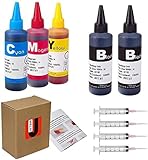
- JETSIR ink refill kit is designed for use with a wide range of compatible ink cartridges, including 950, 951, 952, 902, 901, 60, 61, 62, 63, 21, 22, 564, 920, 940, 932, 933, 711, 970, 971, 92, 94, 95, 96, and 97. Suitable for refillable cartridges, remanufactured cartridges, and continuous ink supply systems (CISS). Please confirm your cartridge type before purchase.
- The JETSIR refill kit includes 5 bottles of dye ink (2 Black, 1 Cyan, 1 Magenta, 1 Yellow), each 100ml. Also included are 4 syringes, refill tips, sealing plugs, and step-by-step instructions—everything you need for a smooth and efficient refill experience.
- Each 100ml bottle provides multiple refills, making this kit ideal for home, office, or small business use. Print more and refill less while reducing overall printing costs.
- JETSIR ink is formulated to deliver vibrant color and crisp black text for documents, photos, reports, and graphics. Enjoy consistent, reliable print quality with every refill.
- Designed for easy refilling, even for first-time users. Refilling your cartridge is quick and easy. Simply draw ink into the syringe, slowly inject it into the cartridge through the refill hole, then seal it securely with the provided plug. For best results, refill gradually to avoid overfilling and allow the cartridge to rest for a few minutes before printing. Following these steps helps ensure smooth ink flow and prevents leakage.
Why inkjet is harder than a 3D printer
A 3D printer gives you a useful motion platform, but inkjet printing requires much more than moving a nozzle across a surface. Each droplet must be ejected at the correct position, with the correct timing, volume, and direction, while the ink remains chemically and mechanically stable.
The difficult systems include:
- Precisely timed printhead firing pulses
- Safe electrical contact with a cartridge or printhead
- Paper transport, registration, and skew control
- Printhead-to-paper spacing
- Rasterization, dithering, and color management
- Bidirectional carriage alignment
- Ink viscosity, surface tension, drying, and clogging control
- Cleaning, capping, parking, and waste-ink management
A gantry can move accurately and still produce poor output if paper slips, rollers collect dust, the platen is uneven, or the head gap changes. A printer that produces one successful test page but cannot remain unclogged between sessions is not a practical printer.
How an inkjet printhead works
Most inkjet systems use one of two technologies:
- Thermal inkjet: a tiny resistive heater rapidly vaporizes a small amount of ink. The resulting bubble forces a droplet through a nozzle.
- Piezoelectric inkjet: a piezoelectric element deforms when driven, mechanically pushing ink through the nozzle.
Consumer cartridges can appear attractive because the reservoir and printhead may be integrated into one replaceable unit. The trade-off is dependence on proprietary electrical interfaces, pinouts, firing waveforms, cartridge availability, and ink formulations.
Do not guess the drive signal. An inkjet cartridge is not a passive nozzle. Incorrect voltage, pulse duration, timing, current, or sequencing can permanently damage a thermal printhead. Use documented drive conditions and current-limited test electronics. A multimeter alone is not enough for debugging fast firing pulses; an oscilloscope or logic analyzer may be necessary.
Three realistic build strategies
1. Reuse a consumer cartridge
This is the most accessible route for a small experimental printer. The cartridge supplies the nozzles and often the ink reservoir, while you design the holder, contacts, motion system, controller, and print pipeline.
Recommended Free Tools
Advantages: integrated fluid handling, relatively accessible cartridge bodies, and less mechanical work than designing a printhead.
Rank #3

- A pressure adjustable manual heat press is required. VersiFlex Kit Includes: A Sawgrass SG1000 printer, 31ml VersiFlex ink cartridge 4 Pack, 50 sheets of VersiFlex Light Heat Transfer Paper.
- VersiFlex Unique Decoration System – Next-gen decoration solution for durable, high-quality prints on porous materials like natural fibers & untreated wood—more versatile than sublimation printing. Innovation that delivers better results.
- Simplified Decoration - No Pre-treatment Needed! VersiFlex technology enables high-quality decoration on porous surfaces - natural fibers, cotton, canvas, and untreated wood. Unlike DTG printing, no pre-treatment is needed with VersiFlex.
- Unleash Vibrant Colors & Soft Feel - VersiFlex Decoration Inks exclusively for the SG1000 that deliver stunning, true-to-life colors with a soft touch. No more stiff, uncomfortable transfers for a professional finish - unlike DTF printing.
- Industry-Trusted Printers, Innovative Inks & Specialized Papers: Experience flawless prints, REACH/RoHS/OEKO-TEX certified.
Disadvantages: proprietary pinouts and waveforms, changing cartridge availability, possible regional variants, delicate printheads, and dependence on compatible commercial consumables. A refillable cartridge is not automatically reliable: it still needs a functioning vent, suitable reservoir or sponge, correct priming, compatible ink, and protection from air and drying.
2. Retrofit an existing printer or gantry
An old inkjet printer may already contain the hardest mechanical subsystems: a carriage, paper-feed mechanism, rollers, platen, capping station, and service position. Reusing those parts can be easier than building them from scratch.
The main difficulty is often reverse-engineering the original electronics and communication protocols. Alternatively, a 3D-printer gantry, CNC frame, plotter, or flatbed XY stage can provide motion, but it does not solve printhead drive, paper handling, rasterization, or maintenance.
3. Follow an open project
Following Open Printer is the most practical path for someone who wants a repairable desktop document printer but can wait for availability and accept vendor-specific cartridge formats. OpenJet is more appropriate for readers interested in experimental materials, browser/API control, or educational research.
Before committing, check whether the project has actually released its CAD, PCB files, firmware, bill of materials, calibration data, and assembly documentation. A project can be technically ambitious without being reproducible.
Anatomy of a DIY inkjet printer
Mechanical system
You need a rigid frame, accurately guided carriage, controlled head height, and a stable paper path. Depending on the design, motion may use belts, leadscrews, or direct drive. The paper system may require pinch rollers, a platen, sheet-feed control, roll tensioning, or an encoder.
Rank #4

- Value kit: The screen printing kit is equipped with the necessary tools needed for screen printing and comes with a detailed operating guide, so even beginners can get started quickly
- Faster exposure: The 50W UV exposure lamp and metal bracket accelerate the curing time of photo emulsion and improve the image display efficiency
- Multiple colors: The set contains six colors: black, white, red, blue, yellow, and green, providing more color choices, and you can blend your favorite colors according to your needs
- Wide range of uses: You can print your favorite patterns on T-shirts, canvas bags, tablecloths and other fabrics to create your own handicrafts
- All-in-one package: The kit contains various tools and materials needed for screen printing: 3 Screen Printing Frames,1 Screen Printing Squeegee,1 Emulsion Scoop Coater,6 Color Inks,1 50W UV Lamp Kit,1 50ml Measuring Cup,2 Plastic Cups,1 Ink Knife,8 Gloves,1 Photo Emulsion Kit,1 Sensitizer,1 Plastic Scraper,1 Tape,15 A4 size films,10 Wood Mixing Stick
Plan for a service position, removable panels, ink-spill containment, and a way to park and cap the printhead. The published Open Printer design illustrates an alternative to a conventional office printer by supporting both sheets and rolls, with an integrated cutter. Its listed dimensions vary slightly between public sources—approximately 497 × 233 × 111 mm on the manufacturer’s site and approximately 50 × 10 × 11 cm on Crowd Supply—so treat those figures as approximate until production documentation is final.
Electronics and control
A complete system generally includes:
- A host computer or Raspberry Pi
- A real-time microcontroller
- Stepper motors and drivers
- Dedicated printhead-driver electronics
- Level shifting, interface protection, and current limiting
- A suitable power supply
- Limit switches, homing sensors, or encoders
- Paper-advance control
- USB, Wi-Fi, or network connectivity
- An emergency stop or power cutoff
The usual architecture separates responsibilities. A Raspberry Pi can handle networking, job management, image processing, and the user interface. A microcontroller handles deterministic motion and printhead timing. This is why “Raspberry Pi-controlled” does not mean that a Pi can safely drive a cartridge directly.
Software and print pipeline
A print job typically follows this path:
- The user submits a document or image.
- Host software converts it to a supported raster format.
- Scaling, rotation, color conversion, and dithering are applied.
- The image is divided into carriage passes or printable swaths.
- Motion and firing commands are synchronized.
- The controller advances the paper by a calibrated distance.
- The process repeats until the page is complete.
- The head parks and is capped.
CUPS can provide the print-server layer, but CUPS alone does not drive an arbitrary inkjet cartridge. You still need a device-specific backend, raster filter, controller protocol, and firmware interface.
Ink system
Ink choice affects nearly every part of the design. Dye inks generally behave differently from pigment inks in viscosity, drying, particle content, paper absorption, and clogging risk. Experimental fluids may require pumps, reservoirs, filters, dampers, agitation, and specialized printheads.
Never casually mix dye and pigment formulations or combine inks from different systems. Incompatible chemistry can cause precipitation, clogged nozzles, poor adhesion, color shifts, or permanent contamination. Account for refill priming, reservoir venting, filtration, storage, shelf life, and waste ink.
Free tools Windows power users keep installed
One-click scans. No signup required.
A staged build workflow
- Define the goal. Decide whether you need monochrome marking, a document printer, art output, or experimental fluid deposition. The simpler the target, the more realistic the project.
- Select the printhead or cartridge. Confirm availability, regional compatibility, electrical documentation, ink compatibility, and mechanical dimensions.
- Validate the drive electronics separately. Use documented waveforms, current limiting, protective interfaces, and a sacrificial or test printhead where appropriate. Do not connect an unknown cartridge to a controller output.
- Build and test motion. Verify homing, steps per millimeter, repeatability, carriage stiffness, and emergency shutdown before adding ink.
- Add the paper path. Test sheet grip, roll tension, platen flatness, skew, and paper advance with dry media.
- Produce a nozzle check. Start with a simple firing pattern rather than a full page. Confirm that the intended nozzles fire without overheating or flooding.
- Implement rasterization. Add scaling, dithering, swath generation, color separation, motion synchronization, and error handling.
- Calibrate registration and feed. Use repeated bands, fine lines, color crosses, and measured paper movement.
- Add cleaning and capping. Do this before treating the machine as complete. Reliable storage is essential.
- Enclose and document the machine. Protect users from ink and moving parts, label connectors, record calibration values, and publish your changes if the license requires it.
Calibration checklist
Assembly is only the beginning. Calibrate:
- X and Y homing
- Steps per millimeter and carriage backlash
- Paper advance and roller pressure
- Printhead-to-paper gap
- Nozzle alignment
- Color-channel registration
- Horizontal and vertical scaling
- Bidirectional offset
- Ink density and drying time
- Dithering pattern
- Roll tension or sheet-feed pressure
Useful test patterns include a nozzle check, solid black and color blocks, fine lines, small text, registration crosses, gray ramps, color gradients, repeated paper-advance bands, and edge or borderless tests. A published dpi figure should never replace these tests.
Best Value
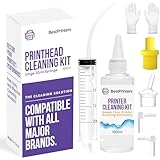
- High Success Rate: Save hundreds of dollars with our best printing cleaning kit for restoring print quality on inkjet printers. Access additional video support of the best printers cleaning kit on YouTube Channel. Remember to run a printhead or power cleaning after use to bring ink back into the printhead
- User-Friendly Design: DIY Print Head Cleaning Kit for Epson. No expertise is required! This cleaning kit fixes common printing issues like discoloration, missing colors, low-quality prints, blank pages and streaks
- Wide Compatibility: Works with popular printer models, including Epson EcoTank, Epson WorkForce HP SmartTanks, HP OfficeJet, Canon Pixma, Brother MFC, DTF, Sublimation and many more.
- Complete Cleaning Solution: Includes a LARGE 20ml print head cleaner syringe and multiple attachments for hp officejet printhead cleaning kit. Our ionized cleaning solution is safe to use on all printer components
- Complete Printhead Cleaning Solution: Includes specialized cleaning fluid, syringes, and tools; printer cleaning kit flush cleaner removes dried ink buildup; extends printhead lifespan and delays replacement
Maintenance and failure prevention
Before each print
- Check ink level and reservoir venting.
- Look for blocked nozzles.
- Clean dust and loose ink from the paper path.
- Confirm that the printhead is capped or has recently been serviced.
After printing
- Park and cap the printhead.
- Wipe only with an appropriate lint-free material and compatible cleaning fluid.
- Remove loose ink from the platen.
- Do not leave the carriage exposed to air.
Periodic maintenance
- Inspect belts, rails, rollers, and homing repeatability.
- Remove paper dust.
- Check cartridge contacts and connectors.
- Replace blocked filters or dampers where the design uses them.
- Recalibrate after mechanical changes.
The most common fundamental failure is allowing the printhead to dry. A reliable capping and cleaning system is not an optional accessory.
What does a DIY open-source inkjet printer cost?
There is no dependable universal price because the design, printhead, ink system, frame, and documentation vary widely. A low parts estimate can be misleading once you include failed cartridges, spare electronics, tooling, test media, replacement rollers, ink, enclosures, and your time.
Typical component categories include a Raspberry Pi or host computer, a microcontroller, stepper motors and drivers, linear motion hardware, a 24 V supply, custom cartridge contacts or a PCB, 3D-printed brackets, refill equipment, a multimeter, precision calipers, and—ideally—an oscilloscope or logic analyzer. Prices and availability are volatile, so do not treat a generic parts list as a confirmed build cost.
Quick wins for a faster PC:
Scan for outdated or missing drivers - takes under a minuteDriver Scan →Clear out junk files and repair common Windows errorsFree Scan →Fix the driver behind crashes, sound loss and screen glitchesFind Drivers →Build or buy?
| Reader | Best path | Reason |
|---|---|---|
| Hobbyist or maker | Retrofit or follow an open project | Good learning value, but avoid designing every subsystem at once. |
| Educator | Use a documented experimental platform | Students can study motion, fluidics, electronics, and software without requiring office-grade output. |
| Artist | Evaluate OpenJet or a controlled deposition build | Experimental media and API control may matter more than speed. |
| Researcher | Build around the required fluid and printhead | A specialist system may be more appropriate than a consumer cartridge. |
| Home user | Buy a conventional inkjet | Paper handling, cleaning, duplexing, and reliability outweigh openness for routine documents. |
| Small business | Buy unless the printer itself is the product | Downtime and support costs can exceed any parts savings. |
Important trade-offs
| Priority | Potential advantage | Limitation |
|---|---|---|
| Repairability | Files and parts may be accessible. | Only useful if replacement boards and documentation remain available. |
| Cartridge freedom | Refillable systems can reduce lock-in. | You may still depend on a proprietary cartridge body and ink chemistry. |
| Cost | Existing motors, frames, and electronics may be reused. | Failed parts and labor can exceed the price of a cheap printer. |
| Customization | Mechanics, firmware, and media paths can be changed. | Every change may require recalibration. |
| Privacy | Local software and print servers can reduce cloud dependence. | Network security remains the builder’s responsibility. |
| Print quality | Specialized output is possible. | Commercial printers generally provide more consistent document quality. |
| Commercial use | Some open projects permit derivatives. | Open Printer’s stated license prohibits commercial reuse. |
Bottom-line recommendation
Build a DIY open-source inkjet printer if the objective is education, research, artwork, workshop experimentation, or unusual material deposition. If you want a usable desktop document printer, follow a project with real documentation and a defined hardware direction rather than inventing the complete system from scratch. Open Printer is the most clearly defined current project, but it remains a developing, not confirmed generally shipping, product and its noncommercial license matters. OpenJet is promising for modular and experimental work, but its public information is not yet enough for a confident buying or build recommendation.
If your priority is dependable high-volume printing, automatic duplexing, scanning, predictable consumable supply, or minimal maintenance, buy a conventional printer. The open-source route is primarily a technical project—not a guaranteed cheaper replacement.
Quick Recap
Product prices and availability are accurate as of the date/time indicated and are subject to change. Any price and availability information displayed on Amazon at the time of purchase will apply.