Crashes, No Sound, or Screen Glitches?
Random freezes, missing sound and display glitches usually trace back to one bad driver. Find and replace yours safely.Free scan · under a minutePC Slower Than It Used to Be?
A free scan shows the junk files, broken settings and background clutter dragging Windows down - then fixes them in one click.Free scan · Windows 10 & 11Some links on this page are affiliate links: if you buy through them we may earn a commission, at no extra cost to you.
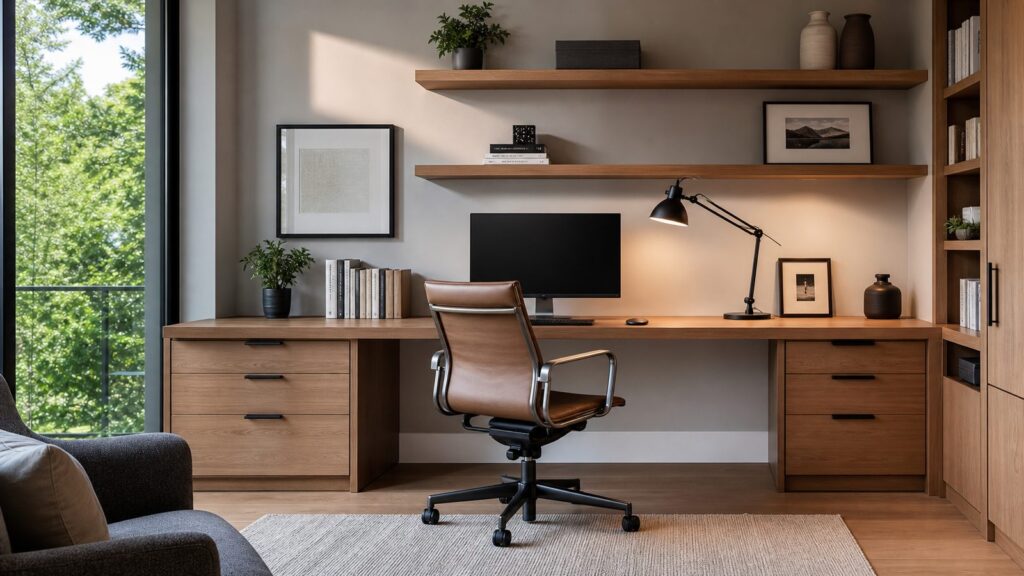
A good desk setup should look calm, personal, and finished, but it still has to handle real work. The best desk decor ideas start with the room itself: outlet locations, daylight, glare, cord routing, chair clearance, wall backing, storage, and air quality. Once those pieces are handled, the trays, plants, art, and accessories actually look intentional instead of fighting the space.
For a simple 2026 desk refresh, most homeowners can expect to spend about $75 to $400 on a lamp, tray, cable clips, plant, desk mat, framed print, and a few organizers. A more complete aesthetic upgrade with a better chair, monitor arm, rug or chair mat, wall shelves, paint, and storage often lands around $400 to $1,500. A premium desk wall with custom shelving, upgraded lighting, electrical work, installation labor, and designer-selected finishes can run $1,500 to $6,000 or more. If the project becomes a true home office remodel, current U.S. pricing commonly falls around $50 to $200 per square foot in an existing room.
On our job sites, the desk areas that hold up best are planned like small work zones, not like display shelves. We look at the wall, floor, wiring, lighting, and daily use first. Then we style the visible surfaces with restraint. A useful target is to keep 20% to 30% of the desktop empty so papers, a laptop, a coffee mug, or project samples have somewhere to land without turning the whole setup into clutter.
As an Amazon Associate I earn from qualifying purchases.
Start With the Desk Wall Before You Buy Decor
The wall behind and around the desk determines how successful the finished look will be. Before buying accessories, sit where the chair will go and check five things: outlet count, daylight direction, camera background, HVAC comfort, and glare. If the room is hot, drafty, too dark, or short on power, decor will not fix the daily friction.
A comfortable desk zone usually needs at least 30 inches of clear width for a compact workstation, 48 to 60 inches for a more generous setup, and about 30 to 36 inches of pull-back space behind the chair. If you use dual monitors, a printer, or plan review materials, depth matters too. A 24-inch-deep desk can work for a laptop, but 28 to 30 inches is more comfortable for a monitor, keyboard, and task lamp.
Popular on Amazon

- All-in-One Desk Organizer: WALI multi-tier desk organizer features 4 letter trays, a vertical file folder organizer, 2 metal pen holders and a sliding divided drawer, keeping your office supplies for desk tidy and maximizing desktop space, ideal for women and men as office desk accessories
- Premium Metal Quality: WALI desktop file organizer is crafted from thickened steel metal wire mesh, featuring dense small mesh to hold desk supplies steadily. Its sturdy structure enhances load-bearing capacity to avoid deformation; all parts are firmly fixed to prevent falling, ensuring overall stability and durability of the desktop organizer
- Save Space: Documents are organized by the vertical file folder organizer. Tiered letter tray is suitable for planner, paper, letters,books, magazines, mail, bills and phones. The sliding drawer and metal pen holders can store all office supply accessories, such as pens, pencils,markers, scissors, suitable for workers, teachers and students
- Easy Installation: No complicated tools or tedious steps. 1 Pack WALI desk organizers and accessories can be assembled in minutes with clear instructions. Ideal for office, dorm, college, home office, school, classroom use
- Elegant & Practical Decor: Classic black finish complements any office, school or dorm decor, serving as both a practical home office storage and organization tool and a sleek desktop decor to show your professional style, ideal for users who pursue a tidy, aesthetic workspace
If you are remodeling, add blocking inside the wall before drywall goes back up. Blocking is simply solid wood installed between studs where shelves, monitor arms, peg rails, wall cabinets, or floating desks will attach. It is inexpensive while the wall is open and frustratingly expensive later. For a finished room, locate studs before hanging heavy art, shelves, or wall-mounted storage.
Do these 3 things before closing this tab:
1Repair Windows errors before they cause bigger problems2Fix the driver behind crashes, sound loss and screen glitches3Clear out junk files and repair common Windows errorsDesk Decor Cost Guide for 2026
The right budget depends on whether you are styling an existing desk or improving the infrastructure around it. A few accessories can make a visible difference, but electrical work, built-ins, lighting, and wall repairs move the project into construction territory.
| Project level | Typical 2026 cost | What it usually includes |
|---|---|---|
| Simple desk refresh | $75-$400 | desk tray, organizers, lamp, art print, plant, cable clips, mouse pad, desk mat |
| Mid-range aesthetic upgrade | $400-$1,500 | Better chair, task lamp, rug or chair mat, monitor arm, shelves, paint, storage |
| Premium desk wall | $1,500-$6,000+ | Upgraded lighting, designer furnishings, wall treatment, electrician work, custom shelving |
| Built-in desk with shelving | $3,000-$10,000+ | Cabinetry, drawers, shelving, cable grommets, finish work, possible lighting |
| Home office remodel | $50-$200 per sq. ft. | Electrical, flooring, insulation, windows, paint, built-ins, finish upgrades |
| New outlet near desk | $100-$450 per outlet | Outlet installation, with cost affected by circuit access, drywall repair, permits, AFCI/GFCI needs |
Interior designer help varies widely. In 2026, traditional design services commonly range from about $50 to $500 per hour or $2,000 to $15,000 for larger projects excluding furniture. For a single desk wall, a limited consult or styling package may be far less than a whole-room design plan.
15 Desk Decor Ideas That Actually Improve the Workspace
1. Build a Layered Lighting Setup
One overhead fixture is rarely enough for a good desk. Use three layers: ambient room light, an adjustable task lamp, and soft background or accent light. This reduces eye strain, controls shadows, and makes video calls look better.
For bulbs, a warm-neutral range around 2700K to 3500K usually works well in home offices. Go warmer for a cozy writing desk and closer to 3500K for detail work. Choose dimmable fixtures where possible. A task lamp should reach across the work surface without blocking your monitor or creating glare on a glossy desktop.
Budget $40 to $250 for a good desk lamp. A hardwired sconce or pendant should be treated as an electrical project, not just decor. Costs depend on the fixture, switch leg, wall or ceiling access, drywall patching, and local permit requirements.
2. Use Statement Wall Art, Cork, or a Peg Rail
The wall above the desk is prime visual space, but it should work from both seated height and camera height. A large framed print, cork panel, fabric pinboard, or peg rail can create an aesthetic backdrop while keeping notes and tools off the desktop.
For scale, art should typically be about two-thirds to three-quarters the width of the desk. Above a 60-inch desk, a 36- to 45-inch-wide piece often feels right. If you prefer a pinboard, mount it where your eyes naturally land, usually 8 to 12 inches above the desktop.
Use proper anchors, and hit studs for heavier pieces. If you are opening walls for a remodel, add blocking behind the planned art rail or shelf zone.
Quick wins for a faster PC:
Scan for outdated or missing drivers - takes under a minuteDriver Scan →Clear out junk files and repair common Windows errorsFree Scan →Fix the driver behind crashes, sound loss and screen glitchesFind Drivers →3. Add Low-Maintenance Plants Based on Actual Light
Plants soften a desk setup and add a biophilic element, but only if they survive. Match the plant to the light level instead of forcing greenery into a dark corner. A bright room can handle succulents or a small ficus. Lower-light spaces are better suited to pothos, snake plant, ZZ plant, or preserved stems.
Keep planters proportionate. A 4- to 6-inch pot works on most desks. Larger plants usually belong on the floor or a side cabinet so they do not crowd the work zone. Use a saucer or waterproof liner to protect wood, MDF, veneer, and painted surfaces.
4. Create a Desk Tray or Drop Zone
A tray gives small objects a home: glasses, keys, notepad, charging case, tape measure, or mail that needs attention. Without a drop zone, those items spread across the desk and make the space look messy even when it is functional.
Also popular on Amazon

- Mesh Pen Holder for Desk: Multipurpose 3 compartments desk organizer (8*4*4in), Suitable for storing pens, pencils, scissors, sticky notes, paper clips, etc. Keep your desk tidy and organized.
- Premium Material: Made of high-quality metal and mesh, durable and sturdy, not easy to deform or break. The smooth surface is easy to clean and will not scratch your desktop or other items.
- Convenient Design: The pen holder has three compartments, which can hold different types of stationery and supplies. The design is simple and practical, and the size is suitable for most desks.
- Sticky notes holder: The mesh pen holder has a sticky notes holder which is convenient for jotting down important reminders, to-do lists, or phone numbers.
- Wide Application: This pen holder is suitable for office, school, home, and other places. It can help you organize your desk, keep your stationery and supplies in order, and make your work more efficient.
Choose a tray around 8 by 12 inches for a small desk or 10 by 14 inches for a larger one. Materials matter. Leather, felt, powder-coated metal, wood, or stone can establish the design language for the entire setup. Repeat that material in at least one other place, such as a frame, lamp base, drawer pull, or bookend.
5. Make Cable Management Match the Design
Cords are one of the quickest ways to ruin an otherwise polished desk. Use adhesive cable clips, under-desk trays, cord sleeves, wall raceways, and grommets. Match visible cable management to the furniture: white raceways on white walls, black sleeves with black metal legs, or wood-toned grommets in stained built-ins.
Do not hide extension cords under rugs or bury overloaded power strips behind cabinetry. Heat and access matter. If a desk needs monitors, chargers, a printer, a lamp, speakers, and a router, it may need another outlet or a better circuit plan. In 2026, adding an outlet near a desk commonly costs about $100 to $450, with many projects around $150 to $350 or roughly $300 on average. Permit rules vary by location, and receptacle requirements may include tamper-resistant devices, AFCI protection, or GFCI protection depending on room and placement.
6. Use a monitor riser, Shelf, or Arm
A monitor riser does two jobs: it improves posture and creates storage below the screen. A good setup puts the top of the monitor near eye level, with the screen roughly an arm’s length away for most users. Keep wrists neutral, elbows relaxed, and frequently used items within easy reach.
A simple riser can cost $25 to $100. A quality monitor arm often runs $60 to $250, more for heavy or dual-monitor setups. If mounting to a wall or built-in panel, confirm the structure can handle the load. Thin decorative paneling alone is not enough.
The Tool Desk
Outbyte Driver Updater FREEFix the driver behind crashes, sound loss and screen glitchesFind Drivers →Outbyte PC Repair FREEClear out junk files and repair common Windows errorsFree Scan →7. Bring in Warm Wood or Natural Texture
Warm wood is one of the strongest desk design directions for 2026 because it makes technology-heavy spaces feel less sterile. You do not need a full wood desk. A walnut riser, oak pencil cup, cane-front storage box, linen pinboard, woven shade, or cork mat can carry the same warmth.
Pick one main texture and repeat it two or three times. For example: white walls, a black lamp, walnut shelf, walnut tray, and black frames. That type of repetition is what makes an aesthetic look designed rather than collected at random.
8. Use Color-Coordinated Closed Storage
Open shelves photograph well for one afternoon. Closed storage works better for real life. Use drawers, bins, file boxes, and cabinets for supplies that create visual noise: cords, batteries, pens, invoices, samples, sticky notes, tools, and manuals.
For a compact desk, use one color family for storage. Matte white, warm gray, olive, black, or natural wood all work well. Labeling can be inside drawers instead of on the front if you want a cleaner look. Budget $30 to $200 for simple organizers and $300 to $1,500 or more for higher-quality freestanding storage pieces.
Recommended Free Tools
9. Add floating shelves, but Keep Them Edited
Floating shelves can make a desk wall feel finished, but they need structure and restraint. A good shelf display includes books, one plant, one personal object, one useful tool, and some empty space. It should not become overflow storage.
For typical desk walls, shelves 8 to 12 inches deep are usually enough. Install the lowest shelf high enough that you will not hit it when standing or reaching; 18 to 24 inches above the desktop is a common starting point, adjusted for monitor height. Heavy shelves should fasten into studs or blocking, not just drywall anchors.
10. Install a Pinboard or Memo Wall
A memo wall is the practical version of a gallery wall. It gives sketches, paint chips, schedules, fabric samples, and reminders somewhere to live without taking over the desktop. Cork, linen-wrapped homasote, magnetic panels, and pegboard are all useful options.
For a built-in look, size the memo surface to align with the desk edges or shelving above it. A 24-by-36-inch board works for small desks. A 36-by-48-inch board is better for a serious home office or creative workspace.
Also popular on Amazon

- Multifunctional: The desktop organizer has 2 storage boxes and 1 pen box, you can store many office supplies, such as pens, scissors, staplers, etc. Perfect for office, bookcase, home, etc
- Quality Material: The office supplies desktop organizer is made of lightweight and durable metal mesh and reinforced with a sturdy steel frame for lasting strength and reliable performance
- Large Capacity Organizer: The 7-layer layered design and large capacity make the paper organizer ideal for managing a wide variety of letter-sized letters, papers, books, bills, and more. Makes it super easy for you to quickly identify the contents of each compartment
- Save Space: Desktop organizer can help you organize your desktop and help you save space better. Keep you productive at work all the time
- Size: 16.75 "W x 8.75 "D x 16.75 "H (U.S. Patent Pending)
11. Choose a Stylish Ergonomic Chair
The chair is part of the decor, but it is also the piece your body deals with all day. Look for adjustable seat height, lumbar support, comfortable arm position, and a base that moves properly on your floor. The chair should slide under the desk without scraping arms or hitting drawers.
Most desks are about 29 to 30 inches high. Many users need a seat height around 17 to 21 inches, but body size and keyboard position matter. If the chair is beautiful but forces raised shoulders, bent wrists, or unsupported posture, it is the wrong chair for a working desk.
Expect to spend $150 to $600 for a decent ergonomic home office chair and more for premium models. It is often the highest-impact upgrade in the room.
12. Use a washable rug or Proper Chair Mat
A rug defines the desk zone, adds acoustic softness, and brings color or texture to the floor. In a rolling-chair setup, choose a low-pile rug or a chair mat designed for the flooring underneath. Thick rugs can make chairs hard to move and create trip points.
Free tools Windows power users keep installed
One-click scans. No signup required.
Size the rug so the chair remains on it when pulled back. For many desks, that means at least 5 by 7 feet. If the room is small, a clear or color-matched chair mat can protect hardwood, LVP, or carpet without visually crowding the space.
13. Build a Personal Object Vignette
A desk should not look like a showroom. Add one small grouping that says something about you: a framed photo, ceramic piece, vintage clock, small sculpture, travel object, or award. Keep it tight and intentional.
The best vignettes use odd numbers and varied heights. Try a framed 5-by-7 photo, a small plant, and a low tray. Keep the group outside your main work reach so it does not interfere with typing, writing, or using a mouse.
14. Design the Video-Call Backdrop
Many home offices are now seen through a laptop camera as often as they are seen in person. Test the camera view from seated height before hanging art or shelves. The best backdrop is often slightly higher and wider than expected because cameras crop the wall differently than your eye does.
A strong backdrop usually includes one larger anchor, such as art or shelving, and two or three quiet supporting elements. Avoid tiny frames, busy patterns, reflective glass, and clutter directly behind your head. Use soft background light if your face is shadowed or the wall looks flat.
15. Consider a Built-In or Semi-Custom Desk Nook
A built-in desk nook is the premium version of desk decor because the storage, work surface, lighting, and cable paths can be designed together. It is especially useful in alcoves, bonus rooms, kitchens, guest rooms, and underused corners.
Good built-ins include cable grommets, removable access panels, outlet locations above and below the work surface, ventilation for electronics, durable finishes, and drawers sized for actual supplies. Painted MDF or plywood can be cost-effective. Stain-grade hardwood costs more but adds warmth and resale appeal.
In 2026, built-in desks with integrated shelving and cabinetry commonly run $3,000 to $10,000 or more depending on length, materials, finish level, drawers, doors, lighting, and site conditions. If you are already remodeling, this is also the time to plan blocking, outlets, sconces, and data or charging locations.
What’s actually slowing this PC down?
Pick the symptom - the matching free tool is one click away.
Also popular on Amazon

- 【Space Saving】: The compact design of this wood desk organizer maximizes vertical space while keeping all office supplies within reach, making your workspace more organized.
- 【Improve Work Efficiency】: This pen organizer contains 4 trays, 1 magazine rack, 1 pen holder, and 1 sliding drawer, which can help you quickly identify the contents of each compartment, helping to keep papers, notebooks, and office supplies neatly organized and easily accessible., so that you can stay busy and creative all day long.
- 【High-quality Materials】: This workspace organizer is made of high-quality wood and solid steel and high-quality plastic for better stability and durability. The outer layer is epoxy-coated, rust-proof and very durable, ensuring a long service life. Its simple design can be perfectly integrated with any decorative style
- 【Easy to Assemble】: Detailed instructions and matching assembly tools ensure a fast and efficient assembly process. It is super easy to assemble without worrying about any problems!
- 【Happy Shopping】: We offer a 100-day return policy. If you have any questions, please feel free to contact us, we will help you within 24 hours.
When to DIY and When to Hire a Pro
Most desk styling is safe for a careful homeowner. DIY is appropriate for trays, organizers, small lamps, plants, desk mats, lightweight framed art, drawer dividers, cable clips, and freestanding storage. Painting one accent wall can also be DIY if the wall is sound and you are comfortable with prep, masking, and cleanup.
Hire a pro when the work touches wiring, hardwired lighting, new outlets, wall-mounted heavy loads, built-ins, drywall repair, wallpaper on damaged walls, or anything that could affect code compliance. Added outlets and hardwired sconces may require permits depending on your jurisdiction. Electrical work can also trigger AFCI, GFCI, tamper-resistant receptacle, box-fill, and access requirements. A licensed electrician will know what applies in your area.
For carpentry, bring in a professional if the desk will be wall-mounted, support significant weight, tie into existing trim, or include integrated lighting and cable access. A floating desk that fails is not a decor problem; it is a structural problem. On our projects, we would rather overbuild the concealed support than rely on optimistic anchor ratings.
Safety, Air Quality, and Comfort Details Worth Planning
A polished desk area should also be safe and comfortable. Do not overload power strips, daisy-chain extension cords, or run cords under rugs. Keep power connections accessible so they can be inspected, unplugged, or replaced. Leave ventilation around chargers, routers, computers, and power supplies, especially inside cabinets.
Indoor air quality deserves attention in rooms used for long work sessions. Paints, varnishes, adhesives, furnishings, composite wood products, rugs, and office supplies can emit volatile organic compounds. EPA indoor air guidance notes that levels of several organic compounds average 2 to 5 times higher indoors than outdoors. Choose low-VOC paint and finishes when possible, ventilate after painting or installing new furniture, and let new rugs or adhesive-backed products air out before full-time use.
Glare is another common comfort issue. Avoid glossy desktops in sunny rooms unless window treatments are excellent. Position monitors perpendicular to strong windows when possible, and use adjustable shades to control daylight. A beautiful desk that forces squinting every afternoon will not stay loved for long.
Common Desk Decor Mistakes to Avoid
The biggest mistake is buying decor before measuring. Measure desktop width and depth, monitor footprint, chair clearance, wall height, shelf depth, outlet distance, and camera framing first. A 30-inch-deep desk gives you very different options than a 20-inch writing table.
Another mistake is building a good-looking setup with too little power. If every device depends on one overloaded strip, the room needs a better plan. Extension cords hidden under rugs or behind built-ins are not a clean solution.
Crashes, No Sound, or Screen Glitches?
Random freezes, missing sound and display glitches usually trace back to one bad driver. Find and replace yours safely.Free scan · under a minuteWindows Errors? Fix Them Before They Spread
Repair common Windows errors and clear accumulated junk for a smoother, more stable PC - no reinstall needed.Free scan · no reinstallOpen shelving can also backfire. If every supply is visible, the desk will look busy even when it is organized. Use open shelves only for objects that contribute to the look: books, plant, art, one personal item, and one useful tool. Put the rest behind doors or inside drawers.
Finally, do not sacrifice ergonomics for the photo. Monitor height, keyboard position, chair support, reach zones, and glare control still matter. A desk that looks aesthetic for a picture but causes neck, wrist, or back strain is not finished.
Also popular on Amazon

- 【Unique Desk Decor】: The monitor stand has a classic black coating, adding elegance and modernity to your office while being sturdy and practical. allowing you to work in a cozy and tidy environment with greater comfort and efficiency.
- 【Improved Work Efficiency】: The monitor riser comes with a sliding drawer and two pen holders. It accommodates various office desk items, saving space. It helps you quickly identify the contents of each compartment, doubling your work speed.
- 【Reduced Fatigue】: Elevate your monitor to a comfortable viewing height, relieving pressure on your neck, shoulders, and back, and enhancing comfort and creativity throughout the day.
- 【Wide Compatibility】: Monitor Riser / Stand for printer, computer, laptop, notebook. with a ventilation design to prevent overheating. Non-slip rubber pads provide stability during work.
- 【Happy Purchase】: Enjoy a 100-day return policy. Contact us with any questions, and we'll provide assistance within 24 hours.(USPTO Patent Application Number: 65268496)
The Builder’s Formula for an Aesthetic Desk Setup
Use this order: choose the wall, solve power and lighting, confirm chair and monitor ergonomics, add storage, then decorate. Keep the desktop 20% to 30% empty. Repeat one material or color across several elements. Use closed storage for clutter and open display for only the pieces that earn their place.
A reliable formula looks like this: one good task lamp, one cable-management system, one monitor riser or arm, one tray, one plant, one larger wall element, one closed storage solution, and one personal object. From there, upgrade with shelves, a rug, a better chair, or a built-in desk nook as the budget allows.
The goal is not to create a desk that looks untouched. The goal is to create a workspace that looks good after a normal workday because the room, furniture, wiring, and storage are doing their jobs.
Frequently Asked Questions
How can I make my desk look aesthetic without creating clutter?
Keep 20% to 30% of the desktop empty, use one tray for small items, hide supplies in closed storage, and repeat one color or material across the lamp, frames, organizers, and hardware.
How much does it cost to decorate or upgrade a desk area in 2026?
A simple desk refresh usually costs $75 to $400. A mid-range upgrade with a chair, lighting, rug, shelves, and storage often costs $400 to $1,500. A premium desk wall with electrical work, lighting, custom shelving, and installation can cost $1,500 to $6,000 or more.
Do I need a permit to add an outlet or hardwired light near my desk?
Often, yes, depending on local rules and the scope of work. New outlets and hardwired lights can trigger permit, AFCI, GFCI, tamper-resistant receptacle, box access, and circuit requirements. Use a licensed electrician for this work.
What is the best lighting for a home office desk?
Use three layers: ambient room lighting, an adjustable task lamp, and soft background or accent lighting. Bulbs around 2700K to 3500K usually work well, with dimmers giving the most control.
Are built-in desks worth the cost?
Built-in desks are worth considering when you need storage, cable routing, a clean video-call background, or a precise fit in an alcove. Expect many built-in desk projects with shelving or cabinetry to cost $3,000 to $10,000 or more in 2026.
What desk decor mistakes make a home office harder to use?
Common mistakes include too few outlets, overloaded power strips, poor lighting, glossy glare-prone surfaces, heavy shelves without proper anchoring, open shelving with no clutter plan, and a chair or monitor setup chosen for looks instead of ergonomics.
Quick Recap
Product prices and availability are accurate as of the date/time indicated and are subject to change. Any price and availability information displayed on Amazon at the time of purchase will apply.
Recommended Free Tools

