Some links on this page are affiliate links: if you buy through them we may earn a commission, at no extra cost to you.
Verdict: Canary Pro—the current product most closely associated with the original Canary All-In-One—is a capable indoor, cloud-connected security camera with an unusually useful combination of temperature, humidity, and air-quality monitoring. Its 1080p video, 147-degree viewing angle, two-way audio, and built-in siren make it convenient for self-monitoring.
It is not a complete alarm system, however. The camera is wired, indoor-only, dependent on Wi-Fi and Canary’s cloud service, and significantly more useful with Premium Service. Buy it if those trade-offs suit you; skip it if you need local recording, outdoor coverage, battery power, or professional monitoring.
As an Amazon Associate I earn from qualifying purchases.
Recommended Free Tools
What happened to the Canary All-In-One?
The original Canary All-In-One was an indoor plug-in camera that combined video surveillance with motion detection, night vision, two-way audio, a remotely activated siren, temperature monitoring, humidity monitoring, and air-quality monitoring.
Canary’s current product lineup presents Canary Pro as the relevant current counterpart. Retail listings and older reviews may still use “Canary All-In-One,” “Canary,” or “Canary Pro” inconsistently, so check the exact model, warranty, included service, and seller before buying. The current lineup generally compares Canary View, Canary Pro, and Canary Flex.
#1 Best Overall
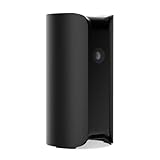
- AWARD-WINNING TECHNOLOGY & DESIGN: Trusted by over a million users & over 10,000 first responders – a camera beautifully designed in New York that doesn’t look like a security camera
- INDOOR WIFI CAMERA: 24/7 watch live HD surveillance, motion notification, two-way audio, speaker & microphone, 147° wide-angle lens, night vision, 10x zoom, privacy settings, automatic arm/disarm
- EASY SETUP IN MINUTES: DIY, no installation required; download the app, plug in the camera, connect to wi-fi and monitor your home, use as pet camera, baby monitor, for elderly care or childcare
- SECURE DATA PROTECTION: US-based company with all data stored in certified high security data centers using AES 256-bit, TLS & SSL encryptions & access control systems to ensure complete privacy
Despite the “all-in-one” name, this is a camera-centered self-monitoring product—not a traditional whole-home alarm with a hub, keypad, door and window sensors, glass-break detection, cellular backup, and guaranteed professional dispatch.
Canary Pro specifications
| Feature | Canary Pro |
|---|---|
| Video | 1080p HD |
| Field of view | 147 degrees |
| Night vision | Yes |
| Motion detection | Yes |
| Audio | Two-way talk |
| Siren | 90-plus dB, according to Canary |
| Sensors | Temperature, humidity, and air quality |
| Power | Wired AC power |
| Use | Indoor |
| Connectivity | Wi-Fi; Canary support also discusses Ethernet |
| Storage | Cloud-based, with availability determined by the current service plan |
These headline specifications are drawn from Canary’s current comparison page, its Canary Pro FAQ, and the company’s original specifications document. That PDF is historical, so it should not be treated as proof of every current app feature, compatibility claim, or price.
Crashes, No Sound, or Screen Glitches?
Random freezes, missing sound and display glitches usually trace back to one bad driver. Find and replace yours safely.Free scan · under a minutePC Slower Than It Used to Be?
A free scan shows the junk files, broken settings and background clutter dragging Windows down - then fixes them in one click.Free scan · Windows 10 & 11Camera and audio performance
For ordinary indoor monitoring, 1080p remains sufficient. It can provide a clear view of a room and help identify a person at typical indoor distances. The 147-degree lens is particularly useful in a corner or near an entrance because it covers a broad area with one camera.
The trade-off is perspective. Wide-angle lenses can produce mild fisheye distortion, especially near the edges of the frame. Night footage is generally black and white, and fast movement may appear blurred. Digital zoom only enlarges existing pixels; it cannot match optical zoom when a face or object is far from the camera.
Rank #2

- AWARD-WINNING TECHNOLOGY & DESIGN: Trusted by over a million users & over 10,000 first responders – a camera beautifully designed in New York that doesn’t look like a security camera
- WIFI CAMERA: 24/7 watch live HD, 90 db siren, temperature/humidity/air quality monitor, motion alerts, speaker & microphone, 147° wide-angle lens, night vision, 10x zoom, privacy settings, auto arm/disarm, member presence notification, connectivity alerts and more
- ADDITIONAL FEATURES: 624h continuous video recording, 60-day video cloud storage, smarter motion alerts with video clips & person/pet/package/sound detection detection, activity zone masking, auto siren, safety button, extended warranty & more with Premium Service plan
- EASY SETUP IN MINUTES: DIY, no installation required; download the app, plug in the camera, connect to wi-fi and monitor your home, use as pet camera, baby monitor, for elderly care or childcare
- SECURE DATA PROTECTION: US-based company with all data stored in certified high security data centers using AES 256-bit, TLS & SSL encryptions & access control systems to ensure complete privacy
Independent reviews generally found the image clear, while noting wide-angle distortion, streaming latency, and limitations when lighting or Wi-Fi conditions were poor. See TechRadar’s review, Reviews.org’s assessment, and TechGearLab’s testing.
Two-way audio lets you speak through the app, but it should not be treated as instant intercom communication. Delays between an event, notification, live view, and conversation are possible. Test the camera from the locations where you expect to use it.
Free tools Windows power users keep installed
One-click scans. No signup required.
How useful is the siren?
Canary says the Pro’s siren exceeds 90 decibels. You can activate it remotely through the app. In the same room, a loud siren may deter an intruder or attract attention. It is not a guarantee of intervention, particularly behind a closed door, across a large property, or during an internet outage. Independent testing found its effectiveness varied with room layout and distance.
Most importantly, Canary is self-monitored. You must notice the alert, open the app, judge what is happening, and decide whether to contact emergency services. That is fundamentally different from a professionally monitored alarm service.
Rank #3
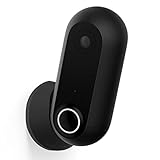
- AWARD-WINNING TECHNOLOGY & DESIGN: Trusted by over a million users & over 10,000 first responders – a camera beautifully designed in New York that doesn’t look like a security camera
- OUTDOOR INDOOR WIFI CAMERA: 24/7 watch live HD, weatherproof, wire-free & wired, motion alerts, speaker & microphone, wide-angle lens, night vision, 10x zoom, privacy settings, auto arm/disarm
- ADDITIONAL FEATURES: 30-day video cloud history, smarter motion alerts with video clips & person detection, activity zone masking, safety button, extended warranty & more with Premium Service plan
- EASY SETUP IN MINUTES: DIY, no installation required; download the app, plug in the camera, connect to wi-fi and monitor your home, use as pet camera, baby monitor, for elderly care or childcare
- SECURE DATA PROTECTION: US-based company with all data stored in certified high security data centers using AES 256-bit, TLS & SSL encryptions & access control systems to ensure complete privacy
HomeHealth sensors: genuinely useful, but not life-safety equipment
The Pro’s environmental sensors are its clearest advantage over a basic indoor camera.
- Temperature: useful for nurseries, pet areas, vacation homes, basements, and rooms vulnerable to overheating or freezing.
- Humidity: useful for spotting unusually damp conditions that could contribute to condensation, mold risk, or damage.
- Air quality: useful as an indication that room conditions have changed.
These readings can help you notice a problem earlier, but Canary should not replace a certified smoke alarm, carbon-monoxide alarm, radon monitor, calibrated particulate monitor, or professional indoor-air-quality assessment. “Air quality” does not mean the camera measures every pollutant, and the available evidence does not support medical or regulatory claims about the readings. TechGearLab observed environmental alerts responding to changes, but that is not the same as certification for life-safety use.
Setup and everyday use
- Download the Canary app and create or sign in to a Canary account.
- Place the camera on a stable surface near continuous power, ideally in a central, high-traffic area.
- Connect it to Wi-Fi or use a supported wired connection where applicable.
- Add it to a Canary location.
- Invite household members who need access.
- Configure Home, Away, and other available modes.
- Test live view, notifications, two-way audio, and the siren before relying on them.
- Confirm that geofencing and location permissions are correctly configured for everyone who affects Home/Away status.
Canary uses geofencing to help determine whether household members are home or away. A phone with disabled location access, aggressive battery optimization, or unreliable GPS can cause unexpected mode changes. Review the setup guidance in the Canary Pro FAQ.
Common problems
- Weak Wi-Fi: live video, notifications, and uploads may be delayed or fail.
- Bad placement: a wide lens cannot compensate for furniture blocking the view or a bright window behind the subject.
- False alerts: pets, shadows, reflections, headlights, and changing light can trigger motion detection.
- Power failure: the camera stops working unless the home has suitable backup power.
- Internet outage: remote viewing, cloud recording, and alerts may be unavailable.
- Privacy: avoid bedrooms, bathrooms, and other sensitive areas unless every occupant has agreed.
The subscription is part of the real price
Canary’s displayed United States price signals observed in August 2026 were $99 for View, $169 for Pro, and $199 for Flex. The comparison page listed Premium at $19.99 per month for the first device, with additional devices at $6.99 per month or $69.99 annually. It also listed 24-month bundles at $21.99 monthly for View, $23.99 for Pro, and $29.99 for Flex. Prices, taxes, promotions, billing terms, and availability can change, so check the official comparison page at checkout.
Rank #4
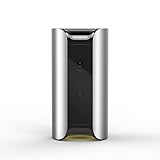
- See and Hear: Stream real-time video of your home with Canary's 1080p HD camera, 147 degree wide-angle lens, automatic night vision, and high-quality audio.
- More Than a Camera: Protect your home with Canary's 90+ dB siren, motion-activated recording, auto-arm/disarm, and instant access to local authorities.
- HomeHealth Technology: Monitor air quality, temperature, and humidity to help understand how your home might affect your health.
- Intelligent Notifications: Receive instant video alerts on your iOS or Android device.
- No Installation/Contracts/Monthly Fees Required: Plug in Canary, connect to the Internet and you're ready to go. Free secure cloud storage included.
Separate the costs into:
- the one-time hardware purchase;
- monthly or annual Premium Service;
- any multi-camera charges;
- and a bundle commitment, if selected.
At the displayed figures, a $169 Pro plus twelve months of $19.99 Premium costs approximately $408.88 before tax. A $23.99 monthly Pro bundle over 24 months totals approximately $575.76 before tax. These are arithmetic illustrations, not guaranteed checkout totals.
What works without Premium?
Canary has a basic/free tier, but the practical experience is more restricted than Premium. Canary support material says video recordings are available with Premium Service, while current product pages describe cloud recording and other features according to the selected plan. Historical reviews mention recording limits, downloads, person detection, desktop streaming, incident support, modes, and warranty benefits in arrangements that may no longer apply.
Do not rely on old claims such as “24-hour history,” “10-second clips,” or “30-day storage.” Plan entitlements have changed over time and may vary by country or device. Before purchase, confirm exactly what the current plan includes, especially recording history, downloads, alert types, and access after cancellation. The Premium Service documentation is the appropriate starting point.
Independent reader supportYour contribution helps us test, update, and keep practical guides available for everyone.Canary Pro versus View and Flex
| Model | Best suited to | Main distinction |
|---|---|---|
| Canary View | Lower-cost indoor monitoring | Cheaper, but lacks Pro’s siren and environmental-sensor package |
| Canary Pro | Indoor self-monitoring plus environmental data | Wired camera with siren, temperature, humidity, and air-quality sensors |
| Canary Flex | Outdoor or flexible placement | Weather-resistant design and wire-free-or-plugged-in operation, without the same Pro sensor package |
Choose View if you only need a basic Canary camera. Choose Flex for a porch, garage approach, yard, or location without a convenient outlet. Choose Pro only when its siren and HomeHealth sensors justify the higher hardware and subscription cost. See Canary’s current model comparison for the latest details.
Best Value
- AWARD-WINNING TECHNOLOGY & DESIGN: Trusted by over a million users & over 10,000 first responders – a camera beautifully designed in New York that doesn’t look like a security camera
- OUTDOOR INDOOR WIFI CAMERA: 24/7 watch live HD, weatherproof, wire-free & wired, motion alerts, speaker & microphone, wide-angle lens, night vision, 10x zoom, privacy settings, auto arm/disarm
- ADDITIONAL FEATURES: 24h continuous video recording, 60-day video cloud storage, smarter motion alerts with video clips & person/pet/package/sound detection, activity zone masking, auto siren, safety button, extended warranty & more with Premium Service plan
- EASY SETUP IN MINUTES: DIY, no installation required; download the app, plug in the camera, connect to wi-fi and monitor your home, use as pet camera, baby monitor, for elderly care or childcare
- SECURE DATA PROTECTION: US-based company with all data stored in certified high security data centers using AES 256-bit, TLS & SSL encryptions & access control systems to ensure complete privacy
Privacy, reliability, and cloud dependence
Canary says communications among the device, Canary Cloud, and smartphone are encrypted using TLS/SSL. Its older specifications also make stronger security claims, such as “bank-level security” and AES encryption; those should be understood as vendor claims, not an independent security certification.
The larger issue is dependence on the account and cloud service. A power failure, Wi-Fi failure, internet outage, account problem, or service outage can affect remote access, recording, and notifications. Before buying, ask how long footage is retained, whether downloads remain available after cancellation, how the account is protected, and what authentication options are supported. Use a unique password and enable every available account-security control. Consumer Reports’ older product page listed two-factor authentication as absent for its tested All-In-One model, but that should not automatically be generalized to every current Canary account or device.
Who should buy Canary Pro?
Buy it if you want one simple indoor device with a wide view, two-way audio, a siren, and environmental monitoring; have reliable Wi-Fi and continuous power; and accept cloud storage plus Premium Service.
Skip it if you need outdoor coverage, battery operation, local microSD or NVR recording, door and window sensors, water-leak or glass-break detection, professional monitoring, broad third-party smart-home compatibility, or a camera with no monthly subscription.
For a broader alarm ecosystem, consider platforms such as Ring. For Google Home integration, compare Google Nest. Arlo may suit buyers seeking a broad camera range, while Wyze targets lower-cost buyers with different subscription and ecosystem trade-offs. These are comparison paths, not claims of current price superiority.
Final verdict
Canary Pro is attractive when you specifically want a camera, siren, and temperature, humidity, and air-quality sensors in one indoor unit. It delivers useful feature density and broad room coverage, but the product’s real ownership cost includes Premium Service, and its cloud dependence limits resilience.
Quick wins for a faster PC:
Fix the driver behind crashes, sound loss and screen glitchesFind Drivers →Repair Windows errors before they cause bigger problemsFix Now →Scan for outdated or missing drivers - takes under a minuteDriver Scan →It is a reasonable choice for indoor self-monitoring—not a replacement for certified safety detectors, a local-recording system, or a professionally monitored whole-home alarm.
Quick Recap
Product prices and availability are accurate as of the date/time indicated and are subject to change. Any price and availability information displayed on Amazon at the time of purchase will apply.

