The Tool Desk
Outbyte PC Repair FREERepair Windows errors before they cause bigger problemsFix Now →Outbyte Driver Updater FREEScan for outdated or missing drivers - takes under a minuteDriver Scan →For a long desk or charging lead, unplug it, gather the slack into a loose loop if the cable’s instructions allow, and secure it without pinching the cable or straining its connector. Keep the result out of walking routes. This advice is for low-voltage leads—not powered extension leads or cable reels, which must not be used wound.
First, identify the cable
Before coiling anything, check what it powers. A low-voltage desk or charging lead is different from a mains extension lead or extension cable reel. A tidy-looking coil does not make a powered extension lead safe to use while wound.
Electrical Safety First warns that “Running a cable reel in its wound state can cause it to overheat and catch fire.” Its UK guidance says reels must be unwound to achieve their current rating. Follow the reel’s marked rating and instructions; do not bind or coil a powered extension cable for use.
How to tidy slack in a low-voltage cable
- Unplug it before arranging it. This makes it easier to handle the slack without working around a live connection.
- Gather only the excess. If appropriate for that particular cable and its manufacturer’s instructions, form a loose, tidy loop. The sources do not establish a universal coil shape or minimum bend radius.
- Secure it gently. Use a removable organizer or a suitable household item, and avoid tight ties, pinching, sharp bends, or pulling the cable at its connector.
- Route it away from feet. Keep the cable out of doorways and walking paths. Electrical Safety First advises: “Keep cables tidy and out of the way to prevent tripping hazards.”
- Label both ends if needed. Labels help distinguish similar leads, especially when several devices share a desk or charging area.
DIY options for organizing desk and charging leads
Electrical Safety First describes cable sleeves and household items such as wooden pegs, binder clips, and toilet rolls as possible DIY organizers. Choose an option that suits the cable and setup, can be removed without damaging the lead, and keeps the cable out of the way.
#1 Best Overall

- Size: Diameter: 1/2"| Length: 10 Feet | Color: Black. Our wire loom is split and easy to load wires. Once loaded, our cable sleeve will close on itself and perfect wire wrap
- Operating temp (degree F.):-103 to 257|Melt temp: 446. Our cable management sleeve is used for Hifi speaker hdmi automotive wires
- Our cord protector keeps cat from chewing cables. Our cable protector is insulated
- Our wire sleeve: UL Recognized
- Our cable organizer keeps the cords organized with no more messy cables in your home and office
| Option | Useful when | What to check |
|---|---|---|
| Wooden peg, binder clip, or toilet roll | You want to gather or separate cables using a household item. | Make sure it does not squeeze, sharply bend, or snag the cable. |
| Cable sleeve | You want to group several leads in a recurring setup. | Check that it suits the cables being organized and does not make access or removal difficult. |
| Removable cable clips | You want to guide a lead along a desk or keep it from slipping into a walkway. | Check the clip’s compatibility with the cable and mounting surface; no particular product compatibility is established here. |
| Labels at both ends | Several similar cables make it hard to identify which device a lead serves. | Use labels that remain legible and do not interfere with the connector. |
These are convenience options for organizing suitable low-voltage leads, not safety devices. No particular organizer or cable is established as compatible with every setup.
Independent reader supportYour contribution helps us test, update, and keep practical guides available for everyone.If the cable is an extension lead or reel
Do not use a powered extension reel while it is wound. Electrical Safety First’s UK guidance says extension leads are generally rated at 13A, though some older versions may be rated at 10A. It also says many cable reels may be rated at 10A or less, with a current rating as low as 3A or 4A when wound. These are guidance figures, not universal ratings: check the specific product’s markings and instructions, and never exceed its rating.
Quick Recap
Best Value

- Customizable Size & Branching: This 10-foot (120 inch) long, 1.5-inch diameter cable sleeve (flat width approx 5.3 inches) easily cuts to your exact length with scissors. Holds 8-10 cables per sleeve and lets you create custom holes anywhere to pull out cables
- Dual-Sided & Discreet: Features a reversible black/white design. The durable black side hides dirt for high-traffic areas, while the crisp white side maintains a cleaner look. Blends seamlessly into any decor, keeping cables hidden and your space instantly tidier
- Anti-Fray & Secure Closure: Integrated Hook-and-Loop backing ensures a sturdy, intact fit even after cutting to size. Provides excellent flexibility, dust protection, and reliable bundling for multiple cables
- Instant Cable Control: Solve tangled cable chaos behind desks, TVs, or entertainment centers in seconds! Simply wrap the sleeve organizer around your cables for a clean, professional setup – perfect for homes, offices, and media areas
- Complete Management Kit: Includes everything needed: 12 reusable cable ties, plus eyelets and hooks for managing oversized or heavy cords. Easily extend length or customize hold by connecting multiple straps together
Rank #4
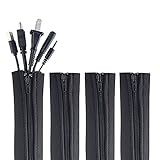
- ZIP IT CLOSED IN SECONDS: Wrap the sleeve around a bundle of cords, pull the zipper, and the tangle is gone; no tools, no cutting and nothing to unplug before you start
- CABLE MANAGEMENT SLEEVE FOR DESK AND TV: One black cable sleeve keeps power cords, HDMI cables, charger cables and speaker wire in a single clean run behind a desk, computer, TV stand or media console
- HIDES AND COVERS LOOSE WIRE: This cord sleeve draws stray cables into one sheath, so the wall and floor behind your setup read as a tidy line instead of a knot of wires
- UNZIPS WHENEVER PLANS CHANGE: The wire sleeve suits a slim charger cable or a thick bundle of computer cords, and it opens again any time you need to add, swap or pull out a cable
- INCLUDES: (4) 24 in x 4 in zipper cable sleeves in black from Wrap-It Storage, enough to take on a desk, a computer tower, a TV wall and a home office in one pass
Rank #3

- Set of 4, each 19-20" long, 1.2" diameter when zipped up. Flexible neoprene cable sleeve with zip-up solution manages and conceals cables while providing easy access
- Form-fitting neoprene stretchy material allows for multiple cables and flexibility (each sleeve can hold up to 8-10 cables). Could double the capacity when zip two sleeves together
- Easy to use, just gather cables together, wrap the sleeve around and zip-up, perfect for home and office use
- Ideal for keeping cords organized behind the TV entertainment system, computer monitor, etc
- Neatly hides messy hanging wires and tangles, instantly refreshing the look of your home and office space
Rank #2
- Size: Diameter: 1/2"| Length: 25 Feet | Color: Black. Our wire loom is split and easy to load wires. Once loaded, our cable sleeve will close on itself and perfect wire wrap
- Operating temp (degree F.):-103 to 257|Melt temp: 446. Our cable management sleeve is used for Hifi speaker hdmi automotive wires
- Our cord protector keeps cat from chewing cables. Our cable protector is insulated
- Our wire sleeve: UL Recognized
- Our cable organizer keeps the cords organized with no more messy cables in your home and office
- Unwind the reel in accordance with its rating and instructions before use.
- Check the marked rating and thermal cut-out.
- Do not daisy-chain extension leads.
- Do not make an extension lead by wiring plugs onto cable ends; Electrical Safety First warns against this.
Product prices and availability are accurate as of the date/time indicated and are subject to change. Any price and availability information displayed on Amazon at the time of purchase will apply.